
1. Product Overview
The Naroote A2-3022 Variable Frequency Drive (VFD) is a multifunctional device designed for precise motor speed control. It offers comprehensive functions for setting frequency, V/F curve, and torsion, along with robust protection features. This manual provides essential information for the safe and effective use of your VFD.

Figure 1: Front-top view of the Naroote A2-3022 Variable Frequency Drive, showcasing its compact design and control panel.
2. Key Features
- Comprehensive Functionality: Allows setting of frequency, V/F curve, torsion, and control over acceleration and deceleration.
- Advanced Protection: Equipped with overload, over voltage, and short circuit protection, ensuring safe operation. Features direct start and fault reset capabilities after booting.
- User-Friendly Interface: Humanized keyboard design with a clear digital screen display for convenient operation and real-time status monitoring.
- Efficient Heat Dissipation: Features an all-aluminum base heat sink combined with an imported powerful fan, providing superior wind power and effective heat dissipation.
- Durable Construction: Built with an ABS shell that is flame-retardant, heat-resistant, and impact-resistant for enhanced durability.

Figure 2: Detail of the VFD's robust ABS shell, highlighting its flame-retardant, heat-resistant, and impact-resistant properties.

Figure 3: Close-up view of the VFD's digital screen display and control panel, showing the clear readouts and intuitive button layout for easy operation.
3. Setup and Installation
Proper installation is crucial for the safe and efficient operation of the VFD. Please follow these general guidelines. For detailed wiring diagrams and specific installation requirements, refer to the separate wiring manual or consult a qualified electrician.
3.1 Unpacking and Inspection
- Carefully unpack the VFD and all accessories.
- Inspect the unit for any signs of physical damage during transit. Do not install if damaged.
- Verify that all components listed in the packing list are present.
3.2 Mounting
- Mount the VFD in a vertical position on a flat, stable surface.
- Ensure adequate ventilation space around the unit (minimum 10 cm clearance on all sides) to allow for proper heat dissipation.
- Avoid mounting in direct sunlight, high humidity, excessive dust, or corrosive environments.
3.3 Wiring
WARNING: High voltage inside. Do not connect AC power to output terminals (U, V, W). Discharging time is greater than 5 seconds. Do not inspect components unless inside 'CHARGE' lamp is turned OFF.
- Ensure all power is disconnected before beginning any wiring.
- Connect the 3-phase AC300-460V input power to the designated input terminals.
- Connect the 3-phase AC380V output to your motor.
- Properly ground the VFD according to local electrical codes.
- Ensure all connections are secure and insulated.
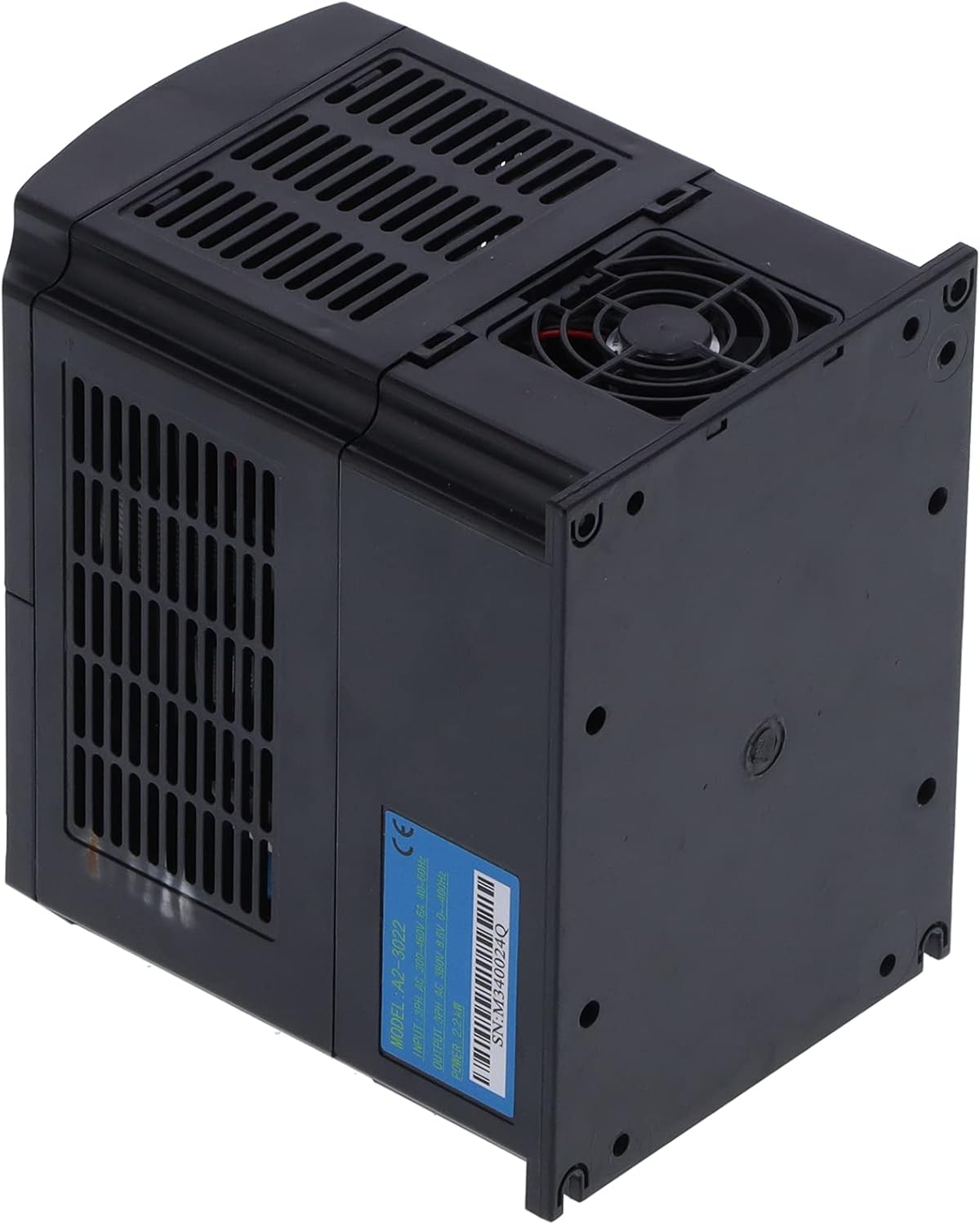
Figure 4: Rear view of the VFD, illustrating the mounting points and the product label with model and electrical specifications.
4. Operating Instructions
The VFD features an intuitive control panel for easy operation. Familiarize yourself with the buttons and display before use.
4.1 Control Panel Buttons
| Button | Function |
|---|---|
| RUN/STOP | Starts the inverter when in idle state. Press again to stop the inverter. |
| STOP/RESET | Stops the inverter when running. Resets the inverter if in a fault state. Returns to the previous menu in setting mode. |
| (Reverse) | Reverses the running direction of the inverter. Effective even during runtime. |
| SET | Enters the menu setting. Saves menu parameters and enters menu items when pressed within a menu item. |
| ▲ / ▼ | Used for menu item selection and modifying sub-item data. |
| ◄ / ► | Used for menu item content modification and panel jog button functions. |
| Panel Potentiometer | Adjusts the operating frequency. |
4.2 Display Window Content
The digital display provides real-time information about the VFD's status. Specific codes and their meanings are detailed in the full programming manual. A common display status is:
- ERRO: Indicates an error or fault condition. Refer to the troubleshooting section for common error codes.
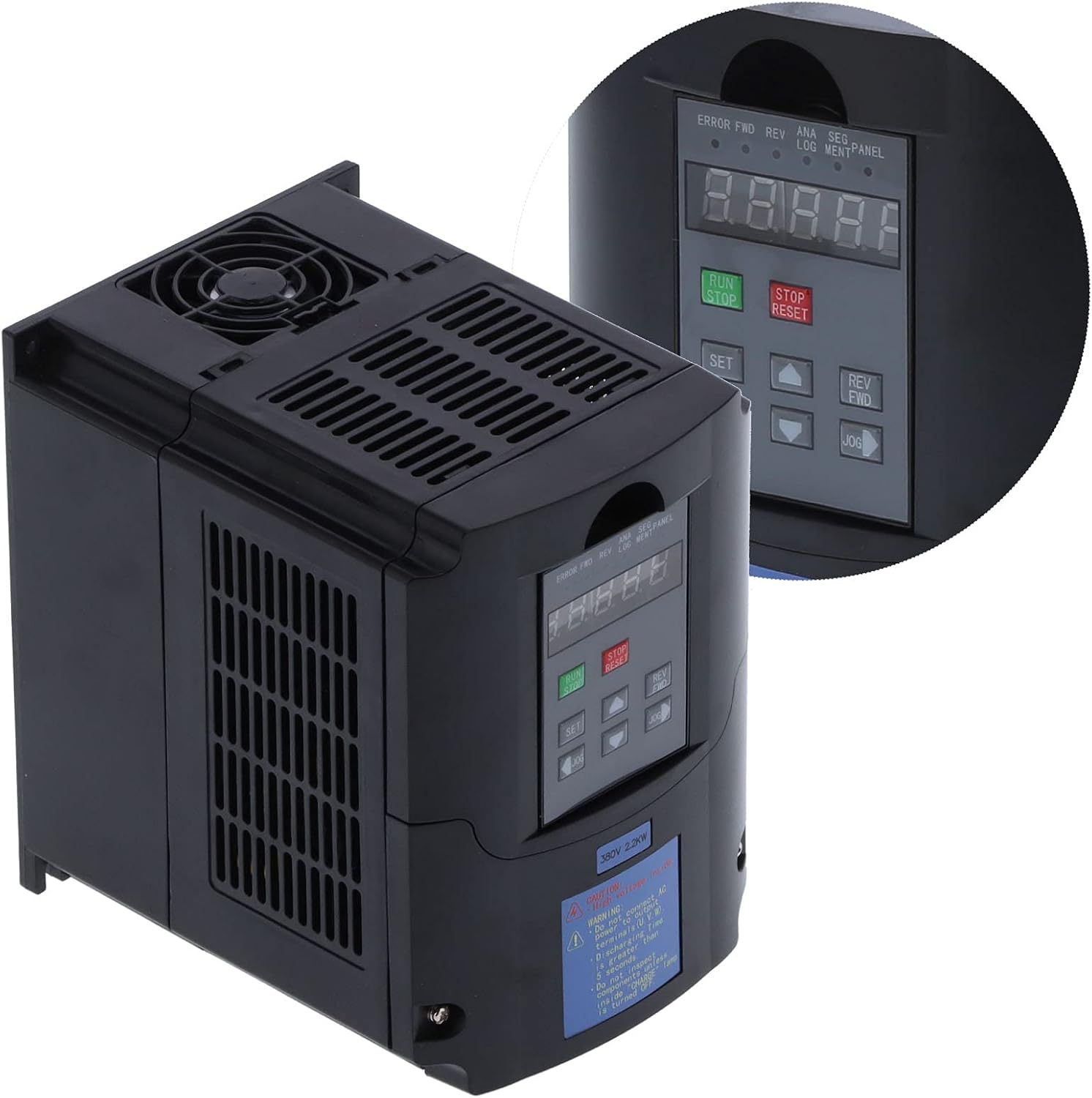
Figure 5: The VFD's control panel with a magnified inset, showing the digital display and button layout for precise control.
5. Maintenance
Regular maintenance helps ensure the longevity and optimal performance of your VFD.
- Cleaning: Periodically clean the exterior of the VFD with a soft, dry cloth. Ensure ventilation openings are free from dust and debris. Do not use liquid cleaners.
- Fan Inspection: Check the cooling fan for proper operation and ensure it is not obstructed. A well-functioning fan is critical for heat dissipation.
- Connection Check: Annually inspect all wiring connections for tightness and signs of corrosion. Loose connections can lead to poor performance or damage.
- Environmental Conditions: Ensure the operating environment remains within the specified temperature and humidity ranges to prevent premature component failure.
6. Troubleshooting
This section provides guidance for common issues you might encounter. For complex problems, contact technical support.
| Problem/Display | Possible Cause | Solution |
|---|---|---|
| ERRO Display | General fault condition (e.g., overload, over voltage, short circuit). | Press the STOP/RESET button to clear the fault. If the fault persists, identify the specific error code (refer to full manual) and address the underlying cause (e.g., reduce load, check input voltage, inspect wiring for short circuits). |
| Motor Not Running | No power, VFD in stop mode, incorrect wiring, or fault condition. | Check power supply. Ensure VFD is in RUN mode. Verify motor and power wiring. Check for any error displays and reset if necessary. |
| Overheating | Insufficient ventilation, blocked fan, or excessive ambient temperature. | Ensure adequate clearance around the VFD. Clean fan and vents. Relocate VFD to a cooler environment if necessary. |
7. Specifications
Technical specifications for the Naroote A2-3022 Variable Frequency Drive:
| Parameter | Value |
|---|---|
| Model | A2-3022 |
| Power | 2.2 KW |
| Input Voltage | 3-phase AC300-460V |
| Input Current | 6A |
| Input Frequency | 40-60HZ |
| Output Voltage | 3-phase AC380V |
| Output Current | 8.6A |
| Output Frequency | 0-400HZ |
| Item Weight | 3.96 pounds |
| Package Dimensions | 8.9 x 8.7 x 6.93 inches |
8. Warranty and Support
For information regarding product warranty, technical support, or service, please refer to the documentation included with your purchase or contact the manufacturer directly. Keep your purchase receipt as proof of purchase.
Manufacturer: Shanrya
Brand: Naroote