
1. Introduction
Thank you for choosing the CHEFFANO BG701 Electric Burr Coffee Grinder. This manual provides essential information for the safe operation, maintenance, and troubleshooting of your new appliance. Please read it thoroughly before first use and retain it for future reference.
The CHEFFANO BG701 is designed to deliver consistent coffee grounds for various brewing methods, from fine espresso to coarse French press, ensuring optimal flavor extraction.
2. Important Safety Instructions
- Read all instructions before using the appliance.
- Do not immerse the motor base in water or other liquids.
- Close supervision is necessary when any appliance is used by or near children.
- Unplug from outlet when not in use, before assembling or disassembling parts, and before cleaning.
- Avoid contact with moving parts.
- Do not operate any appliance with a damaged cord or plug, or after the appliance malfunctions or has been dropped or damaged in any manner.
- The use of attachments not recommended or sold by the manufacturer may cause fire, electric shock, or injury.
- Do not use outdoors.
- Do not let cord hang over edge of table or counter, or touch hot surfaces.
- Do not place on or near a hot gas or electric burner, or in a heated oven.
- Check the bean hopper for the presence of foreign objects before use.
- This appliance is for household use only.
3. Product Components
Familiarize yourself with the parts of your CHEFFANO BG701 coffee grinder:
- Bean Hopper with Lid
- Upper Burr Blade (removable)
- Grind Size Selector Dial
- Cup Selector Knob
- ON/OFF Button
- Grounds Container
- Motor Base
- Cleaning Brush

Image: Overview of the CHEFFANO BG701 Electric Burr Coffee Grinder, showing the main unit, cleaning brush, and coffee beans.

Image: Close-up view of the durable metal burrs system, highlighting its design for uniform grind size and features like low noise and overheat protection.

Image: The large bean hopper of the CHEFFANO coffee grinder, capable of holding up to 8.8oz (250g) of coffee beans, shown in a kitchen setting.
4. Setup and First Use
- Unpack all components and remove any packaging materials.
- Wipe down the exterior of the grinder with a damp cloth.
- Wash the bean hopper lid, bean hopper, and grounds container with warm, soapy water. Rinse thoroughly and dry completely.
- Ensure the upper burr blade is securely in place.
- Place the grounds container into its designated slot on the grinder base.
- Attach the bean hopper to the top of the grinder, ensuring it clicks into place.
- Place the lid on the bean hopper.
- Position the grinder on a stable, flat, and dry surface.
5. Operating Instructions
Follow these steps to grind your coffee beans:

Image: Visual guide showing five easy steps for operating the grinder: 1. Place beans into hopper, 2. Choose coarseness, 3. Turn cup selector, 4. Plug in, 5. Press ON/OFF.
- Fill the Bean Hopper: Open the bean hopper lid and pour your desired quantity of whole coffee beans into the hopper. The hopper has a capacity of up to 8.8 oz (250g).
- Select Grind Size: Rotate the grind size selector dial to your desired setting. The grinder offers 17 settings, ranging from fine to coarse. Refer to the "Grinding Settings" section for guidance.
- Select Cup Quantity: Turn the cup selector knob to choose the number of cups you wish to grind for (2-12 cups). This automatically adjusts the grinding time.
- Plug In: Ensure the grinder is properly plugged into a 120V power outlet.
- Start Grinding: Press the ON/OFF button to begin grinding. The grinder will automatically stop once the selected quantity has been processed.
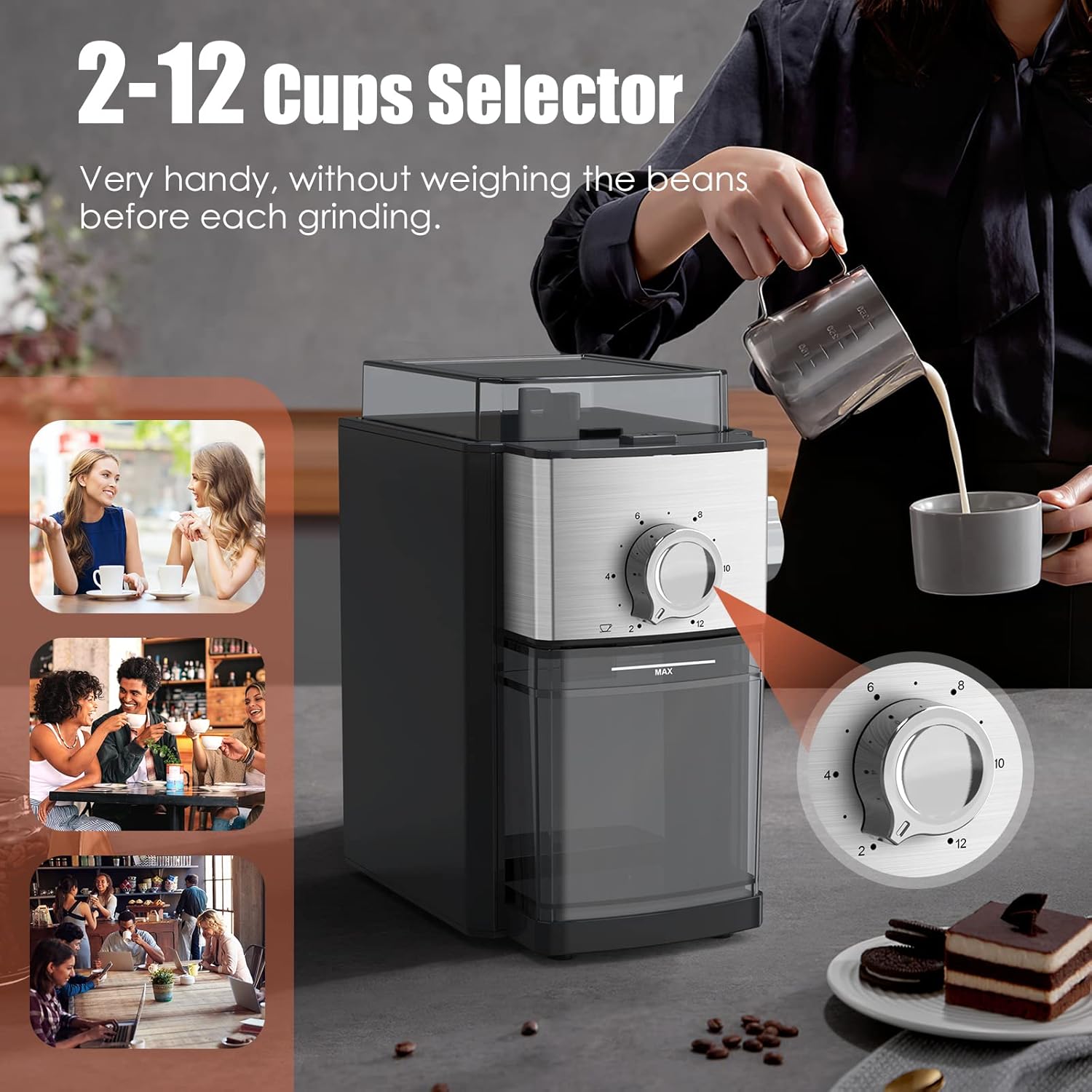
Image: The 2-12 cups selector knob, allowing users to choose the desired amount of coffee grounds without pre-weighing beans.
6. Grinding Settings
The CHEFFANO BG701 offers 17 grind settings to suit various brewing methods. Experiment to find your preferred setting.

Image: Illustration of the 14 grind-size settings, showing the range from fine to coarse suitable for different brewing methods.
| Grind Level | Brewing Method | Description |
|---|---|---|
| Fine | Espresso, Turkish Coffee | Powdery, similar to flour. |
| Medium-Fine | Pour Over, Aeropress | Similar to table salt. |
| Medium | Drip Coffee Makers | Similar to regular sand. |
| Medium-Coarse | Chemex, Siphon | Rougher than sand, with visible particles. |
| Coarse | French Press, Cold Brew | Chunky, similar to sea salt. |
Note: The product description states 17 grind settings, while some visuals may indicate 14. Please refer to the dial on your specific unit for the exact number of available settings.
7. Cleaning and Maintenance
Regular cleaning ensures optimal performance and extends the life of your grinder.
- Unplug the Grinder: Always ensure the grinder is unplugged from the power outlet before cleaning.
- Empty Grounds Container: Remove and empty the grounds container.
- Remove Bean Hopper: Carefully remove the bean hopper.
- Clean Burrs: Remove the upper burr blade. Use the included cleaning brush to remove any residual coffee grounds from both the upper and lower burrs.
- Wash Removable Parts: Wash the bean hopper lid, bean hopper, and grounds container with warm, soapy water. Rinse thoroughly and dry completely.
- Wipe Base: Wipe the exterior of the motor base with a damp cloth. Do not immerse the motor base in water.
- Reassemble: Once all parts are dry, reassemble the grinder.
Tip: For oily dark roasts, cleaning the grounds chute more frequently can prevent clogging.
8. Troubleshooting
| Problem | Possible Cause | Solution |
|---|---|---|
| Grinder does not start. | Not plugged in; hopper or grounds container not correctly seated; power outage. | Ensure power cord is securely plugged in. Check that the bean hopper and grounds container are properly installed. Verify power supply. |
| Grinder stops during operation. | Overheating; motor overload; grounds chute clogged. | Unplug and allow to cool for 30 minutes. Reduce the amount of beans. Clean the grounds chute and burrs. |
| Inconsistent grind. | Burrs are dirty or damaged; incorrect grind setting. | Clean the burrs thoroughly. Adjust the grind setting as needed. If burrs are damaged, contact support. |
| Grounds are static and messy. | Common issue with coffee grinders. | Grind over a sink to contain mess. A small amount of moisture (e.g., a drop of water on beans before grinding) can reduce static, but use sparingly. |
| Grinds chute clogs frequently. | Oily beans; very fine grind setting; excessive grinding. | Clean the chute regularly, especially after grinding oily beans. Try a slightly coarser setting. Avoid grinding for extended periods without emptying. |
9. Specifications
- Brand: CHEFFANO
- Model Number: BG701
- Product Dimensions: 7.4"L x 5.3"W x 8.3"H
- Item Weight: 4.3 pounds
- Voltage: 120 Volts
- Grind Settings: 17 (Fine to Coarse)
- Bean Hopper Capacity: 8.8 oz / 250g
- Grounds Container Capacity: Up to 12 cups
- Material: BPA Free high-grade resin plastic and premium stainless steel
- UPC: 791711688105, 761312568533
10. Warranty and Support
CHEFFANO provides a 12-month worry-free warranty for this product. For any questions, concerns, or warranty claims, please contact CHEFFANO customer support through the retailer's platform or the official CHEFFANO website.
Manufacturer: CHEFFANO
For further assistance, please visit the CHEFFANO Store on Amazon.