Product Overview
The Hunter Wall Control, Model 99815, is designed to provide convenient control over your ceiling fan's three speeds and dimmable lights. It features a sleek design that fits flush against the wall. This control is intended for use in conjunction with ceiling fans that have handheld remotes. For pull chain ceiling fans, it must be paired with the Hunter Universal Receiver (Model 99814, sold separately).

Image: Visual representation of the wall control highlighting its key features: sleek design, simple setup, support for dimming, speed change, and a 75 ft range.
- Controls low, medium, and high fan speeds for optimal comfort.
- Provides easy light dimming control to set the desired ambiance (requires dimmable bulbs).
- Operates fans up to 75 feet away.
What's in the Box
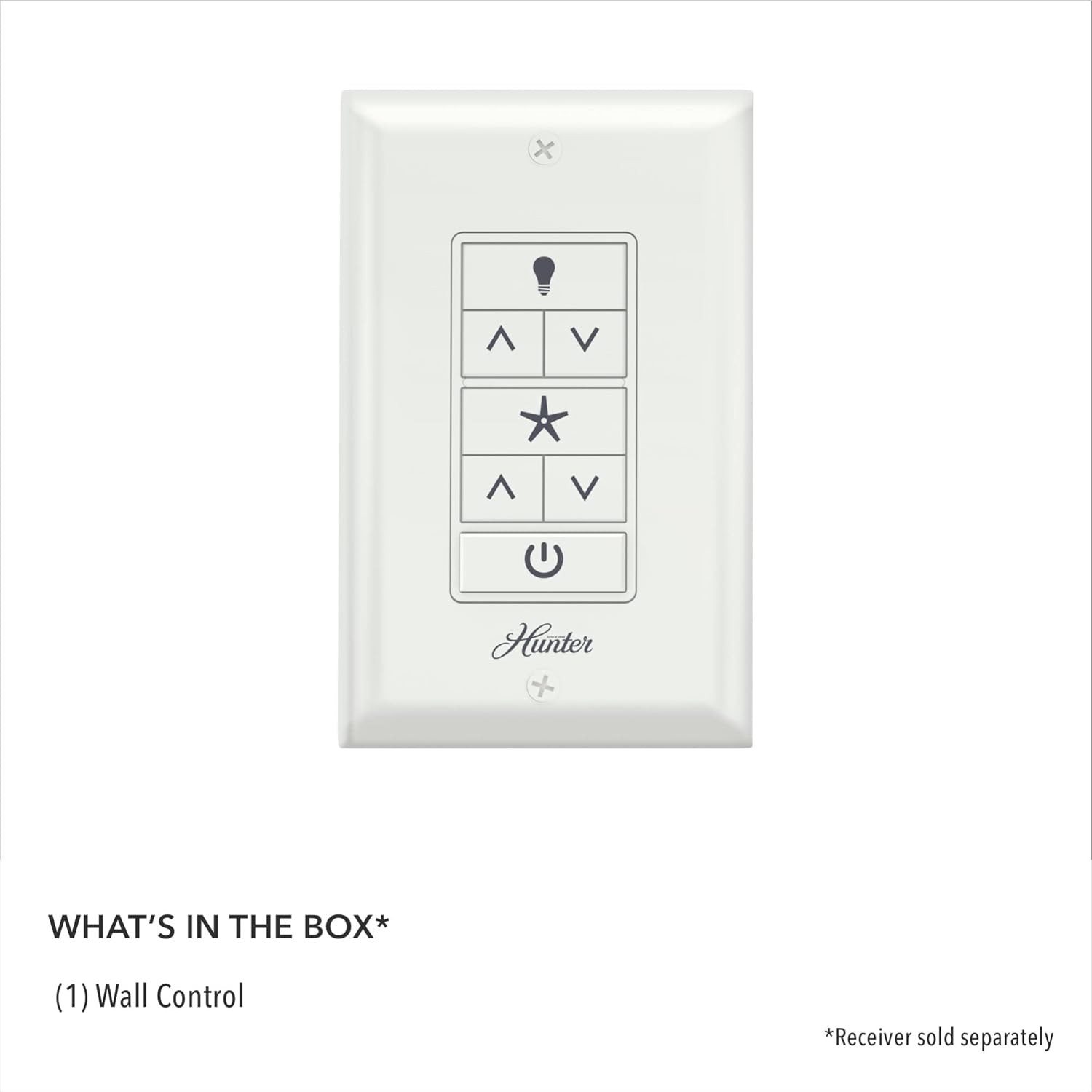
Image: The contents of the product packaging, showing the wall control unit and indicating that the receiver is sold separately.
- (1) Hunter Universal Fan-Light Wall Control (Model 99815)
- (2) AAA batteries (included)
Note: The Hunter Universal Receiver (Model 99814) is required for operation with pull chain fans and is sold separately.
Specifications

Image: A diagram showing the dimensions of the wall control: 4.7 inches high and 1.12 inches wide.
| Brand | Hunter |
| Model Number | 99815 |
| Color | White |
| Product Dimensions | 2.95 x 1.12 x 4.7 inches; 3.68 ounces |
| Power Source | Battery Powered (2 AAA batteries included) |
| Manufacturer | Hunter Fan |
Setup and Installation
This Hunter wall control is designed for straightforward installation. It replaces a standard wall switch and communicates wirelessly with your ceiling fan's receiver. Ensure power is turned off at the circuit breaker before beginning any electrical work.
Compatibility

Image: The Hunter wall control with text indicating compatibility with most ceiling fan brands for existing or new installations.
The wall control works with most ceiling fan brands. For pull chain ceiling fans, the Hunter Universal Receiver (Model 99814, sold separately) is required for proper functionality. This wall control is intended to work with a compatible receiver already installed in your ceiling fan or with the separately purchased Hunter Universal Receiver.
Installation Steps (General Guidance)
- Safety First: Turn off power to the ceiling fan at the main circuit breaker before installation.
- Remove Existing Switch: Carefully remove the existing wall switch and disconnect its wiring.
- Wire the Wall Control: Connect the wires from the wall control to the appropriate household wiring. Refer to the detailed wiring diagram included with your product packaging for specific connections.
- Mount the Wall Control: Secure the wall control into the electrical box and attach the faceplate.
- Insert Batteries: Ensure the two AAA batteries are correctly inserted into the wall control.
- Restore Power: Turn the power back on at the circuit breaker.
- Pairing (if necessary): Follow the pairing instructions provided with your fan's receiver or the Hunter Universal Receiver to establish communication with the wall control.
Always consult the specific installation guide provided in your product packaging for detailed, step-by-step instructions and safety warnings.
Operating Instructions

Image: A close-up of the Hunter wall control showing the light bulb icon button, fan speed up/down arrows, fan on/off button (star icon), light dimming up/down arrows, and the main power button.
The Hunter Universal Fan-Light Wall Control provides intuitive buttons for managing your ceiling fan and light functions.
- Light On/Off & Dimming:
- Press the light bulb icon button to turn the light on or off.
- Use the up arrow (^) below the light bulb icon to brighten the light.
- Use the down arrow (v) below the light bulb icon to dim the light.
- Fan On/Off & Speed Control:
- Press the star icon button to turn the fan on or off.
- Use the up arrow (^) below the star icon to increase fan speed (Low, Medium, High).
- Use the down arrow (v) below the star icon to decrease fan speed.
- Main Power:
- Press the power icon button at the bottom to turn the entire fan unit (fan and light) on or off.
The control is designed to remember the last fan speed or dimming setting used and will return to that setting when the light or fan is turned back on.
Maintenance
Battery Replacement
The Hunter Universal Fan-Light Wall Control is powered by two AAA batteries. When the batteries wear out, they will need to be replaced. The expected battery life is generally long, but replacement will eventually be necessary.
- Turn Off Power: For safety, it is recommended to turn off power to the wall control at the circuit breaker before performing maintenance.
- Remove Faceplate: Carefully remove the faceplate of the wall control.
- Access Batteries: Unscrew the mounting screws and gently pull the wall control away from the wall box to access the battery compartment.
- Replace Batteries: Replace the old AAA batteries with new ones, ensuring correct polarity.
- Reassemble: Carefully push the wall control back into the wall box, secure it with screws, and reattach the faceplate.
- Restore Power: Turn the power back on at the circuit breaker.
Regular cleaning with a soft, dry cloth is recommended to maintain the appearance of the wall control.
Troubleshooting
If you experience issues with your Hunter Universal Fan-Light Wall Control, consider the following troubleshooting steps:
- No Response from Fan/Light:
- Check if the main power to the fan is on at the circuit breaker.
- Verify that the batteries in the wall control are fresh and correctly installed.
- Ensure the wall control is properly paired with the fan's receiver. Refer to the pairing instructions in your fan's manual or the Hunter Universal Receiver manual.
- Light Not Dimming:
- Confirm that the light bulbs installed in your fan are dimmable. Non-dimmable bulbs will not respond to dimming commands.
- Limited Range or Intermittent Operation:
- Ensure there are no significant obstructions between the wall control and the fan's receiver.
- Replace the batteries in the wall control.
- Compatibility Issues with Older Fans:
- This wall control may not be compatible with all older Hunter fan receivers, especially those using DIP switches in the remote and receiver. If you have an older model, verify compatibility with Hunter support or the product documentation for your specific fan model.
If these steps do not resolve the issue, contact Hunter customer support for further assistance.
Warranty and Support
For warranty information, please refer to the documentation included with your Hunter Universal Fan-Light Wall Control or visit the official Hunter website. Hunter provides customer support for product inquiries, technical assistance, and warranty claims.
Manufacturer: Hunter Fan
For assistance, please visit the Hunter Store on Amazon or the official Hunter website.


