
Introduction
The Cooler Master CK721 is a versatile 65% hybrid wireless mechanical keyboard designed for both productivity and gaming. It features durable mechanical switches, multiple connectivity options, and a customizable dial for enhanced control. This manual provides essential information for setting up, operating, maintaining, and troubleshooting your keyboard.

Figure 1: The Cooler Master CK721 keyboard in a typical usage scenario, showcasing its customizable RGB lighting.
What's in the Box
Upon unboxing your Cooler Master CK721 keyboard, you should find the following components:
- Cooler Master CK721 Mechanical Gaming Keyboard
- Soft Wrist Rest
- USB-C to USB-A Cable
- Keycap Puller / Switch Puller Tool
- Additional Mechanical Switches (8 Cherry MX Green switches)
- Quick Start Guide and Product Information

Figure 2: The Cooler Master CK721 keyboard shown with its accompanying soft wrist rest, as found in the product packaging.
Setup
Connecting the Keyboard
The CK721 offers versatile connectivity options:
- Wired (USB-C): Connect the provided USB-C to USB-A cable from the keyboard to your computer's USB port.
- 2.4 GHz Wireless: Insert the included 2.4 GHz wireless dongle into a USB port on your computer. The keyboard will automatically connect for low-latency input.
- Bluetooth 5.1: Enable Bluetooth on your device. On the keyboard, switch to Bluetooth mode and pair with your device. The keyboard supports easy switching between multiple paired devices.

Figure 3: Visual representation of the hybrid wireless technology, including USB-C, 2.4 GHz wireless, and Bluetooth connectivity options.
Compatibility
The Cooler Master CK721 is designed for universal compatibility, supporting a wide range of operating systems and platforms. You can seamlessly switch between devices running Windows (8 and above), Mac OS X, iOS, and Android with a simple keypress.

Figure 4: The keyboard's broad compatibility across Windows, macOS, Android, and iOS operating systems.
Operation
Mechanical Switches
The CK721 is equipped with reliable mechanical switches, rated for 50 million keystrokes. These switches provide consistent responsiveness, accuracy, and tactile feedback, enhancing your typing and gaming experience.

Figure 5: Detailed comparison of different mechanical switch types, highlighting their key characteristics.
3-Way Customizable Dial
A precision dial on the keyboard offers tactile controls for turning or pressing. This dial is fully customizable via software, allowing you to assign various functions such as volume control, media playback, or RGB lighting adjustments.

Figure 6: The multi-functional 3-way dial, illustrating its capabilities for media control, lighting adjustments, and more.
On-the-Fly Controls and Software
The CK721 allows for extensive customization of its RGB lighting and macro functions. You can map 16.7 million colors to any key, customize lighting modes, and fine-tune macros directly on the keyboard without needing software. For advanced configurations, utilize the Cooler Master MasterPlus+ software.

Figure 7: The Cooler Master MasterPlus+ software interface, demonstrating lighting and key mapping customization options.
Ergonomic Design
The keyboard features a portable 65% layout, optimizing desk space while retaining essential keys. It comes with a soft, low-friction cloth wrist rest to ensure comfort during extended typing or gaming sessions, making it ideal for both desktop and mobile setups.

Figure 8: The compact 65% layout of the CK721 keyboard paired with its soft wrist rest for ergonomic comfort.
Maintenance
Cleaning and Top Plate Removal
For routine cleaning and maintenance, the CK721 features a removable aluminum top plate. This design allows for easy access to the switches and keycaps, simplifying the cleaning process and ensuring maximum durability.
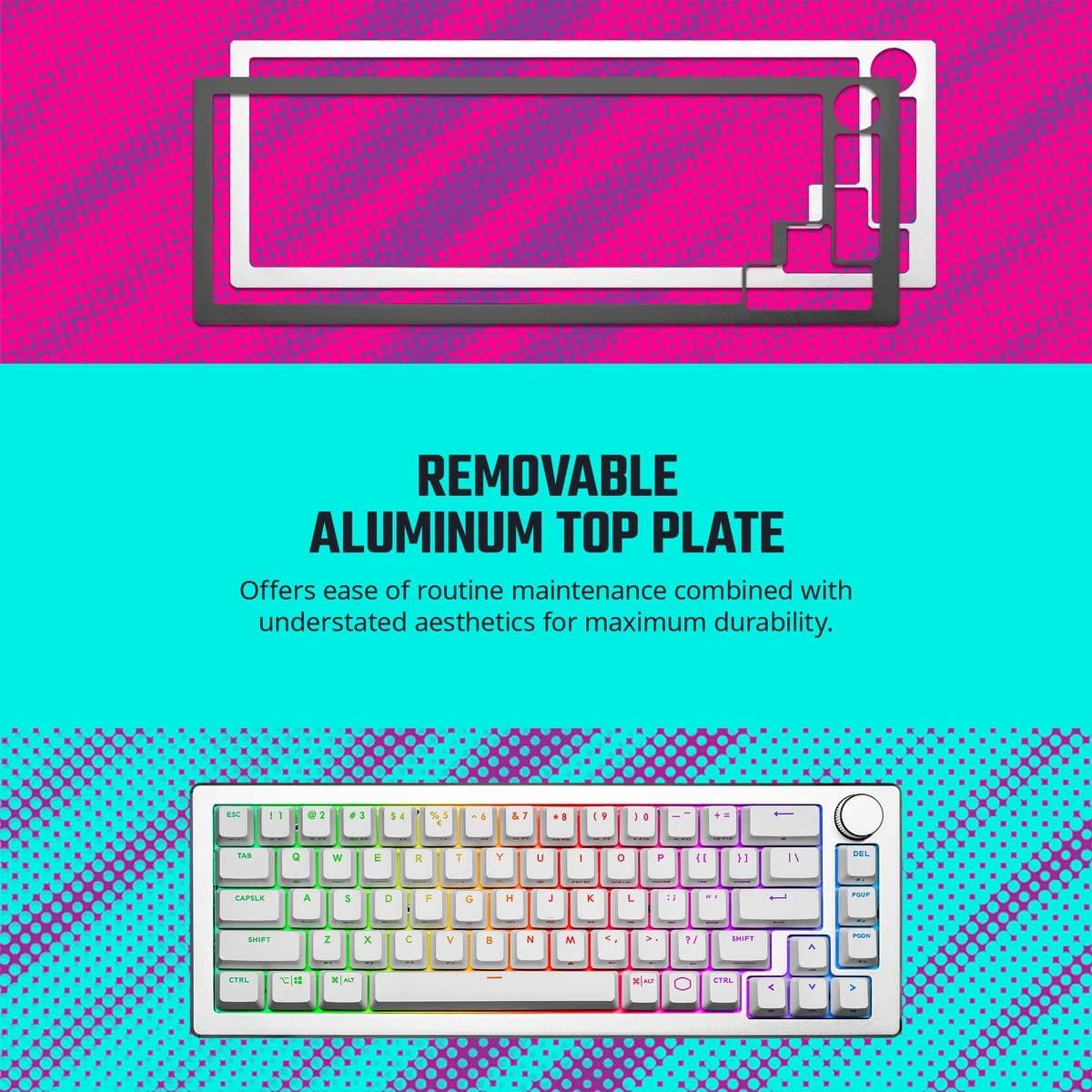
Figure 9: Instructions for detaching the aluminum top cover for convenient cleaning and customization.
Switch and Keycap Replacement
The CK721 supports hot-swappable mechanical switches, allowing you to easily replace individual switches without soldering. Use the provided keycap puller to remove keycaps and the switch puller to remove switches. This enables customization of typing feel and easy replacement of faulty switches.
Troubleshooting
If you encounter any issues with your Cooler Master CK721 keyboard, consider the following general troubleshooting steps:
- Connectivity Issues: Ensure the USB cable is securely connected, the wireless dongle is properly inserted, or Bluetooth is correctly paired. Try restarting your computer or the keyboard.
- Key Malfunctions: If a key is not responding, try removing and re-inserting the keycap and switch. If the issue persists, consider replacing the switch with one of the spares provided.
- Lighting Problems: Check the lighting settings via the on-the-fly controls or the MasterPlus+ software. Ensure brightness is not set to zero.
- Software Issues: If the MasterPlus+ software is not functioning correctly, try restarting the application or reinstalling it. Ensure your keyboard firmware is up to date.
- General Performance: Ensure the keyboard's battery is charged if using wireless modes. Try connecting the keyboard to a different USB port or computer to rule out port-specific issues.
Specifications
| Feature | Detail |
|---|---|
| Brand | Cooler Master |
| Model Number | CK-721-SKTM1-US |
| Operating System Compatibility | Android, iOS, Mac OS, Windows 8 and above |
| Item Weight | 2.6 pounds |
| Product Dimensions (LxWxH) | 13.15 x 4.65 x 1.46 inches |
| Color | CK721 Silver White |
| Power Source | Rechargeable Battery (1 included) |
| Connectivity Technology | Bluetooth, USB-C |
| Keyboard Description | Gaming |
| Recommended Uses | Gaming, Office |
| Special Feature | Wrist Rest |
| Number of Keys | 65% Layout (approx. 67-68 keys, not 19 as per source) |
| Keyboard Backlighting | RGB |
| Style | Brown Switch |
Warranty & Support
For detailed warranty information and further support, please refer to the official user manual PDF provided by Cooler Master. You can access it via the following link:
Cooler Master CK721 User Manual (PDF)
For additional assistance, visit the official Cooler Master support website or contact their customer service.


