
1. Introduction and Overview
Thank you for choosing the Gemmy LightShow Airblown Inflatable Pumpkin Reaper. This 8.5-foot tall inflatable Halloween decoration is designed to enhance your outdoor display with its unique features, including a pumpkin head reaper with realistic flickering flames and a tombstone that lights up with a flashing "RIP" sentiment using Micro LED Lights. This manual provides essential information for safe and proper setup, operation, and maintenance.

Image 1.1: The 8.5-foot tall Gemmy LightShow Airblown Inflatable Pumpkin Reaper set up in a front yard, featuring its illuminated pumpkin head and 'RIP' tombstone.
2. Safety Information
- Electrical Safety: Always plug the inflatable into a grounded outlet. Do not overload electrical outlets. Keep electrical connections dry and away from water.
- Anchoring: Anchor the inflatable securely to prevent movement in wind. Use all provided stakes and tethers.
- Heat Sources: Keep the inflatable away from heat sources when used indoors or outdoors to prevent damage or fire hazards.
- Obstructions: Ensure the fan intake is clear of debris and obstructions to allow for proper inflation and operation.
- Children and Pets: Keep children and pets away from the inflatable during operation to prevent entanglement or damage.
3. Package Contents
Verify that all components are present before beginning assembly:
- 1 x Airblown Inflatable Pumpkin Reaper Unit (with integrated fan and lights)
- 4 x Ground Stakes
- 4 x Tethers (Ropes)

Image 3.1: Included accessories: four ground stakes and four tethers (ropes) for securing the inflatable.
4. Setup Instructions
Follow these steps to set up your Airblown Inflatable Pumpkin Reaper:
- Unpack: Carefully remove the inflatable from its packaging. Ensure no sharp objects are used that could damage the fabric.
- Placement: Choose a flat, clear area for placement, free from sharp objects, debris, or overhead obstructions.
- Positioning: Unfold the inflatable and position it upright. Ensure the fan is facing away from any obstacles that could block airflow.
- Secure Base: Locate the tie-down points at the base of the inflatable. Insert ground stakes through the loops at the base to secure it to the ground.
- Attach Tethers: Attach the tethers to the fabric loops located on the sides of the inflatable. Angle the stakes into the ground at approximately 45 degrees, away from the inflatable, to provide maximum stability. Adjust the tension of the tethers to keep the inflatable upright and stable.
- Power On: Plug the power cord into a standard electrical outlet. The inflatable will begin to inflate automatically.
- Adjust: Once fully inflated, make any final adjustments to the tethers and positioning to ensure the inflatable stands correctly and securely.
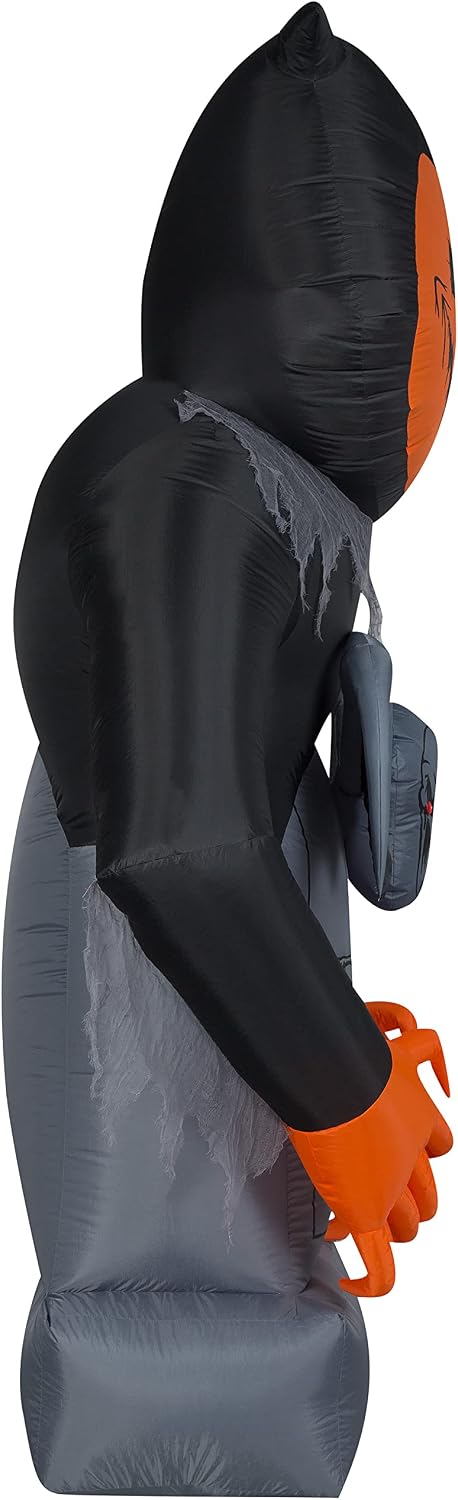
Image 4.1: Side view of the inflatable, showing its profile and potential tether points for securing.
5. Operating Instructions
Operating your Gemmy LightShow Airblown Inflatable Pumpkin Reaper is straightforward:
- Inflation: Once plugged into a power source, the internal fan will automatically inflate the unit. Ensure the fan is unobstructed for continuous operation.
- Lighting Effects: The inflatable features a pumpkin reaper head with a realistic flickering flame effect and a tombstone with flashing Micro LED lights displaying "RIP". These effects activate automatically when the unit is powered.
- Deflation: To deflate, simply unplug the power cord from the electrical outlet. The inflatable will slowly deflate.
Video 5.1: An official seller video demonstrating the Gemmy RIP Reaper Pumpkin Airblown inflatable, showcasing its animation and lighting effects.
6. Maintenance
Proper maintenance will extend the life of your inflatable:
- Cleaning: If the inflatable becomes dirty, wipe it gently with a damp cloth. Do not use harsh chemicals or abrasive cleaners. Ensure the unit is completely dry before storage.
- Storage: After use, unplug the inflatable and allow it to fully deflate. Fold or roll it neatly and store it in a cool, dry place, away from direct sunlight and pests. Keep it in its original box or a suitable storage container to protect it from damage.
- Inspection: Periodically inspect the inflatable, power cord, fan, stakes, and tethers for any signs of wear, tear, or damage. Replace any damaged components immediately.
7. Troubleshooting
If you encounter issues with your inflatable, refer to the following common problems and solutions:
| Problem | Possible Cause | Solution |
|---|---|---|
| Inflatable does not inflate. | Power cord unplugged, fan obstructed, zipper open. | Ensure power cord is securely plugged in. Check for debris blocking the fan intake. Verify all zippers are fully closed. |
| Lights are not working. | Loose connection, damaged bulb (if replaceable), power issue. | Check all light connections. If bulbs are replaceable, inspect and replace if necessary. Ensure the unit is receiving power. |
| Inflatable sways or falls over. | Insufficient anchoring, strong winds. | Ensure all stakes and tethers are properly installed and tightened. Consider additional anchoring in very windy conditions. |
8. Specifications
- Brand: Gemmy
- Model Number: Inflatable Pumpkin Reaper
- Dimensions (L x W x H): 62.99 x 28.35 x 101.97 inches (approximately 8.5 ft tall)
- Item Weight: 7.78 pounds
- Material: Polyester
- Light Color: Multicolor (Fire & Ice, Micro LED)
- Special Feature: LED Lights
- Usage: Indoor or Outdoor
9. Warranty and Support
For warranty information or technical support, please refer to the contact details provided on your product packaging or visit the official Gemmy website. Keep your purchase receipt as proof of purchase.

