
Introduction
This user manual provides comprehensive instructions for the realme 9 Pro+ 5G Smartphone, Model RMX3392. It covers setup, operation, maintenance, and troubleshooting to ensure optimal performance and user experience. The realme 9 Pro+ features a powerful MediaTek Dimensity 920 5G processor, a vibrant 6.4-inch Super AMOLED display, and an advanced 50MP OIS camera system.
Setup
Unboxing and Initial Inspection
Carefully unbox your realme 9 Pro+ smartphone. Verify that all components are present and undamaged. The standard package includes:
- realme 9 Pro+ Smartphone
- USB Cable
- Charger
- SIM Ejector Tool
- Protective Case
- Important Information Guide

Image: Contents of the realme 9 Pro+ retail box, showing the smartphone, USB cable, charger, and documentation.
SIM Card Installation
The realme 9 Pro+ supports Dual-SIM (Nano-SIM). To install SIM cards:
- Locate the SIM card tray on the side of the device.
- Insert the SIM ejector tool into the small hole next to the tray and press gently until the tray pops out.
- Place your Nano-SIM cards into the designated slots on the tray, ensuring the gold contacts face down.
- Carefully reinsert the tray into the phone until it clicks into place.
Initial Charging
Before first use, it is recommended to fully charge the device. Connect the provided USB cable to the phone's USB-C port and the charger, then plug the charger into a power outlet. The realme 9 Pro+ supports 60W SuperDart Charge for rapid charging.
Power On/Off
To power on, press and hold the Power button (located on the right side) until the realme logo appears. To power off, press and hold the Power button, then select 'Power off' from the options on the screen.
Operating Your Device
Display and Navigation
The realme 9 Pro+ features a 6.4-inch Super AMOLED display with a 1080 x 2400 pixel resolution and a 90Hz refresh rate for smooth visuals. Navigate the interface using touch gestures. The in-display fingerprint sensor provides secure and convenient unlocking.

Image: Front view of the realme 9 Pro+ highlighting its Super AMOLED display.
Camera Features
The device is equipped with a versatile triple camera system:
- Main Camera: 50 MP with f/1.8 aperture, OIS (Optical Image Stabilization) for clear photos even in low light.
- Ultrawide Camera: 8 MP with f/2.2 aperture and 119° field of view for expansive shots.
- Macro Camera: 2 MP with f/2.4 aperture for close-up photography.
- Front Camera: 16 MP with f/2.4 aperture for high-quality selfies.

Image: Detailed view of the realme 9 Pro+ camera module, featuring the 50MP OIS main sensor.

Image: Infographic showcasing the 50MP Sony IMX766 OIS flagship camera and other key features.
Connectivity
The realme 9 Pro+ supports 5G cellular networks, Wi-Fi, and Bluetooth for seamless connectivity. It also includes NFC for contactless payments and data transfer.
Operating System
The smartphone runs on Android 12, providing a user-friendly interface and access to a wide range of applications through the Google Play Store.
Maintenance
Battery Care
To prolong battery life, avoid exposing the device to extreme temperatures. Use only the original charger and cable. It is advisable to keep the battery charge between 20% and 80% for optimal longevity.
Software Updates
Regularly check for and install software updates to ensure your device has the latest features, security patches, and performance improvements. You can usually find this option in the 'Settings' menu under 'System' or 'About phone'.
Cleaning the Device
Use a soft, lint-free cloth to clean the screen and body of the phone. Avoid using harsh chemicals or abrasive materials that could damage the finish.
Troubleshooting
Common Issues and Solutions
- Device not powering on: Ensure the battery is charged. Press and hold the Power button for at least 10 seconds.
- Network connectivity issues: Check if SIM cards are properly inserted. Verify network settings and ensure you are within network coverage. For USA buyers, note that this smartphone is not compatible with CDMA networks (Verizon, Sprint, US Cellular).
- Battery draining quickly or overheating: Close background applications. Reduce screen brightness. Avoid using the phone while charging. If issues persist, consider a factory reset after backing up data.
- Apps crashing: Clear the app's cache and data in 'Settings' > 'Apps'. If the problem continues, reinstall the app.
Factory Reset
If you encounter persistent software issues, a factory reset may resolve them. Warning: This will erase all data on your phone. Back up important data before proceeding. Go to 'Settings' > 'System' > 'Reset options' > 'Erase all data (factory reset)'.
Specifications
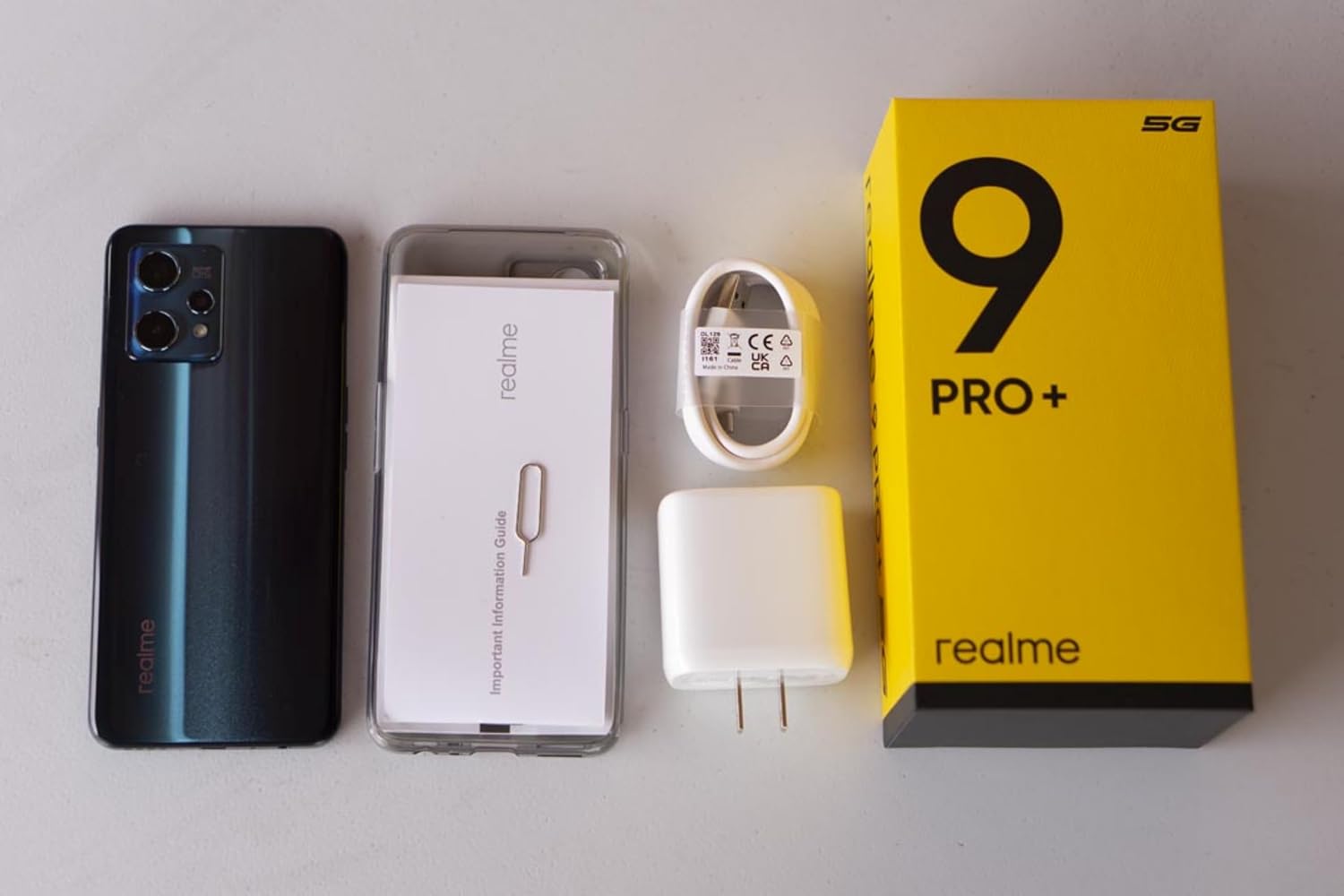
Image: Key specifications of the realme 9 Pro+ including connectivity and battery.
| Feature | Specification |
|---|---|
| Model Name | Realme 9 Pro+ (RMX3392) |
| Display | 6.4 Inches Super AMOLED, 1080 x 2400 pixels, 90Hz Refresh Rate |
| Processor | MediaTek Dimensity 920 5G (6 nm) Octa-core |
| RAM | 8 GB |
| Internal Storage | 128 GB |
| Rear Camera | 50 MP (OIS) + 8 MP (Ultrawide) + 2 MP (Macro) |
| Front Camera | 16 MP |
| Battery Capacity | 4500 mAh (Non-removable) |
| Charging | 60W SuperDart Charge |
| Operating System | Android 12.0 |
| Dimensions | 6.31 x 2.89 x 0.31 inches |
| Weight | 6.4 ounces (182 Grams) |
| Connectivity | 5G, Wi-Fi, Bluetooth, NFC, USB Type-C |
| Audio Jack | 3.5 mm |
Warranty and Support
Your realme 9 Pro+ smartphone comes with a standard manufacturer's warranty. Please refer to the warranty card included in your product packaging for specific terms and conditions, including coverage period and service procedures.
For further assistance, technical support, or to find authorized service centers, please visit the official realme website or contact realme customer service. You can find more information and support resources at the realme Store.