
1. Introduction and Overview
This manual provides detailed instructions for the safe installation, operation, and maintenance of your Sofucor 52 Inch Solid Wood Ceiling Fan with Light and Remote. Please read all instructions carefully before beginning installation and retain this manual for future reference.
The Sofucor 52-inch ceiling fan is designed to enhance comfort and style in various indoor and outdoor settings. It features solid wood blades, a reversible DC motor for year-round use, adjustable LED lighting, and remote control operation.
2. Safety Information
WARNING: To reduce the risk of fire, electric shock, or personal injury, always turn off the main power supply at the circuit breaker before installation or maintenance.
- All wiring must be in accordance with national and local electrical codes. If you are unfamiliar with wiring, consult a qualified electrician.
- Ensure the installation site is structurally sound and capable of supporting the fan's weight (approximately 14.53 lbs).
- Do not operate the fan with damaged blades. Replace any damaged blades immediately.
- Keep hands, clothing, and other objects clear of the fan blades when the fan is in operation.
- This fan is suitable for damp locations but should not be directly exposed to rain.
Video: How to install a ceiling fan with light. This video provides a visual guide to the installation process, demonstrating key steps for setting up your ceiling fan safely and correctly.
3. Package Contents
Carefully unpack all components and ensure all items are present before beginning installation. Refer to the parts list below:
- Fan Blades (3x, solid wood)
- Motor Assembly
- Downrods (3x: 5-inch, 10-inch, 24-inch)
- Mounting Bracket
- Canopy and Canopy Cover
- LED Light Kit
- Lampshade
- Remote Control with Receiver
- Hardware Pack (screws, washers, wire nuts)
- Instruction Manual

Image: A visual representation of the various components included in the Sofucor ceiling fan package, laid out for easy identification.
4. Installation Instructions
4.1 Pre-Installation Preparation
- Turn off power at the circuit breaker.
- Ensure the mounting location can support the fan's weight.
- Gather necessary tools: screwdriver, wire strippers, electrical tape, ladder.
- Choose the appropriate downrod length (5", 10", or 24") based on your ceiling height. The fan can also be installed on sloped ceilings up to 15 degrees.
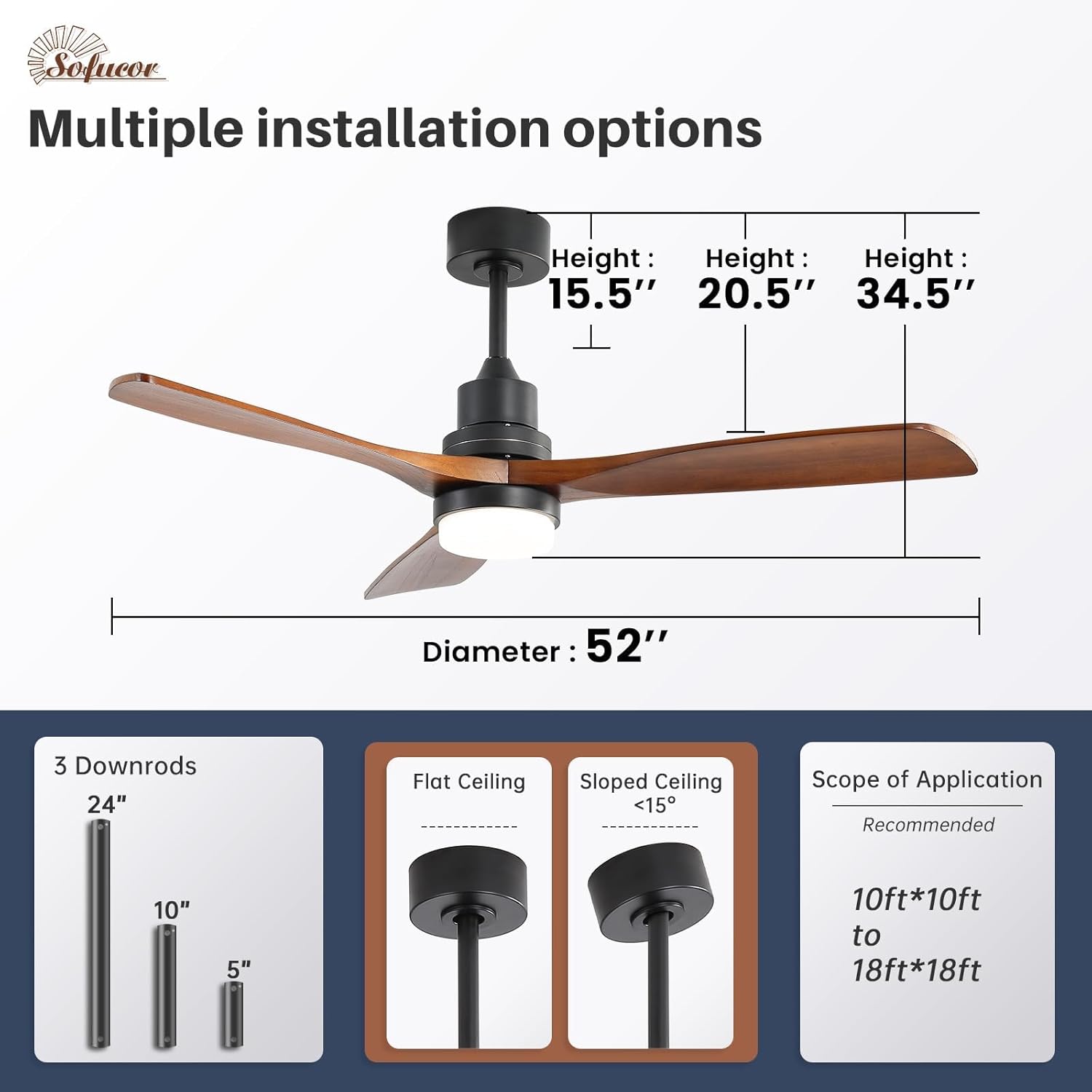
Image: This image illustrates the various installation options, including different downrod lengths (15.5", 20.5", 34.5" total height with 5", 10", 24" downrods respectively) and suitability for flat or sloped ceilings (up to 15 degrees). It also shows the recommended room size for optimal airflow (10ft*10ft to 18ft*18ft).
4.2 Fan Assembly
- Attach Blades: Secure the solid wood blades to the motor housing using the provided screws and washers. Ensure they are tightened securely.
- Install Downrod: Feed the fan wires through the chosen downrod. Insert the downrod into the motor assembly and secure it with the provided pin and screws.
- Connect Receiver: Connect the remote control receiver to the fan's wiring harness.
Video: Sofucor Smart Ceiling Fans, Installation Guide. This video demonstrates the step-by-step assembly of the fan components, including attaching blades, installing the downrod, and connecting the receiver.
4.3 Mounting to Ceiling
- Install Mounting Bracket: Secure the mounting bracket to the ceiling junction box using screws appropriate for your ceiling type (concrete, junction box, or wooden).
- Hang Fan: Carefully lift the fan assembly and hang it from the mounting bracket.
- Wire Connections: Connect the fan's electrical wires to your home's wiring (black to hot, white to neutral, green to ground) using wire nuts. Ensure all connections are secure.
- Install Canopy: Slide the canopy up to cover the wiring and mounting bracket, securing it with screws.
- Install LED Light Kit and Lampshade: Connect the LED light kit wires and secure the light kit to the fan. Attach the lampshade.

Image: This image displays different mounting bracket options for various ceiling materials, including concrete, junction box, and wooden ceilings, highlighting the need to select appropriate screws.
5. Operating Instructions
Your Sofucor ceiling fan is operated using the included remote control. Ensure the remote has working batteries.
- Power On/Off: Press the power button to turn the fan and light on or off.
- Fan Speed: Select from 6 precise fan speeds using the numbered buttons (1-6).
- Light Control:
- Color Temperature: Cycle through three color temperatures (3000K Warm Light, 4000K Natural Light, 6000K White Light).
- Brightness: Adjust light brightness from 10% to 100%. The light has a memory function, retaining the last setting.
- Reversible Function: Use the reverse button to change the blade direction.
- Summer Mode: Downward airflow creates a cooling effect.
- Winter Mode: Upward airflow circulates warm air trapped near the ceiling.
- Timer Function: Set the fan to automatically turn off after 1, 4, or 8 hours.

Image: This image demonstrates the three light color options (3000K Warm Light, 4000K Natural Light, 6000K White Light) and the adjustable brightness range from 10% to 100% for the Sofucor ceiling fan.

Image: This image highlights the advantages of the Sofucor DC motor, including the reversible function for summer cooling and winter heat circulation, and the 6 adjustable speeds for various comfort levels (Comfortable Breeze, Natural Wind, Strong Wind).
6. Maintenance
Regular maintenance ensures optimal performance and longevity of your ceiling fan.
- Cleaning: Clean the fan blades and motor housing periodically with a soft, damp cloth. Do not use abrasive cleaners or solvents.
- Tighten Screws: Check all screws and connections annually to ensure they are secure.
- Blade Balance: If the fan wobbles, check that all blades are securely attached and balanced. A balancing kit may be used if necessary.
7. Troubleshooting
| Problem | Possible Cause | Solution |
|---|---|---|
| Fan does not start | Loose wiring; no power; remote not paired. | Check circuit breaker; ensure all wires are connected; pair remote control (refer to remote instructions). |
| Fan wobbles | Loose blades; unbalanced blades; loose mounting bracket. | Tighten all blade screws; use a balancing kit; ensure mounting bracket is securely fastened. |
| Light does not work | Loose light kit wiring; faulty LED driver. | Check light kit connections; contact customer support for replacement LED kit if necessary. |
| Remote not working | Dead batteries; remote not paired; interference. | Replace batteries; re-pair remote; ensure no obstructions between remote and receiver. |
| Light resets to white after power cycle | Default light setting after power interruption. | This is a common behavior for some LED lights. Adjust to your preferred setting after power is restored. |
8. Specifications
| Feature | Detail |
|---|---|
| Brand | Sofucor |
| Model Name | Sofucor 52 Pulgadas |
| Size | 52 Inch |
| Electric Fan Design | Ceiling Fan |
| Power Source | DC Motor |
| Number of Blades | 3 |
| Blade Material | Solid Wood |
| Number of Power Levels | 6 Speeds |
| Light Type | LED (3 Color Temperatures, Dimmable) |
| Color Temperatures | 3000K, 4000K, 6000K |
| Control Method | Remote Control |
| Noise Level | 30 Decibels |
| Indoor/Outdoor Usage | Indoor, Outdoor (Damp Rated, avoid direct rain) |
| Included Components | Fan Blades, Light Kit, Remote, Wire Whip, 3 Downrods |
| Item Weight | 14.53 Pounds |
| Voltage | 120.0 V |
| Wattage | 18 watts |
| Efficiency | A+++ |
9. Warranty and Support
Sofucor provides the following warranty for your peace of mind:
- Motor Warranty: Lifetime free replacement for the DC motor.
- Parts Warranty: 2-year protection for other components (e.g., fan blades, bulbs, remote controls, receivers).
For technical support, installation questions, or warranty claims, please contact Sofucor customer service. Detailed guides and videos are also available for self-installation assistance.


