
1. Introduction
This manual provides essential information for the proper use, care, and maintenance of your Revo Horizon Polarized Sunglasses. Please read these instructions carefully to ensure optimal performance and longevity of your eyewear.

Image 1.1: Revo Horizon Sunglasses, front view, satin black frame with graphite lenses.
The Revo Horizon sunglasses feature a titanium navigator frame and polarized lenses, designed for clarity and protection. The frame is constructed from a single titanium sheet, offering a lightweight and durable design without soldering on the frame front. Handmade acetate temples complement the design.
2. Key Features and Technology
2.1 Revo Light Management System™
Revo's signature Light Management System (LMS) technology is engineered to manage the entire spectrum of light. It allows beneficial light to pass through while reducing or blocking harmful light, enhancing visual comfort and clarity.

Image 2.1: Diagram illustrating the layers and functions of the Revo Light Management System lens technology.
- Blocks Harmful Light: Filters specific wavelengths of light that can be detrimental to eye health.
- Reduces Blue Light: Optimizes contrast and brightness by reducing excessive blue light.
- Optimizes Full Spectrum: Enhances the overall visual experience for superior vision.
2.2 Lens Technology: Serilium+ Polarized Lenses
The Horizon sunglasses are equipped with Revo high-contrast polarized Serilium+ lenses. These lenses are:
- Lightweight: Constructed from a featherlight nylon material for comfort.
- Impact-Resistant: Designed to withstand impacts, providing durability and safety.
- Glare-Reducing: Polarized film diminishes glare and reduces eyestrain, especially in bright conditions.
- Digital Device-Friendly: Reduces glare and enhances clarity when viewing digital screens.
- 6-Base Lens Technology: Features a flatter profile from temple to temple.

Image 2.2: Visual comparison demonstrating the clarity and glare reduction provided by Revo Serilium+ Graphite lenses.
The Graphite lens option is a gray-based, silver flash mirror coated lens, offering neutral color definition and enhanced contrast for bright, sunny conditions.
3. Setup and Fit
Your Revo Horizon sunglasses are designed for a comfortable and secure fit. To ensure the best experience, consider the following:
3.1 Finding Your Sunglass Size
Proper fit is crucial for comfort and performance. Refer to the sizing guide below to determine the ideal fit for your head size.
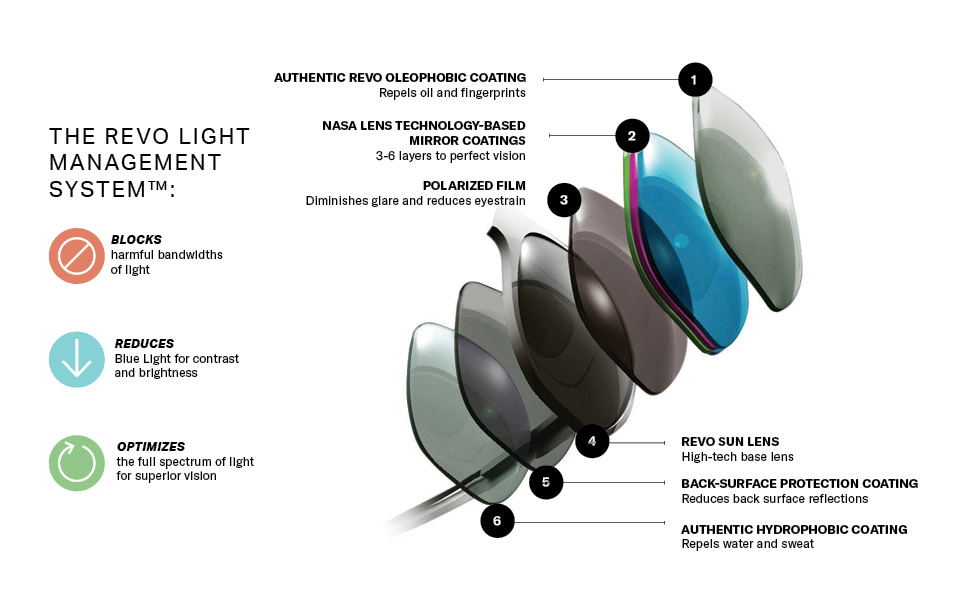
Image 3.1: Guide on how to measure head size for optimal sunglass fit.
- Head Size Measurement: Measure your head from the farthest left to the farthest right of your cheekbones.
- Temple Size: This measures the width of the frame from screw to screw.
- Eye Size Number: This measures the width of the lens, measured from the bridge, in millimeters.
The Revo Horizon model has a size specification of 57-14-140 (Lens Width-Bridge Width-Temple Length in mm).
4. Operating Your Sunglasses
Simply place the sunglasses on your face, ensuring the nose pads rest comfortably on your nose bridge and the temples extend securely over your ears. The polarized lenses will immediately begin to reduce glare and enhance visual clarity in bright conditions.

Image 4.1: Man wearing Revo Horizon sunglasses.
These sunglasses are suitable for various activities, including everyday wear, water sports, hiking, and golf, providing consistent optical performance.
5. Care and Maintenance
Proper care will extend the life and maintain the performance of your Revo Horizon sunglasses.
- Cleaning Lenses: Use the provided microfiber cloth to clean lenses. For stubborn smudges, lightly dampen the cloth with water or a lens cleaning solution specifically designed for coated lenses. Avoid using abrasive materials or harsh chemicals.
- Storage: Always store your sunglasses in the protective hard case when not in use to prevent scratches and damage.
- Handling: Avoid placing sunglasses face down on hard surfaces. Do not expose them to extreme heat, such as leaving them on a car dashboard in direct sunlight, as this can damage the lens coatings and frame materials.

Image 5.1: Included accessories: Hard Sunglasses Case and Microfiber Pouch.
6. Specifications
| Feature | Detail |
|---|---|
| Model Name | Horizon |
| Brand | Revo |
| Lens Type | Polarized Serilium+ (Nylon) |
| Frame Material | Titanium (front), Handmade Acetate (temples) |
| Lens Color (Current Model) | Graphite |
| Frame Color (Current Model) | Satin Black |
| Lens Technology | Revo Light Management System, NASA-based mirror coatings, Oleophobic, Hydrophobic |
| Size (Lens-Bridge-Temple) | 57-14-140 mm |
| Department | All Ages, Unisex |
| Origin | Imported |
7. Warranty Information
All Revo sunglasses are covered against defects in material or workmanship for two years from the date of purchase. This warranty specifically covers manufacturing defects.
Exclusions: The warranty does not cover:
- Scratched lenses.
- Products damaged through misuse (e.g., dropping, improper storage).
- Products damaged through alteration (e.g., unauthorized repairs or modifications).
For warranty claims, please retain your proof of purchase and contact Revo customer support.
8. Customer Support
For further assistance, product inquiries, or warranty service, please visit the official Revo website or contact their customer service department. Contact information can typically be found on the Revo brand website or through your retailer.
Online Resources: Visit the Revo Store on Amazon


