
Introduction
Welcome to the user manual for your Brondi Stone+ Flip Phone. This guide provides essential information to help you set up, operate, and maintain your device. The Brondi Stone+ is designed for ease of use, featuring a convenient flip design and essential mobile functionalities.
- Notification LED: The LED on the flip cover indicates incoming calls, missed calls, and new messages.
- Raised Rubber Keypad: The raised rubber keys provide comfortable and tactile feedback for dialing and navigating functions.
- Quick Access Keys: Dedicated keys on the keypad provide quick access to Camera, Messages, and Flashlight functions.
- Micro-USB Connector: For charging and data transfer.
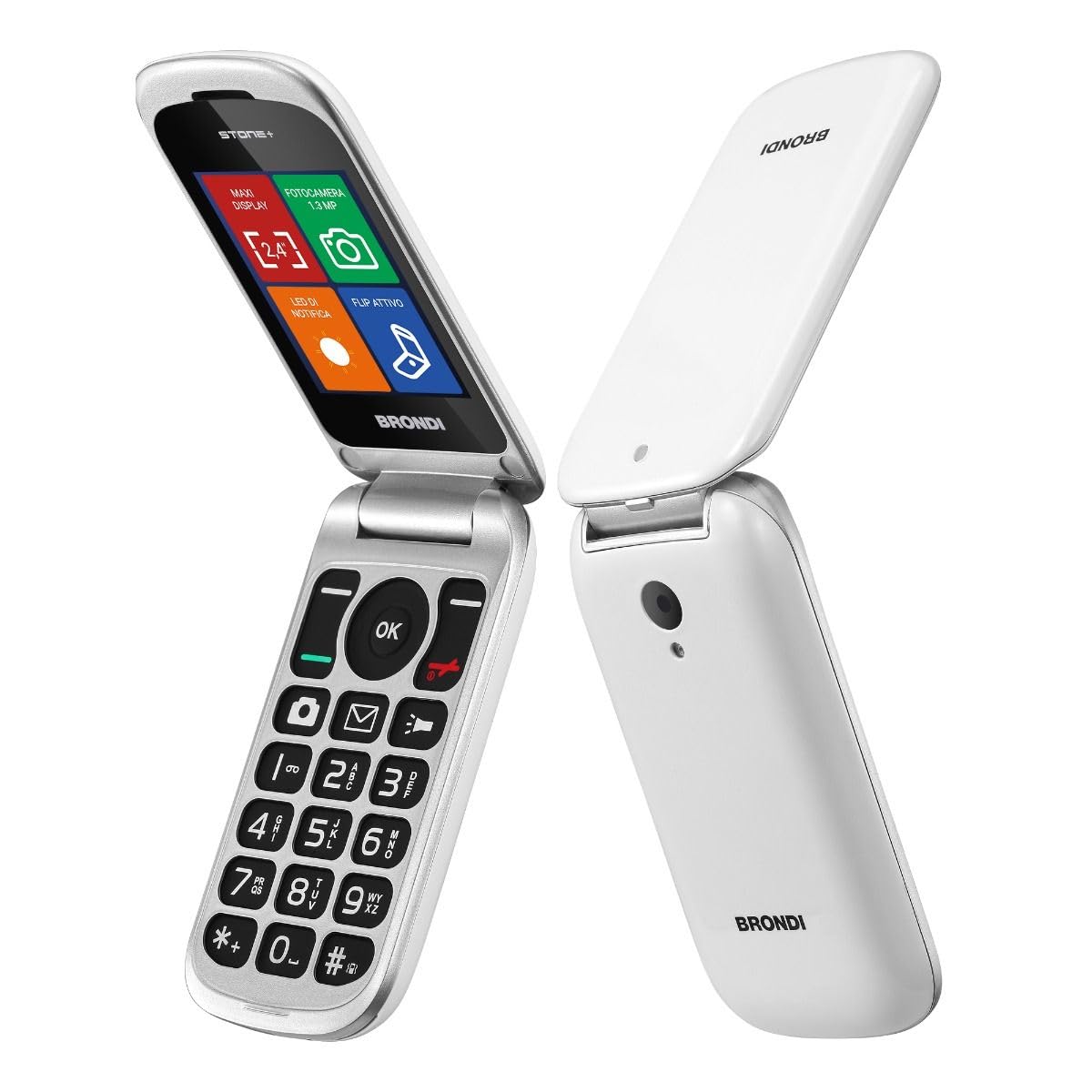
Image: Brondi Stone+ Flip Phone in white, shown in its closed, compact state.
Setup
1. Unboxing and Components
Your Brondi Stone+ package should contain the following items:
- Telephone
- Battery
- Charger
- Earphones
2. Battery Installation
- Remove the back cover of the phone.
- Align the battery contacts with the phone's terminals.
- Gently press the battery into place.
- Replace the back cover.
3. SIM Card Installation (Dual SIM)
The Brondi Stone+ supports two SIM cards (Dual SIM functionality).
- With the battery removed, locate the SIM card slots.
- Insert your SIM card(s) into the designated slots, ensuring the gold contacts face downwards and the cut corner aligns correctly.
- Reinsert the battery and replace the back cover.
4. Charging the Device
- Connect the Micro-USB charger cable to the charging port on the phone.
- Plug the charger into a power outlet.
- Allow the phone to charge fully before first use. The battery indicator on the screen will show charging status.
5. Powering On/Off
- To power on, press and hold the Power/End Call button until the screen lights up.
- To power off, press and hold the Power/End Call button, then select "Power off" from the options.
Operating Instructions
1. Making and Receiving Calls
- Making a Call: Dial the number using the keypad and press the Call button.
- Receiving a Call (Active Flip): Simply open the phone's flip cover to answer an incoming call.
- Ending a Call: Close the phone's flip cover or press the End Call button.

Image: Brondi Stone+ Flip Phone in open position, displaying the keypad and main screen interface.
2. Sending and Receiving Messages
- Access the Messages menu from the main screen or use the dedicated Quick Access Key.
- Select "New Message" to compose an SMS.
- Enter the recipient's number and your message using the keypad.
- Press "Send" to dispatch the message.
3. Using the Camera
- Press the dedicated Camera Quick Access Key or navigate to the Camera application.
- Frame your shot using the display.
- Press the "OK" button to capture a photo.
- Note: The phone requires a MicroSD card (up to 16GB) to save photos.

Image: Detailed view of the Brondi Stone+ keypad, highlighting the quick access buttons for camera, messages, and flashlight.
4. Using the Flashlight
- Press the dedicated Flashlight Quick Access Key to turn the flashlight on or off.
5. Adjusting Volume
- Use the volume keys on the side of the phone to adjust call volume, ringtone volume, and media volume.
6. Phonebook and Contacts
- Navigate to the "Contacts" menu to add, edit, or delete entries.
- You can store contacts on the phone's internal memory or on your SIM card(s).
Maintenance
1. Cleaning Your Device
- Use a soft, dry cloth to clean the phone's exterior.
- Avoid using liquid cleaners or abrasive materials, as these can damage the device.
2. Battery Care
- To prolong battery life, avoid exposing the phone to extreme temperatures.
- Charge the battery regularly, but avoid overcharging for extended periods.
- If the phone will not be used for a long time, charge it to about 50% and store it in a cool, dry place.
3. Storage
- Store the phone in a safe place away from direct sunlight, moisture, and dust.
- Keep it out of reach of children and pets.
Troubleshooting
If you encounter issues with your Brondi Stone+, refer to the following common problems and solutions:
| Problem | Solution |
|---|---|
| Phone does not turn on. | Ensure the battery is correctly inserted and charged. Connect the charger and try again. |
| Cannot make or receive calls. | Check if the SIM card(s) are properly inserted and active. Verify network signal strength. |
| Poor call quality. | Move to an area with better network coverage. Ensure the earpiece/microphone is not obstructed. |
| Battery not charging. | Check the charger cable and adapter for damage. Ensure the charging port on the phone is clean and free of debris. Try a different power outlet. |
| Cannot save photos. | Insert a MicroSD card (up to 16GB) into the phone. Ensure the card has sufficient free space. |
Specifications
| Feature | Detail |
|---|---|
| Brand | Brondi Chi Parla |
| Model Name | Stone+ |
| Operating System | Proprietary |
| Display Size | 2.4 Inches |
| Display Resolution | 320 x 240 |
| Cellular Technology | GSM |
| Connectivity Technology | Bluetooth |
| SIM Card Slots | Dual SIM |
| Form Factor | Flip (Clamshell) |
| Rear Camera Resolution | 1.3 MP |
| Max. Supported Flash Memory | 16 GB (MicroSD) |
| Battery Capacity | 800 mAh Lithium-ion |
| Talk Time | 190 Minutes |
| Dimensions | 10.3 x 5 x 1.9 cm |
| Weight | 87 Grams |
| Connector Type | Micro-USB |
| Headphone Jack | 3.5 mm |
Warranty and Support
1. Manufacturer's Warranty
The Brondi Stone+ Flip Phone comes with a 2-year manufacturer's warranty from the date of purchase. This warranty covers defects in materials and workmanship under normal use. Please retain your proof of purchase for warranty claims.
2. Customer Support
For technical assistance, troubleshooting beyond this manual, or warranty inquiries, please contact Brondi customer support. Refer to the contact information provided in your product packaging or visit the official Brondi website for the most up-to-date support details.
Website: www.brondi.it (Note: This is a placeholder URL, please refer to your product documentation for the official support website.)
