
1. Introduction
The KAIWEETS ST100 is a versatile and intelligent voltage tester designed for a wide range of electrical measurements. It combines multiple functions into a compact and user-friendly device, making it suitable for vehicle, industrial, and household electrical problem-solving. This manual provides detailed instructions to ensure safe and effective use of your ST100.
2. Safety Information
Always adhere to local and national safety codes. Use personal protective equipment (PPE) such as safety glasses and insulated gloves. Before any electrical work, ensure power is disconnected and verified with the tester. Do not use the device if it appears damaged or is operating abnormally. Refer to the CAT III 600V rating for safe operating voltage limits.
- Do not exceed the maximum input values for any function.
- Exercise extreme caution when working with live circuits.
- Keep hands and fingers away from the probe tips when testing.
- Replace batteries immediately when the low battery indicator appears to ensure accurate readings.
3. Product Overview
3.1 What's in the Box
Your KAIWEETS ST100 package includes:
- KAIWEETS ST100 Voltage Tester
- Test Leads (Red and Black)
- User Manual (this document)

Figure 1: KAIWEETS ST100 Voltage Tester and included test leads.
3.2 Key Components and Features
The ST100 is designed for comprehensive electrical measurements, featuring:
- Backlit LCD Screen: Provides clear readings in various lighting conditions.
- Non-Contact Voltage (NCV) Sensor: Detects AC voltage without physical contact, enhancing safety.
- Indicator Bar: Visual indication of voltage levels (High/Low) with corresponding beeper frequency.
- Test Lead Sockets: For connecting the included test leads for precise measurements.
- Function Buttons: For mode selection and backlight control.
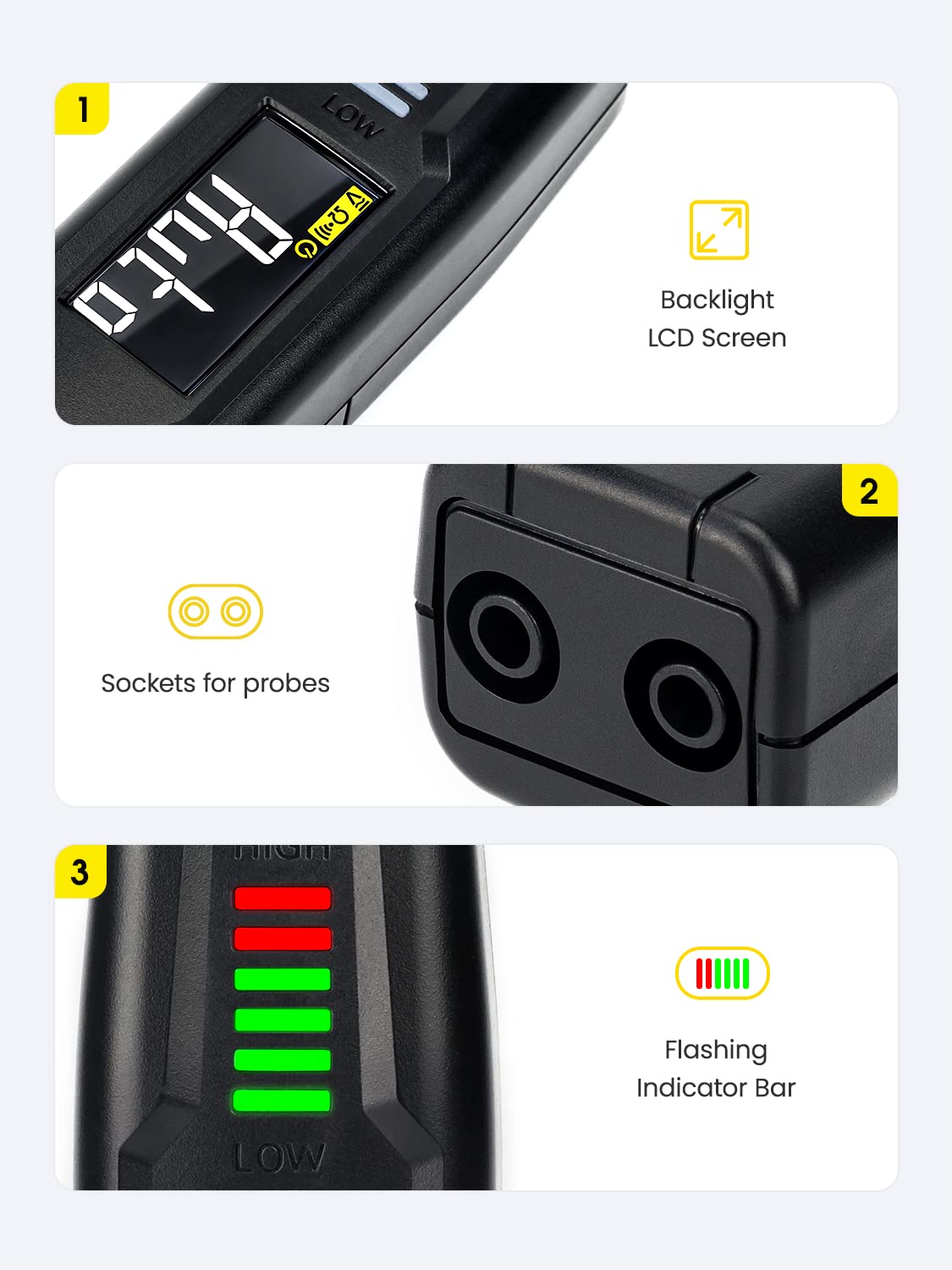
Figure 2: Detailed view of the ST100's display, probe inputs, and indicator lights.

Figure 3: The ST100's comprehensive measurement capabilities.
4. Setup
4.1 Battery Installation
The KAIWEETS ST100 requires 2 AAA batteries for operation. To install or replace batteries:
- Locate the battery compartment cover on the back of the device.
- Slide or unscrew the cover to open the compartment.
- Insert the 2 AAA batteries, ensuring correct polarity (+/-).
- Close the battery compartment cover securely.
5. Operating Instructions
5.1 Power On/Off
Press the red power button to turn the device on or off. The device will automatically enter NCV mode upon startup.
5.2 Auto Mode
In Auto Mode, the ST100 automatically identifies the measurement type (Voltage, Resistance, or Continuity) and displays the reading. This simplifies operation by eliminating the need for manual range selection.

Figure 4: The ST100's intelligent Auto Measurement feature.
5.3 Non-Contact Voltage (NCV) Testing
The NCV function allows for voltage detection without direct contact, ideal for quickly checking for live wires or identifying breaks in cables.
- Ensure the tester is in NCV mode (default upon power on).
- Place the NCV sensor tip near the wire or outlet to be tested.
- The indicator bar will light up and the beeper will sound, with frequency and light intensity increasing with higher voltage.

Figure 5: Using the NCV function to detect live voltage.

Figure 6: The display indicating Live/NCV detection.
5.4 Probe Measurements
Connect the red test lead to the 'INPUT' terminal and the black test lead to the 'COM' terminal. Press the 'FUNC' button to cycle through different measurement modes.
- AC/DC Voltage: Measure voltage by placing the probes across the circuit.
- Resistance: Measure resistance of components by placing probes across them.
- Continuity: Test for continuity in circuits. A beeper will sound if continuity is detected.
- Capacitance: Measure the capacitance of capacitors.
- Diode Testing: Test the forward voltage drop of diodes.

Figure 7: Examples of Capacitance, Resistance, and Diode Testing.
5.5 Phase Sequence Detection
The ST100 can assist in determining phase sequence in three-phase systems. Follow specific instructions in the full user guide for this advanced function.

Figure 8: Testing phase sequence with the ST100.
5.6 General Usage Tips
- Backlight: Press the light bulb button to toggle the display backlight.
- Auto Power Off: The device features an auto power-off function after approximately 15 minutes of inactivity to conserve battery life.
5.7 Product Demonstration Video
Video 1: An introductory video demonstrating the features and basic operation of the KAIWEETS ST100 Voltage Tester, including non-contact voltage detection and probe measurements.
6. Maintenance
- Cleaning: Use a soft, damp cloth to clean the exterior of the device. Do not use abrasive cleaners or solvents.
- Storage: Store the tester in a cool, dry place away from direct sunlight and extreme temperatures. Remove batteries if storing for extended periods to prevent leakage.
- Probe Care: Inspect test leads for any damage before each use. Replace if insulation is cracked or wires are exposed.
7. Troubleshooting
- No Display/Power: Check battery installation and ensure batteries are not depleted. Replace if necessary.
- Inaccurate Readings: Ensure probes are making good contact. Verify the correct mode is selected (if not using Auto mode). Low battery can also affect accuracy.
- NCV Not Detecting: Ensure the NCV sensor tip is close enough to the live source. Environmental interference can sometimes affect NCV sensitivity.
- No Continuity Beep: Check if the circuit is truly continuous. Ensure probes are firmly connected. The internal speaker may be quiet in noisy environments.
8. Specifications
| Specification | Value |
|---|---|
| Product Dimensions | 6.89 x 1.1 x 1.22 inches |
| Item Model Number | US-ST100 |
| Batteries | 2 AAA batteries required |
| Item Weight | 2.86 ounces (81 Grams) |
| Brand | KAIWEETS |
| Power Source | Electric |
| Color | Black |
9. Warranty and Support
KAIWEETS provides 36-month technical support for the ST100 Smart Voltage Tester. If you have any questions or require assistance, please do not hesitate to contact KAIWEETS customer service. For the most up-to-date support information, please visit the official KAIWEETS website or refer to the contact details provided with your product packaging.


