Introduction and Safety Information
Thank you for choosing the Dripex Under Desk Elliptical Machine. This manual provides important instructions for the safe assembly, operation, and maintenance of your elliptical trainer. Please read this manual thoroughly before using the product and retain it for future reference.
Important Safety Instructions:
- Consult your physician before starting any exercise program.
- Keep children and pets away from the equipment during use.
- Place the elliptical on a flat, stable surface.
- Wear appropriate exercise attire and footwear.
- Do not exceed the maximum user weight of 100 kg (220 lbs).
- Inspect the machine for loose or damaged parts before each use. Do not use if damaged.
- Stop exercising immediately if you feel faint, dizzy, or experience pain.
Setup and Assembly
Your Dripex Under Desk Elliptical Machine comes mostly pre-assembled. Follow these steps to prepare it for use.
- Unboxing: Carefully remove all components from the packaging. Ensure all parts listed in the "Included Components" section are present.
- Placement: Place the elliptical on a stable, level surface. Ensure there is enough clear space around the machine for safe operation, especially if using it in a standing position or with the resistance bands.
- Stabilization: The elliptical features anti-slip pads on its base. Ensure these pads are making full contact with the floor to prevent movement during exercise.
- Resistance Bands (Optional): If your model includes elastic resistance bands for arm workouts, attach them securely to the designated points on the elliptical as per the diagram in the hardware pack.

Image: The compact design of the elliptical, showing its dimensions and integrated carry handle for easy placement and storage.
Operating Instructions
1. Adjusting Resistance Levels
The Dripex Under Desk Elliptical features 8 levels of adjustable magnetic resistance, allowing you to customize your workout intensity.
- To increase resistance, turn the resistance knob clockwise towards the "HIGH" setting.
- To decrease resistance, turn the resistance knob counter-clockwise towards the "LOW" setting.

Image: Close-up of the resistance knob, illustrating the 8 adjustable levels from low to high tension for varied workout intensity.
2. Using the LCD Digital Monitor
The integrated LCD monitor tracks your workout progress. It typically displays the following metrics:
- Time: Duration of your current workout session.
- Distance: Estimated distance covered during your workout.
- Calories: Estimated calories burned.
- Speed: Current speed of your pedaling.
- Scan: Automatically cycles through all metrics.
To operate the monitor, press the button usually located below the display. A single press typically cycles through modes, and holding it down may reset values.
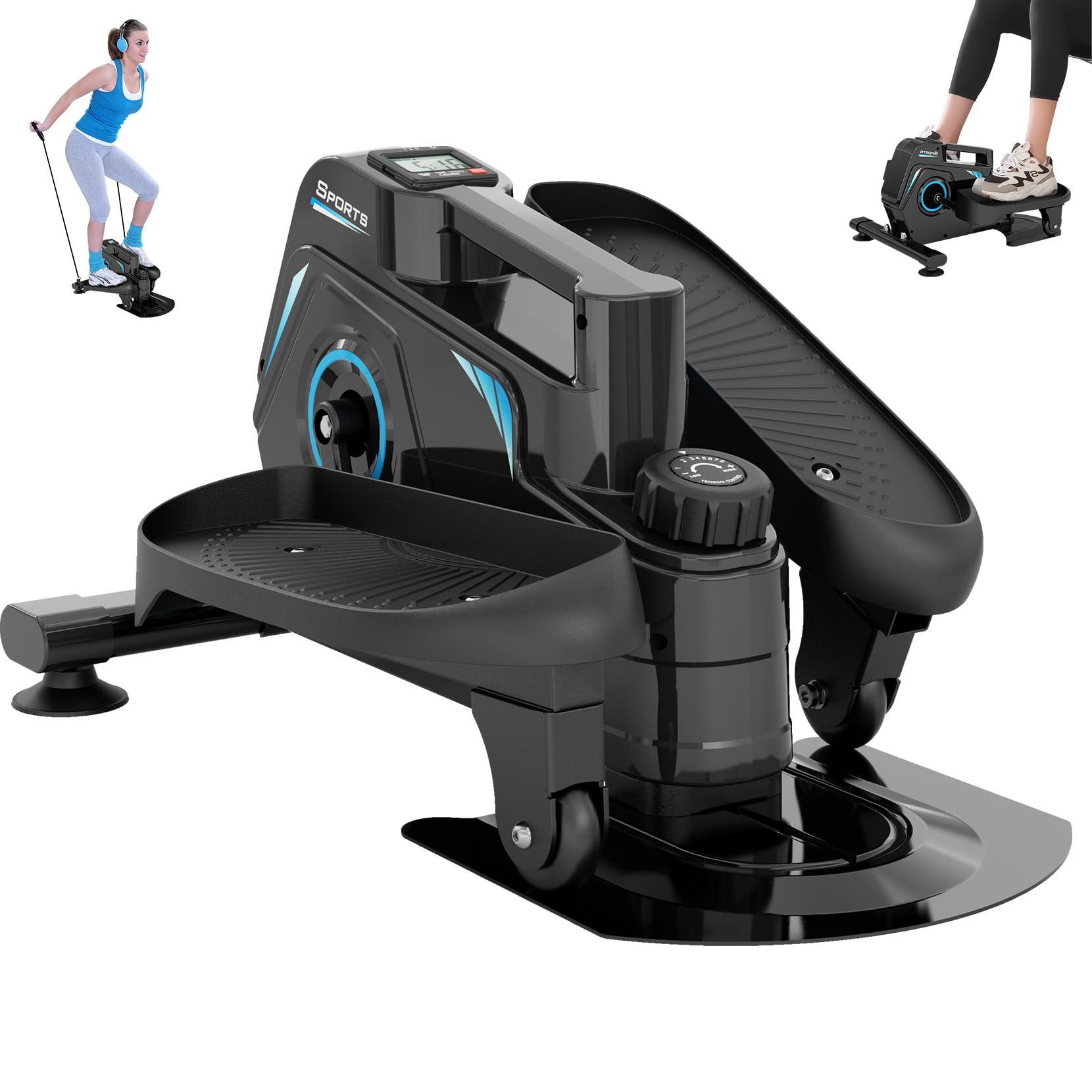
Image: The LCD digital monitor showing various workout data such as time, distance, calories, and speed, with a "STOP SCAN" indicator.
3. Versatile Workout Positions
This elliptical machine supports both sitting and standing exercise positions, allowing for a low-impact workout that targets different muscle groups.
- Sitting Use: Place the elliptical under your desk or in front of a chair. Ensure your chair is stable and you maintain good posture while pedaling. This is ideal for relieving knee pressure and improving circulation during prolonged sitting.
- Standing Use: Position the elliptical on a flat, stable surface. Stand on the pedals and maintain balance. This position engages more core and leg muscles.
- Arm Workout (with bands): If using the included elastic resistance bands, hold the handles and perform arm exercises while pedaling, engaging your upper body, back, shoulders, and chest.

Image: A person using the elliptical while seated at a desk, demonstrating its low-impact exercise benefits for both rest and work periods.

Image: A person demonstrating a full-body workout using the elliptical in a standing position with attached resistance bands for arm, waist, hip, and leg exercises.
4. Quiet Operation
The magnetic resistance system ensures an ultra-smooth and quiet workout experience, making it suitable for use in offices or shared living spaces without disturbing others.

Image: An illustration highlighting the hyper-quiet and ultra-smooth design of the elliptical, indicating noise levels below 20 dB, suitable for quiet environments.
Maintenance
Regular maintenance ensures the longevity and optimal performance of your elliptical machine.
- Cleaning: Wipe down the machine with a damp cloth after each use to remove sweat and dust. Avoid abrasive cleaners or solvents.
- Inspection: Periodically check all bolts, nuts, and moving parts for tightness and wear. Tighten any loose fasteners.
- Storage: Store the elliptical in a cool, dry place away from direct sunlight and extreme temperatures. Its compact size and handle make it easy to store.
- Battery Replacement: If the LCD monitor display becomes dim or unresponsive, replace the batteries (typically AA or AAA, refer to the monitor compartment for specifics).
Troubleshooting
Here are solutions to common issues you might encounter:
| Problem | Possible Cause | Solution |
|---|---|---|
| LCD Monitor not displaying | Dead batteries or loose connection. | Replace batteries. Check battery compartment for secure connection. |
| Unusual noise during operation | Loose parts or friction. | Inspect and tighten all bolts and nuts. Ensure the machine is on a level surface. |
| Resistance not changing | Resistance mechanism issue. | Ensure the resistance knob is turning freely. If the issue persists, contact customer support. |
| Machine slides during use | Not on a stable surface or anti-slip pads are dirty. | Place on a firm, level surface. Clean the anti-slip pads and the floor beneath. |
Specifications
| Feature | Detail |
|---|---|
| Model Name | Under Desk Elliptical Machine |
| Brand | Dripex |
| Resistance Mechanism | Magnetic |
| Resistance Levels | 8 Adjustable Levels |
| Maximum Weight Recommendation | 100 Kilograms (220 lbs) |
| Product Dimensions | 62D x 42W x 33H Centimeters (24.4D x 16.5W x 13H Inches) |
| Item Weight | 12 Kilograms (26.4 lbs) |
| Material | Aluminum |
| Display Type | LCD Digital Monitor |
| Screen Size | 2.5 Inches |
| Included Components | 1x Dripex Under Desk Elliptical, 1x Hardware Pack, 1x User Manual |
Warranty Information
Dripex provides friendly after-sales service for its products. Specific warranty terms and duration may vary. Please refer to the warranty card included in your hardware pack or contact customer support for detailed information regarding your product's warranty.
Customer Support
For any questions, concerns, or assistance with your Dripex Under Desk Elliptical Machine, please contact our customer support team.
You can reach us through Amazon messages for prompt assistance.
Please have your product model and ASIN (B09SLD94WZ) ready when contacting support to help us serve you better.


