
ASVEGEN Land Rover Range Rover Sport L320 (2005-2009) Compatible System
ASVEGEN 12.1 Inch Vertical Screen Car Radio GPS Navigation
Model: Land Rover Range Rover Sport L320 (2005-2009) Compatible System
1. Product Overview
This manual provides detailed instructions for the ASVEGEN 12.1 Inch Touch Vertical Screen Android 12.0 Car Radio GPS Navigation system. This advanced multimedia player is specifically designed to integrate seamlessly with Land Rover Range Rover Sport L320 models from 2005 to 2009, enhancing your vehicle's infotainment capabilities.

Figure 1.1: Front view of the ASVEGEN 12.1 inch vertical screen car radio unit, showcasing its large display and integrated controls.
Key Features:
- Operating System: Android 12.0
- Processor: OCTA-Core CPU with 4GB RAM + 64GB ROM
- Display: 12.1 Inch IPS Capacitive Touch Screen (1024*768 resolution)
- Connectivity: Built-in Wi-Fi, Bluetooth 5.0
- Smartphone Integration: Apple CarPlay & Android Auto (wired/wireless), Mirror Link
- Navigation: Integrated GPS module for online and offline maps
- Audio: Built-in DSP, EQ balanced audio processing
- Vehicle Compatibility: Supports original steering wheel control, parking sensors, and camera (if equipped)
2. Setup and Installation
Proper installation is crucial for optimal performance. It is highly recommended to have this unit installed by a qualified professional to ensure correct wiring and integration with your vehicle's existing systems.
2.1 Compatibility Check
This unit is designed for Land Rover Range Rover Sport L320 models from 2005 to 2009. Before installation, verify that your vehicle's OEM screen matches the configuration shown in Figure 2.1. This unit supports the original steering wheel controls and OEM factory amplifier sound system.
Note: This unit does not support factory headrest monitors. For aftermarket headrest monitors, an extra RCA cable may be required.

Figure 2.1: Comparison showing the vehicle's dashboard before and after the installation of the ASVEGEN vertical screen unit.
2.2 Package Contents
Verify that all components are present in the package before beginning installation:
- 1x Car Stereo Unit
- 1x Power Cable
- 1x Radio Antenna
- 1x Wi-Fi Antenna
- 1x USB Cable
- 1x RCA Cable
- 1x Video Cable
- 1x DVR Cable
- 1x AUX Input Cable
- 1x Camera Adapter

Figure 2.2: Rear view of the ASVEGEN unit, illustrating the various ports and cables for connection to the vehicle's electrical system and peripherals.
2.3 Basic Connection Overview
While professional installation is recommended, a general understanding of the connections is helpful:
- Power Cable: Connects the unit to the vehicle's power supply.
- Radio Antenna: Connects to the vehicle's radio antenna for FM/AM reception.
- Wi-Fi Antenna: Ensures stable Wi-Fi connectivity.
- USB Cables: For connecting external USB devices, such as flash drives or a 4G dongle.
- RCA/Video Cables: Used for audio/video output to external displays or input from cameras.
- Camera Adapter: For connecting a reverse camera.
3. Operating Instructions
This section details the operation of your ASVEGEN car radio system, covering its various functions and features.
3.1 Basic System Operation
- Power On/Off: The unit typically powers on with the vehicle's ignition. A long press on the power button (if available) can manually turn it off or on.
- Touch Screen Interface: Navigate the Android 12.0 system using the responsive 12.1-inch IPS touch screen. Swipe, tap, and pinch-to-zoom gestures are supported.
- Split Screen Function: The system supports displaying two applications simultaneously on the screen, such as navigation and music playback.
- Intelligent Voice Control: Access apps and functions using voice commands.

Figure 3.1: Examples of the user interface, demonstrating the system's performance across different applications like radio, video player, and settings.
3.2 GPS Navigation
The built-in GPS module allows for precise navigation. The system supports both online and offline map applications. You can download maps for offline use or utilize online services like Google Maps, Waze, or iGo Maps when connected to Wi-Fi.
- Voice Guide: Receive turn-by-turn voice directions.
- 2D/3D Map Views: Switch between different map perspectives for better clarity.

Figure 3.2: The GPS navigation screen displaying various map applications and real-time road conditions.
3.3 Connectivity Features
- Wi-Fi Connection: Connect to a Wi-Fi hotspot (e.g., from your smartphone) to access the internet, download apps from the Google Play Store, and stream content.
- Bluetooth 5.0: Pair your smartphone via Bluetooth for hands-free calling, automatic phonebook loading, and Bluetooth music playback.

Figure 3.3: The Bluetooth interface, showing options for phone calls and music streaming.
- Apple CarPlay & Android Auto: Seamlessly integrate your smartphone. This unit supports both wired and wireless connections for CarPlay and Android Auto, allowing access to navigation, music, messages, and more directly from the car's display.
- Mirror Link: Project your phone's screen onto the car radio display for a larger view of your mobile content.
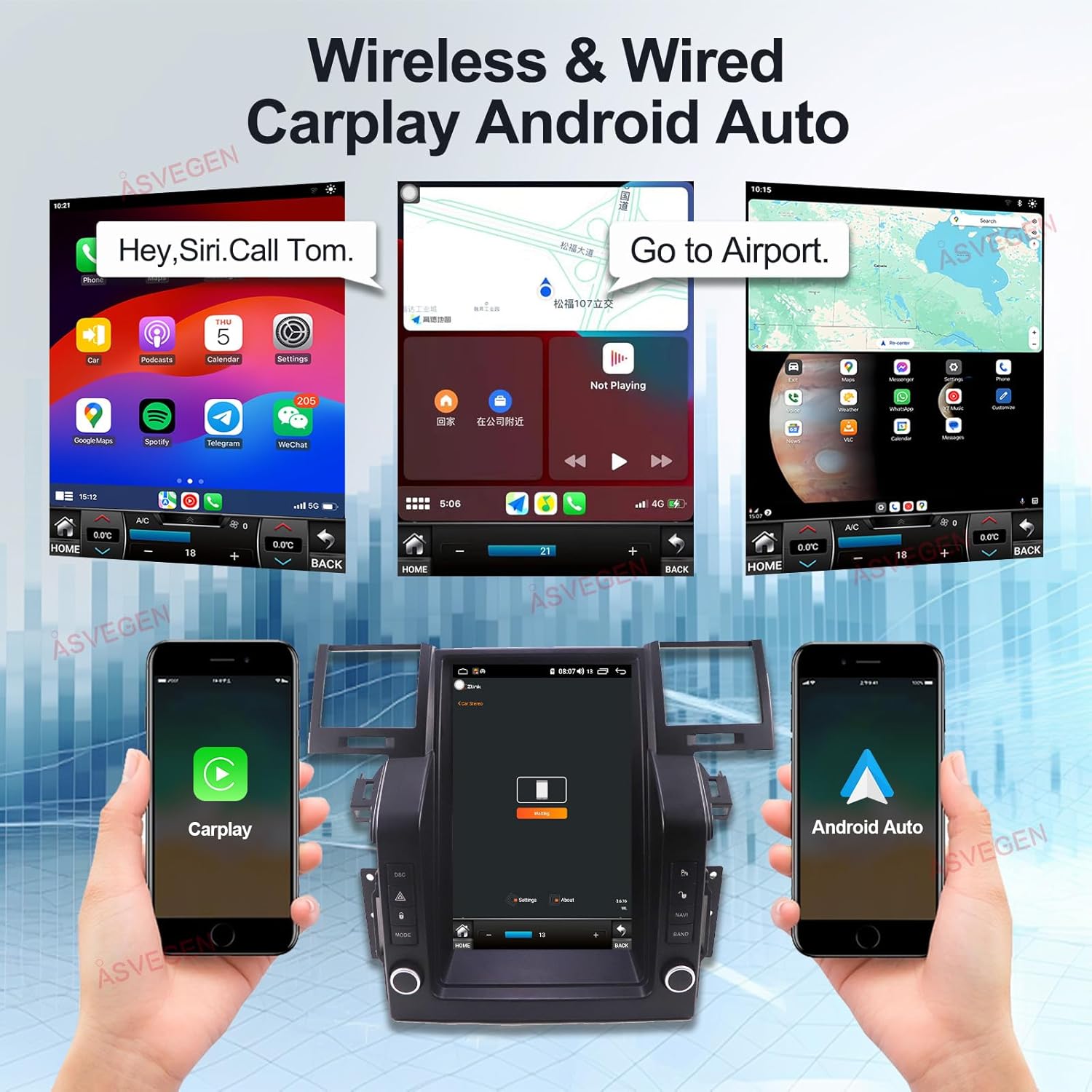
Figure 3.4: Demonstrates the Apple CarPlay and Android Auto interfaces, highlighting seamless smartphone integration.
3.4 FM/AM/RDS Radio
The built-in FM/AM tuner supports worldwide analog radio frequencies. You can store up to 30 stations for quick access. RDS (Radio Data System) provides additional information like station name and song title where available.
3.5 Audio Features
The unit features a built-in DSP (Digital Signal Processor) and EQ balanced audio processing technology, allowing for excellent sound quality and customization of audio settings to suit your preferences.
3.6 Vehicle Integration
- Steering Wheel Controls: Retains all original steering wheel control functions, allowing you to manage audio, calls, and navigation without taking your hands off the wheel.

Figure 3.5: Illustration of how the unit integrates with the vehicle's steering wheel controls for convenient operation.
- Parking Sensor & Camera Support: If your vehicle is equipped with original parking sensors and/or a camera, the unit is designed to support and display their output.
- Driving Recorder/OBD2 Support: The unit supports external driving recorders (DVR) and OBD2 devices (if your car has them), providing additional functionality and diagnostics.
3.7 Important Operating Notes
- CD/DVD Playback: This unit does not have a built-in CD/DVD player. If you wish to play CDs or DVDs, an external USB DVD drive is required (sold separately).
- SIM Card Slot: There is no built-in SIM card slot. For 4G connectivity, you can connect an external 4G dongle (sold separately).
4. Maintenance
Regular maintenance helps ensure the longevity and optimal performance of your ASVEGEN car radio system.
4.1 Screen Cleaning
To clean the touch screen, use a soft, lint-free cloth. For stubborn smudges, slightly dampen the cloth with water or a screen-safe cleaning solution. Avoid using harsh chemicals, abrasive materials, or excessive liquid, as these can damage the screen.
4.2 Software Updates
Periodically check the manufacturer's website or contact support for available software updates. Updates can improve performance, add new features, and resolve bugs. Follow the provided instructions carefully when performing any software update.
4.3 General Care
- Avoid exposing the unit to extreme temperatures or direct sunlight for prolonged periods.
- Do not attempt to disassemble the unit. Refer all servicing to qualified personnel.
- Ensure all cables are securely connected to prevent intermittent issues.
5. Troubleshooting
This section addresses common issues you might encounter with your ASVEGEN car radio system. If the problem persists after trying these solutions, please contact customer support.
5.1 No Power / Unit Does Not Turn On
- Check Power Connection: Ensure the power cable is securely connected to both the unit and the vehicle's power source.
- Check Vehicle Ignition: Verify that the vehicle's ignition is on, as the unit typically powers on with the ignition.
- Check Fuses: Inspect the vehicle's fuse box for any blown fuses related to the radio or accessory power.
5.2 No Sound Output
- Check Volume Level: Ensure the volume is not muted or set to a very low level.
- Check Audio Source: Verify that the correct audio source (e.g., Radio, Bluetooth, CarPlay) is selected.
- Check Speaker Connections: If professionally installed, ensure all speaker wires are correctly connected.
- Amplifier Check: If your vehicle has an OEM amplifier, ensure it is functioning correctly and compatible with the unit.
5.3 GPS Not Working / Inaccurate Positioning
- Check GPS Antenna: Ensure the GPS antenna is properly connected and placed in a location with a clear view of the sky (e.g., dashboard).
- Software/Map Update: Ensure your navigation software and maps are up to date.
- Internet Connection: For online maps, verify a stable Wi-Fi connection.
5.4 Bluetooth Connection Issues
- Ensure Bluetooth is On: Verify Bluetooth is enabled on both the car unit and your mobile device.
- Forget Device and Re-pair: On your phone, remove the car unit from your paired devices list, then attempt to re-pair.
- Restart Devices: Restart both the car unit and your mobile device.
5.5 Touch Screen Unresponsive
- Restart Unit: Try restarting the unit (turn vehicle ignition off and on, or use the reset button if available).
- Clean Screen: Ensure the screen is clean and free of debris or moisture.
6. Specifications
Detailed technical specifications for the ASVEGEN 12.1 Inch Touch Vertical Screen Android 12.0 Car Radio GPS Navigation system.
| Feature | Specification |
|---|---|
| Operating System | Android 12.0 |
| CPU | OCTA-Core Rockchip |
| RAM | 4GB |
| ROM | 64GB |
| Screen Size | 12.1 Inch |
| Screen Type | IPS Capacitive Touch Screen |
| Screen Resolution | 1024*768 |
| Bluetooth Version | 5.0 |
| Wi-Fi | Built-in Wi-Fi Module |
| GPS | Built-in GPS Module (supports online/offline maps) |
| Radio Tuner | FM/AM/RDS Receiver |
| Audio Output Mode | AUX, Stereo |
| Special Features | Apple CarPlay, Android Auto, Mirror Link, DSP, Split Screen, Voice Control |
| Mounting Type | Dashboard Mount |
| Item Weight | 8.48 pounds |
| Package Dimensions | 20.4 x 17.4 x 9.7 inches |
7. Warranty and Support
For warranty information, please refer to the specific warranty terms provided by ASVEGEN or your retailer at the time of purchase. Typically, electronic products come with a limited manufacturer's warranty covering defects in materials and workmanship.
7.1 Technical Support
If you encounter issues that cannot be resolved using the troubleshooting guide, or if you require further assistance with installation or operation, please contact ASVEGEN customer support or your authorized retailer. Have your product model number and purchase details ready when contacting support.
For the most up-to-date support contact information, please visit the official ASVEGEN website or refer to the documentation included with your product.
Related Documents - Land Rover Range Rover Sport L320 (2005-2009) Compatible System
 |
Vehicle Rear Seat Entertainment Display User Manual - asvegen User manual for the asvegen Universal Version Vehicle Rear Seat Entertainment Display, covering safety instructions, device overview, and basic operations for headrest-mounted, overhead, and integrated display systems. Includes V1.0 details. |
 |
Axxess AX-LR90092 Installation Instructions for Land Rover Range Rover Sport and Discovery Comprehensive installation and programming guide for the Axxess AX-LR90092 data interface with SWC, designed for select 2004-2009 Land Rover Range Rover Sport and Discovery models. Features wiring diagrams, connection instructions, and LED feedback troubleshooting. |
 |
2010+ Range Rover Sport & Land Rover LR4 Remote Starter Installation Instructions Comprehensive installation guide for 2010 and later Range Rover Sport and Land Rover LR4 remote starter systems, detailing component connection, wiring, and testing procedures. |
 |
Easy Lift Suspension Module User Manual for Land Rover Comprehensive user manual for the Easy Lift suspension module by Land Rover Passion, covering installation, operation, calibration, and troubleshooting for various Land Rover models. |
 |
Car Solutions High-Definition Link for InControl Touch Pro Instruction Manual This instruction manual provides detailed information on installing and using the Car Solutions High-Definition Link for InControl Touch Pro, enabling advanced connectivity for compatible Land Rover and Jaguar vehicles. |
 |
CANHBLR1 Hi-Beam CAN-Bus Interface Installation Guide | CAN Connect Detailed installation guide and product information for the CANHBLR1 Hi-Beam CAN-Bus Interface by CAN Connect, designed for Land Rover vehicles. |