
Introduction
This user manual provides comprehensive instructions for the safe and efficient operation, installation, and maintenance of your Mayer MMWG25B Built-in Microwave Oven with Grill. Please read this manual thoroughly before using the appliance and retain it for future reference.
Important Safety Instructions
When using electrical appliances, basic safety precautions should be followed, including the following:
- Read all instructions before using the appliance.
- Do not operate the oven if the cord or plug is damaged, if it is not working properly, or if it has been damaged or dropped.
- Do not heat liquids or other foods in sealed containers since they are liable to explode.
- Only allow children to use the oven without supervision when adequate instructions have been given so that the child is able to use the oven in a safe way and understands the hazards of improper use.
- Do not use corrosive chemicals or vapors in this appliance.
- Do not use this appliance for commercial purposes. This microwave oven is intended for household use only.
- Always ensure the turntable and turntable support are correctly positioned before operation.
- Do not attempt to operate this oven with the door open as this can result in harmful exposure to microwave energy.
Product Features
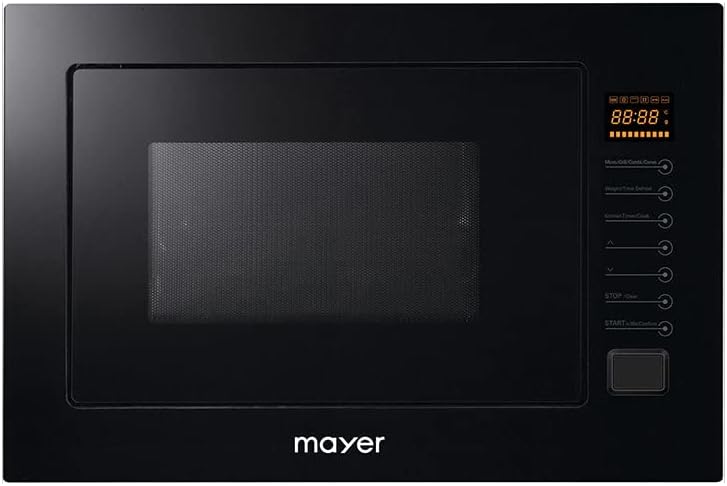
This image shows the front panel of the Mayer MMWG25B microwave oven, featuring a black finish, a large glass door, and a digital touch control panel on the right side. The display shows '88:88'.
The Mayer MMWG25B is a versatile built-in microwave oven designed for modern kitchens. Key features include:
- Built-in Design: Seamlessly integrates into your kitchen cabinetry.
- Stainless Steel Decoration: Features top and bottom stainless steel accents for a sleek look.
- Touch Digital Control Panel: Intuitive and easy-to-use controls for precise settings.
- 25 Liters Capacity: Generous interior space for various cooking needs.
- Microwave and Grill Functionality: Offers both microwave heating (1450W) and grill cooking (1000W).
- 8 Auto Menus: Pre-programmed settings for common dishes, simplifying cooking.
- Defrost by Weight or Time: Flexible defrosting options for different food types.
- Child Safety Lock: Prevents accidental operation by children.
- Cooking End Signal: Alerts you when your food is ready.
- Turntable Diameter: 315mm Ø turntable ensures even cooking.
Installation
This appliance is designed for built-in installation. Proper installation is crucial for safety and optimal performance. It is recommended that installation be performed by a qualified technician.
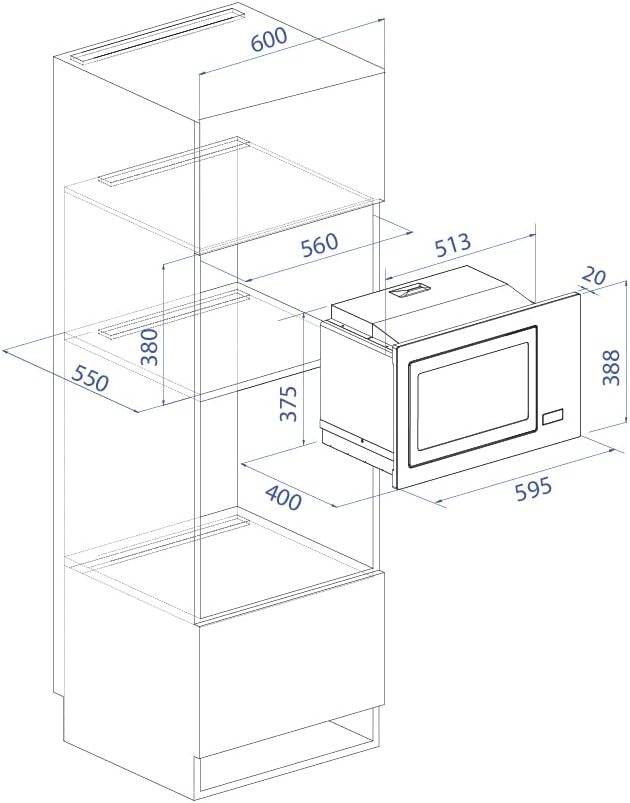
This diagram illustrates the precise dimensions for installing the Mayer MMWG25B built-in microwave oven. Key measurements include a width of 595mm, height of 388mm, and depth of 513mm, with specific cabinet cutout requirements for proper fit.
Installation Requirements:
- Ensure the cabinet opening dimensions match the appliance specifications (refer to the dimensional diagram).
- Provide adequate ventilation space around the appliance as specified in the installation diagram.
- The electrical outlet must be easily accessible after installation.
- The appliance requires a power supply of 220-240V~, 50Hz.
- The rated input power for microwave operation is 1450W, and for grill operation is 1000W.
Installation Steps (Summary):
- Prepare the cabinet opening according to the provided dimensions.
- Carefully slide the microwave oven into the prepared opening.
- Secure the oven to the cabinet using the provided screws and mounting hardware.
- Plug the appliance into a grounded electrical outlet.
- Perform a test run to ensure proper operation.
Operating Instructions
Familiarize yourself with the touch digital control panel for optimal use of your microwave oven.
Basic Microwave Cooking:
- Place food in a microwave-safe container on the turntable.
- Close the oven door securely.
- Select the desired power level using the control panel.
- Set the cooking time.
- Press the "Start" button to begin cooking. The oven will signal when cooking is complete.
Using Auto Menus:
The oven features 8 pre-programmed auto menus for convenience. Refer to the appliance's internal menu guide or the full manual for specific auto menu functions.
- Press the "Auto Menu" button.
- Rotate the dial or press the corresponding button to select the desired auto menu (e.g., Popcorn, Potato, Pizza).
- Confirm the selection and press "Start".
Defrosting:
You can defrost food by weight or by time.
- Defrost by Weight: Select the defrost by weight function, input the food's weight, and the oven will calculate the defrosting time.
- Defrost by Time: Select the defrost by time function and manually set the desired defrosting duration.
Child Safety Lock:
To activate the child lock, press and hold the designated button (often "Stop/Clear" or a specific lock icon) for a few seconds until the lock indicator appears on the display. Repeat the process to deactivate.
Maintenance and Cleaning
Regular cleaning and maintenance will ensure the longevity and efficient operation of your microwave oven.
- Always unplug the oven before cleaning.
- Clean the interior and exterior surfaces with a soft, damp cloth and mild detergent. Avoid abrasive cleaners.
- Remove the turntable and turntable support for separate cleaning in warm, soapy water.
- Wipe the oven door, door seals, and control panel regularly to remove spills and grime.
- For stubborn food residue inside, place a bowl of water with lemon slices in the oven and heat for a few minutes to create steam, then wipe clean.
Troubleshooting
If you encounter issues with your microwave oven, refer to the following common problems and solutions:
| Problem | Possible Cause | Solution |
|---|---|---|
| Oven does not start. | Power cord not plugged in; Door not closed properly; Fuse blown or circuit breaker tripped. | Ensure plug is securely in outlet; Close door firmly; Check household fuse/circuit breaker. |
| Food not heating. | Incorrect cooking time/power level set; Door not closed properly. | Adjust time/power; Ensure door is fully latched. |
| Turntable not rotating. | Turntable not correctly placed; Food too large/heavy; Turntable motor fault. | Reposition turntable; Reduce food size/weight; Contact service if issue persists. |
| Oven light not working. | Bulb needs replacement. | Contact qualified service personnel for bulb replacement. |
If the problem persists after attempting these solutions, please contact customer support.
Specifications
| Attribute | Detail |
|---|---|
| Brand | Mayer |
| Model | MMWG25B |
| Capacity | 25 Liters |
| Installation Type | Built-In |
| Rated Input Power (Microwave) | 1450W |
| Rated Input Power (Grill) | 1000W |
| Frequency | 50 Hz |
| Material | Stainless Steel |
| Turntable Diameter | 315mm Ø |
| Control Type | Touch Control |
| Special Features | Defrost, Turntable, Child Safety Lock, 8 Auto Menus |
Warranty and Support
For warranty information, service, or technical support, please contact Mayer customer service. Keep your purchase receipt as proof of purchase for any warranty claims.
Contact information can typically be found on the manufacturer's official website or on your product packaging.


