
1. Introduction
Thank you for choosing the Safecourt Kitchen 6-Piece 1000W Immersion Blender Set. This versatile 5-in-1 appliance is designed to simplify your food preparation tasks, offering blending, chopping, whisking, pureeing, and frothing capabilities. With its powerful 1000W motor and 20 adjustable speeds, you can achieve perfect results for a wide range of recipes. Please read this manual carefully before first use to ensure safe and optimal operation.
2. Important Safety Instructions
- Read all instructions before using the appliance.
- Always unplug the appliance from the power outlet before cleaning, assembling, or disassembling parts.
- Do not immerse the motor unit in water or any other liquid. Wipe with a damp cloth only.
- Keep hands, hair, clothing, and utensils away from moving blades and attachments during operation to prevent injury.
- Blades are sharp. Handle with extreme care when cleaning or assembling.
- This appliance is not intended for use by children or persons with reduced physical, sensory, or mental capabilities unless supervised.
- Do not operate any appliance with a damaged cord or plug, or after the appliance malfunctions or has been dropped or damaged in any manner.
- Ensure the voltage indicated on the appliance corresponds to your local mains voltage before connecting.
- Avoid contact with hot parts.
- Do not use outdoors.
3. Product Overview
Components
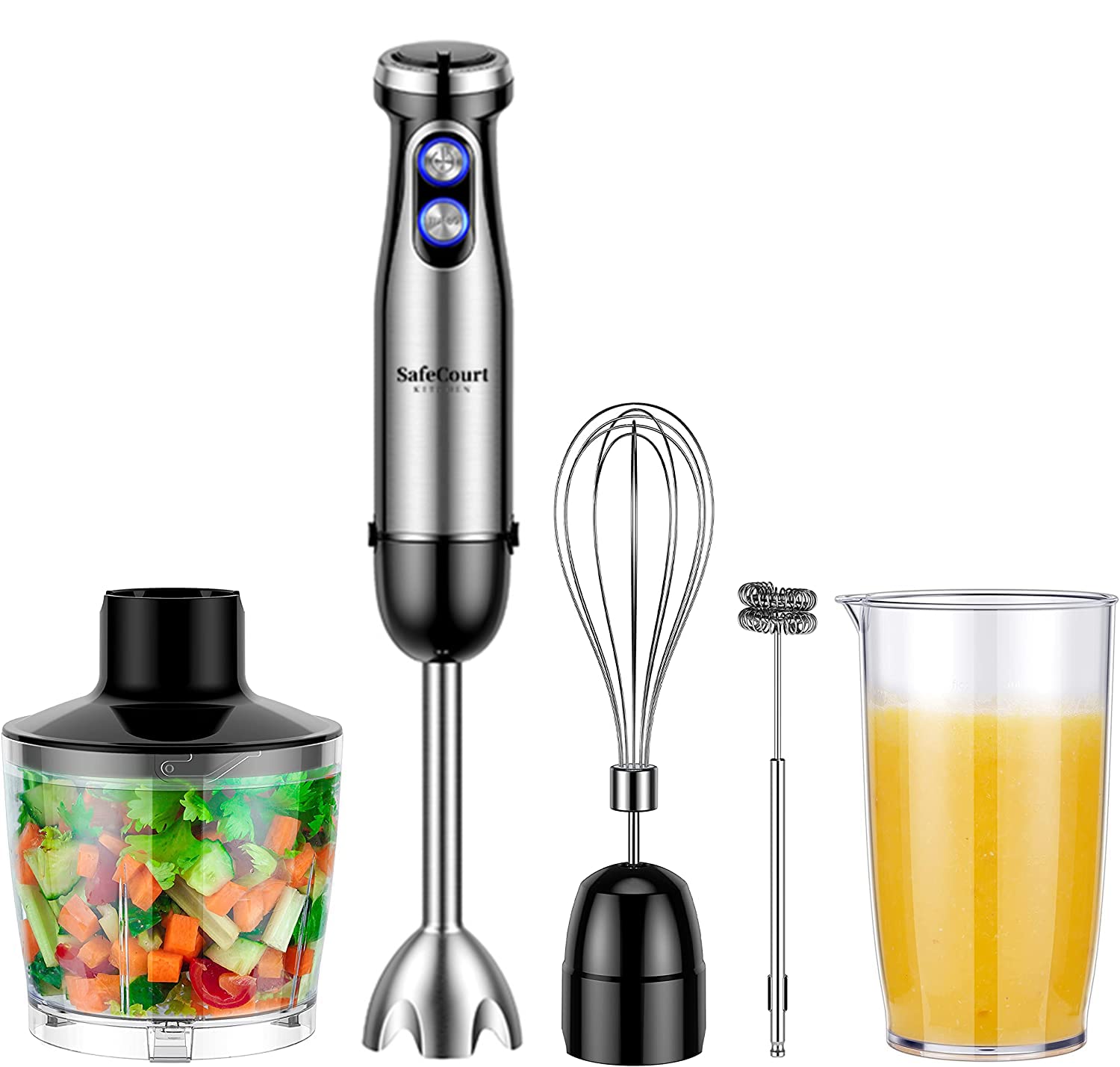
- Motor Unit (with speed dial, power button, and turbo button)
- Immersion Blender Shaft (stainless steel with 4 blades)
- Chopper Bowl (600ml) with Chopper Blade and Lid
- Whisk Attachment
- Milk Frother Attachment
- Blending Beaker (500ml)
Controls and Features
The motor unit features an intuitive control panel for precise operation:
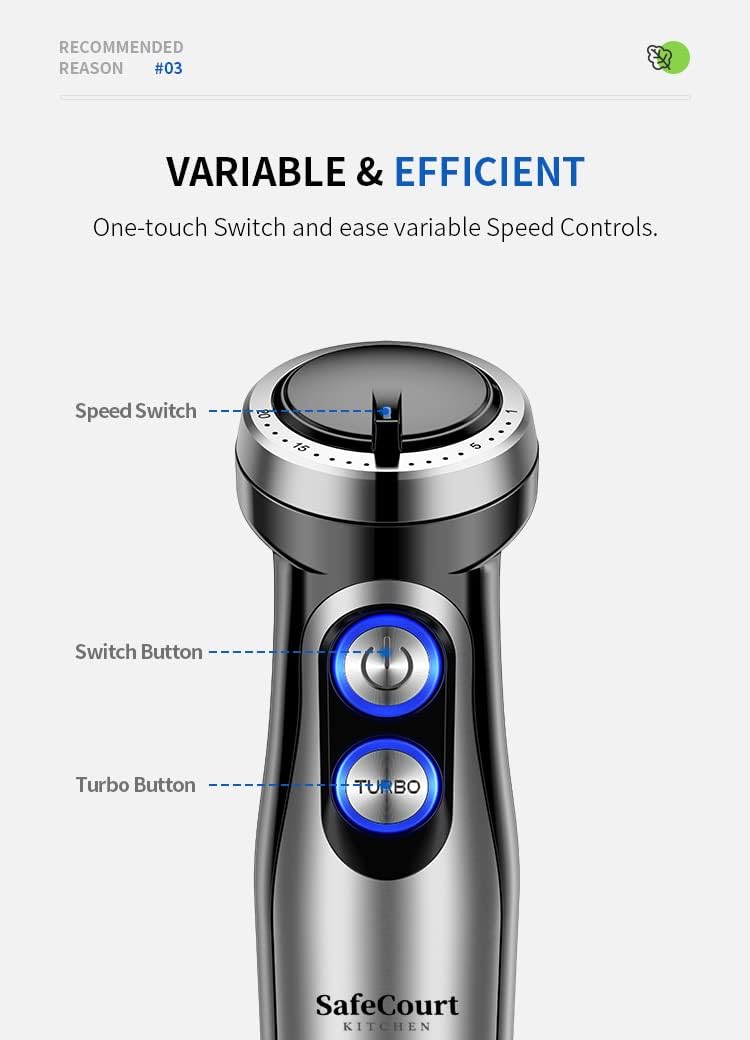
- Speed Dial: Located at the top of the motor unit, this dial allows you to select from 20 variable speeds for precise control over your blending tasks.
- Power Button: Press and hold to activate the blender at the selected speed.
- Turbo Button: Provides maximum power instantly for tougher ingredients or quick bursts of blending.

4. Setup and Assembly
Before first use, wash all detachable parts (blending shaft, chopper bowl, blades, whisk, frother, beaker) in warm soapy water, rinse thoroughly, and dry. The motor unit should only be wiped with a damp cloth.
Assembling the Immersion Blender
- Align the immersion blender shaft with the motor unit.
- Twist the shaft clockwise until it locks securely into place.
Assembling the Chopper
- Place the chopper blade onto the central pin inside the chopper bowl.
- Add ingredients to the chopper bowl.
- Place the chopper lid onto the bowl, ensuring it is properly seated.
- Attach the motor unit to the chopper lid, twisting clockwise until it locks.
Assembling the Whisk/Milk Frother
- Insert the whisk or milk frother into the whisk gear box.
- Attach the whisk gear box to the motor unit, twisting clockwise until it locks.
5. Operating Instructions
Always ensure the appliance is correctly assembled and plugged into a suitable power outlet before operation.
Immersion Blending
- Attach the immersion blender shaft to the motor unit.
- Place ingredients into the 500ml blending beaker or another suitable container. Do not overfill.
- Immerse the blender shaft into the ingredients before starting the appliance.
- Select your desired speed using the speed dial.
- Press and hold the power button to begin blending. For tougher ingredients, use the Turbo button for short bursts.
- Move the blender gently up and down to ensure even blending.
- Release the power button to stop. Unplug the appliance before removing the blender shaft.
Chopping

- Assemble the chopper as described in Section 4.
- Ensure the motor unit is securely attached to the chopper lid.
- Plug in the appliance.
- Use the power button for continuous chopping or the Turbo button for pulse action, which is ideal for coarse chopping.
- Process ingredients until desired consistency is reached.
- Unplug the appliance before disassembling and removing chopped food.
Whisking

- Assemble the whisk attachment to the motor unit.
- Place ingredients (e.g., eggs, cream) into a suitable mixing bowl.
- Immerse the whisk into the ingredients.
- Plug in the appliance and select a suitable speed.
- Press and hold the power button to whisk until light and fluffy.
- Release the power button to stop. Unplug before removing the whisk.
Milk Frothing

- Assemble the milk frother attachment to the motor unit.
- Pour milk into a cup or small container.
- Immerse the frother head just below the surface of the milk.
- Plug in the appliance and press the power button.
- Move the frother gently up and down to create foam.
- Release the power button to stop. Unplug before removing the frother.
6. Cleaning and Maintenance
Proper cleaning and maintenance will extend the life of your appliance.
- Always unplug the appliance from the power outlet before cleaning.
- Motor Unit: Wipe the motor unit with a damp cloth. Do not immerse it in water or any other liquid.
- Detachable Parts: The immersion blender shaft, chopper bowl, chopper blade, whisk, milk frother, and blending beaker are dishwasher safe. Alternatively, they can be washed by hand in warm soapy water, rinsed, and dried thoroughly.

- Caution: The blades are very sharp. Handle the chopper blade and immersion blender shaft with extreme care during cleaning.
- Storage: Store the appliance and its attachments in a dry, safe place, out of reach of children.
7. Troubleshooting
If you encounter any issues with your appliance, please refer to the following common problems and solutions:
- Appliance does not turn on:
- Ensure the power cord is securely plugged into a working outlet.
- Check that the motor unit is correctly assembled and locked onto the chosen attachment.
- Poor blending/chopping performance:
- Ensure ingredients are cut into appropriate sizes before processing.
- Do not overfill the chopper bowl or blending beaker.
- Increase the speed setting or use the Turbo function for tougher ingredients.
- Ensure blades are clean and free from obstructions.
- Excessive splashing during blending:
- Ensure the immersion blender shaft is fully submerged in the ingredients before starting.
- Use the blending beaker or a deep container.
- Start at a lower speed and gradually increase.
8. Specifications
| Model Number | HB200 |
| Brand | Safecourt Kitchen |
| Power | 1000 Watts |
| Voltage | 230V |
| Number of Speeds | 20 (Variable) |
| Chopper Capacity | 600 Millilitres |
| Blending Beaker Capacity | 500 Millilitres |
| Material | Stainless Steel (Blades, Immersion Shaft) |
| Dimensions (L x W x H) | 6.5 x 6 x 40 cm |
| Weight | 1.4 Kilograms |
| Dishwasher Safe Parts | Yes (Detachable attachments) |
9. Warranty and Support
For warranty information and customer support, please refer to the documentation provided with your purchase or contact your retailer. Keep your proof of purchase for any warranty claims.