
Owigift Kipor GK400, KGE5500E, KGE6500X, KGE6500X3, KGE6500E, KGE6500E3, Kenowa Truelife 8500, Tigmax 389CC 13HP Generators
Owigift Carburetor Replacement Manual
Brand: Owigift
Compatible Models: Kipor GK400, KGE6500X, KGE6500X3, KGE6500E, KGE6500E3, KGE5500E, Kenowa Truelife 8500, Tigmax 389CC 13HP Generators (5500-6500 Watt)
1. Introduction
This manual provides essential information for the installation, operation, and maintenance of your Owigift replacement carburetor. This carburetor is designed to replace the original part in various generator models, ensuring proper fuel delivery and engine performance. Please read this manual thoroughly before proceeding with installation or any maintenance.
2. Product Contents
The package includes the following components:
- 1x Carburetor with Auto Choke and Solenoid
- Associated Gaskets (as pictured)

Figure 2.1: Complete Owigift Carburetor package including the main carburetor unit, auto choke, solenoid, and three different gaskets for installation.
3. Compatibility Verification
This carburetor is a replacement part compatible with the following generator models:
- Kipor GK400
- Kipor KGE5500E
- Kipor KGE6500X
- Kipor KGE6500X3
- Kipor KGE6500E
- Kipor KGE6500E3
- Kenowa Truelife 8500
- Tigmax 389CC 13HP Generators
- Generators in the 5500-6500 Watt range
Important Note on Versions:
There are two very similar versions of this carburetor. It is critical to carefully compare the provided images with your existing carburetor to ensure compatibility and avoid confusion. Discrepancies, even minor ones, can affect fitment and function.
If you are uncertain about compatibility, please contact Owigift customer support for assistance before attempting installation.
4. Setup and Installation
Installation of a carburetor requires mechanical aptitude and familiarity with generator components. If you are not confident in your abilities, it is highly recommended to seek assistance from a qualified technician.
4.1 Safety Precautions
- Ensure the generator is turned off and cooled down.
- Disconnect the spark plug wire to prevent accidental starting.
- Work in a well-ventilated area.
- Have a fire extinguisher readily available.
- Wear appropriate personal protective equipment (e.g., gloves, eye protection).
- Drain fuel from the fuel tank and carburetor bowl before beginning work.
4.2 Installation Steps (General Guide)
- Preparation: Locate the existing carburetor on your generator. Take photos of the current setup, including hose and wire connections, for reference during reassembly.
- Disconnect Components: Carefully disconnect the fuel line, throttle linkage, choke linkage, and any electrical connections (like the auto choke solenoid wire) from the old carburetor.
- Remove Old Carburetor: Unbolt the old carburetor from the engine manifold and air filter housing. Be mindful of any gaskets that may be stuck.
- Clean Mounting Surfaces: Thoroughly clean the mounting surfaces on the engine manifold and air filter housing to ensure a good seal with the new gaskets.
- Install New Gaskets: Place the new gaskets provided with your Owigift carburetor onto the mounting surfaces. Ensure they are correctly oriented.
- Mount New Carburetor: Carefully position the new Owigift carburetor onto the engine manifold, aligning it with the bolt holes. Secure it with the original bolts, tightening them evenly.
- Reconnect Components: Reconnect the fuel line, throttle linkage, choke linkage, and electrical connections (auto choke solenoid). Refer to your reference photos if needed.
- Verify Auto Choke Connection: Ensure the auto choke solenoid is properly connected. This component is crucial for cold starting.
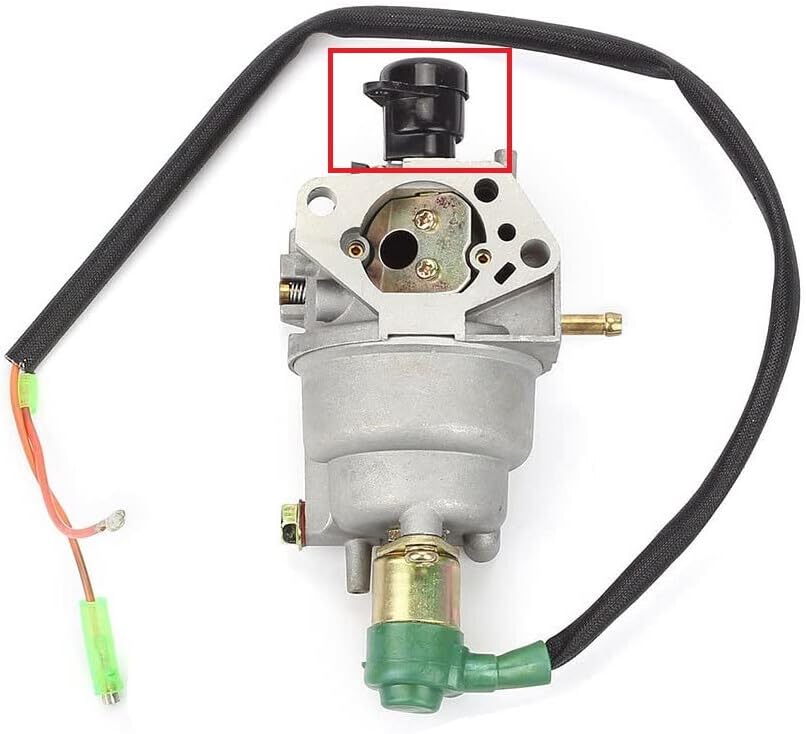
Figure 4.1: Top view highlighting the auto choke component. Ensure this is correctly oriented and connected.

Figure 4.2: Side view showing the auto choke. Proper connection of this part is vital for automatic choke function.

Figure 4.3: Detail of the auto choke solenoid connection. Ensure electrical wires are securely attached.
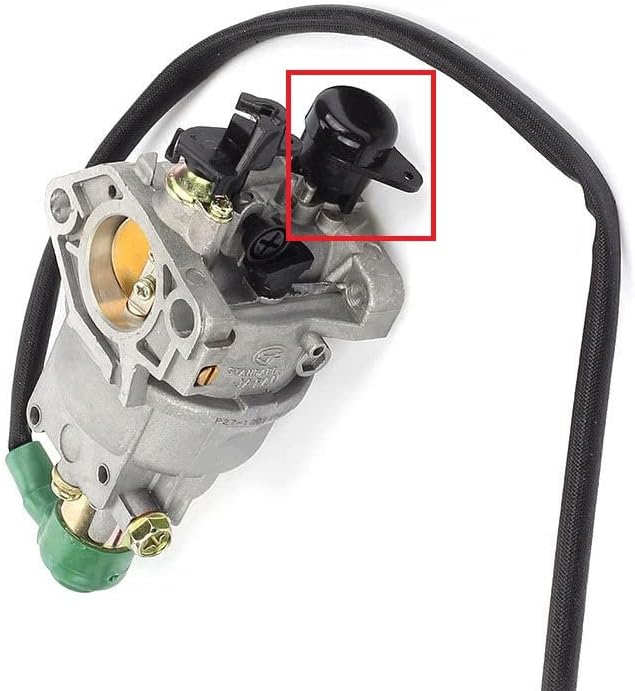
Figure 4.4: Additional view of the auto choke. Confirm its position matches your original unit.
4.3 Post-Installation Check
- Double-check all connections: fuel lines, linkages, and electrical wires.
- Ensure no tools or debris are left near moving parts.
- Slowly add fuel back to the tank and check for any leaks around the carburetor.
- Reconnect the spark plug wire.
5. Operating Principles
The carburetor is a vital component of your generator's engine, responsible for mixing air and fuel in the correct proportions for combustion. The auto choke mechanism automatically adjusts the air-fuel mixture during cold starts, enriching it to help the engine start more easily. Once the engine warms up, the auto choke disengages, allowing for a leaner, more efficient mixture.
After installation, the generator should start and run smoothly. If you experience issues, refer to the Troubleshooting section.
6. Maintenance
Proper maintenance extends the life of your carburetor and ensures optimal generator performance.
- Fuel Quality: Always use fresh, clean fuel. Stale or contaminated fuel is the leading cause of carburetor issues. Consider using a fuel stabilizer if the generator will be stored for extended periods.
- Fuel Filter: Regularly inspect and replace the fuel filter as per your generator's maintenance schedule. A clogged fuel filter can restrict fuel flow to the carburetor.
- Air Filter: Ensure the air filter is clean and free of debris. A dirty air filter can cause the engine to run rich and affect carburetor performance.
- Carburetor Cleaning: If the generator experiences rough running or starting issues due to fuel contamination, the carburetor may need cleaning. This typically involves disassembling the carburetor, cleaning jets and passages with carburetor cleaner, and reassembling with new gaskets if necessary. This task is best performed by experienced individuals.
7. Troubleshooting
If your generator experiences issues after carburetor replacement, consider the following common problems and solutions:
| Problem | Possible Cause | Solution |
|---|---|---|
| Engine cranks but won't start |
|
|
| Engine starts but runs rough/stalls |
|
|
| Fuel leaks from carburetor |
|
|
For persistent issues, it is advisable to consult a professional generator repair service.
8. Specifications
| Attribute | Detail |
|---|---|
| Brand | Owigift |
| Manufacturer | Owigift |
| Part Type | Carburetor (with Auto Choke) |
| Compatible Engine Size | 389CC 13HP (for specific models) |
| Compatible Generator Wattage | 5500-6500 Watt (for specific models) |
| UPC | 718997240612 |
| ASIN | B09SFXVBVC |
| Date First Available | February 14, 2022 |
9. Warranty and Support
Owigift is committed to customer satisfaction. If you have any questions regarding the compatibility, installation, or performance of your carburetor, please do not hesitate to contact our customer support team.
We aim to resolve any issues or inquiries within 24 hours. Please have your product details (ASIN: B09SFXVBVC) ready when contacting support to facilitate a quicker resolution.
Ask a question about this manual
Ask about setup, troubleshooting, compatibility, parts, safety, or missing instructions. Manuals+ will review the question and use this page’s manual context to help answer it.