1. Introduction
This manual provides comprehensive instructions for the installation, operation, maintenance, and troubleshooting of your Waterstone 1455C-PG Industrial 2 Bend U-Spout Cold Only Filtration Faucet. Please read this manual thoroughly before installation and use to ensure proper function and longevity of your product. Retain this manual for future reference.
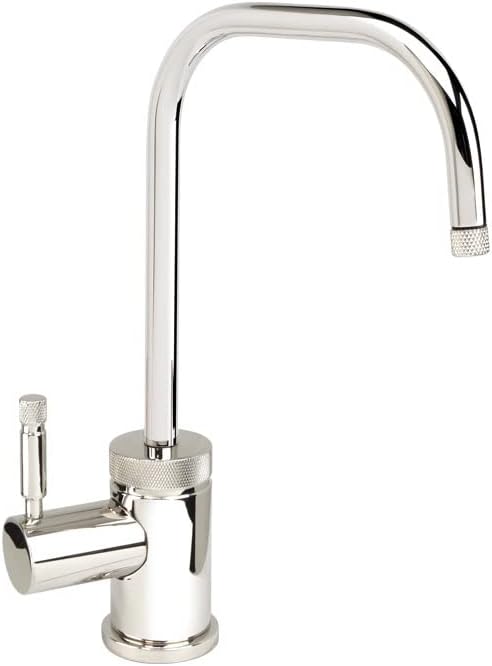
Image 1.1: The Waterstone 1455C-PG Industrial 2 Bend U-Spout Cold Only Filtration Faucet, showcasing its polished gold finish and industrial design.
2. Safety Information
Please observe the following safety precautions during installation and operation:
- Always turn off the main water supply before beginning any installation or maintenance.
- Wear appropriate personal protective equipment, such as safety glasses and gloves.
- If you are unsure about any part of the installation process, consult a qualified plumber.
- Ensure all connections are secure to prevent leaks.
- Do not use harsh chemicals or abrasive cleaners on the faucet finish.
3. Package Contents
Verify that all components are present before beginning installation. The package should contain:
- Waterstone 1455C-PG Filtration Faucet Assembly
- Mounting Hardware (washers, nuts)
- Connection Hoses/Lines
- Installation Instructions (this manual)
If any parts are missing or damaged, please contact Waterstone customer support.
4. Setup and Installation
Professional installation is recommended. Follow these general steps for installation:
4.1. Tools Required (Not Included)
- Adjustable Wrench
- Phillips Head Screwdriver
- Plumber's Putty or Silicone Sealant
- Teflon Tape
4.2. Pre-Installation
- Turn off the main water supply to the installation area.
- Clear the area under the sink for easy access.
- Ensure the mounting hole on your sink or countertop is the correct size for the faucet.
4.3. Faucet Mounting
- Apply a thin bead of plumber's putty or silicone sealant around the base of the faucet where it meets the sink/countertop.
- Insert the faucet body through the mounting hole.
- From underneath the sink, secure the faucet using the provided rubber washer, metal washer, and mounting nut. Tighten firmly but do not overtighten.
4.4. Water Line Connection
- Connect the cold water supply line to the faucet's cold water inlet. Use Teflon tape on threaded connections to ensure a watertight seal.
- Connect the filtration system's output line to the faucet's filtration inlet (if applicable and not integrated). This faucet is designed for cold-only filtration.
- Ensure all connections are hand-tight, then use an adjustable wrench to tighten an additional quarter to half turn. Do not overtighten.
4.5. Testing
- Slowly turn on the main water supply.
- Check all connections for leaks. If leaks are present, tighten the connections slightly.
- Open the faucet handle to allow water to flow and flush the lines for a few minutes to clear any debris.
5. Operating Instructions
The Waterstone 1455C-PG faucet features a single lever handle for cold water flow control.
- To turn on the water, lift the lever handle.
- To increase water flow, lift the handle further.
- To turn off the water, push the lever handle down.
This faucet is designed for cold water filtration only and does not mix hot water.
6. Maintenance
6.1. Cleaning the Faucet
- Clean the faucet regularly with a soft cloth and mild soap and water.
- Rinse thoroughly with clean water and dry with a soft cloth to prevent water spots.
- Avoid abrasive cleaners, harsh chemicals, ammonia-based products, or scouring pads, as these can damage the finish.
6.2. Aerator Maintenance
If water flow decreases, the aerator may be clogged. To clean:
- Unscrew the aerator from the tip of the spout.
- Rinse any debris from the screen.
- Reassemble the aerator and screw it back onto the spout.
7. Troubleshooting
| Problem | Possible Cause | Solution |
|---|---|---|
| Low Water Flow | Clogged aerator; partially closed shut-off valve; debris in water line. | Clean aerator (see Section 6.2); ensure shut-off valve is fully open; flush water lines. |
| Leaks at Faucet Base | Loose mounting nut; insufficient sealant. | Tighten mounting nut; reapply plumber's putty or silicone sealant. |
| Leaks at Connections | Loose connections; worn washers; insufficient Teflon tape. | Tighten connections; replace washers; reapply Teflon tape. |
| Faucet Drips | Worn ceramic disk cartridge. | Contact Waterstone customer support for a replacement cartridge. |
If troubleshooting steps do not resolve the issue, please contact Waterstone customer support.
8. Specifications
- Model: 1455C-PG
- Brand: Waterstone
- Material: Solid Brass (or 316 Stainless Steel, depending on variant)
- Finish Type: Polished Gold (as per current product)
- Spout Type: 2 Bend U-Spout
- Spout Reach: 6 inches
- Spout Swivel: 360 degrees
- Flow Rate: 1.1 gpm maximum
- Valve Type: 1/4 turn ceramic disk cartridge
- Special Feature: Rust Resistant, Resistant to reverse osmosis water
- Dimensions: Approximately 6 x 1.75 x 9.75 inches (Product Dimensions)
- Item Weight: 8 pounds
- Made In: USA

Image 8.1: A visual representation of various finish options available for Waterstone faucets, including the Polished Gold finish of this model.
9. Warranty and Support
Waterstone products are manufactured to high-quality standards and come with a lifetime functional warranty. For specific warranty details, claims, or technical support, please refer to the official Waterstone website or contact their customer service department directly.
Contact Information: Please visit www.waterstoneco.com for the most current support information.


