
Introduction
This manual provides detailed instructions for the safe and effective use of your PHIXTON Rechargeable High Lumens Tactical Handheld Flashlight. Please read this manual thoroughly before operating the device and retain it for future reference.
Safety Information
- Do not look directly into the LED light when it is active, as it can cause temporary vision impairment.
- Keep the flashlight away from children.
- Do not disassemble or modify the flashlight. This can void the warranty and cause damage.
- Ensure proper battery polarity during installation.
- While the flashlight is waterproof for rain, do not submerge it in water.
- Do not charge the battery overnight to prevent overcharging.
- Use only the provided charging cable and socket, or compatible USB devices.
Package Contents
Verify that all items are present in the package:
- 1x PHIXTON Flashlight
- 1x Rechargeable Battery
- 1x USB Socket
- 1x USB Cable
- 1x Bike Mount
- 1x Gift Box (packaging)
Setup
1. Battery Installation
- Unscrew the tail cap of the flashlight.
- Insert the provided rechargeable battery into the flashlight with the positive (+) end facing towards the head of the flashlight. Ensure the battery is placed inside the white tube.
- Screw the tail cap back on securely.
2. Initial Charging
Before first use, fully charge the flashlight battery.
- Push/pull the head of the flashlight to reveal the 3.5mm charging port.
- Connect the USB cable to the flashlight's charging port and to the provided USB socket or another compatible USB power source (e.g., power bank, computer, car charger).
- The indicator light will show charging status. Charge for approximately 6-8 hours until the indicator turns green. Do not charge for more than 12 hours.

Figure 1: Charging the PHIXTON Flashlight using the USB cable and various power sources.
Operating Instructions
1. Power On/Off and Mode Switching
The flashlight features a single button for power control and mode selection.
- To Turn On/Off: Press the button firmly until it clicks. The flashlight will turn on in the last used mode. Press firmly again to turn off.
- To Switch Modes: With the flashlight on, gently press the button (without a full click) to cycle through the 5 lighting modes: High, Middle, Low, Strobe, and SOS.

Figure 2: PHIXTON Flashlight with its control button and available light modes.

Figure 3: Visual representation of the flashlight's brightness and various light modes in use.
2. Adjustable Focus (Zoom Function)
The flashlight features an adjustable head to change the beam focus.
- Spotlight (Zoom In): Pull the head of the flashlight forward to narrow the beam, creating a concentrated spotlight for long-distance illumination.
- Floodlight (Zoom Out): Push the head of the flashlight backward to widen the beam, creating a broad floodlight for illuminating a larger area at close range.
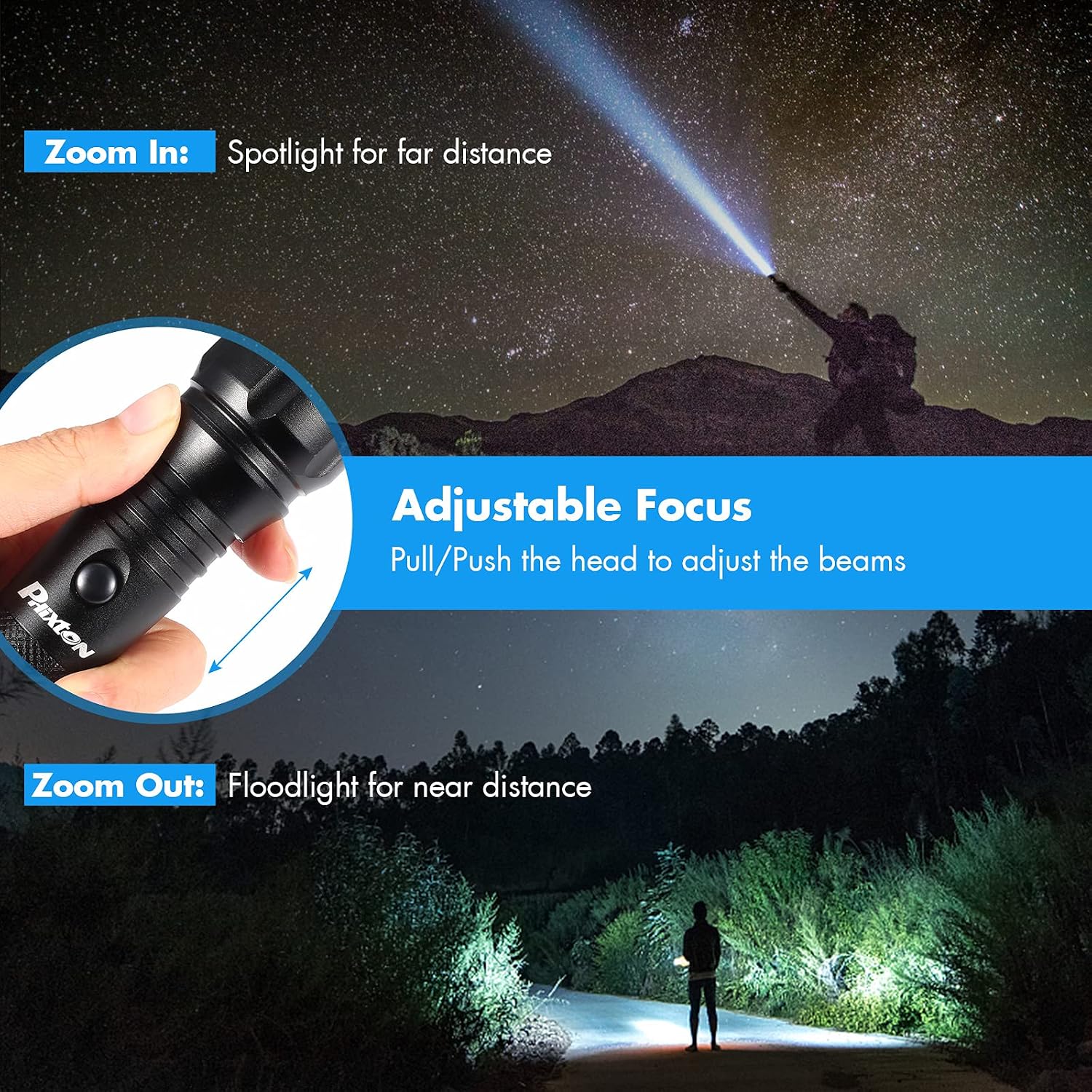
Figure 4: Demonstrating the adjustable focus from spotlight to floodlight.
3. Usage Scenarios
The PHIXTON flashlight is versatile and suitable for various activities:
- Camping and Hiking: Illuminate trails and campsites.
- Night Walking: Enhance visibility and safety during evening strolls.
- Work: Provide focused light for tasks in dimly lit areas.
- Emergencies: Essential for power outages or unexpected situations, with SOS mode for signaling.

Figure 5: Examples of the flashlight in different practical applications.
Charging Instructions
The flashlight is equipped with a high-capacity rechargeable battery designed for long-lasting performance.
- To charge, push or pull the flashlight head to expose the 3.5mm charging port.
- Connect the provided USB cable to the flashlight and a suitable USB power source (wall charger, power bank, laptop, car charger).
- Charging typically takes 6-8 hours. The charging indicator light will turn green when fully charged.
- Avoid charging for more than 12 hours to prevent potential battery damage. Do not leave charging overnight.
- The battery can be recharged over 500 times.
Maintenance
1. Cleaning
- Wipe the flashlight body with a soft, damp cloth.
- Do not use abrasive cleaners or solvents.
- Keep the lens clean for optimal light output. Use a lens cleaning cloth if necessary.
2. Storage
- Store the flashlight in a cool, dry place away from direct sunlight.
- If storing for an extended period, charge the battery partially (around 50%) and recharge every 3-6 months to maintain battery health.
3. Water Resistance
The flashlight is designed to be waterproof for use in rainy conditions (IP66 rated). However, it is not intended for submersion in water. Ensure the charging port cover is closed when not charging to maintain water resistance.

Figure 6: PHIXTON Flashlight demonstrating its water-resistant design.
Troubleshooting
| Problem | Possible Cause | Solution |
|---|---|---|
| Flashlight does not turn on. | Battery is depleted. Battery inserted incorrectly. Loose tail cap. | Charge the battery. Check battery polarity (+/-). Tighten the tail cap. |
| Light is dim or flickers. | Low battery. Dirty lens. | Recharge the battery. Clean the lens with a soft cloth. |
| Flashlight not charging. | Charging cable or adapter faulty. Charging port not fully exposed. Battery not making contact. | Try a different USB cable or adapter. Ensure the flashlight head is pulled/pushed to expose the port. Check battery installation. |
| Cannot switch modes. | Button not pressed gently enough. | Ensure you are gently pressing the button, not fully clicking it, to cycle modes. |
Specifications
| Brand | PHIXTON |
| Model Number | 1 |
| Light Source Type | LED (XM-L2) |
| Brightness | Up to 5000 Lumens |
| Illumination Distance | Up to 300 meters |
| Light Modes | High, Middle, Low, Strobe, SOS |
| Power Source | Rechargeable Battery |
| Battery Life | Up to 12 hours (on lower settings) |
| Charging Time | 6-8 hours (approx.) |
| Material | Aluminum Alloy |
| Water Resistance | IP66 (Waterproof for rain, not submersion) |
| Dimensions (LxWxH) | Approximately 20 x 2 x 2 Centimeters |
| Item Weight | 448 grams (0.99 Pounds) |
Warranty and Support
PHIXTON is committed to providing high-quality products and customer service. For any questions, concerns, or warranty inquiries regarding your flashlight, please contact PHIXTON customer support through the retailer's platform where the product was purchased. Please refer to your purchase documentation for specific warranty terms and contact details.