
Introduction
The Albrecht DR 112 is a versatile and robust portable radio designed for outdoor enthusiasts and everyday use. This multi-functional device provides access to DAB+ and FM radio, Bluetooth streaming, and serves as a flashlight, reading lamp, thermometer, and power bank. Its independent power sources, including an integrated battery, hand crank, USB charging, and a solar panel, make it an ideal companion for various activities without relying on external power.
Equipped with a durable, shock-resistant, and IPX5 water-protected housing, the DR 112 is built to withstand challenging environments. Additionally, it features an integrated SOS alarm function for emergencies, providing both optical and acoustic signals.
Key Features:
- Multiple Power Sources: Integrated battery, hand crank, USB-C, and solar panel.
- Radio Reception: Crystal-clear DAB+ and classic FM radio.
- Bluetooth Streaming: Connect your mobile phone or tablet for music playback.
- Mobile Power Bank: Charge electronic devices via the USB output.
- Emergency Functions: SOS alarm (optical and acoustic) and integrated flashlight/reading lamp.
- Durability: Solid, shock-resistant housing with IPX5 water protection.
- Additional Features: Integrated thermometer, two adjustable alarm times with snooze, 10 selectable menu languages, large LCD display with backlight.
Safety Instructions
Please read these safety instructions carefully before using the Albrecht DR 112. Failure to follow these instructions may result in injury or damage to the device.
- Water Protection: The device is IPX5 water-protected, meaning it is resistant to water jets. Do not submerge the device in water.
- Temperature: Operate the device within the specified temperature range of -10°C to +55°C. Avoid extreme temperatures.
- Charging: Use only the provided USB-C cable for charging. Do not use damaged cables or chargers.
- Battery: The device contains an integrated Lithium-Ion battery. Do not attempt to replace the battery yourself. Do not expose the battery to excessive heat or direct sunlight.
- Crank Handle: When using the hand crank, ensure it is fully extended and turn it smoothly. Do not apply excessive force.
- Flashlight: Do not look directly into the flashlight beam to avoid eye injury.
- Disassembly: Do not attempt to disassemble or repair the device yourself. Refer all servicing to qualified personnel.
- Disposal: Dispose of the device and its battery responsibly according to local regulations.
Package Contents
Ensure all items are present in the package:
- Albrecht DR 112 Outdoor Radio
- Integrated Lithium-Ion Battery (4000 mAh)
- USB-C Charging Cable
- Carabiner
- User Manual (this document)
Product Overview
Familiarize yourself with the various components of your Albrecht DR 112 radio.

Figure 1: Front view of the Albrecht DR 112, highlighting the LCD display, power button, settings button, navigation buttons, and speaker grille. The radio is red and black.

Figure 2: Side view of the radio, illustrating the foldable hand crank for manual power generation and the powerful integrated flashlight at the front.
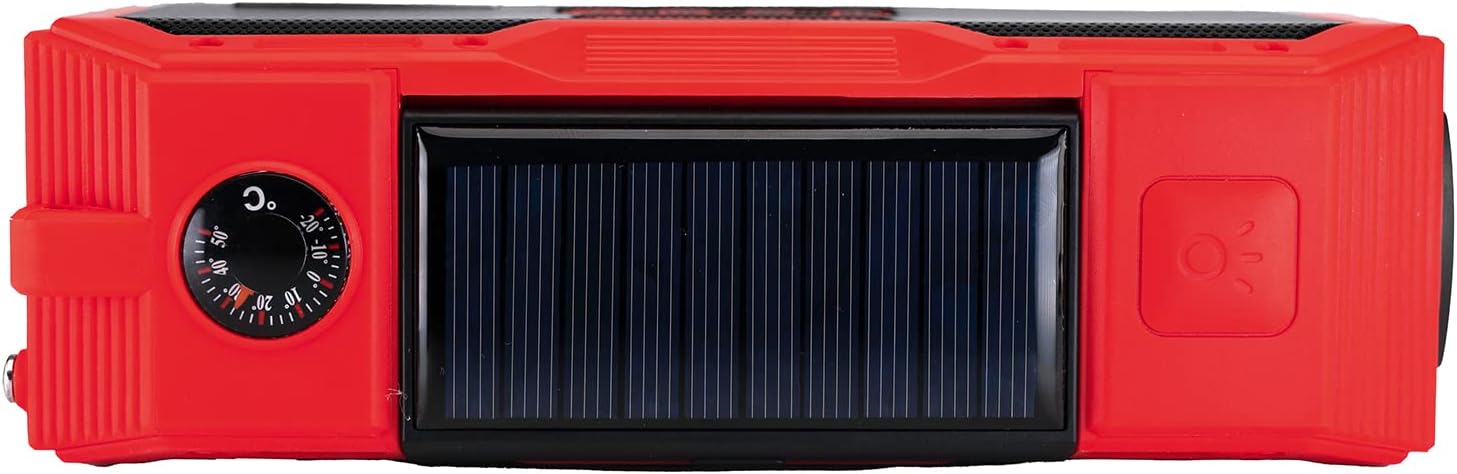
Figure 3: Top view of the radio, featuring the solar panel for charging in sunlight and an analog thermometer dial for ambient temperature readings.

Figure 4: Back view of the radio, displaying the Albrecht branding, model number (DR 112), power specifications, and the SOS button for emergency signaling.

Figure 5: Side view of the radio, revealing the USB-C input port for charging the radio and the USB-A output port for using the radio as a power bank to charge other devices.

Figure 6: Top view of the radio with the multi-LED reading lamp extended and illuminated, providing ambient light.
Controls and Ports:
- LCD Display: Shows radio information, time, battery status, and menu options.
- Power Button: Turns the radio on/off.
- Settings Button: Accesses menu and settings.
- Navigation Buttons (Up/Down/Left/Right/OK): For menu navigation and tuning.
- Volume Buttons (+/-): Adjusts audio volume.
- Telescopic Antenna: Extend for optimal radio reception.
- Hand Crank: Generates power manually.
- Solar Panel: Charges the internal battery using sunlight.
- Flashlight: Integrated LED light at the front.
- Reading Lamp: Multi-LED panel on top, extendable.
- Thermometer: Analog dial on top.
- USB-C Input (DC IN 5V): For charging the radio.
- USB-A Output (USB OUT DC IN 5V): For charging external devices (Power Bank function).
- SOS Button: Activates the emergency alarm.
Setup
Initial Charging:
Before first use, it is recommended to fully charge the internal battery using the USB-C cable.
- Connect the supplied USB-C cable to the USB-C input port on the side of the radio.
- Connect the other end of the USB-C cable to a USB power adapter (not included) or a computer's USB port.
- The charging indicator on the display will show the charging status. A full charge typically takes several hours.
Alternative Charging Methods:
- Solar Charging: Place the radio with the solar panel facing direct sunlight. The solar panel will slowly charge the battery. This method is ideal for maintaining charge or for emergency power in sunny conditions.
- Hand Crank Charging: Extend the hand crank handle on the side of the radio. Rotate the crank clockwise or counter-clockwise at a steady pace (approx. 120-150 RPM) to generate power. A few minutes of cranking can provide enough power for short periods of use or emergency calls.
Antenna Setup:
For optimal radio reception, extend the telescopic antenna fully. The antenna is located on the top-right side of the radio and can be retracted into the housing when not in use.
Operating Instructions
Power On/Off:
- To turn on the radio, press and hold the Power button (
 ) for a few seconds.
 - To turn off the radio, press and hold the Power button again until the display turns off.
Radio Modes (DAB+, FM, Bluetooth):
Press the Mode button (often integrated with the Power or Settings button, refer to display for current mode) to cycle through available modes: DAB+, FM, and Bluetooth.
DAB+ Radio:
- Select DAB+ mode.
- The radio will automatically scan for available DAB+ stations. This may take a moment.
- Use the Up/Down navigation buttons to browse through the list of found stations.
- Press OK to select a station.
FM Radio:
- Select FM mode.
- Use the Up/Down navigation buttons to manually tune the frequency, or press and hold to auto-scan for the next available station.
- Press OK to confirm.
Bluetooth Streaming:
- Select Bluetooth mode. The display will show "Pairing" or "Waiting for connection".
- On your mobile device, enable Bluetooth and search for "Albrecht DR 112".
- Select the radio from the list to pair. Once connected, you can stream audio from your device to the radio.
Volume Adjustment:
Use the Volume + and Volume - buttons to adjust the audio output level.
Flashlight and Reading Lamp:
- Flashlight: Press the dedicated flashlight button (if available, otherwise refer to manual for specific button, often a short press of power button or a side button) to turn the front flashlight on/off.
- Reading Lamp: Extend the multi-LED panel from the top of the radio. Press the reading lamp button (if available, or a specific combination) to turn it on/off.
SOS Alarm Function:
In an emergency, activate the SOS alarm:
- Press and hold the SOS button located on the back of the radio.
- The radio will emit a loud audible alarm and flash its lights (flashlight/reading lamp) to attract attention.
- Release the button to stop the alarm.
Power Bank Function:
Use the Albrecht DR 112 to charge your mobile devices:
- Connect your device's charging cable to the USB-A output port on the side of the radio.
- The radio's internal battery will begin charging your connected device.
- Note that using the power bank function will drain the radio's battery.
Alarm Clock and Snooze:
The radio features two adjustable alarm times and a snooze function. Access these settings via the Settings button and navigate to the "Alarm" menu.
Menu Navigation and Language Selection:
Press the Settings button to enter the main menu. Use the navigation buttons (Up/Down/Left/Right) to scroll through options and OK to confirm selections. To change the menu language, navigate to the "Language" setting. The radio supports 10 languages: German, English, French, Italian, Spanish, Danish, Swedish, Finnish, Norwegian, and Polish.
Thermometer:
The integrated analog thermometer on the top of the radio provides an approximate ambient temperature reading.
Maintenance
- Cleaning: Wipe the radio with a soft, damp cloth. Do not use harsh chemicals or abrasive cleaners.
- Storage: When not in use for extended periods, store the radio in a cool, dry place. It is recommended to charge the battery periodically to maintain its health.
- Water Protection: While IPX5 rated, avoid prolonged exposure to heavy rain or direct water streams. Ensure all port covers are securely closed when exposed to moisture.
Troubleshooting
| Problem | Possible Cause | Solution |
|---|---|---|
| Radio does not turn on. | Battery is depleted. | Charge the radio using the USB-C cable, hand crank, or solar panel. |
| Poor radio reception (DAB+/FM). | Antenna not extended; weak signal area; interference. | Fully extend the telescopic antenna. Move to an area with better signal. Avoid placing near electronic devices that may cause interference. |
| Bluetooth pairing fails. | Radio not in Bluetooth pairing mode; device too far; Bluetooth disabled on external device. | Ensure the radio is in Bluetooth mode. Keep devices within range (approx. 10 meters). Enable Bluetooth on your external device. |
| "F/W update mode" error on display. | Firmware issue or accidental entry into update mode. | Try performing a soft reset by pressing and holding the power button for an extended period (e.g., 10-15 seconds). If the issue persists, contact Albrecht customer support for firmware recovery instructions. |
| Power bank function not charging external device. | Radio battery too low; incorrect cable; external device not compatible. | Ensure the radio has sufficient battery charge. Use a compatible USB cable. Verify the external device can be charged via USB. |
Specifications
| Feature | Detail |
|---|---|
| Model Number | 27911 |
| Dimensions (L x W x H) | 174 x 55 x 79 mm |
| Weight | 510 grams |
| Power Supply | 3.7V Lithium-Ion Battery, 4000 mAh |
| Charging Input | USB-C, 5V DC, 2A |
| Power Bank Output | USB-A, 5V DC |
| Speaker Output | 2 x 5 Watt |
| Tuner Technology | DAB+, FM |
| Connectivity | Bluetooth, USB |
| Water Protection | IPX5 |
| Operating Temperature | -10°C to +55°C |
| Menu Languages | 10 (German, English, French, Italian, Spanish, Danish, Swedish, Finnish, Norwegian, Polish) |
Warranty and Support
Albrecht products are manufactured with high quality standards. For information regarding warranty terms and conditions, please refer to the warranty card included with your product or visit the official Albrecht website.
For technical support, troubleshooting assistance, or spare parts, please contact Albrecht customer service. You can find contact details on the official Albrecht website or through your retailer.
Visit the official Albrecht Store for more information and products: Albrecht Store on Amazon


