
1. Introduction
The Uleway G180 is a mobile phone designed for seniors, featuring large buttons, a clear menu, and a loud speaker for ease of use. It includes essential functions such as an SOS emergency button, FM radio, and a flashlight.
Key Features:
- Large Buttons and Clear Display: Designed for easy dialing and viewing, with large font options.
- Loud Speaker and Volume: Ensures clear conversations, compatible with hearing aids.
- SOS Emergency Button: Allows quick dialing of up to 5 pre-set emergency contacts.
- Dual SIM Support: Accommodates two 2G SIM cards for flexible network usage.
- Multi-Functions: Includes Bluetooth, camera, FM radio, MP3 player, alarm clock, and a super bright flashlight.
- Long Battery Life: 1000mAh battery provides extended talk and standby times.

Image 1.1: Overview of Uleway G180 key features including calculator, calendar, flashlight, Bluetooth, large font, SOS emergency call, speed dial, and large buttons.
2. Package Contents
Please check the box for the following items:
- Uleway G180 Mobile Phone
- Rechargeable Lithium-ion Battery (1000mAh)
- USB Charging Cable
- User Manual
3. Phone Overview
The Uleway G180 features a curved design for comfortable grip and a clear 1.77-inch display. The keypad includes large, easy-to-press buttons with audible feedback.

Image 3.1: Front and side view of the Uleway G180 phone, highlighting its large buttons and ergonomic design.

Image 3.2: The Uleway G180 phone held in hands, illustrating its curved design for a comfortable grip and unique visual experience.
Physical Layout:
- Front: 1.77-inch display, large numeric keypad, green call button, red end call button, navigation keys.
- Side: Volume control buttons.
- Back: SOS emergency button, loudspeaker, camera.
- Bottom: Charging port, flashlight.

Image 3.3: Rear view of the Uleway G180, highlighting the large volume loudspeaker for clear audio.
4. Setup
4.1. Installing the Battery, SIM Card(s), and Micro SD Card
- Remove the back cover of the phone.
- Insert your 2G SIM card(s) into the designated SIM1 and SIM2 slots. Ensure the gold contacts face downwards.
- If desired, insert a Micro SD card (up to 32GB) into the Micro SD card slot for additional storage.
- Insert the 1000mAh Lithium-ion battery, ensuring the contacts align correctly.
- Replace the back cover.
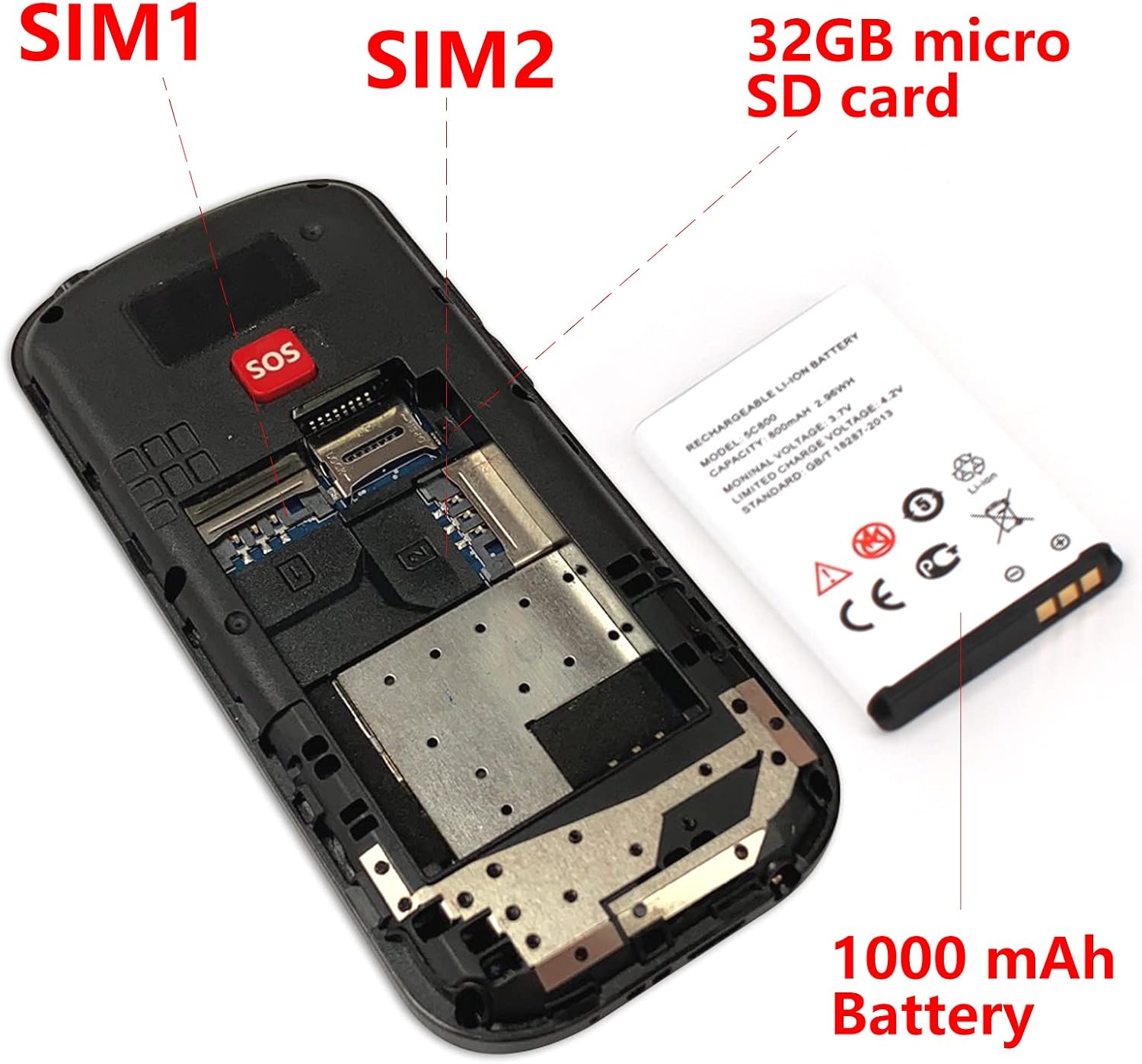
Image 4.1: Internal view of the Uleway G180, showing the locations for SIM1, SIM2, 32GB Micro SD card, and the 1000mAh battery.
4.2. Initial Charging
Before first use, fully charge the phone battery. Connect the USB charging cable to the phone's charging port and plug the other end into a power adapter. The battery indicator on the screen will show charging status. If the phone does not power on after battery installation, please charge it first.
5. Operating Instructions
5.1. Power On/Off
- To Power On: Press and hold the red end call button until the screen lights up.
- To Power Off: Press and hold the red end call button until the power off option appears, then confirm.
5.2. Making and Receiving Calls
- To Make a Call: Enter the phone number using the keypad and press the green call button.
- To Receive a Call: Press the green call button when the phone rings.
- To End a Call: Press the red end call button.
5.3. SOS Emergency Call Function
The SOS button on the back of the phone can be programmed with up to 5 emergency contacts. In an emergency, pressing and holding this button will automatically dial these numbers in sequence until one answers. It will also send an emergency SMS to these contacts.
- Navigate to the SOS settings in the phone menu.
- Add up to 5 emergency contact numbers.
- In an emergency, press and hold the SOS button on the back of the phone.

Image 5.1: Illustration of the SOS emergency call feature, showing how pressing the button can alert pre-set contacts like 'My Doctor', 'Daughter', 'Son', 'Husband/Wife', and 'First Aid'.
5.4. Speed Dial
Assign frequently called numbers to specific keys for quick dialing. Refer to the phone's menu for speed dial setup instructions.
5.5. FM Radio
The phone includes a built-in FM radio. Access it through the main menu. Headphones may be required for optimal reception.
5.6. Flashlight
Activate the super bright flashlight via a dedicated button or through the phone's menu for use in dark environments.
5.7. Camera
The phone is equipped with a basic camera for capturing photos. Access it from the main menu.
6. Maintenance
6.1. Cleaning
Wipe the phone with a soft, dry cloth. Avoid using liquid cleaners or abrasive materials, as these can damage the device.
6.2. Battery Care
- Do not expose the battery to extreme temperatures.
- Use only the original or approved charger.
- If the phone will not be used for an extended period, charge it partially before storing.
7. Troubleshooting
Common Issues and Solutions:
- Phone does not power on: Ensure the battery is correctly installed and fully charged.
- Poor call quality/noise: If the speaker quality is poor on the other end, it may be due to network conditions or the other party's device. Try moving to an area with better signal.
- Cannot make/receive calls: Check if the SIM card is properly inserted and activated. Ensure you have network coverage.
- SOS button not working: Verify that emergency numbers are correctly programmed in the SOS settings.
8. Specifications

Image 8.1: Dimensions of the Uleway G180 phone, measuring 112mm in height, 53mm in width, and 13mm in thickness.
| Feature | Detail |
|---|---|
| Model | G180 |
| Brand | Uleway |
| Network Frequency | GSM 850/900/1800/1900 (2G) |
| SIM Slot | Dual SIM dual standby |
| Display Size | 1.77 inches |
| Display Resolution | 120*160 |
| Expandable Memory | Micro SD card up to 32GB |
| Camera | Yes |
| Battery Capacity | 1000mAh Lithium-ion |
| Talk Time | 5-6 hours |
| Standby Time | Up to 240 hours |
| Dimensions | 112.1 x 58.2 x 12.8 mm |
| Connectivity | Bluetooth, USB |
| Special Features | SOS button, FM radio, flashlight, large keypad |
9. Warranty and Support
9.1. Warranty Information
Uleway provides technical and customer service support for two years from the date of purchase. This warranty covers manufacturing defects and excludes damage caused by human factors.
9.2. Customer Support
For any technical assistance or customer service inquiries, please refer to the contact information provided at the point of purchase or visit the official Uleway website.
