
Introduction
Thank you for choosing the OnLyee White Noise Machine, Model CR1016. This device is designed to create a calming sound environment to aid in sleep, improve focus, and promote relaxation. It features 42 non-looping sounds, a USB rechargeable battery, and an auto-off timer for convenient use at home, in the office, or while traveling. Please read this manual carefully to ensure proper use and maintenance of your device.

Figure 1: OnLyee White Noise Machine (Model CR1016)
Safety Information
- This device contains a built-in rechargeable battery. Use only a compliant and safety-certified charger for recharging.
- Keep the device away from water and do not expose it to moisture.
- This product is not a toy. Keep it out of reach of children.
- When using headphones, maintain safe listening levels to prevent hearing damage from prolonged exposure to high volumes.
Package Contents
- OnLyee White Noise Machine (Model CR1016)
- USB Charging Cable (Type-C)
- User Manual

Figure 2: Included items in the package.
Product Overview
The OnLyee White Noise Machine features an intuitive control panel for easy operation. The top panel includes buttons for power, volume adjustment, sound categories, and timer settings.
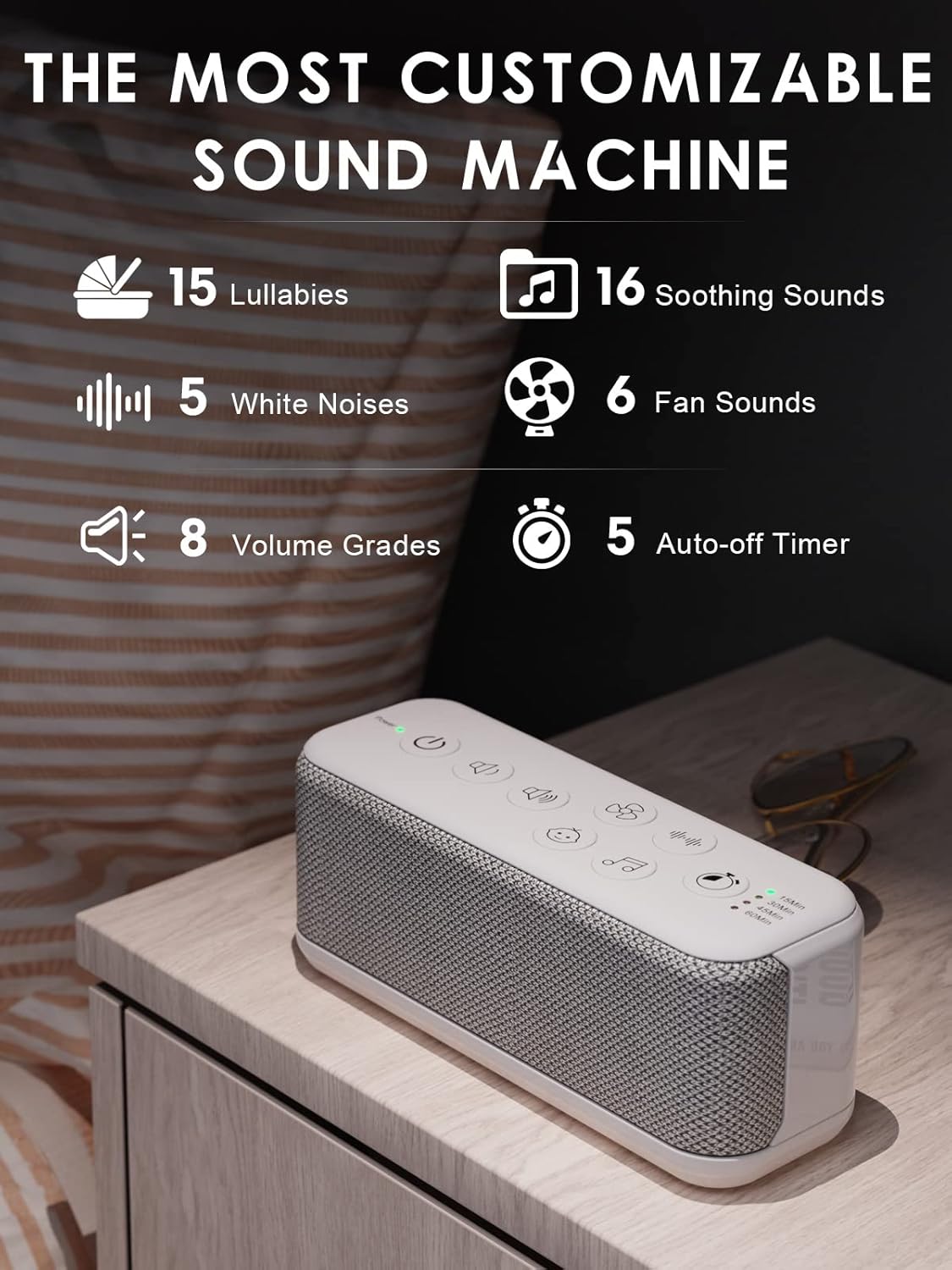
Figure 3: Top control panel of the device.

Figure 4: Detailed view of the easy-to-operate control buttons.
Controls and Indicators:
- Power Button: Turns the device on or off.
- Volume Up/Down: Adjusts the sound level (8 levels).
- Sound Category Buttons: Selects between Lullabies, Soothing Sounds, White Noises, and Fan Sounds.
- Timer Button: Sets the auto-off timer (15/30/45/60 minutes).
- Timer Indicators: LEDs show the active timer setting.
- Headphone Jack: 3.5mm port for private listening.

Figure 5: Device with 3.5mm headphone jack for private listening.
Setup
- Charge the Device: Before first use, ensure the device is fully charged. Connect the provided USB Type-C cable to the device and a compatible USB power source. The power indicator light will show charging status.
- Placement: Place the device on a stable, flat surface away from direct sunlight, heat sources, and moisture.
Charging the Device
The OnLyee White Noise Machine features a built-in rechargeable battery for portable use. To charge:
- Connect the USB Type-C cable to the charging port on the device.
- Plug the other end of the USB cable into a USB power adapter (not included) or a computer's USB port.
- The power indicator light will illuminate to show charging is in progress.
- A full charge takes approximately 3 hours and provides over 20 hours of playback.

Figure 6: Charging the device via USB.

Figure 7: Battery performance: 3 hours charge for 20+ hours playback.
Operating Instructions
- Power On/Off: Press the Power button () to turn the device on or off. The power indicator light will show its status.
- Sound Selection: The device offers 42 non-looping sounds across four categories: Lullabies, Soothing Sounds, White Noises, and Fan Sounds. Press the respective category button ( for Fan, for White Noise, for Lullabies, for Soothing Sounds) to cycle through the sounds within that category.
- Volume Adjustment: Use the Volume Up () and Volume Down () buttons to select one of the 8 available volume levels.
- Timer Settings: Press the Timer button () to set the auto-off timer to 15, 30, 45, or 60 minutes. The corresponding LED indicator will light up. To disable the timer for continuous play, cycle through the options until no timer LED is lit.
- Memory Function: The device remembers your last selected sound, volume level, and timer setting when powered off, ensuring effortless daily use.
- Using Headphones: For private listening, plug any standard 3.5mm headphones into the headphone jack on the side of the device.
Figure 8: Overview of customizable sound and timer options.

Figure 9: Setting the auto-off timer.

Figure 10: The device retains your last settings for convenience.
Official Product Videos:
Product Features Overview
Video 1: This video demonstrates some key features of the OnLyee White Noise Machine, Model CR1016, including its controls and sound options.
Sleep Sound Machine Overview
Video 2: An overview of the OnLyee Sleep Sound Machine, highlighting its benefits for sleep and relaxation.
Maintenance
- Cleaning: Wipe the device with a soft, dry cloth. Do not use liquid cleaners or abrasive materials.
- Storage: Store the device in a cool, dry place when not in use for extended periods.
- Battery Care: To prolong battery life, avoid fully discharging the device frequently. Charge it regularly, even if not in constant use.
Troubleshooting
| Problem | Possible Solution |
|---|---|
| Device does not turn on. | Ensure the device is charged. Connect it to a power source using the USB cable. |
| No sound or low volume. | Increase the volume using the Volume Up button. Ensure headphones are not plugged in if you intend to use the speaker. |
| Sound quality is poor. | Ensure the device is not obstructed. Try a different sound setting. |
| Timer not working as expected. | Press the Timer button repeatedly to cycle through the desired time settings (15/30/45/60 min). Ensure the corresponding LED is lit. |
Specifications
- Model Number: CR1016
- Product Dimensions: 6.3 x 2.2 x 2.6 inches
- Item Weight: 12.03 ounces (0.34 Kilograms)
- Power Source: Battery Powered (USB Type-C)
- Battery: 1 C battery required (included) - Note: Internal rechargeable battery, 'C battery' likely refers to internal cell type.
- Number of Tracks: 42
- Material Type: Acrylonitrile Butadiene Styrene (ABS)
- Color: Gray

Figure 11: Product dimensions for portability.
Warranty and Support
- Manufacturer's Warranty: OnLyee provides a one-year manufacturer's warranty for this item.
- Return Policy: A 30-day money-back guarantee is offered.
- Customer Support: Expect a 24-hour response for inquiries related to this product.