
Insta360 CINRSGP/A
Insta360 ONE RS Twin Edition User Manual
Model: CINRSGP/A | Brand: Insta360
Introduction to Your Insta360 ONE RS
The Insta360 ONE RS Twin Edition offers unparalleled versatility, combining a powerful 4K action camera with a 5.7K 360-degree camera. Its modular design allows you to easily swap lenses to suit any shooting scenario. Key features include advanced FlowState Stabilization, high-resolution 48MP photos, and vibrant Active HDR video. This manual will guide you through setting up and operating your camera to capture stunning footage.
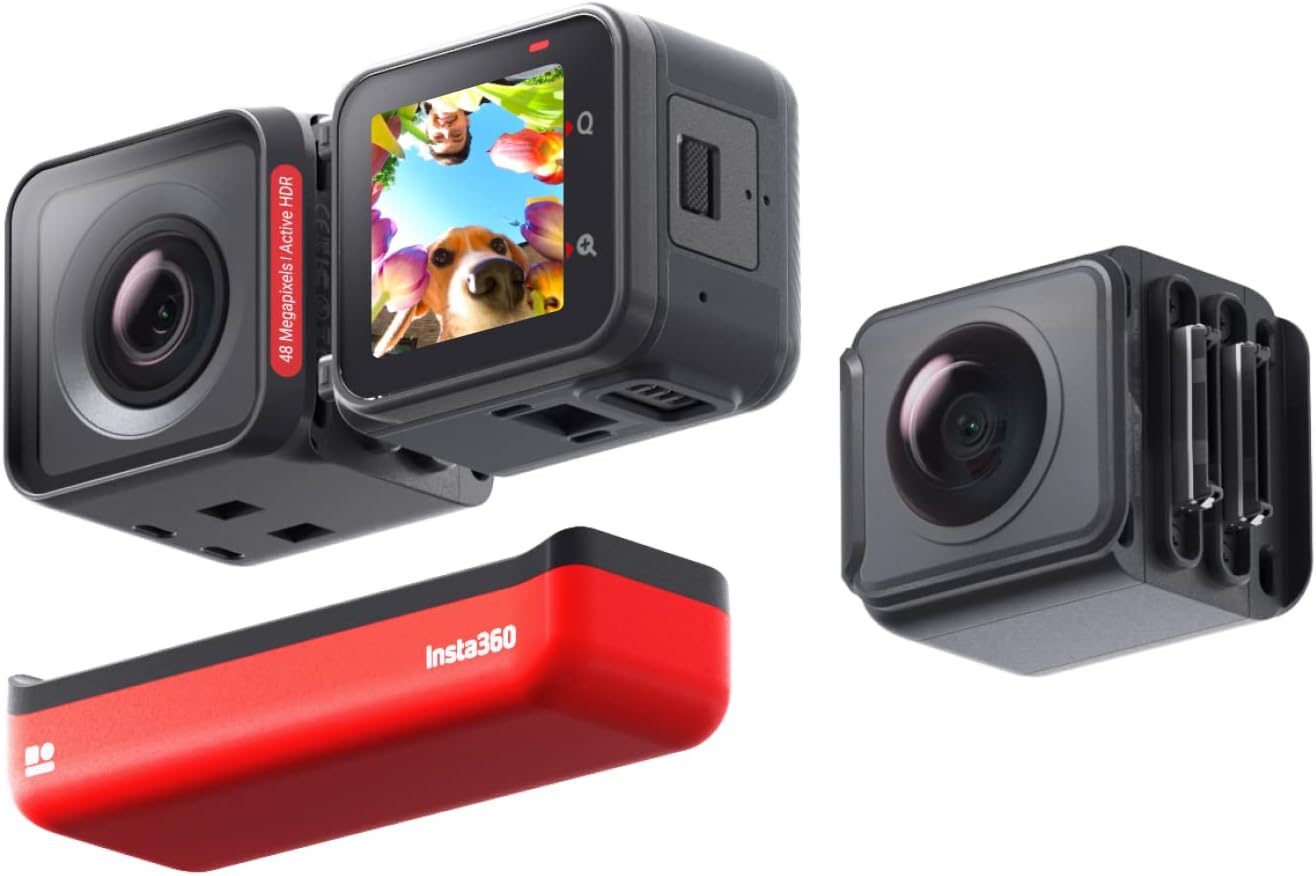
Image: The core components of the Insta360 ONE RS Twin Edition, including the core, 4K Boost Lens, 360 Lens, and battery base.
What's in the Box
Your Insta360 ONE RS Twin Edition package includes the following items:
- 1x 4K Boost Lens
- 1x 360 Lens
- 1x ONE RS Core
- 1x ONE RS Battery Base
- 1x Lens Cap for 360 Lens
- 1x ONE RS Mounting Bracket
Setup Guide
Assembly
The Insta360 ONE RS is a modular camera. To assemble, align the chosen lens (4K Boost or 360) with the ONE RS Core and the ONE RS Battery Base. Ensure the connectors are properly aligned and gently push the modules together until they click securely. The mounting bracket then secures the assembled camera.

Image: Exploded view of the Insta360 ONE RS showing the 4K Boost Lens, 5.7K 360 Lens, ONE RS Core, and Battery Base.
Battery Installation and Charging
The ONE RS Battery Base is an integral part of the camera assembly. Ensure it is securely connected to the Core and lens module. The camera comes with one Lithium Ion battery included. To charge, connect the camera to a power source using the provided USB cable. The battery capacity is 1445mAh.
SD Card Installation
A Micro SD card (not included) is required to store your footage. Locate the SD card slot on the side of the ONE RS Core. Gently insert the Micro SD card until it clicks into place. For optimal performance, especially when recording in 4K or higher resolutions, use a U3 (V30) speed class Micro SD card from a reputable brand to prevent freezing or data corruption during recording.
Operating Your Camera
Basic Operation
To power on the Insta360 ONE RS, press and hold the power button located on the Core. The touchscreen display allows for intuitive navigation through menus and settings. Swipe gestures are used to access different modes and options.
Lens Functionalities
- 4K Boost Lens: This lens captures stunningly detailed wide-angle videos at 4K 60fps and crisp 48MP photos. It's ideal for traditional action camera shots.
- 5.7K 360 Lens: This lens offers endless creative possibilities by capturing a full 360-degree view in 5.7K resolution. You can reframe your shots in post-production to achieve unique perspectives.

Image: The Insta360 ONE RS assembled with the 4K Boost Lens, capable of 4K 60fps video and 48MP photos.

Image: The Insta360 ONE RS assembled with the 5.7K 360 Lens, allowing for full spherical capture and reframing.
Stabilization
The Insta360 ONE RS features FlowState Stabilization, providing buttery smooth footage regardless of the lens used. The powerful RS Core delivers in-camera stabilization when paired with the wide-angle lenses, reducing the need for extensive post-editing.

Image: A side-by-side comparison illustrating the effectiveness of FlowState Stabilization in smoothing out shaky footage.
Special Features
- Invisible Selfie Stick: When using the 360 Lens, the Invisible Selfie Stick feature makes the selfie stick disappear from your shots, creating impossible drone-like footage and third-person perspectives.
- 6K Widescreen Video: Capture cinematic 6K widescreen videos with a 2.35:1 aspect ratio for a professional film look.
- Active HDR Video: The 4K Boost Lens supports Active HDR, which keeps videos stable and clearer, especially in challenging lighting conditions with high contrast.
- Horizon Lock: This feature keeps your footage perfectly level, even if the camera rotates during action.

Image: A user holding the Invisible Selfie Stick with the 360 Lens, demonstrating how the stick is removed from the final footage.

Image: A visual representation of the Horizon Lock feature, showing how it maintains a level horizon despite camera movement.
Waterproofing
The Insta360 ONE RS Twin Edition is waterproof to 16ft (5 meters) when fully assembled with the Core, Battery Base, and chosen lens, and secured within its mounting bracket. Ensure all components are properly sealed before exposing the camera to water.

Image: The rugged design of the Insta360 ONE RS, showcasing its waterproof capabilities for various action sports.
Maintenance
To ensure the longevity and optimal performance of your Insta360 ONE RS, follow these maintenance guidelines:
- Cleaning Lenses: Use a soft, lint-free cloth specifically designed for camera lenses to gently wipe away dust or smudges. For stubborn marks, use a specialized lens cleaning solution. Avoid abrasive materials or harsh chemicals.
- Battery Care: Store batteries in a cool, dry place. Avoid fully discharging the battery for extended periods. If storing for a long time, charge the battery to about 50-60%.
- General Cleaning: Wipe the camera body and mounting bracket with a soft, damp cloth. Ensure all ports and connections are dry before reassembling or charging.
- Waterproofing Seals: After using the camera in water, rinse it with fresh water and dry thoroughly. Inspect the rubber seals on the battery base and lens modules for any debris or damage that could compromise waterproofing.
Troubleshooting
Here are solutions to common issues you might encounter with your Insta360 ONE RS:
- Camera Overheating: In demanding shooting conditions (e.g., prolonged 4K recording in hot environments), the camera may display a heat warning. If this occurs, stop recording and allow the camera to cool down. The mounting bracket is designed to aid in heat dissipation.
- Video Freezing/Corruption: This is often caused by using an incompatible or slow Micro SD card. Ensure you are using a U3 (V30) speed class card. If issues persist, try formatting the SD card within the camera's settings or using a different card.
- Water Leakage: If water enters the camera, immediately power it off and remove the battery. Dry all components thoroughly. Check all seals for damage or debris before reassembly. Water damage is typically not covered under warranty if proper sealing procedures were not followed.
- Connectivity Issues (Wi-Fi/Bluetooth): Ensure the camera's firmware is up to date. Restart both the camera and your connected device (smartphone/remote). Try resetting the camera's Wi-Fi/Bluetooth settings.
Specifications
| Feature | Detail |
|---|---|
| Brand | Insta360 |
| Model Number | CINRSGP/A |
| Item Weight | 5.7 ounces |
| Product Dimensions | 1.85 x 3.11 x 2.2 inches |
| Batteries | 1 Lithium Ion batteries required (included) |
| Color | Red, Black |
| Special Features | 6K Widescreen Mode, Active HDR, Flowstate Image Stabilization, Time Lapse |
| Video Capture Resolution | 4K Boost Lens: 6016x2560@25/24fps (6K Widescreen), 4000x3000@24/25/30fps, 3840x2160@24/25/30/50/60fps, 2720x1530@24/25/30/60/100fps, 1920x1080@24/25/30/60/120/200fps; 360 Lens: 5760x2880@30/25/24fps, 3840x1920@50/30fps, 3008x1504@100fps |
| Screen Size | 2.3 Inches |
| Connectivity Technology | Wi-Fi |
Warranty and Support
Insta360 products typically come with a standard manufacturer's warranty. For detailed warranty information, technical support, or service inquiries, please visit the official Insta360 website or refer to the comprehensive User Guide (PDF) provided with your product.
Related documentsCINRSGP/A


Ask a question about this manual
Ask about setup, troubleshooting, compatibility, parts, safety, or missing instructions. Manuals+ will review the question and use this page’s manual context to help answer it.