
Introduction
The Satisfyer Big Heat Connect App Vibrator is designed to provide a versatile and stimulating experience. This device features a smooth, body-safe silicone design with adjustable warmth and vibration settings. Its app connectivity allows for customizable control, enhancing user interaction and pleasure.
Key features include:
- Warming Function: Helps relax muscles and increase circulation for intensified sensations.
- G-Spot Stimulation: Designed with an ergonomic shape and size (22.5 cm) to effectively reach and stimulate the G-spot.
- Intuitive Control Panel: Easy-to-use buttons for direct control of functions.
- Free App Control: Connects via Bluetooth to the Satisfyer Connect App (iOS and Android) for remote control and personalized programs.
- Waterproof Design: IPX7 rated, allowing for use in water up to 1 meter deep for 30 minutes.
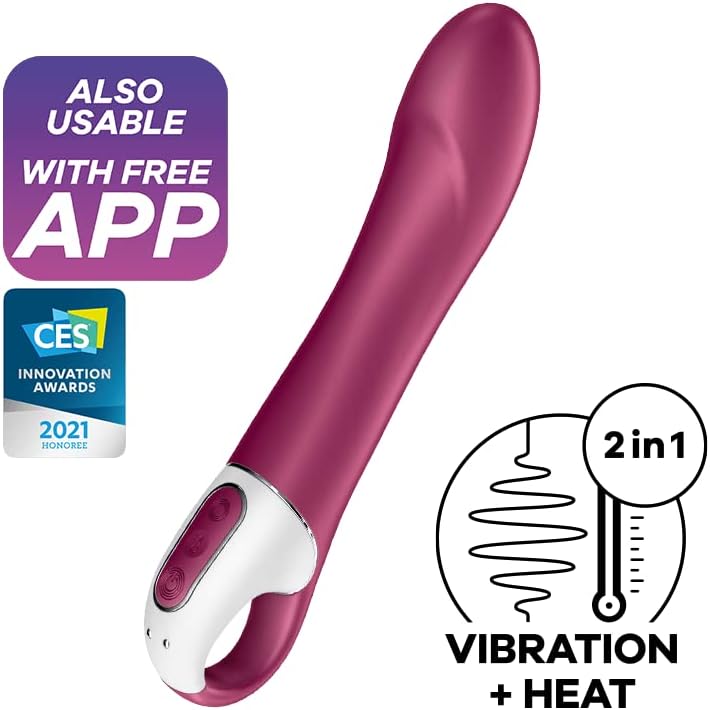
Image: The Satisfyer Big Heat Connect App Vibrator highlighting its app compatibility and the combination of vibration and heat functions.

Image: A diagram illustrating the various features of the Satisfyer Big Heat, such as app connectivity, the voluminous shaft, body-friendly silicone, heat function, and magnetic charging port.
Setup
1. Initial Charging
Before first use, fully charge your Satisfyer Big Heat. Connect the magnetic charging cable to the charging points on the device and plug the USB end into a suitable USB power source (e.g., computer, USB wall adapter). The device will indicate charging status, typically by a blinking light, which will become solid when fully charged. A full charge can take approximately 2-3 hours.
2. Cleaning Before First Use
Clean the device thoroughly before its initial use. Use a mild soap and warm water or a specialized toy cleaner. Rinse thoroughly and allow to air dry completely.
3. App Installation (Optional)
To utilize the full range of features, download the free Satisfyer Connect App. It is available for both iOS and Android devices. Search for "Satisfyer Connect" in your device's app store and follow the installation instructions.

Image: The Satisfyer Big Heat Connect App Vibrator shown in its retail packaging, indicating app compatibility.
Operating Instructions
1. Power On/Off
Press and hold the power button (usually marked with a circle or power symbol) for 2-3 seconds to turn the device on or off.
2. Vibration Control
Once powered on, press the vibration button (often a wave symbol) to cycle through different vibration patterns and intensities. Continue pressing to find your preferred setting.
3. Warming Function
Press the heat button (often a flame or temperature symbol) to activate the warming function. Press again to adjust or deactivate the heat.
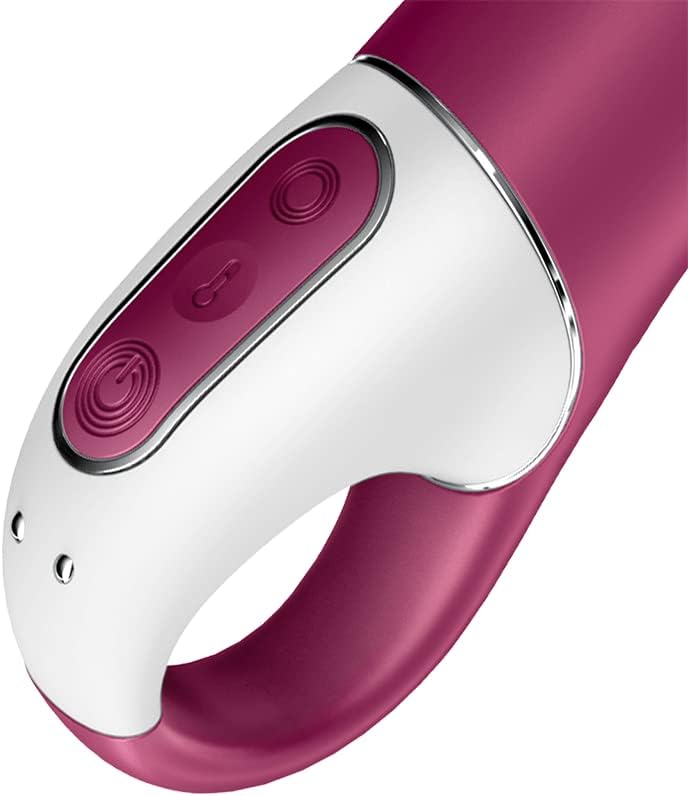
Image: A detailed view of the intuitive control panel on the Satisfyer Big Heat, showing the power, vibration, and heat buttons.
4. App Control (Bluetooth Connection)
- Ensure your device is powered on and Bluetooth is enabled on your smartphone.
- Open the Satisfyer Connect App. The app will automatically search for and connect to your Big Heat vibrator.
- Once connected, you can use the app interface to control vibration patterns, intensity, and the warming function. The app offers a wide range of customizable programs, remote control options, and other interactive features.

Image: The Satisfyer Connect App interface displayed on smartphones, showcasing features such as remote control, vibration creation, and data security.
5. Waterproof Use
The Satisfyer Big Heat is IPX7 waterproof. This means it can be safely used in the shower or bath. Ensure the charging port is dry before connecting the charger.
Maintenance
1. Cleaning
After each use, clean your device with warm water and a mild, toy-safe soap or a dedicated toy cleaner. Rinse thoroughly to remove all soap residue. Avoid using harsh chemicals, alcohol, or petroleum-based cleaners, as these can damage the silicone material.
2. Drying
Pat the device dry with a lint-free cloth or allow it to air dry completely before storing.
3. Storage
Store your Satisfyer Big Heat in a clean, dry place, away from direct sunlight and extreme temperatures. Keep it separate from other toys made of different materials to prevent material degradation.
4. Charging
Charge the device regularly to maintain battery health, even if not used frequently. Avoid overcharging by disconnecting once fully charged.
Troubleshooting
Device Not Turning On
- Ensure the device is fully charged. Connect it to the charger and wait for the charging indicator to confirm.
- Press and hold the power button for 2-3 seconds. A quick press may not activate it.
Device Not Charging
- Check the magnetic connection: Ensure the charging cable is securely attached to the device's charging points.
- Try a different USB power source or charging cable to rule out a faulty component.
- Ensure the charging points on the device are clean and free of debris.
App Connectivity Issues
- Ensure the device is powered on and within Bluetooth range of your smartphone.
- Verify that Bluetooth is enabled on your smartphone.
- Close and reopen the Satisfyer Connect App.
- Restart your smartphone.
- If issues persist, try unpairing and re-pairing the device in your phone's Bluetooth settings, then reconnect via the app.
Specifications
| Feature | Detail |
|---|---|
| Model Number | 4001623 |
| Product Dimensions | 8.86 x 2.13 x 1.57 inches (22.5 x 5.4 x 4 cm) |
| Weight | 7.76 ounces (220 grams) |
| Material | Silicone |
| Color | White/Red |
| Battery | 1 Lithium Ion battery (included) |
| Waterproof Rating | IPX7 (up to 1 meter for 30 minutes) |
| Connectivity | Bluetooth (for Satisfyer Connect App) |
Warranty Information
The Satisfyer Big Heat Connect App Vibrator comes with a 15-year warranty. This warranty ensures long-lasting satisfaction and covers manufacturing defects under normal use. Please retain your proof of purchase for warranty claims. For detailed terms and conditions, refer to the official Satisfyer website or contact customer support.

Image: A graphic highlighting the 15-year warranty provided by Satisfyer.
Support
For further assistance, technical support, or warranty claims, please visit the official Satisfyer website or contact their customer service department. You can often find FAQs, troubleshooting guides, and contact information on their support pages.
Official Satisfyer Store: Visit the Satisfyer Store on Amazon