
TECKNET HS004
TECKNET Bluetooth Headphones User Manual
Model: HS004
Introduction
This user manual provides comprehensive instructions for the TECKNET Bluetooth Headphones, Model HS004. Please read this manual carefully before using the product to ensure proper operation and to maximize its lifespan. Keep this manual for future reference.
"TECKNET Bluetooth Headset, Wireless On Ear Headphones with Noise Cancelling Microphone for Trucker, Hand Free Wireless Headset with Mute Mic for Cellphone, PC, Home, Office, Call Center"
Product Overview
Key Features
- Dual Device Connection: Utilizes Bluetooth 5.2 technology for fast and stable connection with two devices simultaneously within a 10-meter (33 feet) range. This allows for seamless switching between devices, such as watching videos on a laptop while staying connected to a smartphone.
- 330° Rotatable Microphone: The microphone can be rotated 330 degrees, allowing it to be positioned for use on either the right or left ear. This flexibility ensures optimal voice capture and enhances the calling experience.
- Premium Comfort: Designed for extended wear, these headphones feature an ultra-lightweight construction, super soft memory foam ear cups, and an adjustable headband. They are rigorously tested for stability and comfort across various ear shapes.
- Long Battery Life: Provides up to 20 hours of continuous talk time and 200 hours of standby time on a single 2-hour charge. This extended battery life is ideal for office, home, remote work, call centers, VoIP, and Skype use.
- Universal Compatibility: Works with a wide range of devices including iPhones, smartphones, desktops, laptops, and tablets. Note: The mute function is currently supported only with mobile phones.
Design and Components
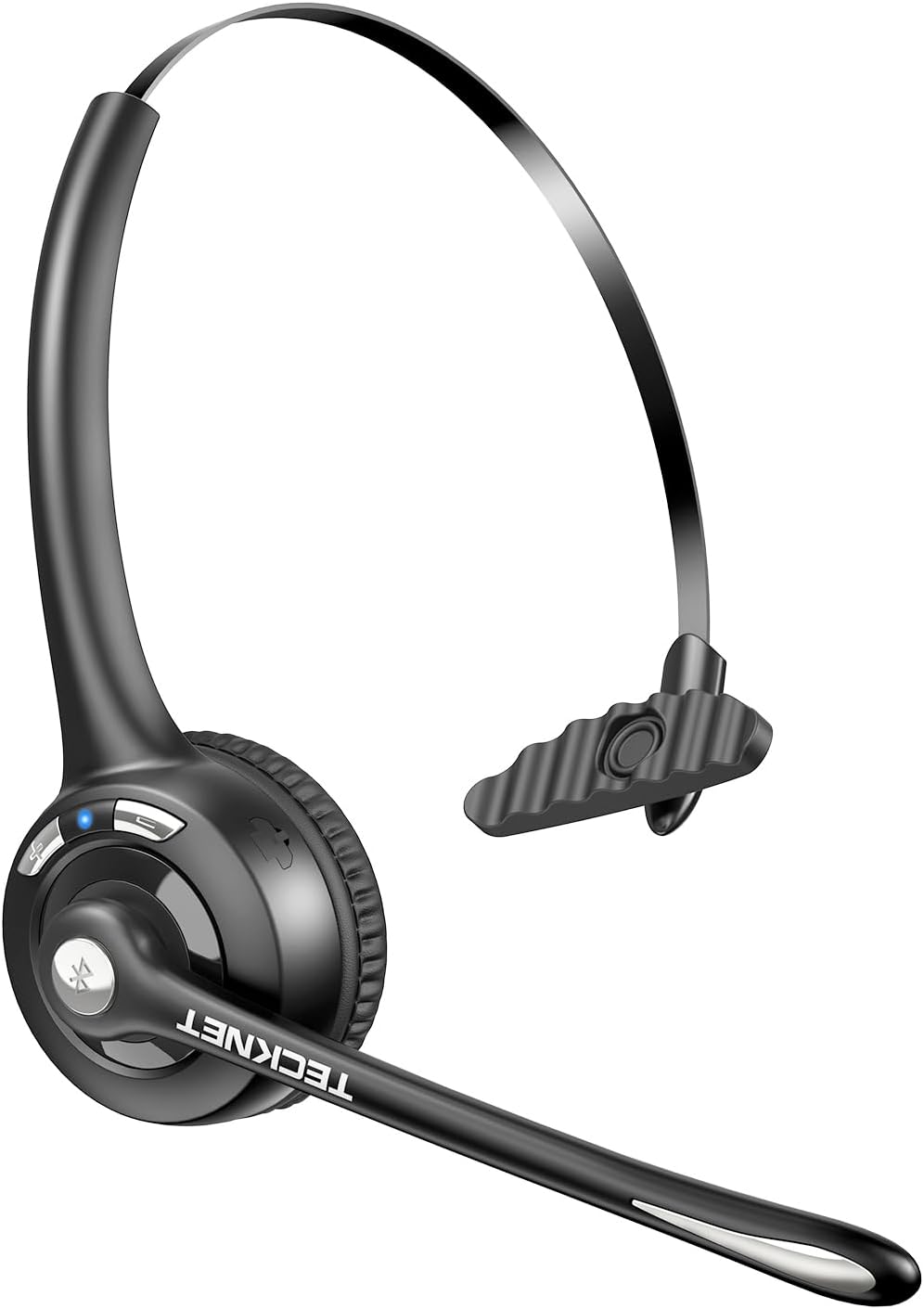
The TECKNET Bluetooth Headset in Dark Grey, showcasing its over-ear design and integrated microphone.

Illustration of the headset's dual device connection capability, showing it paired with both a laptop and a smartphone via Bluetooth 5.2.

The 330° rotatable microphone feature, demonstrating its flexibility for use on either the left or right ear, ensuring optimal voice capture.

Visual representation of the headset's lightweight design (1.5oz) and comfort features, including the rotatable microphone, gripper T-pad, soft ear pad, and noise-cancelling microphone.

Battery performance details: 20 hours talking time, 200 hours standby time, and 2 hours charging time, illustrated with a user wearing the headset.

Detailed diagram of the headset's controls, including the LED indicator, Volume up/down buttons, USB-C port, and multi-functional button.
What's in the Box
The TECKNET Bluetooth Headphones package includes:
- TECKNET Bluetooth Headphones (Model HS004)
- User Manual
- Charging Cable (USB-C)
- 3.5mm Audio Cable (for wired connection)
Setup
Charging the Headphones
Before first use, fully charge the headphones. Connect the provided USB-C charging cable to the headset's USB-C port and the other end to a USB power source (e.g., computer USB port, wall adapter). The LED indicator will show charging status and turn off when fully charged. A full charge takes approximately 2 hours.
Bluetooth Pairing
- Ensure the headphones are powered off.
- Press and hold the Multi-functional button (usually the power button) until the LED indicator flashes blue and red alternately, indicating pairing mode.
- On your device (smartphone, laptop, etc.), enable Bluetooth and search for available devices.
- Select "TECKNET HS004" from the list of found devices.
- Once connected, the LED indicator will typically show a solid blue light or flash blue slowly.
- To connect a second device, disable Bluetooth on the first device temporarily, put the headphones back into pairing mode, connect the second device, then re-enable Bluetooth on the first device. The headphones will automatically connect to both.
Official product video demonstrating the features and setup of the TECKNET Bluetooth Wireless Headset.
Operating Instructions
Basic Controls
| Button/Feature | Function |
|---|---|
| Multi-functional Button | Power On/Off, Play/Pause, Answer/End Call |
| Volume Up (+) | Increase Volume |
| Volume Down (-) | Decrease Volume |
| 330° Rotatable Microphone | Adjust microphone position for optimal voice pickup. |
| Mute Function | Mute/unmute microphone (works only with mobile phones). |
Usage Scenarios
The TECKNET Bluetooth Headphones are suitable for various applications:
- Video Conferencing: Clear audio and microphone for online meetings.
- E-Learning: Ideal for online courses and educational content.
- Live Streaming: Provides reliable audio input and output for streaming.
- Call Center: Designed for continuous communication in professional environments.
- Travel: Lightweight and comfortable for on-the-go use.

The headset supports various hands-free conversation scenarios, including call centers, remote meetings, online classes, and live streaming.
Maintenance
- Cleaning: Use a soft, dry cloth to clean the headphones. Do not use abrasive cleaners or solvents.
- Storage: Store the headphones in a cool, dry place away from direct sunlight and extreme temperatures.
- Battery Care: To preserve battery life, avoid fully discharging the battery frequently. Charge regularly, even if not in use for extended periods.
- Handling: Handle the headphones with care. Avoid dropping them or subjecting them to strong impacts, as this may cause damage to the headband or other components.
Troubleshooting
| Problem | Possible Cause | Solution |
|---|---|---|
| Cannot pair with device | Headphones not in pairing mode; Bluetooth off on device; device too far. | Ensure headphones are in pairing mode (flashing blue/red). Turn on Bluetooth on your device. Move device closer to headphones (within 10m). |
| No sound or low volume | Volume too low; headphones not connected; incorrect audio output selected. | Increase volume on both headphones and connected device. Re-pair headphones. Check audio output settings on your device. |
| Microphone not working | Microphone muted; incorrect input device selected; microphone not positioned correctly. | Ensure microphone is not muted. Check input device settings on your computer/phone. Adjust the 330° rotatable microphone. |
| Short battery life | Not fully charged; aging battery. | Ensure headphones are fully charged (2 hours). If battery life significantly degrades over time, consider product replacement. |
| Headband cracking | Physical stress; material fatigue. | Handle with care, avoid excessive bending or twisting. If within warranty, contact support. |
Specifications
| Feature | Detail |
|---|---|
| Model Name | HS004 |
| Connectivity Technology | Wireless (Bluetooth 5.2) |
| Bluetooth Range | 10 Meters (33 feet) |
| Battery Life (Talk Time) | Up to 20 Hours |
| Battery Life (Standby) | Up to 200 Hours |
| Charging Time | Approx. 2 Hours |
| Microphone | 330° Rotatable, Noise Cancelling |
| Ear Placement | On Ear |
| Material | Leather (ear cups) |
| Item Weight | 5.6 ounces |
| Dimensions (Package) | 6.46 x 6.42 x 2.28 inches |
| Frequency Range | 20 Hz - 40,000 Hz |
| Impedance | 32 Ohm |
Warranty and Support
TECKNET products are designed for reliability and performance. For warranty information and technical support, please refer to the warranty card included with your product or visit the official TECKNET website.
You can also visit the TECKNET Store on Amazon for more product information and customer service options.
Related documentsHS004


Ask a question about this manual
Ask about setup, troubleshooting, compatibility, parts, safety, or missing instructions. Manuals+ will review the question and use this page’s manual context to help answer it.