
Introduction
Welcome to the user manual for your Focal Alpha 80 Evo active studio monitor. This document provides essential information for setting up, operating, maintaining, and troubleshooting your monitor to ensure optimal performance. The Alpha 80 Evo is an 8-inch active 2-way studio monitor designed for precise audio reproduction in professional and home studio environments.

This image displays the Focal Alpha 80 Evo studio monitor from a slight angle, showcasing its 8-inch Slatefiber woofer and 1-inch aluminum inverted dome tweeter. The monitor has a dark grey finish with the "FOCAL" logo prominently displayed.
Key Features
- High-Output Precision – 8" Slatefiber woofer and 1" aluminum tweeter deliver balanced, detailed monitoring with deep low end.
- Flexible Connectivity – TRS, XLR, and RCA inputs support up to three audio sources at once.
- Custom Room Tuning – Adjustable LF and HF shelving plus sensitivity control for any studio space.
- Powerful Bi-Amp Design – 80W LF and 35W HF Class D amplifiers provide 106dB SPL peak at 1m.
- Professional Build – MDF cabinet with laminar port, wall-mount inserts, and protective grills.

This diagram illustrates the key features of the Alpha 80 Evo, including the aluminium inverted dome tweeter, 8" Slatefiber cone woofer, large laminar port, 3 inputs (XLR, TRS, RCA), inserts for wall fastening, and bass and treble level settings. It also mentions the automatic disengageable stand-by mode.
Setup
Unpacking
Carefully remove the monitor from its packaging. Retain all packaging materials for future transport or storage.
Placement
Position your Alpha 80 Evo monitors on stable surfaces, ideally at ear level, forming an equilateral triangle with your listening position. Ensure adequate space around the monitors for proper heat dissipation and bass port performance.
Connections
The Alpha 80 Evo offers flexible input options:
- XLR Input: For balanced professional audio connections.
- TRS Input: For balanced or unbalanced 1/4-inch jack connections.
- RCA Input: For unbalanced consumer audio connections.
Connect your audio source to one of the available inputs. Ensure the monitor is powered off before making connections.

This image shows the rear panel of the Focal Alpha 80 Evo, detailing the XLR, TRS, and RCA input jacks, along with the sensitivity switch, LF and HF shelving controls, power switch, and auto stand-by switch. The power inlet and serial number area are also visible.
Power On
After all connections are made, connect the power cable to the monitor and a suitable power outlet. Flip the power switch on the rear panel to the "ON" position. The LED on the front will illuminate.
Operating
Sensitivity Control
The sensitivity switch on the rear panel allows you to adjust the input sensitivity to match your audio source's output level. Options typically include 0dB and +6dB.
Room Tuning (LF/HF Shelving)
The Alpha 80 Evo features adjustable low-frequency (LF) and high-frequency (HF) shelving filters to optimize the monitor's response to your room acoustics.
- LF Shelving: Adjusts the bass response. Use this to compensate for room modes or proximity to walls.
- HF Shelving: Adjusts the treble response. Use this to compensate for room absorption or reflections.
Experiment with these controls to achieve a balanced sound in your listening environment.
Auto Stand-by Mode
The monitor features an automatic stand-by mode that activates after approximately 15 minutes of no audio signal, conserving power. It will automatically reactivate upon detection of an audio signal. This feature can be enabled or disabled via a switch on the rear panel.
Maintenance
Cleaning
Use a soft, dry cloth to clean the cabinet. Avoid abrasive cleaners or solvents. Do not spray liquids directly onto the monitor.
Handling
Always handle the monitor with care. Avoid touching the woofer cone or tweeter dome.
Storage
If storing the monitor for an extended period, use the original packaging to protect it from dust and physical damage.
Troubleshooting
No Sound
- Check power connections and ensure the monitor is switched on.
- Verify audio cable connections at both the monitor and the source.
- Ensure the audio source is active and outputting a signal.
- Check the sensitivity setting on the monitor.
Distorted Sound
- Reduce the input level from your audio source.
- Check for damaged audio cables.
- Ensure the monitor's LF/HF shelving settings are not excessively boosting frequencies.
Hum or Buzz
- Check for ground loops. Try connecting all audio equipment to the same power strip.
- Ensure balanced cables (XLR, TRS) are used where possible.
- Move power cables away from audio cables.
Specifications
| Feature | Detail |
|---|---|
| Brand | Focal |
| Model | Alpha 80 Evo |
| Type | Active 2-Way Studio Monitor |
| Woofer | 8" (20cm) Slatefiber cone |
| Tweeter | 1" (25mm) Aluminium inverted dome |
| Frequency Response (+/- 3dB) | 38Hz - 22kHz |
| Maximum SPL (peak @ 1m) | 106dB |
| LF Amplifier | 80W Class D |
| HF Amplifier | 35W Class D |
| Inputs | XLR, TRS, RCA |
| LF Shelving | Adjustable, +/- 6dB (0 - 250Hz) |
| HF Shelving | Adjustable, +/- 3dB (4.5 - 35kHz) |
| Sensitivity | 0dB or +6dB |
| Automatic Stand-by | After 15 minutes of no use |
| Power Supply | 100 - 240V (T2AL fuse/250V) |
| Dimensions (HxWxD) | 15.35 x 11.65 x 13 inches (390 x 296 x 330 mm) |
| Weight | 21.6 lbs (9.8 kg) |
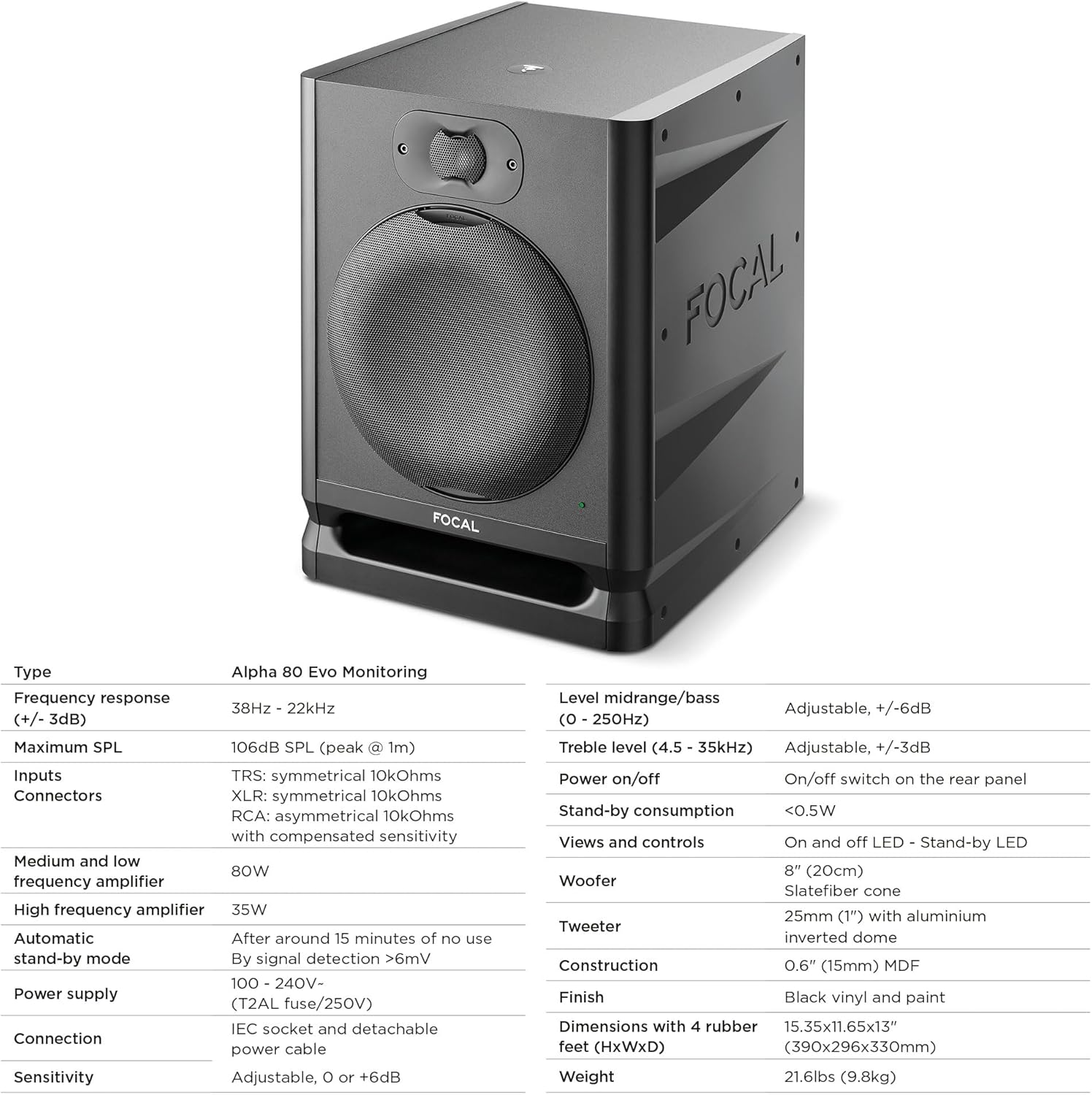
This image presents a table of detailed technical specifications for the Focal Alpha 80 Evo, including frequency response, maximum SPL, amplifier power, input types, and physical dimensions.
Warranty and Support
For warranty information and technical support, please refer to the official Focal website or contact your authorized dealer. Keep your proof of purchase for warranty claims.


