
1. Introduction
The ATOTO F7WE is a 10.1-inch QLED display car stereo designed to enhance your in-car entertainment and connectivity. This unit supports both Wireless CarPlay and Android Auto, offering seamless integration with your smartphone for navigation, music, calls, and more. It features a high-resolution display, powerful audio output, and support for various accessories to provide a comprehensive driving experience.
Key features include:
- Wireless CarPlay & Android Auto for convenient smartphone integration.
- 10.1-inch QLED Touchscreen with 1280x720 resolution and 178° wide viewing angle.
- Dual Screen Display for simultaneous navigation and front camera view.
- High-Performance Audio with 4x49W Max / 4x29W RMS amplifier and 4V RCA Pre-out.
- Clear Hands-Free Calling with internal and external microphone support and noise reduction.
- Support for Front and Rear Cameras for enhanced safety.
- Over-The-Air (OTA) firmware updates for continuous improvement.
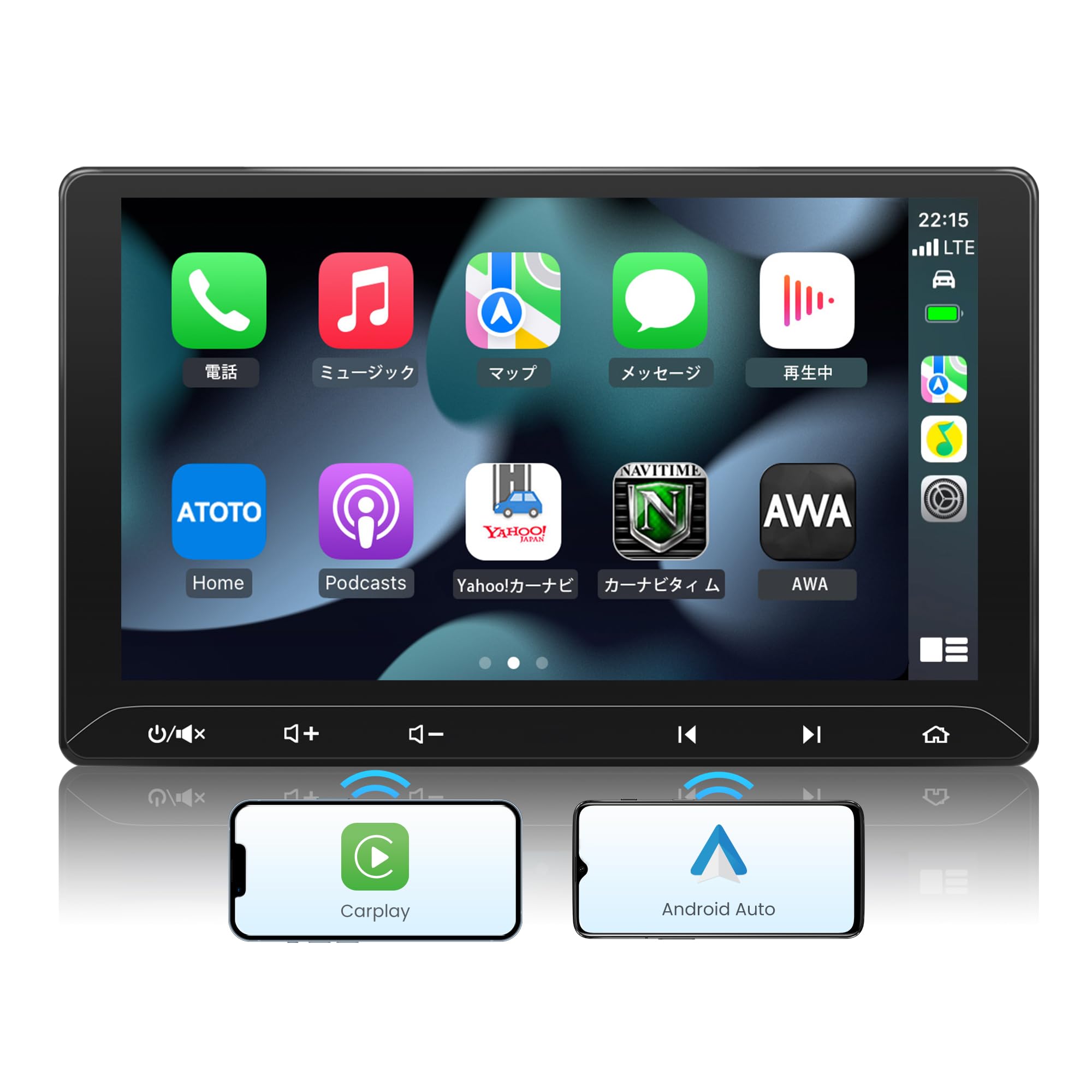
Image: The ATOTO F7WE 10.1-inch QLED Display Car Stereo unit.
2. Safety Information
Please read all instructions carefully before installation and use. Improper installation or operation can lead to damage to the unit, vehicle, or personal injury. Always prioritize safe driving practices.
- Professional Installation Recommended: If you are unsure about any part of the installation process, consult a qualified professional.
- Power Supply: Ensure the unit is connected to a 12V DC power supply with a negative ground.
- Wiring: Double-check all wiring connections before powering on the unit to prevent short circuits or damage.
- Driving Safety: Do not operate the unit in a way that distracts you from driving. Adjust settings or view complex information only when the vehicle is safely parked.
- Temperature: Avoid exposing the unit to extreme temperatures or direct sunlight for prolonged periods.
- Moisture: Keep the unit dry and away from moisture to prevent electrical hazards.
3. Setup and Installation
3.1. Package Contents
The ATOTO F7WE package includes the following items:
- ATOTO F7WE Car Stereo Unit
- 2DIN Side Brackets
- Adaptive Cage
- Mounting Screws
- Power Harness
- External Microphone
- Wi-Fi Antenna
- HD LCD Protective Film
- User Manual (this document)

Image: Overview of included components with the ATOTO F7WE unit.
3.2. Dimensions and Vehicle Compatibility
The F7WE is a universal double DIN head unit designed to fit vehicles with a standard double DIN dashboard opening. The display is 10.1 inches. Please verify your vehicle's dashboard dimensions before installation. Depending on your car model, additional accessories such as a dash frame kit, specific wiring harness, radio antenna adapter, or CANBUS data interface may be required and are sold separately.

Image: Detailed dimensions of the ATOTO F7WE unit and its mounting frame.
3.3. Wiring Diagram
Refer to the following diagram for proper wiring connections. Ensure all connections are secure to prevent malfunction or damage.

Image: Comprehensive wiring diagram for the ATOTO F7WE car stereo, showing connections for power, speakers, steering wheel controls, and external devices.
- Power Harness: Connect the main power harness to your vehicle's wiring.
- Speaker Outputs: Connect to your vehicle's speakers.
- External Microphone: Plug the external microphone into the designated port for improved call quality.
- Wi-Fi Antenna: Connect the Wi-Fi antenna for stable wireless connectivity.
- USB Ports: Two USB ports are available. One is for smartphone connection (CarPlay/Android Auto/AutoLink), and the other is for external storage (FAT32 or NTFS format).
- Camera Inputs: Dedicated inputs for front and rear cameras.
- RCA Outputs: For connecting external amplifiers or subwoofers.
4. Operating Instructions
4.1. Wireless CarPlay & Android Auto
The F7WE features a dedicated Wi-Fi 6 module for fast and stable wireless connection to CarPlay and Android Auto. After initial setup, the unit will automatically reconnect to your smartphone.
- Initial Setup: Pair your smartphone via Bluetooth and follow the on-screen prompts to enable Wireless CarPlay or Android Auto.
- Automatic Connection: Once set up, CarPlay/Android Auto will launch automatically when you start your vehicle and your phone is nearby.
- Wired Connection: For wired CarPlay/Android Auto, connect your smartphone using its original USB cable to the "PhoneLink" USB port on the F7WE. Connection typically takes about 3 seconds.
- Charging: When using Wireless CarPlay/Android Auto, you can charge your smartphone via a separate USB port or wireless charger in your vehicle.

Image: The ATOTO F7WE displaying navigation and media via Wireless CarPlay/Android Auto.

Image: Illustration of both wireless and wired connection options for CarPlay and Android Auto.
4.2. QLED Touchscreen Display
The 10.1-inch QLED display offers a clear and vibrant viewing experience with a resolution of 1280x720. Its wide 178° viewing angle ensures visibility from various positions, and the responsive touch panel allows for smooth operation.
4.3. Dual Screen Display (Navigation & Front Camera)
The split-screen function allows you to view navigation from CarPlay or Android Auto simultaneously with the front camera feed. This feature is particularly useful for maneuvering in tight spaces or parking, providing a clear view of the road ahead without closing your navigation map. This feature requires the ATOTO AC-44P5 Front DVR Camera (sold separately).

Image: The ATOTO F7WE display showing a split screen with navigation and a front camera view.
4.4. Audio Features
Experience high-fidelity sound with the F7WE's powerful audio system:
- Amplifier: High-performance TCB502 amp chip with 4x49W Max output and 4x29W RMS output.
- Pre-out: 4V RCA pre-outs provide a clean signal to external amplifiers, ensuring powerful and clear sound reproduction even at high volumes.
- Equalizer: Customize your sound with the 12-band EQ and 7 audio presets.

Image: Visual representation of the ATOTO F7WE's audio capabilities, including amplifier power and RCA pre-outs.
4.5. Bluetooth Connectivity
With Bluetooth 5.0, the F7WE offers stable and clear hands-free calling and music streaming. The unit includes both an internal microphone and supports an external microphone for optimal voice pickup, even in noisy driving environments.

Image: The ATOTO F7WE display showing a hands-free call interface via Bluetooth.
4.6. Camera Support
The F7WE supports both front and rear cameras to enhance driving safety and awareness. The 10.1-inch display provides a clear view of road conditions and surroundings.
- Rear Camera: Connect the ATOTO AC-HD02LR Rear View Camera (sold separately) for clear rear visibility during reversing and parking. Supports Live Rear-View while driving.
- Front Camera: Connect the ATOTO AC-44P5 Front DVR Camera (sold separately) for recording and viewing front road conditions.
Image: The ATOTO F7WE displaying a rear view camera feed with parking guidelines.
4.7. Other Media Functions
- FM/AM Radio: Built-in tuner for radio reception.
- Video Playback: Supports video playback from external USB storage.
- Video Output: Two RCA video outputs are available for connecting external monitors, such as headrest displays.
- Steering Wheel Control: Compatible with ATOTO AC-44F5SWCIR remote (sold separately) for convenient control.

Image: The ATOTO F7WE displaying various media functions, including video playback and external monitor support.
5. Maintenance
- Screen Cleaning: Use a soft, lint-free cloth to gently wipe the screen. Avoid abrasive cleaners or solvents.
- Firmware Updates: The F7WE supports Over-The-Air (OTA) firmware updates. Access this feature through the system settings to ensure your unit always has the latest features and improvements.
- General Care: Keep the unit free from dust and debris. Ensure proper ventilation around the unit to prevent overheating.

Image: Illustration of the OTA update process for the ATOTO F7WE.
6. Troubleshooting
If you encounter issues with your ATOTO F7WE, please refer to the following common troubleshooting tips:
| Problem | Possible Cause | Solution |
|---|---|---|
| Unit does not power on. | Incorrect wiring, blown fuse, insufficient power. | Check power connections, vehicle fuse box, and ensure 12V DC supply. |
| CarPlay/Android Auto fails to connect wirelessly. | Bluetooth/Wi-Fi interference, phone settings, initial pairing issue. | Ensure phone's Bluetooth and Wi-Fi are on. Re-pair the device. Check phone's CarPlay/Android Auto settings. |
| CarPlay/Android Auto fails to connect via USB. | Non-original/low-quality USB cable, incorrect USB port. | Use the original or a certified USB cable. Connect to the designated "PhoneLink" USB port. |
| Poor audio quality or no sound. | Incorrect speaker wiring, volume settings, external amplifier issues. | Check speaker connections, adjust volume, verify external amplifier connections if used. |
| Steering wheel controls not working. | Incorrect wiring, incompatible vehicle, no external remote connected. | Ensure steering wheel control wires are correctly connected (e.g., to power GND as per user reviews). If using an external remote (AC-44F5SWCIR), ensure it's properly paired. |
| Screen glare or poor visibility. | Sunlight reflection, screen protector. | Adjust screen angle if possible. Consider an anti-glare screen protector. |
For further assistance, please contact ATOTO customer support.
7. Specifications
| Feature | Description |
|---|---|
| Brand | ATOTO |
| Model Number | F7G211WE |
| Display Size | 10.1 inches |
| Display Type | QLED Touchscreen |
| Display Resolution | 1280 x 720 HD |
| Connectivity Technology | Bluetooth 5.0, USB, Wi-Fi 6 |
| Smartphone Integration | Wireless CarPlay, Wireless Android Auto, Wired MirrorLink |
| Audio Output Power | Max 4x49W / RMS 4x29W |
| Pre-out Voltage | 4V RCA |
| Equalizer | 12-band EQ, 7 audio presets |
| Microphone | Internal + External Microphone (included) |
| Camera Inputs | Front Camera (AC-44P5 compatible), Rear Camera (AC-HD02LR compatible) |
| USB Ports | 2 (1 for PhoneLink, 1 for external storage) |
| Supported USB Storage Format | FAT32, NTFS |
| Control Methods | App, Touch, Remote (optional), Voice |
| Operating System | SealedCoreSystem (not Android OS) |
| Origin | China |
8. Warranty and Support
8.1. Warranty Information
The ATOTO F7WE comes with a 12-month manufacturer's warranty from the date of purchase. This warranty covers defects in materials and workmanship under normal use. You can extend this warranty by an additional 6 months by contacting ATOTO customer service after your purchase.
Please retain your proof of purchase for warranty claims.
8.2. Customer Support
For technical assistance, troubleshooting, or warranty inquiries, please contact ATOTO customer support. You can usually find contact information on the ATOTO official website or through the retailer where you purchased the product.
The unit also supports OTA (Over-The-Air) online firmware updates, ensuring your device stays up-to-date with the latest features and bug fixes without complicated manual procedures.


