
1. Introduction
This manual provides detailed instructions for the installation, operation, and maintenance of your MB Quart GMR1.5S2W Marine Audio System. This system includes a Bluetooth-enabled gauge mount source unit and two 6.5-inch coaxial marine-grade speakers, designed for durability and high-quality audio in marine and powersport environments.
The MB Quart GMR1.5S2W system is built to withstand harsh outdoor conditions, featuring waterproof, dustproof, sunproof, and shockproof construction that meets or exceeds IP67 requirements. It delivers 160 Watts peak power, ensuring clear and robust sound for your adventures.
2. What's in the Box
Upon opening your MB Quart GMR1.5S2W package, you will find the following components:
- MB Quart GMR1.5S2W Bluetooth Source Unit
- Two 6.5-inch Coaxial Marine Speakers
- Complete Wiring Harnesses
- Mounting Hardware

Figure 2.1: All components of the MB Quart GMR1.5S2W Marine Audio System.
Video 2.1: An unboxing video demonstrating the contents of the MB Quart GMR1.5S2W package, including the source unit, speakers, and accessories.
3. Setup and Installation
Installation of the MB Quart GMR1.5S2W system is designed to be straightforward, requiring basic hand tools. The entire process can typically be completed within an hour, depending on your specific system configuration and vehicle.
3.1 Speaker Installation
The 6.5-inch coaxial speakers are universal in size, making them easy to integrate into most marine and powersport applications. They require a total mounting depth of 2.99 inches (75.95mm) and a cutout diameter of 3.14 inches (79.76mm).

Figure 3.1: Example of a 6.5-inch marine speaker installed in a boat panel.
3.2 Wiring Connections
The system includes all necessary wiring harnesses. Each wire is conveniently labeled to ensure correct and easy connections, minimizing installation errors. The source unit provides four channels of output for the speakers and an additional RCA subwoofer output for expanding your audio system.
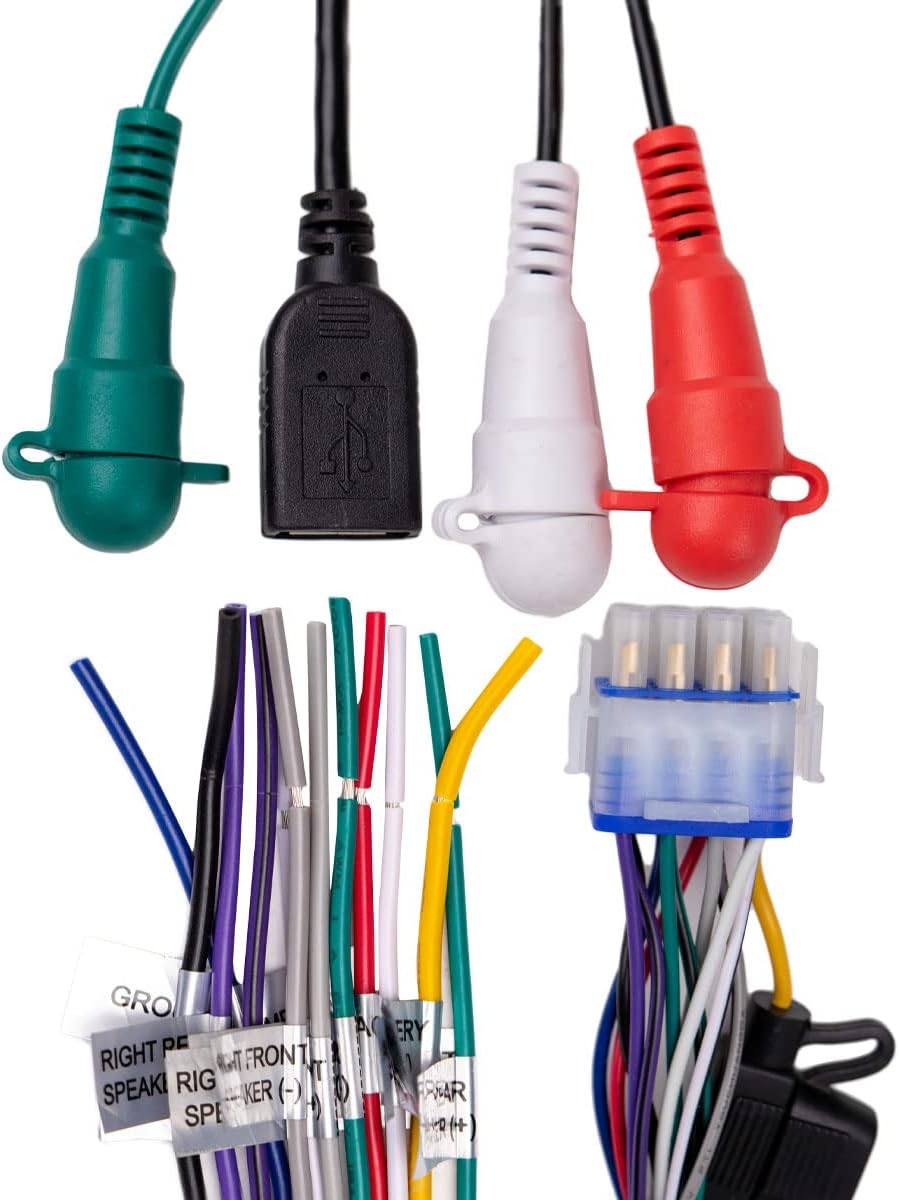
Figure 3.2: Labeled wiring harness for simplified installation.
3.3 Mounting the Source Unit
The gauge mount source unit comes with appropriate mounting hardware, including a U-bracket, threaded rods, and nuts, to secure it firmly in place.

Figure 3.3: Mounting bracket and hardware for the source unit.
4. Operating Instructions
The GMR1.5S2W source unit offers versatile connectivity and intuitive controls for your marine audio experience.
4.1 Bluetooth Connectivity
The Bluetooth-enabled source unit allows for quick pairing with your mobile devices. It automatically connects to the last paired device, providing seamless access to your music library. Press the 'BT' button to activate Bluetooth pairing mode.
4.2 USB and Auxiliary Inputs
In addition to Bluetooth, the unit features a USB input for playing media from USB storage devices and an auxiliary RCA input for connecting other audio sources. Use the 'USB' and 'AUX' buttons to switch between these input modes.
4.3 Control Unit Functions
The circular control unit provides easy access to all essential audio functions:
- BT Button: Activates Bluetooth mode.
- USB Button: Selects USB input.
- AUX Button: Selects auxiliary RCA input.
- Play/Pause Button (►►): Plays or pauses current track.
- Skip Forward Button (►►|): Skips to the next track.
- Skip Backward Button (|◄◄): Skips to the previous track.
- Volume Knob (Center): Rotates to adjust the main volume.
- SUB- / SUB+ Buttons: Adjusts the subwoofer output level.

Figure 4.1: Front view of the GMR1.5S2W control unit.
5. Maintenance
To ensure the longevity and optimal performance of your MB Quart Marine Audio System, follow these maintenance guidelines:
- Cleaning: Regularly clean the speakers and control unit with a soft, damp cloth. Avoid abrasive cleaners or solvents that could damage the marine-grade finish.
- Connection Checks: Periodically inspect all wiring connections for corrosion or looseness, especially after exposure to saltwater or harsh weather. Ensure all connections are secure and free from debris.
- Protection: While the system is waterproof and dustproof, consider using protective covers when the boat or vehicle is stored for extended periods, especially in extreme conditions.
- Environmental Care: Avoid exposing the system to direct, prolonged sunlight when not in use, as this can degrade materials over time.
6. Troubleshooting
If you encounter issues with your MB Quart Marine Audio System, refer to the following common troubleshooting steps:
- No Power:
- Check the main power connection and ensure it is securely connected to a 12V DC source.
- Verify that the vehicle's battery has sufficient charge.
- Inspect any inline fuses for the system and replace if blown.
- No Sound from Speakers:
- Ensure the volume is turned up on both the source unit and your connected device.
- Check all speaker wire connections for proper polarity and secure contact.
- Confirm the correct audio input source (Bluetooth, USB, AUX) is selected on the unit.
- If using the subwoofer output, ensure the subwoofer amplifier is powered on and connected correctly.
- Bluetooth Not Connecting:
- Ensure Bluetooth is enabled on your mobile device and the source unit is in pairing mode.
- Forget the device from your mobile device's Bluetooth settings and attempt to re-pair.
- Move your mobile device closer to the source unit to ensure it is within range.
- Restart both the source unit and your mobile device.
If these steps do not resolve the issue, please contact MB Quart customer support for further assistance.
7. Specifications
| Feature | Specification |
|---|---|
| Model Name | GMR1.5S2W |
| Input Voltage | 12 Volts (DC) |
| Speaker Type | Coaxial |
| Special Feature | Waterproof (IP67 rated) |
| Compatible Devices | Smartphone, Tablet, Laptop |
| Speaker Size | 6.5 Inches |
| Woofer Diameter | 6.5 Inches |
| Speaker Maximum Output Power | 160 Watts (Peak) |
| RMS Power Handling (per speaker) | 40 Watts |
| Frequency Response | 35 Hz - 21 kHz |
| Speaker Sensitivity | 89 dB |
| Connectivity Technology | Bluetooth, USB, Auxiliary (RCA) |
| Audio Output Mode | Surround (2.0 channel with subwoofer output) |
| Color | White |
| Number of Items | 2 (speakers) + 1 (source unit) |
| Item Weight | 5.13 pounds |
| Product Dimensions | 12 x 9 x 8 inches (packaging) |
8. Warranty and Support
Your MB Quart GMR1.5S2W Marine Audio System comes with a Full Warranty, ensuring consistent out-of-the-box durability and peace of mind. Specific warranty details are typically provided with your product documentation.
For additional protection, 2-Year and 3-Year Protection Plans may be available for purchase. These plans offer extended coverage beyond the standard manufacturer's warranty.
For further support, technical assistance, or warranty claims, please visit the official MB Quart Store or contact their customer service department:


