
Hogar 3 Node Wi-Fi
Hogar 3 Node Insert Module User Manual
Model: 3 Node Wi-Fi
Introduction
The Hogar 3 Node Insert Module is designed to transform any existing switch into a smart switch. This compact module, measuring approximately 22mm, integrates seamlessly into standard gang boxes, enabling control of multiple electrical fittings and appliances via the Hogar SE App, Amazon Alexa, or Google Assistant.
Key features include:
- Control lights, fans, curtains, or any appliances via smartphone, Alexa, and Google Assistant.
- Designed for installation within existing switch boards, supporting all gangbox sizes.
- Operates on your home's Wi-Fi network; no separate smart home controller is required.
- Offers control through the Hogar SE App or via voice commands.
Product Overview

Image: The Hogar 3 Node Insert Module shown alongside its product packaging, highlighting its compact design and branding.

Image: A close-up front view of the Hogar 3 Node Insert Module, displaying its terminal labels (N, L, O1, O2, O3, S1, S2, S3) for wiring connections.

Image: The Hogar 3 Node Insert Module and its packaging, with icons illustrating key features such as control of lights/fans/curtains, retrofit design, easy installation, voice control, and app control.
Setup and Installation
The Hogar 3 Node Insert Module is designed for easy integration into your existing electrical system. It comes with wiring and a user manual for installation guidance.
Pre-installation Checklist:
- Ensure power to the switchboard is turned off at the main circuit breaker before beginning installation.
- Verify that your home has a stable Wi-Fi network (2.4 GHz recommended).
- Confirm the module fits within your existing gang box.
Installation Steps:
- Power Off: Turn off the main power supply to the switchboard where the module will be installed.
- Access Wiring: Carefully open the switchboard to access the existing wiring.
- Connect Module: Follow the wiring diagram provided in the included user manual. Connect the module's terminals (N, L, O1, O2, O3, S1, S2, S3) to the corresponding wires for neutral, live, output loads, and switch inputs.
- Secure Module: Place the module inside the gang box, ensuring it is securely positioned and does not obstruct other components.
- Close Switchboard: Carefully close the switchboard cover.
- Power On: Restore power to the switchboard from the main circuit breaker.
- App Pairing: Download the Hogar SE App from your smartphone's app store. Follow the in-app instructions to pair the module with your home Wi-Fi network and configure your devices.

Image: Information regarding free installation and demo service available within 72 hours of product delivery. Users are advised to call +91 844 844 0789 to avail this service.
Operating the Module
Once installed and paired, the Hogar 3 Node Insert Module offers flexible control options:
1. Hogar SE App Control:
- Open the Hogar SE App on your smartphone.
- Select the specific module or connected appliance you wish to control.
- Toggle switches on/off, set schedules, or create scenes directly from the app interface.
2. Voice Control (Amazon Alexa / Google Assistant):
- Ensure your Amazon Alexa or Google Assistant device is linked to your Hogar SE account.
- Use voice commands such as:
- "Alexa, turn on the living room lights."
- "Hey Google, turn off the fan."
- "Alexa, set the bedroom lights to 50%."
3. Manual Switch Control:
- The module retains the functionality of your existing physical wall switches, allowing for traditional manual control.

Image: A user demonstrating control of smart switches using a smartphone, illustrating the convenience of app-based operation.
Maintenance
The Hogar 3 Node Insert Module requires minimal maintenance. Follow these guidelines to ensure optimal performance and longevity:
- Cleaning: Ensure the module and surrounding switchboard area are kept clean and free from dust. Use a dry, soft cloth for cleaning. Do not use liquid cleaners directly on the module.
- Firmware Updates: Periodically check the Hogar SE App for available firmware updates. Keeping the module's firmware updated ensures access to the latest features and security enhancements.
- Power Cycles: If the module becomes unresponsive, try power cycling it by turning off the main power supply to the switchboard for a few minutes, then turning it back on.
- Environmental Conditions: Ensure the module is installed in a dry environment, away from direct moisture or extreme temperatures.
Troubleshooting
If you encounter issues with your Hogar 3 Node Insert Module, refer to the following common troubleshooting steps:
| Problem | Possible Cause | Solution |
|---|---|---|
| Module not responding to app/voice commands. | No power, Wi-Fi disconnected, app issue. | Check power supply. Verify Wi-Fi connection on module and router. Restart Hogar SE App. Re-pair module if necessary. |
| Physical switch not working. | Incorrect wiring, module malfunction. | Ensure correct wiring as per manual (consult an electrician if unsure). Power cycle the module. |
| Cannot connect to Wi-Fi. | Incorrect Wi-Fi password, out of range, 5GHz network. | Double-check Wi-Fi password. Move router closer or use a Wi-Fi extender. Ensure you are connecting to a 2.4 GHz network. |
| Voice commands not recognized. | Incorrect device name, unlinked account. | Verify device names in Hogar SE App and Alexa/Google Home app. Ensure Hogar account is linked to your voice assistant. |
Specifications
| Attribute | Detail |
|---|---|
| Brand | Hogar |
| Model Number | 3 Node Wi-Fi |
| Manufacturer | Hogar Controls India Private Limited |
| Product Dimensions | 4.95 x 5.05 x 2.2 cm |
| Item Dimensions LxWxH | 49 x 50 x 22 Millimeters |
| Net Quantity | 1.00 count |
| Included Components | Wiring, user manual |
Warranty and Support
The Hogar 3 Node Insert Module comes with a 15 Months Warranty from the date of purchase.
For any product-related queries, technical assistance, or to avail free installation and demo services (available within 72 hours post product delivery), please contact Hogar support:
- Support Contact: +91 844 844 0789
- Installation Service: Free installation and demo available in 72 hours post product delivery. Terms & Conditions Apply.
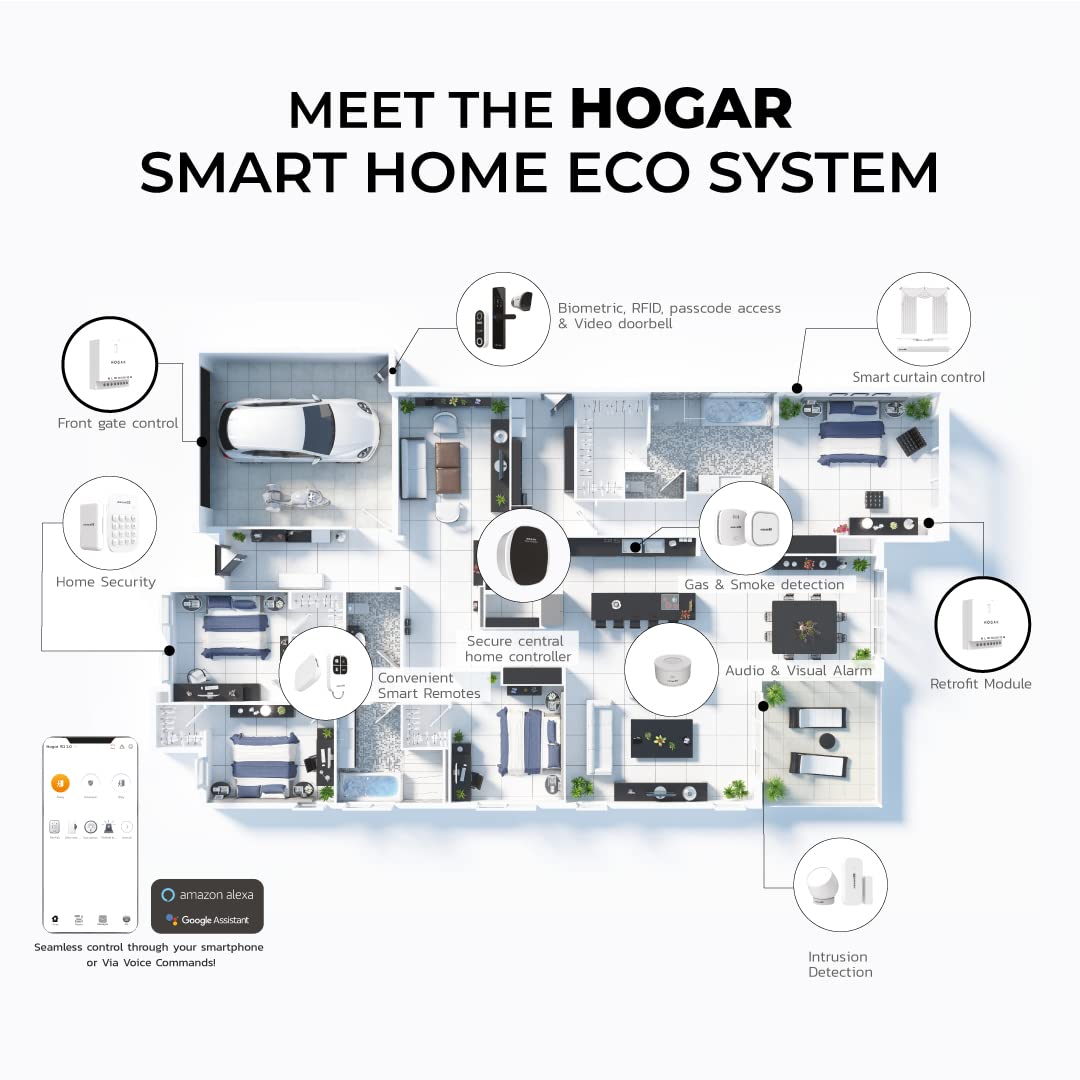
Image: A diagram illustrating the broader Hogar Smart Home Ecosystem, showcasing various interconnected smart devices and solutions for a comprehensive smart home experience.

Image: An infographic detailing reasons to choose Hogar, including being a one-stop solution, high quality, retrofit design, three-level security, and wide pre & post sales support, alongside a display of various Hogar products.
Ask a question about this manual
Ask about setup, troubleshooting, compatibility, parts, safety, or missing instructions. Manuals+ will review the question and use this page’s manual context to help answer it.