
1. Introduction
This manual provides comprehensive instructions for the safe and efficient operation, setup, and maintenance of the Festool OF 1400 EBQ-Plus Router. It covers its key features, including a torsion-proof design, quick cutter changes, precise depth adjustment, and effective dust extraction, ensuring optimal performance for various routing tasks.

Figure 1.1: Festool OF 1400 EBQ-Plus Router with included accessories and Systainer storage case.
2. Safety Information
Always observe the following safety precautions when operating the Festool OF 1400 EBQ-Plus Router to prevent injury and damage to the tool.
- Read the Manual: Before operation, thoroughly read and understand all instructions and safety warnings in this manual.
- Personal Protective Equipment (PPE): Always wear safety glasses, hearing protection, and a dust mask. Use gloves when handling cutters.
- Work Area: Keep the work area clean, well-lit, and free of clutter. Ensure proper ventilation, especially when routing materials that produce fine dust.
- Secure Workpiece: Always clamp or otherwise secure the workpiece firmly to prevent movement during operation.
- Proper Cutters: Use only sharp, correctly sized, and undamaged router bits suitable for the material and application.
- Electrical Safety: Ensure the power supply matches the tool's specifications. Do not operate in damp or wet conditions. Inspect the power cord for damage before each use.
- Tool Maintenance: Disconnect the power before making adjustments, changing accessories, or performing maintenance.
- Avoid Overreaching: Maintain proper footing and balance at all times.
- Dust Extraction: Connect a dust extraction system to minimize dust exposure and maintain a clear view of the workpiece.
3. Package Contents
The Festool OF 1400 EBQ-Plus Router package includes the following items:
- Festool OF 1400 EBQ-Plus Router
- Systainer SYS3 M 337
- Collet diameter 8 mm
- Collet diameter 12 mm
- Side stop with fine adjustment
- Copy ring diameter 30 mm
- Extraction hood (top)
- Chip collector
- Open-end wrench SW 24
- Plug it mains cable (4 m)
- Cutter box (empty, for storing bits)
4. Setup
4.1. Installing a Router Bit
- Ensure the router is disconnected from the power supply.
- Press the spindle lock button to secure the spindle.
- Insert the desired router bit into the appropriate collet (8mm or 12mm). Ensure the shank is inserted as far as possible without bottoming out.
- Tighten the collet nut firmly using the supplied open-end wrench (SW 24). Do not overtighten.
- Release the spindle lock.
4.2. Attaching Dust Extraction
For optimal dust collection, connect a suitable dust extractor to the router's dust port.
- Attach the chip collector and top extraction hood to the router base.
- Connect the hose from your dust extractor to the dust port on the chip collector.
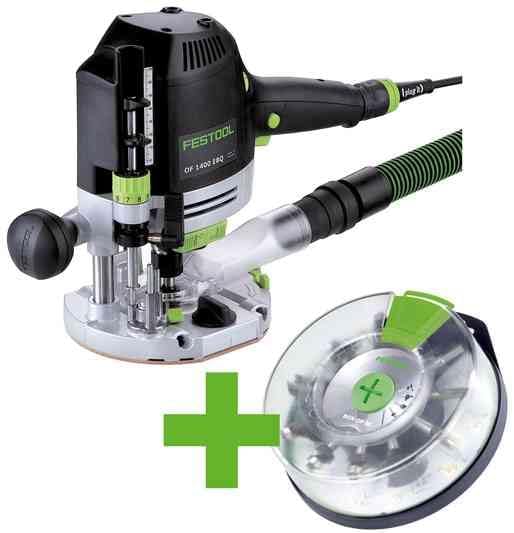
Figure 4.1: Router with dust extraction hose and clear base attached for efficient chip collection.
4.3. Attaching the Side Stop
The side stop with fine adjustment allows for precise routing parallel to an edge.
- Slide the side stop assembly onto the guide rods at the base of the router.
- Secure it in place using the locking knobs.
- Use the fine adjustment knob to set the desired distance from the edge.
5. Operating Instructions
5.1. Adjusting Routing Depth
The OF 1400 EBQ-Plus features a precise 1/10 mm depth adjustment system.
- Place the router on the workpiece.
- Release the plunge lock.
- Lower the router until the bit touches the workpiece surface.
- Lock the plunge mechanism.
- Use the fine adjustment knob to set the desired routing depth. The scale provides accurate readings.
- For deeper cuts, it is recommended to make multiple passes, gradually increasing the depth.
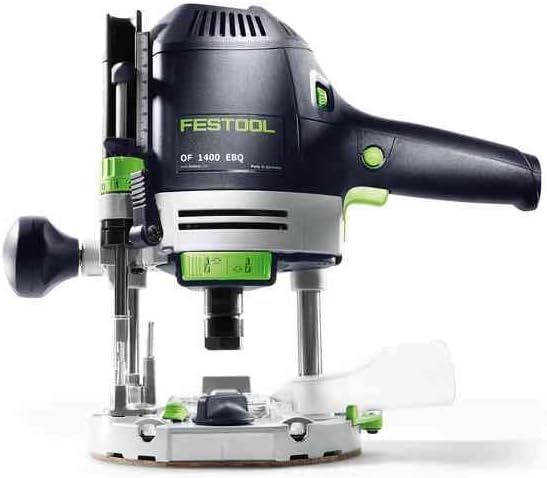
Figure 5.1: Detailed view of the router's controls, including the depth adjustment mechanism.
5.2. Powering On and Off
- Connect the router to a suitable power outlet (230V).
- To turn on, press the power switch.
- To turn off, release the power switch. The quick brake system will rapidly stop the bit rotation.
5.3. Speed Control
The router features variable speed control (10,000 - 22,500 min⁻¹) via the MMC electronic system. Adjust the speed according to the router bit diameter and the material being routed. Lower speeds are generally used for larger bits and harder materials.
5.4. General Routing Techniques
- Always move the router against the direction of bit rotation (climb cutting is generally not recommended for handheld routers).
- Maintain a steady, consistent feed rate. Avoid forcing the tool.
- Ensure the workpiece is securely clamped.
- For edge routing, use the side stop or a guide rail for straight cuts.

Figure 5.2: A user demonstrating proper handling of the router during operation.

Figure 5.3: Router being used with a guide rail system for accurate and straight routing.
6. Maintenance
Regular maintenance ensures the longevity and optimal performance of your Festool OF 1400 EBQ-Plus Router.
- Cleaning: After each use, disconnect the power and clean the router, especially the collet area and plunge mechanism, from dust and debris using a brush or compressed air.
- Collet Inspection: Regularly inspect the collet and collet nut for wear or damage. Replace if necessary to ensure proper bit gripping.
- Carbon Brushes: The motor uses carbon brushes. Refer to the service manual or contact Festool service for brush inspection and replacement if the tool shows signs of reduced power or sparking.
- Power Cord: Inspect the power cord for cuts, abrasions, or other damage. Replace damaged cords immediately.
- Storage: Store the router and its accessories in the Systainer in a dry, secure location, away from direct sunlight and extreme temperatures.
7. Troubleshooting
| Problem | Possible Cause | Solution |
|---|---|---|
| Router does not start. | No power supply; damaged cord; faulty switch. | Check power connection. Inspect cord for damage. Contact service if switch is faulty. |
| Excessive vibration or poor cut quality. | Dull or damaged router bit; loose collet; incorrect speed setting. | Replace or sharpen bit. Ensure collet is tightened. Adjust speed for material. |
| Motor overheats. | Overloading the tool; insufficient ventilation; dull bit. | Reduce feed rate or depth of cut. Ensure vents are clear. Use sharp bits. |
| Dust extraction is ineffective. | Dust port clogged; dust extractor not connected or insufficient power. | Clear dust port. Ensure dust extractor is properly connected and operating. |
For issues not listed here, please contact Festool customer support or an authorized service center.
8. Technical Specifications
| Model | OF 1400 EBQ-Plus |
| Part Number | 576540 |
| Power Consumption | 1400 W |
| Voltage | 230 Volts |
| Idle Speed | 10,000 - 22,500 min⁻¹ |
| Collet Diameter | 6.00 - 12.70 mm (includes 8 mm and 12 mm) |
| Milling Stroke | 70.00 mm |
| Milling Depth Fine Adjustment | 8.00 mm |
| Table Opening | 63.00 mm |
| Dust Extraction Connection | Ø 27/36 mm |
| Cable Length | 4.00 m |
| Product Weight | 4.70 kg (10.34 pounds) |
| Dimensions (L x W x H) | 0.39 x 0.39 x 0.39 inches (Note: These dimensions likely refer to packaging, not the tool itself) |
Note: Specifications are subject to change without notice.
9. Warranty and Support
Festool provides a comprehensive warranty for its products. Please refer to the official Festool website or your purchase documentation for detailed warranty terms and conditions specific to your region.
For technical support, service, or spare parts, please contact your authorized Festool dealer or visit the official Festool website:


