1. Introduction
Thank you for choosing the Braun TexStyle 1 Steam Iron, model SI1009OR. This manual provides essential information for the safe and efficient use, maintenance, and troubleshooting of your new steam iron. Please read these instructions carefully before first use and keep them for future reference.
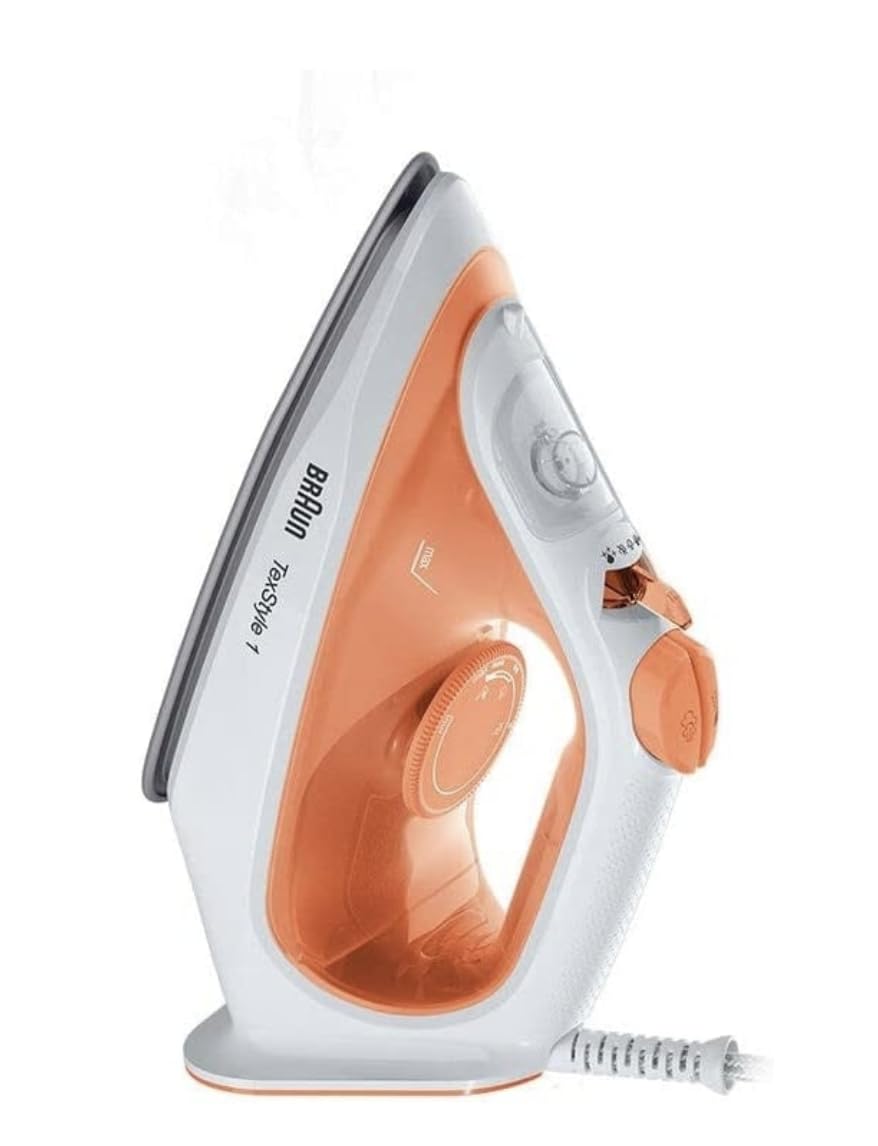
Image 1.1: Front view of the Braun TexStyle 1 Steam Iron, showcasing its orange and white design.
2. Important Safety Instructions
When using electrical appliances, basic safety precautions should always be followed to reduce the risk of fire, electric shock, and injury to persons, including the following:
- Read all instructions before using the iron.
- Do not leave the iron unattended while it is connected to the power supply or on an ironing board.
- To protect against the risk of electric shock, do not immerse the iron in water or other liquids.
- Always turn the iron OFF before plugging or unplugging from the outlet.
- Do not operate any appliance with a damaged cord or plug, or after the appliance malfunctions or has been dropped or damaged in any manner.
- Close supervision is necessary for any appliance being used by or near children.
- Use the iron only for its intended use.
- The iron must be used and rested on a stable surface.
- The filling aperture must not be opened during use.
3. Product Overview
The Braun TexStyle 1 Steam Iron SI1009OR is designed for efficient and convenient ironing. Key features include a non-stick soleplate, 1900W power, and a self-cleaning function.
Components:
- Water Spray Nozzle
- Water Filling Inlet
- Steam Control Slider (Dry/Steam/Eco)
- Spray Button
- Steam Boost Button
- Temperature Control Dial
- Indicator Light
- Handle
- Power Cord
- Non-Stick Soleplate
- Water Tank (220 ml capacity)

Image 3.1: View of the non-stick soleplate and the iron's base, highlighting its design.
4. Setup
4.1 Unpacking
- Carefully remove the iron from its packaging.
- Remove any stickers or protective films from the soleplate or body of the iron.
- Keep packaging materials out of reach of children.
4.2 First Use Preparation
- Before first use, it is recommended to iron an old piece of damp cloth to ensure any manufacturing residues are removed from the soleplate.
- Fill the water tank as described in the 'Filling the Water Tank' section below.
5. Operating Instructions
5.1 Filling the Water Tank
- Ensure the iron is unplugged from the power outlet.
- Set the steam control slider to the 'Dry' position.
- Open the water filling inlet cover.
- Hold the iron in a tilted position and fill the water tank with tap water up to the 'MAX' mark. Do not overfill.
- Close the water filling inlet cover securely.
5.2 Setting the Temperature
- Plug the iron into a suitable power outlet (220V).
- Turn the temperature control dial to the desired setting according to the fabric type. Refer to the fabric care labels on your garments.
- The indicator light will illuminate, indicating the iron is heating up. The iron heats up quickly, typically within 35 seconds.
- The indicator light will turn off when the set temperature is reached.
5.3 Dry Ironing
- Ensure the water tank is empty or the steam control slider is set to the 'Dry' position.
- Set the temperature according to the fabric type.
- Once the indicator light turns off, you can begin dry ironing.
5.4 Steam Ironing
- Fill the water tank as described in section 5.1.
- Set the temperature control dial to a steam-suitable setting (usually between '••' and 'MAX'). Steam is only produced at higher temperatures.
- Once the indicator light turns off, move the steam control slider to the desired steam position (continuous steam or Eco mode).
- For an extra burst of steam, press the steam boost button. This delivers up to 120 g/min of steam.
- For energy saving, select the 'Eco' mode, which reduces steam output by 50%.
5.5 Water Spray Function
- The water spray function can be used with dry or steam ironing to dampen stubborn creases.
- Press the spray button to release a fine mist of water onto the fabric.
5.6 Vertical Steaming
- The steam boost function can be used for vertical steaming of hanging garments, curtains, etc.
- Hold the iron vertically a few centimeters away from the fabric and press the steam boost button.
5.7 After Use
- Turn the temperature control dial to 'MIN' and set the steam control slider to 'Dry'.
- Unplug the iron from the power outlet.
- Allow the iron to cool down completely before storing.
- Empty any remaining water from the tank to prevent limescale buildup.
6. Maintenance and Cleaning
6.1 Self-Cleaning Function
The iron features a self-cleaning function to remove scale particles from the steam chamber. Perform this function regularly, especially in hard water areas.
- Fill the water tank to the 'MAX' level.
- Set the steam control slider to 'Dry' and the temperature dial to 'MAX'.
- Plug in the iron and wait for the indicator light to turn off.
- Unplug the iron.
- Hold the iron horizontally over a sink.
- Press and hold the self-clean button (refer to product diagram if available, otherwise use steam boost repeatedly) to allow hot water and steam to flush out scale.
- Gently shake the iron back and forth until the water tank is empty.
- Plug in the iron again and let it heat up to dry the soleplate.
- Unplug and let it cool before storing.
6.2 Cleaning the Soleplate
- After the iron has cooled down, wipe the soleplate with a damp cloth and a non-abrasive liquid cleaner if necessary.
- Do not use abrasive pads, scouring powders, or harsh chemicals as these can damage the non-stick coating.
6.3 Storage
- Always store the iron upright on its heel rest, with the power cord neatly wrapped.
- Ensure the iron is completely cool and empty of water before storage.
7. Troubleshooting
| Problem | Possible Cause | Solution |
|---|---|---|
| Iron does not heat up. | Not plugged in; power outlet faulty; temperature dial set to MIN. | Check power connection; try another outlet; set temperature dial to desired setting. |
| No steam or insufficient steam. | Water tank empty; temperature too low; steam control set to Dry; scale buildup. | Fill water tank; set temperature higher (to steam-suitable range); move steam control to steam position; perform self-clean. |
| Water leaks from soleplate. | Temperature too low for steam; water tank overfilled; iron left horizontal too long with steam on. | Increase temperature; do not overfill water tank; store upright; ensure steam control is on Dry when not actively steaming. |
| White flakes coming from soleplate. | Limescale buildup. | Perform self-cleaning function. Use distilled water in hard water areas. |
8. Specifications
- Brand: Braun
- Model Number: BRSI1009OR (also referred to as SI1009OR)
- Power: 1900 W
- Voltage: 220 V
- Water Tank Capacity: 220 ml
- Continuous Steam: 25 g/min
- Steam Boost: 120 g/min
- Heat-up Time: Approximately 35 seconds
- Soleplate: Non-Stick
- Special Features: Self-cleaning, Eco mode (50% energy saving), Water spray
- Power Cord Length: 1.9 meters
- Item Weight: 1.2 kg
- Product Dimensions: 60 x 60 x 85 cm (Note: These dimensions typically refer to packaging; actual iron dimensions are smaller.)
- Primary Material: Stainless Steel (for soleplate)
- Color: Orange
- Year of Manufacture: 2021
9. Warranty and Support
For warranty information and customer support, please refer to the warranty card included with your product or visit the official Braun website. Keep your purchase receipt as proof of purchase for any warranty claims.
You can also visit the Braun Store on Amazon for more product information and support.


