
Introduction
This manual provides detailed instructions for setting up, operating, maintaining, and troubleshooting your TAGG Verve Neo Smartwatch. Please read this guide thoroughly to ensure optimal performance and longevity of your device.
Package Contents
Verify that all items are present in your package:
- TAGG Verve Neo Smartwatch
- Watch Straps
- Charging Cable
- User Manual (this document)
Setup
1. Initial Charging
Before first use, fully charge your smartwatch. Connect the charging cable to the charging port on the back of the watch and to a USB power source. The watch display will indicate charging status.

Image: The TAGG Verve Neo Smartwatch connected to its charging cable, illustrating the charging process.
2. App Installation and Pairing
To unlock the full functionality of your smartwatch, download and install the official TAGG companion application on your smartphone. The app is compatible with Android 4.4 & above and iOS 8.0 & above.
- Search for the "TAGG" app in your smartphone's app store (Google Play Store for Android, Apple App Store for iOS).
- Install the application.
- Open the app and follow the on-screen instructions to create an account or log in.
- Ensure Bluetooth is enabled on your smartphone.
- In the app, select "Add Device" or similar option and choose "TAGG Verve Neo" from the list of available devices.
- Confirm the pairing request on both your smartphone and the smartwatch.
3. Basic Settings
After successful pairing, you can customize initial settings through the app, such as time format, unit preferences, and personal profile information.
Operating Your Smartwatch
Display and Navigation
The TAGG Verve Neo features a 1.69-inch HD display. Navigate through menus and features using touch gestures:
- Swipe Up/Down: Scroll through notifications or menu options.
- Swipe Left/Right: Access quick widgets or different feature screens.
- Tap: Select an item or confirm an action.
- Side Button: Press to return to the home screen or wake the display.
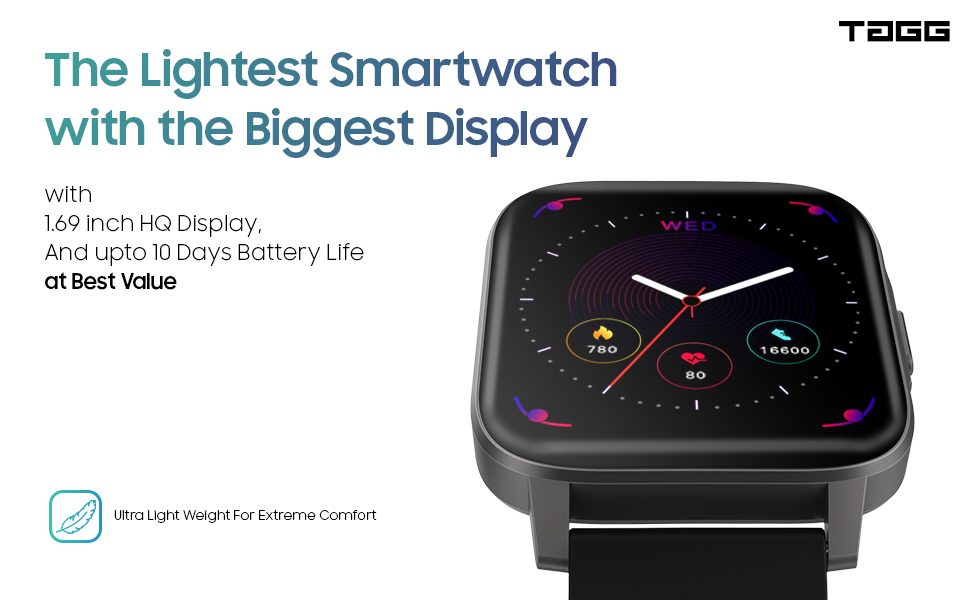
Image: The smartwatch display showcasing health metrics like steps, heart rate, and calories, highlighting its large vivid display.
Key Features
- Health Monitoring:
- Heart Rate Tracking: Real-time 24/7 heart rate monitoring.
- Blood Oxygen (SpO2) Tracking: Real-time SpO2 level measurement.
- Sleep Tracking: Monitors sleep patterns and provides daily reports.
- Female Menstrual Cycle Tracking: Assists in tracking menstrual cycles.

Image: Close-up of the smartwatch's rear, highlighting the Sense+ Technology sensors for accurate health data tracking.
- Sports Modes: Access over 60 sports modes to track various activities. The in-app GPS feature helps map your workout routes.
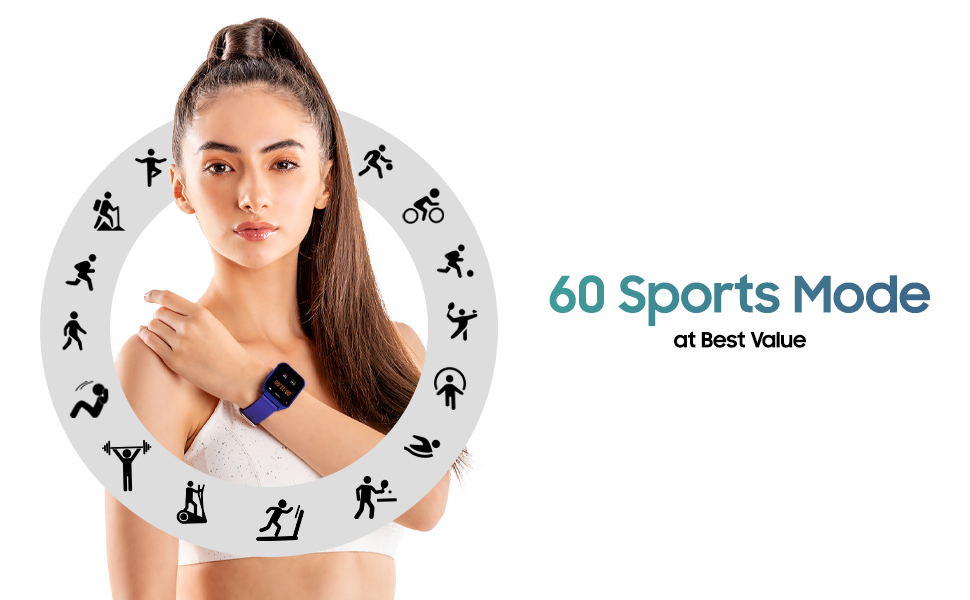
Image: A visual representation of the 60 sports modes available on the smartwatch, encircling a user.
- Watch Faces: Choose from over 150 watch faces available in the app library to personalize your device.

Image: A selection of diverse watch faces and interchangeable strap options, demonstrating customization possibilities.
- Notifications: Receive vibration alerts for calls, SMS, and social media notifications directly on your wrist.

Image: The smartwatch screen displaying incoming notifications from messaging and social media applications.
- Built-in Tools: The smartwatch includes built-in games and a calculator for convenience.
- Reminders: Set up medicine, sedentary, and hydration reminders through the app to stay on track with your health goals.

Image: The smartwatch interface displaying icons for various smart reminders, including medicine, sedentary, and hydration alerts.
Maintenance
Cleaning Your Smartwatch
Regular cleaning helps maintain the device's appearance and functionality:
- Wipe the screen and body with a soft, damp, lint-free cloth.
- Avoid using harsh chemicals, abrasive cleaners, or aerosol sprays.
- Ensure the charging contacts on the back of the watch are clean and dry before charging.
Water Resistance
The TAGG Verve Neo Smartwatch is IP68 waterproof, meaning it is protected against dust ingress and can withstand immersion in water up to 1.5 meters for 30 minutes. While it is suitable for daily use and light water exposure (e.g., hand washing, rain), it is not recommended for diving, high-pressure water activities, or prolonged submersion.

Image: The smartwatch shown partially submerged in water, illustrating its IP68 waterproof capability.
Battery Care
- Avoid extreme temperatures, which can affect battery life.
- Charge the device using only the provided charging cable.
- Do not attempt to replace the battery yourself.
Troubleshooting
| Issue | Possible Solution |
|---|---|
| Watch not turning on/charging | Ensure the charging cable is securely connected to both the watch and the power source. Check if the power source is active. Clean the charging contacts. |
| Unable to pair with smartphone | Make sure Bluetooth is enabled on your phone. Restart both the watch and your phone. Ensure the TAGG app is updated to the latest version. Try unpairing and re-pairing the device. |
| Inaccurate sensor readings (Heart Rate, SpO2, Steps) | Ensure the watch is worn snugly on your wrist, not too tight or too loose. Clean the sensor area on the back of the watch. Environmental factors or movement can sometimes affect accuracy. Consult the app for calibration options if available. |
| Display not waking up with wrist raise | Check the "Raise to Wake" setting in the smartwatch or companion app to ensure it is enabled. Adjust the sensitivity if possible. |
| Notifications not appearing | Verify that notification permissions are granted to the TAGG app on your smartphone. Ensure Bluetooth connection is stable. Check notification settings within the app for specific applications. |
Specifications
| Feature | Detail |
|---|---|
| Model | Verve Neo |
| Display Size | 1.69 Inches |
| Dimensions (LxWxH) | 44 x 38 x 10 Millimeters |
| Item Weight | 21 g |
| Battery Life (Average) | Up to 10 Days |
| Battery Capacity | 150 mAh (Lithium Polymer) |
| Water Resistance | IP68 |
| Connectivity | Bluetooth, GPS (in-app) |
| Operating System Compatibility | Android 4.4 & above, iOS 8.0 & above |
| Special Features | Alarm Clock, Blood Pressure Monitor (implied by SpO2/HR), Calorie Tracker, Distance Tracker, Heart Rate Monitor, Sleep Tracker, Menstrual Cycle Tracker, Games, Calculator |
Warranty and Support
Warranty Information
Your TAGG Verve Neo Smartwatch comes with a 1-Year Limited Warranty from the date of purchase. This warranty covers manufacturing defects. Please retain your proof of purchase for warranty claims. The warranty does not cover damage caused by misuse, accidents, unauthorized repairs, or normal wear and tear.
Customer Support
For technical assistance, warranty claims, or further inquiries, please visit the official TAGG website or contact their customer support. You can also find more information and products on the TAGG Store on Amazon.