1. Introduction and Overview
This manual provides essential instructions for the safe and effective use of your Moulinex Steam Cooking Accessory. Designed to expand the capabilities of your Moulinex Clickchef Food Processor, this accessory enables healthy steam cooking, preserving nutrients and flavors in your food.
Please read this manual thoroughly before first use and keep it for future reference.
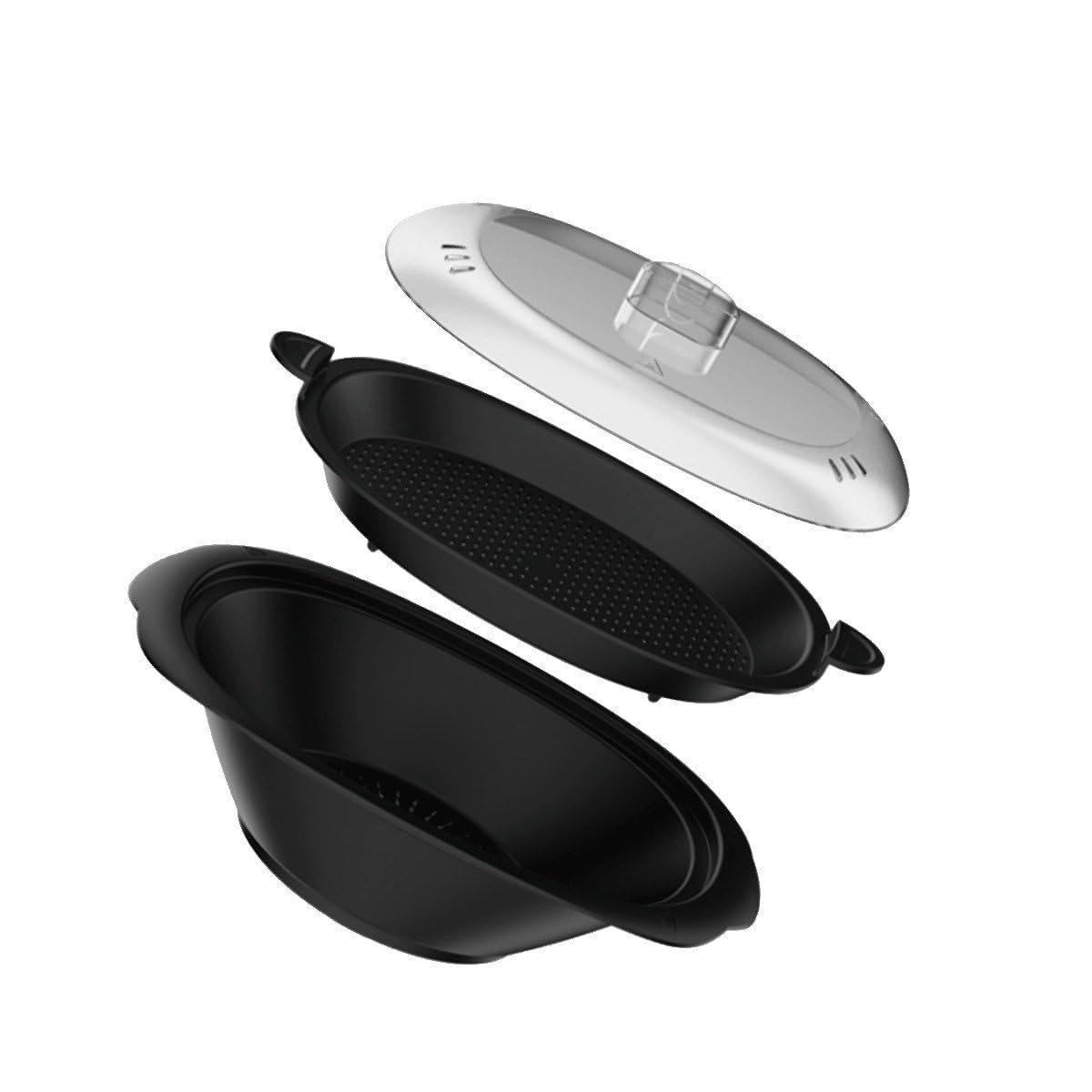
Image 1.1: Moulinex Steam Cooking Accessory. This image shows the complete steam cooking accessory, including the main basket and lid.
2. Compatible Models
This Steam Cooking Accessory (Model XF38K800) is specifically designed for use with the following Moulinex Clickchef Food Processor series:
- Moulinex Clickchef HF452 series (e.g., HF4521, HF452110, HF452111)
- Moulinex Clickchef HF456 series (e.g., HF4568, HF456810, HF456811)
- Moulinex Clickchef HF506 series (e.g., HF5061, HF506110, HF506121)
Always verify your food processor's model number, typically found on the nameplate located on the underside of the appliance, to ensure compatibility.
3. Product Contents
The Moulinex Steam Cooking Accessory package typically includes:
- Main Steam Basket
- Steam Basket Insert (for cooking multiple items simultaneously)
- Lid for Steam Basket
4. Setup
Follow these steps to correctly set up the steam cooking accessory on your Moulinex Clickchef Food Processor:
- Ensure Safety: Before assembly, ensure your Moulinex Clickchef Food Processor is unplugged from the power outlet and switched off.
- Prepare the Main Bowl: Place the main cooking bowl of your food processor onto the motor unit.
- Add Water: Pour the required amount of water into the main cooking bowl. Refer to your food processor's manual for specific water levels for steam cooking.
- Position the Steam Basket: Carefully place the main steam basket onto the rim of the food processor's main cooking bowl. Ensure it is seated securely.
- Use the Insert (Optional): If cooking different items or larger quantities, place the steam basket insert inside the main steam basket.
- Place Food: Arrange your food items in the steam basket(s), ensuring not to overfill or block steam circulation.
- Secure the Lid: Place the lid onto the steam basket, ensuring it is properly closed to retain steam.
5. Operating Instructions (Steam Cooking)
Once the accessory is set up and food is placed, proceed with steam cooking using your Moulinex Clickchef Food Processor:
- Plug In and Power On: Plug your food processor into a power outlet and switch it on.
- Select Program: Refer to your Moulinex Clickchef Food Processor's instruction manual to select the appropriate steam cooking program, temperature, and cooking time for your specific food items.
- Start Cooking: Initiate the cooking process according to your food processor's controls.
- Monitor Progress: Avoid lifting the lid frequently during cooking to prevent steam loss and ensure efficient cooking.
- Careful Removal: Once cooking is complete, use oven mitts or heat-resistant gloves to carefully remove the hot lid and steam basket. Be aware of escaping steam.
- Serve: Transfer the steamed food to a serving dish.
6. Cleaning and Maintenance
Proper cleaning and maintenance will prolong the life of your steam cooking accessory:
- Unplug and Cool: Always ensure the food processor is unplugged and the accessory has cooled down completely before cleaning.
- Disassemble: Separate the main steam basket, insert, and lid.
- Washing: The steam cooking accessory components are generally dishwasher safe. Alternatively, wash them by hand using warm, soapy water and a non-abrasive sponge.
- Rinse and Dry: Rinse all parts thoroughly under running water to remove any soap residue. Dry completely before storing.
- Storage: Store the clean and dry accessory in a safe place, away from direct sunlight and extreme temperatures.
7. Troubleshooting
If you encounter issues while using the steam cooking accessory, consider the following:
- No Steam Production: Ensure sufficient water has been added to the main cooking bowl of the food processor. Verify that the lid is properly secured.
- Food Not Cooking Evenly: Avoid overfilling the steam baskets. Ensure food items are cut into similar sizes for consistent cooking. Check that the lid is fully closed.
- Accessory Not Fitting: Double-check that your food processor model is listed as compatible. Ensure the accessory is correctly aligned and seated on the main cooking bowl.
For persistent issues, refer to your Moulinex Clickchef Food Processor's main instruction manual or contact Moulinex customer support.
8. Specifications
| Brand | Moulinex |
| Accessory Model Number | XF38K800 |
| Compatible Food Processor Models | Moulinex Clickchef HF452, HF456, HF506 series |
| Weight | 1.3 Kilograms |
| Material | Durable food-grade plastic |
9. Warranty and Support
For information regarding the warranty of your Moulinex Steam Cooking Accessory, please refer to the documentation provided with your original Moulinex Clickchef Food Processor or visit the official Moulinex website.
If you require technical assistance or have questions not covered in this manual, please contact Moulinex customer support. Contact details can typically be found on the Moulinex official website or in your food processor's main manual.
Note: Information regarding spare parts availability for this accessory is currently unavailable.


