
1. Introduction
The TBS Crossfire Nano RX PRO is a compact FPV long-range drone receiver designed to boost telemetry output power without sacrificing size. This receiver offers enhanced performance for your FPV drone setup, ensuring reliable communication over extended distances. This manual provides essential information for the proper installation, operation, and maintenance of your Nano RX PRO.
2. What's in the Box
- 1x TBS Crossfire Nano Receiver Pro
- 1x TBS Crossfire Immortal T Antenna
- 1x Spare shrink tube
- 6x 30awg silicon connection wires (2 black, 2 red, 1 white, 1 yellow)
- 1x Pin header 1x4
3. Specifications
| Feature | Detail |
|---|---|
| Weight | 0.5g (receiver only) |
| Size | 11mm x 18mm |
| Input Power | +3.3V to 8.4V |
| Required Firmware | V6.14 or higher |
| Special Feature | Enhanced Long Range Telemetry |
| Connectivity Technology | TBS Crossfire |
4. Setup
- Firmware Update: Ensure your TBS Crossfire transmitter and the Nano RX PRO receiver are running the latest compatible firmware (V6.14 or higher). Refer to the official TBS website for firmware downloads and update instructions.
- Wiring: Connect the Nano RX PRO to your flight controller using the provided silicon connection wires. Follow the wiring diagram specific to your flight controller and the Nano RX PRO. Typically, this involves connecting power (VCC), ground (GND), and two signal wires (TX/RX for CRSF protocol).
- Antenna Installation: Securely attach the TBS Crossfire Immortal T Antenna to the receiver. Position the antenna away from other electronics and carbon fiber parts of your drone for optimal signal reception. Use the spare shrink tube to protect connections if necessary.
- Binding: Power on your flight controller and the Nano RX PRO. Put your TBS Crossfire transmitter into binding mode. The receiver should automatically enter binding mode or require a button press, depending on the firmware version. Once bound, the LED on the receiver will indicate a successful connection.
- Flight Controller Configuration: Configure your flight controller's software (e.g., Betaflight, ArduPilot) to recognize the Crossfire protocol (CRSF) on the correct UART port. Verify that all channels are responding correctly in the receiver tab.
5. Operating
Once successfully set up and bound, the TBS Crossfire Nano RX PRO operates seamlessly with your TBS Crossfire transmitter. Ensure your transmitter is powered on and within range before powering your drone. The receiver provides robust, low-latency control and telemetry data back to your transmitter, including battery voltage, RSSI (Received Signal Strength Indicator), and other critical flight parameters.
Always perform a range check before flying, especially after any changes to your setup. Monitor your RSSI and link quality indicators on your transmitter to ensure a safe and reliable connection during flight.
6. Maintenance
- Regular Inspection: Periodically inspect the receiver and antenna for any signs of damage, such as frayed wires, cracked shrink tubing, or bent antenna elements.
- Cleanliness: Keep the receiver free from dust, dirt, and moisture. Use a soft, dry brush or compressed air to clean if necessary. Avoid using liquids.
- Firmware Updates: Regularly check the TBS website for new firmware releases. Updates often include performance improvements, bug fixes, and new features.
- Antenna Care: The Immortal T Antenna is durable, but avoid excessive bending or sharp impacts. Ensure it is always mounted in a way that minimizes obstruction.
7. Troubleshooting
- No Link/Binding Issues:
- Ensure both transmitter and receiver are powered on and within range.
- Verify firmware versions are compatible and up to date.
- Check wiring connections for continuity and correct polarity.
- Try rebinding the receiver to the transmitter.
- Poor Range/Signal Loss:
- Check antenna placement and orientation. Ensure it's not obstructed by carbon fiber or other components.
- Inspect the antenna for damage.
- Ensure the transmitter's power output is set correctly.
- Check for local interference sources.
- Telemetry Not Working:
- Verify the flight controller is configured for CRSF telemetry on the correct UART.
- Check wiring between the receiver and flight controller for telemetry data.
- Ensure the flight controller's OSD (On-Screen Display) is configured to show telemetry data if applicable.
8. Product Images
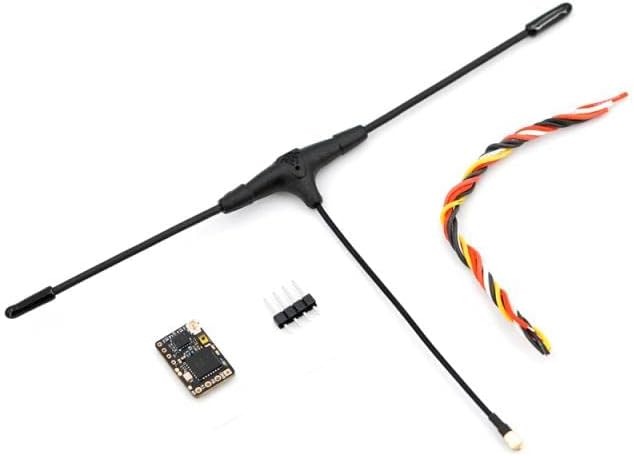
Image 1: The TBS Crossfire Nano Receiver Pro kit, including the receiver module, Immortal T antenna, and connection wires.
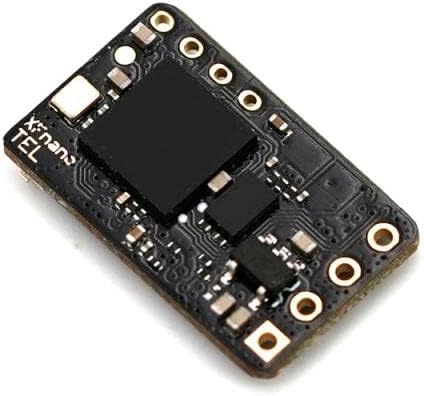
Image 2: A detailed close-up of the compact TBS Crossfire Nano Receiver Pro module, highlighting its small form factor.
9. Warranty and Support
For warranty claims, technical support, or further assistance, please refer to the official TBS (Team BlackSheep) website or contact their customer service directly. Keep your proof of purchase for warranty validation. Specific warranty terms and conditions may vary by region and product.


