
1. Introduction
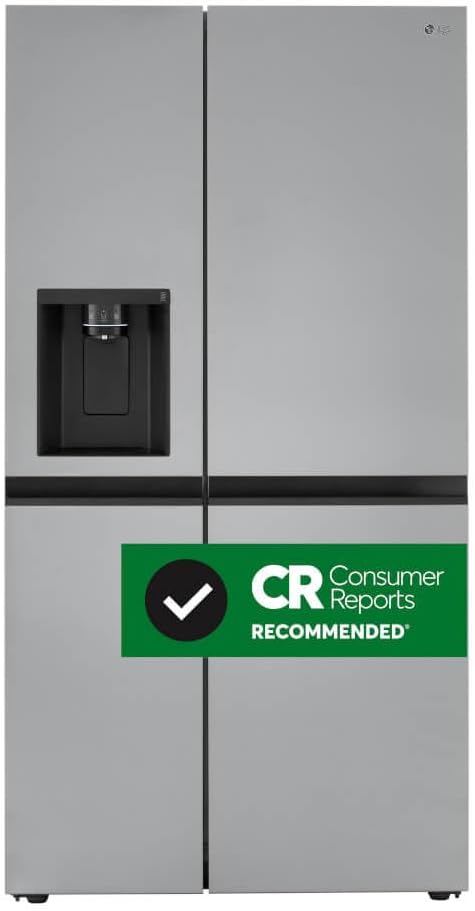
This manual provides essential information for the safe and efficient operation, installation, and maintenance of your LG 27 cu. ft. Side-by-Side Refrigerator with Smooth Touch Ice Dispenser, Model LRSXS2706S. Please read all instructions thoroughly before using your appliance.
Key features of this refrigerator include a 27.2 cu. ft. total capacity, Smooth Touch Ice Dispenser, sleek flat-panel design with pocket handles, Interior Touch Display Controls, Door Cooling+, and a SpacePlus™ Ice Maker. It also features a Craft Ice™ Maker for spherical ice.

2. Safety Information
Always follow basic safety precautions to reduce the risk of fire, electric shock, or injury when using your refrigerator. This product contains chemicals known to the State of California to cause cancer and birth defects or other reproductive harm (Proposition 65 warning).
- Ensure the refrigerator is properly grounded.
- Do not store explosive substances such as aerosol cans with a flammable propellant in this appliance.
- Keep ventilation openings clear of obstruction.
- Do not use mechanical devices or other means to accelerate the defrosting process, other than those recommended by the manufacturer.
- Do not damage the refrigerant circuit.
3. Setup
3.1. Installation Clearance
Proper clearance is essential for optimal performance and ventilation. Ensure the following minimum clearances:
- Sides: 1/8 inch (0.3 cm)
- Top: 1 inch (2.5 cm)
- Back: 2 inches (5 cm)

3.2. Initial Cleaning
Before first use, clean the interior and exterior of the refrigerator with a soft cloth and mild detergent. Rinse thoroughly and dry.
3.3. Connecting Water Line
Connect the water line to the refrigerator's water inlet valve. Ensure all connections are secure and leak-free. Flush the water system for several minutes before consuming water or ice.
4. Operating Instructions
4.1. Control Panel (ThinQ Display)
The ThinQ display on the exterior of the freezer door allows you to control various functions and monitor the refrigerator's status. This includes temperature settings for the freezer and refrigerator, water filter status, and special features like Ice Plus and Smart Grid Wi-Fi.
4.2. Smooth Touch Ice & Water Dispenser
The external dispenser provides filtered water, cubed ice, and crushed ice. Simply press your cup against the lever to dispense. The UVnano feature helps reduce bacteria in the water nozzle.
This video demonstrates the Smooth Touch Ice Dispenser in action, showing how to dispense cubed ice. It also briefly showcases the Craft Ice Maker.
4.3. SpacePlus™ Ice Maker (Door Ice)
Located in the freezer door, the SpacePlus™ Ice System provides traditional ice cubes, maximizing freezer shelf space. The ice bucket can be removed for easy access and cleaning.

4.4. Craft Ice™ Maker (Freezer Drawer)
The Craft Ice™ Maker, located in the freezer compartment, automatically produces slow-melting, spherical ice balls. This feature is ideal for specialty drinks.
This video highlights the Craft Ice Maker, demonstrating the production and collection of spherical ice balls, a feature beneficial for users who frequently use ice.
4.5. InstaView™ Door-in-Door®
The InstaView™ panel on the right refrigerator door allows you to see inside the easy-access compartment without opening the door. Double-tap the glass panel to illuminate the interior.

This video provides an overview of the LG Side-by-Side Refrigerator, including a demonstration of the InstaView feature where the door illuminates to show interior contents.
4.6. Interior Storage
The refrigerator features adjustable tempered glass shelves and multiple door bins for flexible storage. The freezer compartment also includes shelves and a drawer for organized storage of frozen items.

5. Maintenance
5.1. Cleaning the Exterior
The PrintProof™ Stainless Steel exterior can be cleaned with a soft, damp cloth. Avoid abrasive cleaners or harsh chemicals that may damage the finish.
5.2. Cleaning the Interior
Remove shelves and drawers and wash with a mild soap solution. Wipe down interior surfaces with a damp cloth and dry thoroughly. For stubborn odors, use a solution of baking soda and water.
5.3. Water Filter Replacement
The water filter (LT1000P) should be replaced approximately every 6 months or when the filter indicator light illuminates on the ThinQ display. Refer to the filter packaging for specific instructions.

5.4. Fresh Air Filter Replacement
The Fresh Air Filter helps maintain optimal air quality inside the refrigerator. Replace it as indicated by the ThinQ display or approximately every 6 months.
6. Troubleshooting
If you experience issues with your refrigerator, consult the following common troubleshooting tips:
- No Power: Check if the power cord is securely plugged in and the circuit breaker has not tripped.
- Temperature Issues: Ensure the temperature settings are correct and the doors are sealing properly. Avoid overfilling the compartments.
- Ice Maker Not Producing Ice: Verify the water line is connected and the ice maker is turned on. Check for any obstructions in the ice chute.
- Water Dispenser Not Working: Ensure the water line is connected and the water filter is correctly installed.
For more complex issues, utilize the SmartDiagnosis™ feature via the LG ThinQ app for remote assistance.
7. Specifications
| Feature | Specification |
|---|---|
| Brand | LG |
| Model Info | LRSXS2706S |
| Total Capacity | 27.2 Cubic Feet |
| Refrigerator Capacity | 17.52 Cubic Feet |
| Freezer Capacity | 9.64 Cubic Feet |
| Dimensions (D x W x H) | 34"D x 37"W x 74"H |
| Item Weight | 273 Pounds |
| Installation Type | Freestanding |
| Color | PrintProof Stainless Steel |
| Defrost System | Electric |
| Refrigerant | R-600A |
| Certification | Energy Star |
8. Warranty
- Parts & Labor: 1 Year
- Sealed System (Parts & Labor): 5 Years
- Compressor (Parts & Labor): 5 Years
For detailed warranty terms and conditions, please refer to the warranty card included with your product or visit the official LG website.
9. Support
For further assistance, technical support, or to order replacement parts, please refer to the user manual included with your refrigerator or visit the LG customer support website. You may also contact LG customer service directly.