
Introduction
The Portronics Power 10 is a versatile 10000 mAh power bank designed for portable charging. It features 22.5W Power Delivery (PD) fast charging, 15W wireless charging, and multiple output ports, including Type-C. This manual provides essential information for the safe and efficient use of your Power 10 device.
Product Features
- 10W Wireless Charging: Conveniently charge compatible smartphones wirelessly.
- 18W Type-C PD Output: Provides fast charging for smartphones and tablets via the Type-C port.
- Dual USB Output: Allows simultaneous charging of two devices via USB-A ports.
- Type-C Input: Enables efficient recharging of the power bank and supports laptop charging.
- Lightweight Design: Weighs approximately 273g for enhanced portability.
- LED Digital Display: Shows the remaining battery percentage and charging status.
Package Contents
- Portronics Power 10 Power Bank
- USB Charging Cable
- User Manual
Setup
Initial Charging of the Power Bank
Before first use, fully charge your Portronics Power 10 power bank. Connect the provided USB charging cable to the Type-C input port on the power bank and to a compatible USB wall adapter (not included). The LED digital display will show the charging progress. A full charge typically takes approximately 6 hours.

Image: The Portronics Power 10 power bank displaying its 10000mAh capacity and a smartphone being charged via cable, illustrating its high power capacity.
Understanding the Digital Display
The integrated LED digital display shows the current battery percentage of the power bank. This allows you to monitor the charge level accurately.

Image: A close-up view of the Portronics Power 10's LED digital display, clearly showing '75%' battery charge, indicating its digital display feature.
Operating Instructions
Wired Charging
- Connect one end of your device's charging cable to your smartphone or tablet.
- Connect the other end of the cable to one of the USB output ports (USB-A or Type-C PD) on the Power 10 power bank.
- The power bank will automatically begin charging your device. The digital display will show the power bank's remaining charge.

Image: The Portronics Power 10 power bank connected to two smartphones via USB cables, demonstrating its dual USB output capability for multitasking.
Wireless Charging
The Power 10 supports 10W wireless charging for compatible devices.
- Ensure your device supports wireless charging.
- Place your wireless charging compatible device directly onto the wireless charging pad area of the Power 10 power bank.
- Ensure the device is centered on the charging pad for optimal connection. The power bank will automatically detect and begin charging your device wirelessly.

Image: A smartphone being wirelessly charged on the Portronics Power 10, with the phone screen indicating '75% Charged', highlighting the 10W wireless charging feature.
Maintenance
- Keep the power bank away from water, moisture, and extreme temperatures.
- Avoid dropping or subjecting the device to strong impacts.
- Clean the power bank with a soft, dry cloth. Do not use harsh chemicals or abrasive materials.
- Store the power bank in a cool, dry place when not in use.
- For optimal battery life, fully charge the power bank at least once every three months if not used regularly.
Troubleshooting
- Power bank not charging: Ensure the charging cable is securely connected to both the power bank's Type-C input and a working power source. Try a different cable or adapter.
- Device not charging from power bank: Check if the power bank has sufficient charge. Ensure the charging cable is properly connected to both the power bank's output port and your device. For wireless charging, ensure your device is centered on the pad and supports wireless charging.
- Slow charging: Ensure you are using a fast-charging compatible cable and your device supports fast charging. For optimal speed, use the Type-C PD output.
- Digital display not working: Try charging the power bank to see if the display reactivates. If the issue persists, contact customer support.
Specifications
| Feature | Detail |
|---|---|
| Model Name | Power 10 |
| Model Number | POR-1210 |
| Battery Capacity | 10000 mAh |
| Battery Type | Lithium Polymer |
| Wireless Charging Output | 10W |
| Type-C PD Output | 18W |
| USB Output Ports | 2 |
| Type-C Input | Yes |
| Digital Display | Yes |
| Dimensions (L x W x T) | 15.2 x 9.9 x 2.2 cm |
| Weight | 273 Grams |
| Battery Charge Time | 6 Hours |
| Country of Origin | India |
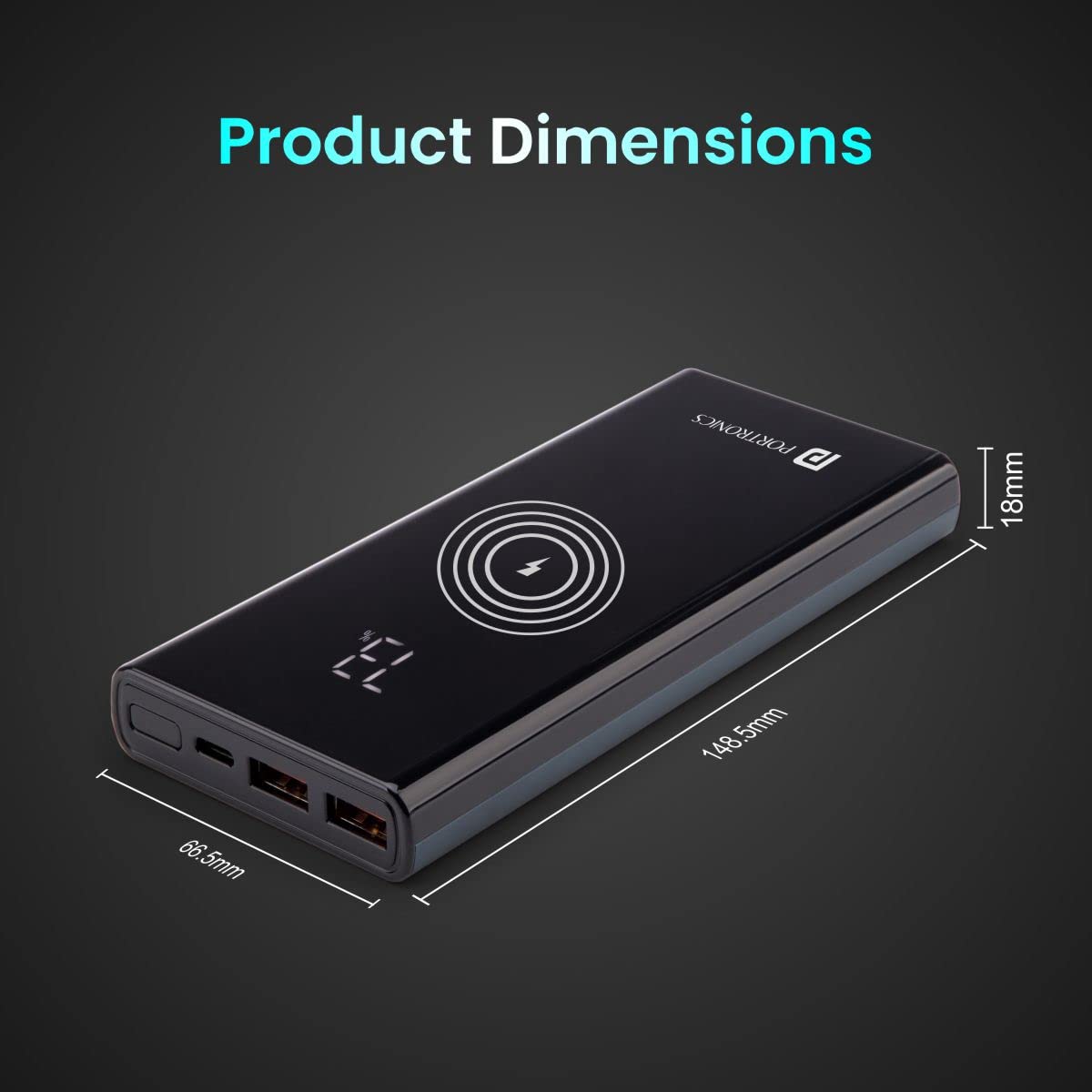
Image: A visual representation of the Portronics Power 10 power bank with its dimensions labeled: 148.5mm length, 68.5mm width, and 18mm thickness.
Safety Information
- Do not disassemble, modify, or repair the device yourself.
- Avoid exposure to direct sunlight, heat sources, or flammable materials.
- Do not use the power bank in environments with high humidity or dust.
- Keep out of reach of children.
- Dispose of the power bank responsibly according to local regulations.
Warranty and Support
Warranty
The Portronics Power 10 comes with a 1 Year Manufacturing Warranty from the date of purchase. This warranty covers manufacturing defects. Please retain your purchase receipt for warranty claims.
Customer Support
For any assistance, please contact Portronics customer support:
- Call/WhatsApp: 9555-245-245
- Email Support: https://support.portronics.com
- Operating Hours: 10 AM - 6 PM

Image: Portronics Port-Care support details, including contact number and email for personalized assistance.


