
Introduction
This manual provides essential information for the safe and efficient operation, installation, and maintenance of your Maxima Professional Convection Oven. Designed for baking, roasting, and grilling, this appliance is a valuable asset for any professional kitchen. Please read these instructions thoroughly before use and keep them for future reference.
Safety Instructions
WARNING: Failure to follow these safety instructions may result in fire, electric shock, or personal injury.
- Always ensure the appliance is connected to a grounded power outlet with the correct voltage (230V) and frequency (50Hz).
- Do not operate the oven with a damaged power cord or plug. Contact qualified personnel for repairs.
- Keep hands, face, and clothing away from the oven door and interior when hot. Use oven mitts when handling hot trays or food.
- Do not immerse the appliance in water or other liquids.
- Ensure adequate ventilation around the oven during operation. Do not block air vents.
- This appliance is intended for professional use. Do not allow children or untrained personnel to operate it.
- Always unplug the oven before cleaning or maintenance. Allow it to cool completely.
- Do not place flammable materials near or on the oven.
Product Overview
The Maxima Convection Oven is designed for efficient and uniform cooking. Key features include:
- Professional convection oven for roasting, baking, and grilling.
- Stainless steel construction with an enamelled interior chamber.
- Equipped with two motors for efficient heat distribution.
- Adjustable thermostat from 0°C to 300°C.
- Adjustable timer from 0 to 120 minutes.
- Removable door with thermal double glazing for easy cleaning and safety.
- Includes four baking trays (435 x 315 mm) with 70 mm spacing.
- Features temperature indicator lights.
- Stable operation on four rubber feet.
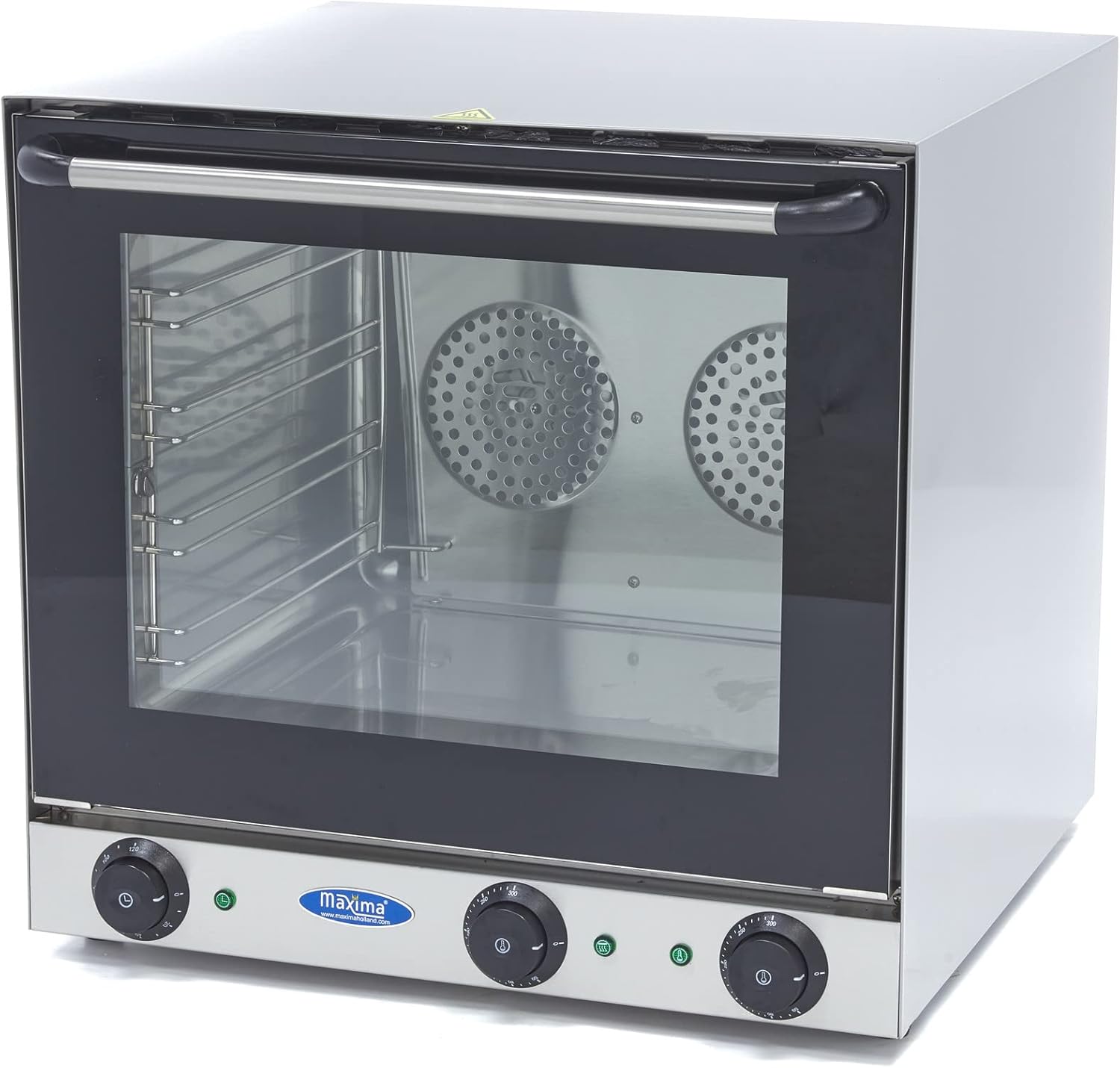
Figure 1: Front view of the Maxima Convection Oven, showing the control knobs, glass door, and interior fans.
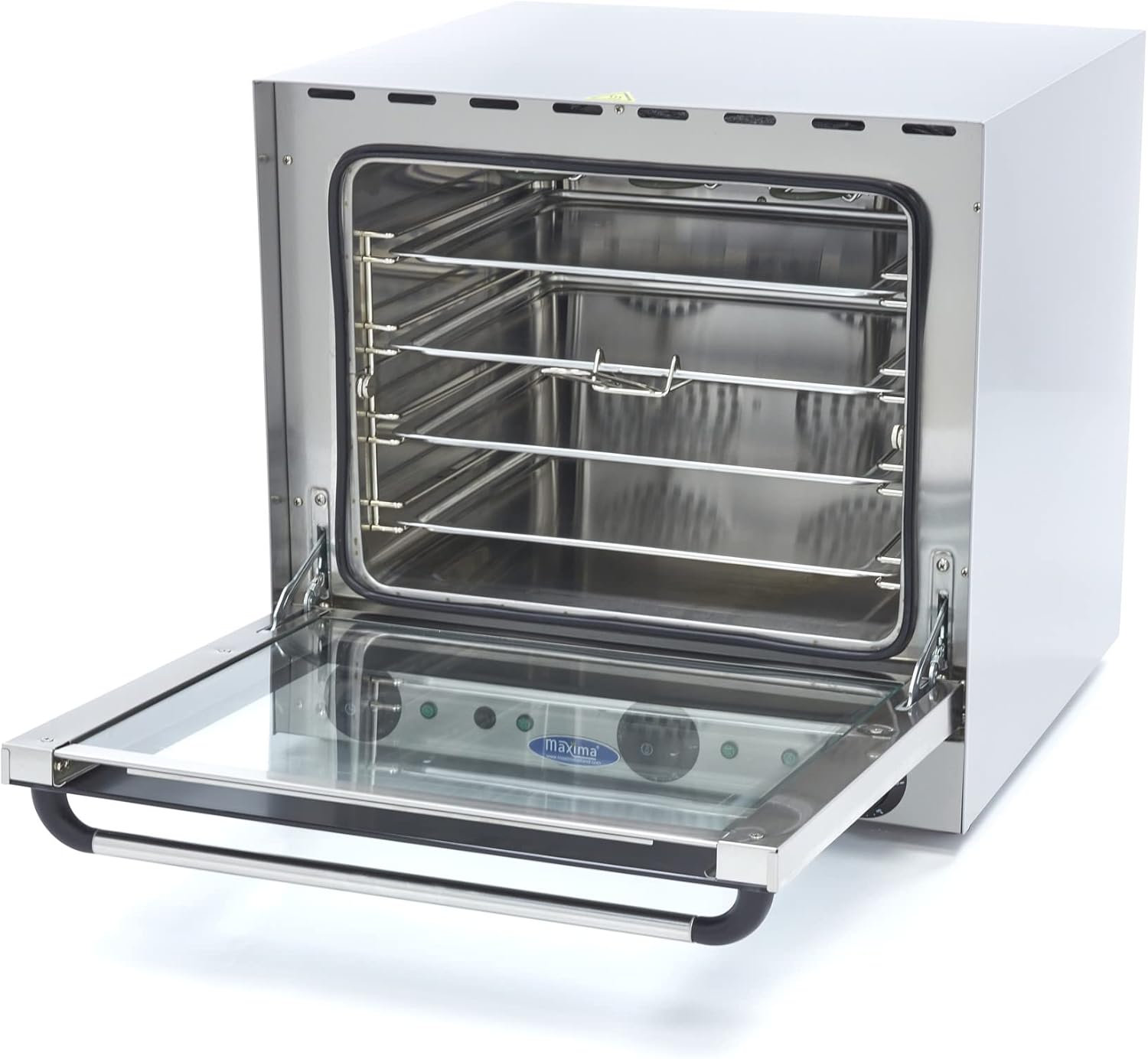
Figure 2: Interior view of the Maxima Convection Oven, showing the rack supports for four baking trays.
Setup
- Unpacking: Carefully remove the oven from its packaging. Inspect for any damage during transit. Report any damage to your supplier immediately.
- Placement: Place the oven on a stable, level, and heat-resistant surface. Ensure there is sufficient space around the appliance for ventilation (at least 10 cm on all sides). The rubber feet will prevent slipping.
- Electrical Connection:
- Verify that the local power supply matches the specifications of the oven (230V/50Hz/1 phase).
- Plug the oven into a dedicated, grounded electrical outlet. Do not use extension cords or adapters.

Figure 3: Example of a 230V power plug for the oven.
- Initial Cleaning: Before first use, wipe down the interior and exterior surfaces with a damp cloth. Ensure the oven is completely dry before plugging it in.
Operating Instructions
Familiarize yourself with the control knobs located on the front panel:
- Temperature Control (Left Knob): Adjusts the oven temperature from 0°C to 300°C. The orange indicator light will illuminate when the oven is heating and turn off when the set temperature is reached.
- Timer Control (Right Knob): Sets the cooking time from 0 to 120 minutes. The oven will automatically turn off when the timer reaches zero. For continuous operation, set the timer to the "ON" position (usually indicated by a bell symbol or infinity sign).
- Grill Function: This oven includes a grill function. When activated, the grill element will heat up, allowing for browning and crisping. Refer to specific recipes for optimal grill usage.
Basic Operation Steps:
- Place food on the provided baking trays.
- Slide the trays into the desired rack positions inside the oven. The spacing between trays is 70 mm.
- Close the oven door securely.
- Set the desired temperature using the left knob. The orange indicator light will turn on.
- Allow the oven to preheat until the orange indicator light turns off, indicating the set temperature has been reached.
- Set the desired cooking time using the right knob.
- Monitor the cooking process through the double-glazed door.
- When the timer finishes, the oven will turn off. Carefully remove the hot trays using oven mitts.
Cleaning and Maintenance
Regular cleaning ensures optimal performance and extends the lifespan of your oven.
- Before Cleaning: Always unplug the oven from the power outlet and allow it to cool completely before cleaning.
- Exterior Cleaning: Wipe the stainless steel exterior with a damp cloth and mild detergent. Dry thoroughly. Do not use abrasive cleaners or scouring pads.
- Interior Cleaning: The enamelled interior is easy to clean.
- For light soil, wipe with a damp cloth and mild detergent.
- For stubborn food residue, place a bowl of water inside the oven. Heat the oven to 200°C for a short period. The steam will loosen food particles, making them easier to wipe away with a cloth.
- Removable Door: The oven door can be easily removed for thorough cleaning. Consult the manufacturer's instructions or diagrams for specific removal steps. Clean the glass with a non-abrasive glass cleaner.
- Trays and Racks: The baking trays and racks can be washed with warm soapy water.
Troubleshooting
Before contacting service, please check the following common issues:
| Problem | Possible Cause | Solution |
|---|---|---|
| Oven does not turn on. | Not plugged in; power outage; faulty outlet; timer not set. | Ensure plug is securely in a working outlet. Check circuit breaker. Set timer to desired duration or "ON" position. |
| Oven not heating. | Temperature knob not set; indicator light not on; heating element issue. | Adjust temperature knob. If indicator light does not come on, contact service. |
| Uneven cooking. | Overcrowding; blocked vents; fan malfunction. | Do not overcrowd trays. Ensure proper ventilation. If problem persists, contact service. |
| Excessive smoke. | Food spills; greasy residue. | Clean the oven interior thoroughly. Avoid spills. |
If the problem persists after attempting these solutions, please contact Maxima customer support or a qualified service technician.
Specifications
| Attribute | Value |
|---|---|
| Brand | Maxima |
| Model Number | 09300417 |
| Dimensions (L x W x H) | 59.5 x 61.5 x 57 cm |
| Net Weight | 39 kg |
| Material | Stainless Steel (exterior), Enamelled (interior) |
| Voltage | 230V |
| Frequency | 50Hz |
| Power | 4670W (2670W Oven + 2000W Grill) |
| Temperature Range | 0°C to 300°C |
| Timer Range | 0 to 120 minutes |
| Number of Trays | 4 |
| Tray Dimensions | 435 x 315 mm |
| Tray Spacing | 70 mm |
Warranty and Support
This Maxima product is designed for durability and performance. For any technical assistance, spare parts, or warranty claims, please contact your authorized Maxima dealer or Maxima Kitchen Equipment directly. While specific warranty details are not provided in this manual, standard consumer rights and return policies apply. Please retain your proof of purchase for any warranty-related inquiries.
For more information, you may visit the official Maxima website or contact their customer service.


