1. Product Overview
Pristine 8K resolution meets astounding Mini LED contrast for a next-level viewing experience, powered by the intelligent Cognitive Processor XR™. Feel your senses get pushed to the limit with thousands of tiny, high-density Mini LEDs in precisely controlled lighting zones. Coupled with XR Backlight Master Drive, the BRAVIA XR Z9K delivers unprecedented brightness, color, and contrast that make your content feel impossibly real.
Key Features
- INTELLIGENT TV PROCESSING: The Cognitive Processor XR understands how humans see to deliver intense contrast with deep blacks, high peak brightness, and natural colors.
- MINI LED CONTRAST: Thousands of Mini LEDs are controlled with absolute precision by XR Backlight Master Drive delivering unprecedented contrast with deep blacks, natural colors, and maximum brightness.
- ALL YOUR GAME SETTINGS IN ONE PLACE: Game Menu puts all your gaming picture settings and exclusive assist features in a single easy-to-manage interface.
- PERFECT FOR PLAYSTATION 5: Take your gaming to the next level with input lag as low as 8.5ms and BRAVIA XR exclusive features for the PlayStation 5 – Auto HDR Tone Mapping & Auto Genre Picture Switch.
- FEATURES SPECIFIED IN HDMI 2.1: Get the advantage in high-performance gaming on BRAVIA XR TVs with HDMI 2.1 features such as 4K/120, VRR, and ALLM.
- WIDE SPECTRUM OF COLORS: Rediscover everything you watch with billions of accurate colors and see impressive picture quality that is natural and beautiful, enhanced by XR Triluminos Pro.
- PREMIUM SMART TV: Google TV with Google Assistant organizes your favorite content all in one place. Stream from Prime Video, Netflix, Disney+, Apple TV, HBO Max, Peacock and many more. Also, stream from your Apple device with AirPlay 2 support.
- MOVIES INCLUDED WITH BRAVIA CORE: Bring the cinematic experience home. Enjoy streaming high-quality 4K UHD quality movies included with the BRAVIA CORE app, exclusively on select Sony TVs.
- ENHANCED ENTERTAINMENT: Experience immersive and engaging cinematic content as the creator intended with support for Dolby Vision, IMAX Enhanced, and Netflix Adaptive Calibrated Mode.
- BRAVIA CAM included: Enjoy video chat on the big screen, use gesture controls, and allow Ambient Optimization Pro to automatically adjust picture and sound according to your room environment.

Figure 1.1: Front view of the Sony BRAVIA XR Z9K TV showcasing its vibrant display.

Figure 1.2: The Google TV interface on the Sony BRAVIA XR Z9K, showing various streaming apps and content recommendations.
Video 1.1: Official Sony BRAVIA XR Z9K 8K HDR Mini LED TV overview, highlighting key features and visual quality.
2. Setup Guide
2.1 Unpacking the TV
- Carefully open the packaging and remove the TV. It is recommended to have at least two people for handling large screen sizes.
- Check that all accessories are included: Remote Control, Power Cable, Stand, and BRAVIA CAM.
- Retain the packaging materials for future transport or storage.
2.2 Stand Installation or Wall Mounting
The TV can be placed on a stand or mounted on a wall. Refer to the separate Installation Manual (PDF) provided by Sony for detailed instructions specific to your chosen setup.

Figure 2.1: Detailed dimensions of the 75-inch Sony BRAVIA XR Z9K TV and its included remote control.
2.3 Connecting Peripherals
- Power Connection: Connect the supplied power cable to the TV's power input and then to a wall outlet.
- HDMI Devices: Connect your external devices (e.g., game consoles, Blu-ray players, soundbars) to the HDMI ports. This TV supports HDMI 2.1 features like 4K/120Hz, VRR, and ALLM for optimal performance with compatible devices.
- Network Connection: For smart TV features, connect the TV to your home network via Wi-Fi or an Ethernet cable. Note that the built-in Ethernet port supports up to 100 Mbps. For higher speeds, a compatible USB3 Ethernet adapter may be used.
- BRAVIA CAM: Attach the BRAVIA CAM to the designated port on the TV for features like gesture control and ambient optimization.

Figure 2.2: Rear view of the Sony BRAVIA XR Z9K TV, illustrating the various input and output ports for connectivity.
3. Operating Your TV
3.1 Initial Setup and Google TV
- Power on the TV using the remote control.
- Follow the on-screen instructions to select your language, connect to your Wi-Fi network, and sign in with your Google account.
- Google TV organizes your favorite content from various streaming services in one place.

Figure 3.1: The intuitive Google TV home screen, providing personalized content recommendations and easy access to apps.
3.2 Voice Control with Google Assistant
The included remote control features a built-in microphone for Google Assistant. Press the Google Assistant button on your remote and speak commands to search for content, control smart home devices, or get information.
3.3 Gaming Features
The BRAVIA XR Z9K is designed to enhance your gaming experience, especially with the PlayStation 5.
- Auto HDR Tone Mapping: Optimizes HDR settings instantly for PlayStation 5 games.
- Auto Genre Picture Switch: Automatically switches to Game Mode for reduced input lag when gaming, and back to Standard Mode for movies.
- HDMI 2.1 Support: Enjoy smooth, high-frame-rate gaming with 4K/120Hz, Variable Refresh Rate (VRR), and Auto Low Latency Mode (ALLM).
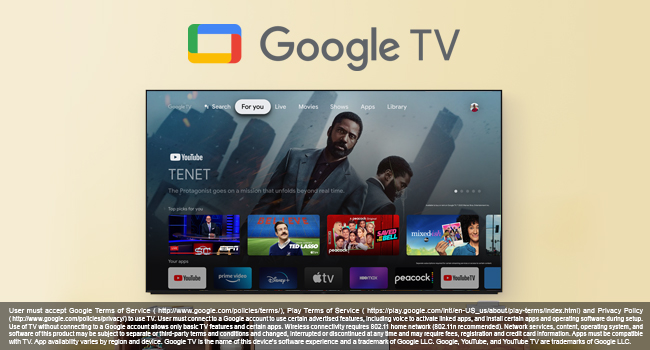
Figure 3.2: The Sony BRAVIA XR Z9K TV displaying a PlayStation 5 game, highlighting its gaming optimization features.
4. Maintenance and Care
- Screen Cleaning: Gently wipe the screen with a soft, dry microfiber cloth. For stubborn smudges, slightly dampen the cloth with water or a screen-specific cleaning solution (avoid harsh chemicals).
- Frame and Stand: Clean the TV frame and stand with a soft, dry cloth.
- Ventilation: Ensure the TV's ventilation openings are not blocked to prevent overheating.
- Power Off: When not in use for extended periods, unplug the TV from the power outlet.
5. Troubleshooting
Common Issues and Solutions
| Problem | Possible Cause | Solution |
|---|---|---|
| No Power | Power cable disconnected; Power outlet issue. | Ensure power cable is securely connected. Test the outlet with another device. |
| No Picture/Sound | Incorrect input source; Device not powered on; Cable issue. | Select the correct input source. Power on the connected device. Check HDMI/audio cables. |
| Network Connectivity Issues | Wi-Fi signal weak; Router issue; Ethernet speed limitation. | Restart your router and TV. Ensure TV is within Wi-Fi range. For 4K streaming via wired connection, consider a USB3 Ethernet adapter as the built-in port is 100 Mbps. |
| Remote Control Not Working | Low batteries; Obstruction. | Replace batteries. Ensure no obstructions between remote and TV. |
For more detailed troubleshooting, refer to the full User Manual (PDF) or contact Sony customer support.
6. Technical Specifications
| Feature | Specification |
|---|---|
| Brand Name | Sony |
| Model Number | XR75Z9K |
| Screen Size | 75 Inches (191 cm visible diagonal) |
| Display Technology | LCD with Mini LED backlight |
| Resolution | 8K |
| Refresh Rate | 120 Hz |
| Product Dimensions | 65.79 x 15.59 x 39.29 inches |
| Item Weight | 16 ounces (approx. 1 pound) |
| Color Name | Black |
| Connectivity Technology | Bluetooth, Wi-Fi, USB, Ethernet, HDMI |
| Speaker Type | Acoustic Multi-Audio Frame Tweeter |
| Included Components | Stand, Remote Control, Power Cable, BRAVIA CAM |
| Batteries | 2 AAA batteries required (included) |
7. Warranty and Support
For warranty information, please refer to the documentation included with your product or visit the official Sony support website. Sony provides customer support for product assistance, troubleshooting, and service inquiries.
You can find the comprehensive User Manual in PDF format here: Sony BRAVIA XR Z9K User Manual (PDF)
For installation specific details, refer to the Installation Manual (PDF) here: Sony BRAVIA XR Z9K Installation Manual (PDF)


