
SINOX EDGE
SINOX Edge Energy Saving 1200 MM Ceiling Fan Instruction Manual
Model: EDGE
1. Introduction
Thank you for choosing the SINOX Edge Energy Saving 1200 MM Ceiling Fan. This manual provides essential information for the safe installation, operation, and maintenance of your new fan. Please read it thoroughly before use and keep it for future reference.

Image 1.1: SINOX Edge Ceiling Fan and Remote Control. This image displays the complete fan unit with its three orange blades, black motor housing, and the accompanying white remote control.
2. Important Safety Instructions
Always follow basic safety precautions when installing, operating, and maintaining electrical appliances to reduce the risk of fire, electric shock, or injury to persons.
- Ensure the power supply is disconnected before installation or maintenance.
- Installation must be performed by a qualified electrician in accordance with local electrical codes.
- Mount the fan securely to a ceiling joist or structure capable of supporting its weight.
- Do not insert fingers or any objects into the fan blades while the fan is operating.
- Keep children away from the fan during operation.
- Do not use the fan in damp or wet locations.
3. Package Contents
Verify that all components are present in the package:
- Fan motor unit
- Blade set (3 blades)
- Remote control
- Assembly set (includes downrod, canopy, mounting bracket, hardware)
4. Setup and Installation
4.1 Pre-Installation Checklist
- Confirm the ceiling can support the fan's weight (approximately 4.88 kg).
- Ensure adequate clearance from walls and other obstructions (minimum 30 cm from blade tip to wall).
- Verify the electrical supply meets the fan's requirements (230 Volts AC).
4.2 Installation Steps
- Turn off Power: Locate the circuit breaker for the fan's intended location and turn off the power.
- Install Mounting Bracket: Secure the mounting bracket to the ceiling joist or a suitable electrical junction box.
- Assemble Downrod and Canopy: Attach the downrod to the fan motor unit and slide the canopy over the downrod.
- Wire Connections: Connect the fan's electrical wires to the household wiring according to the wiring diagram provided in the separate wiring guide (not included in this manual). Ensure all connections are secure.
- Hang Fan: Carefully lift the fan assembly and hang it on the mounting bracket.
- Attach Blades: Securely attach the three fan blades to the motor housing. Ensure all screws are tightened.
- Secure Canopy: Slide the canopy up to the ceiling and secure it to the mounting bracket.
- Restore Power: Turn the power back on at the circuit breaker.

Image 4.1: SINOX BLDC Ceiling Fan Energy Saving Features. This image highlights the fan's energy efficiency, stating it saves up to Rs. 1500/year and consumes only 32 Watts.
5. Operating Instructions
5.1 Remote Control Functions
The SINOX Edge fan comes with a smart remote control for convenient operation. Ensure batteries are inserted correctly into the remote.
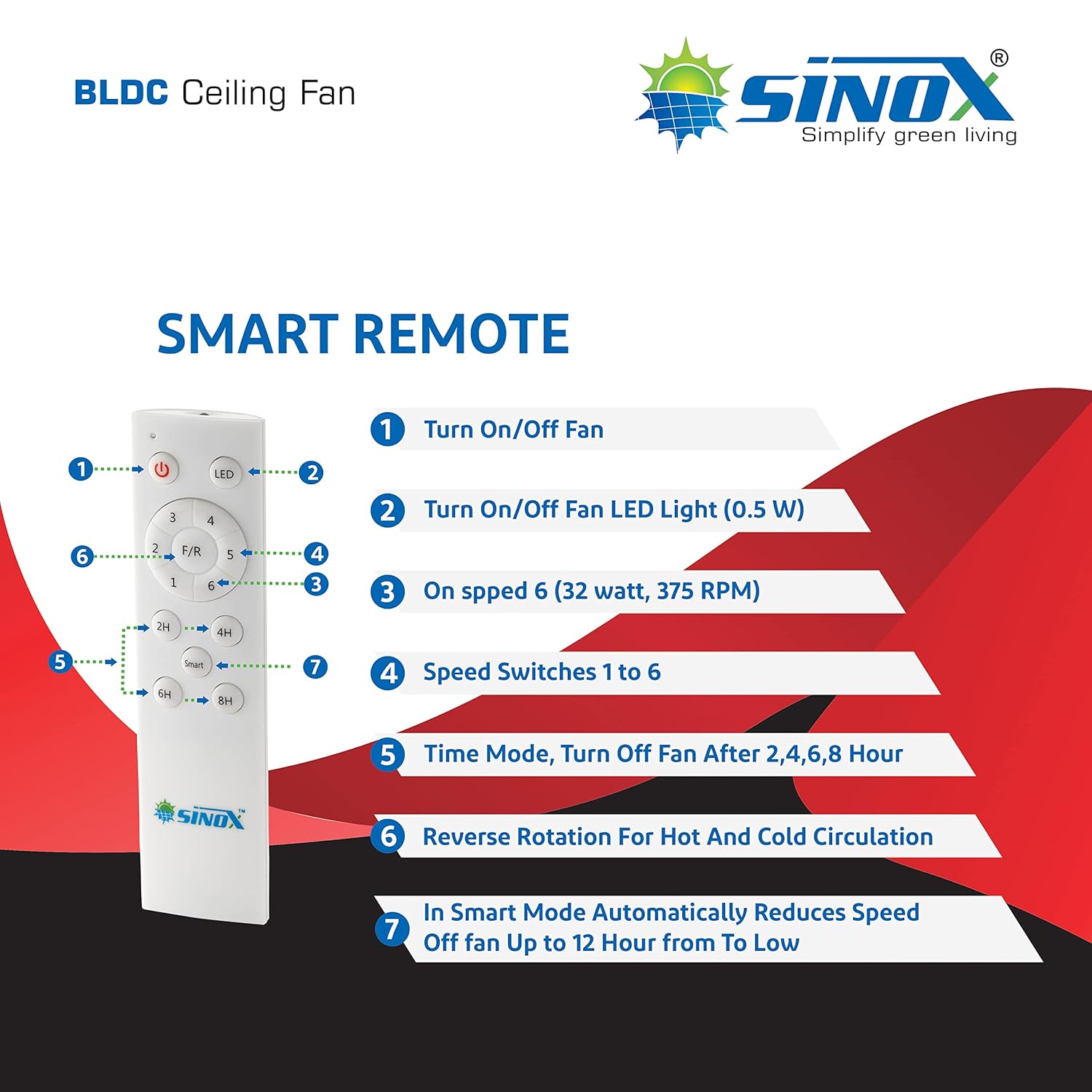
Image 5.1: SINOX Smart Remote Control Functions. This image details the buttons on the remote: 1. Turn On/Off Fan, 2. Turn On/Off Fan LED Light (0.5W), 3. On speed 6 (32 watt, 375 RPM), 4. Speed Switches 1 to 6, 5. Time Mode (Turn Off Fan After 2, 4, 6, 8 Hours), 6. Reverse Rotation For Hot And Cold Circulation, 7. In Smart Mode Automatically Reduces Speed Off Fan Up to 12 Hour From Low.
- Power Button: Turns the fan on or off.
- LED Light Button: Toggles the integrated 0.5W LED light on or off, functioning as a night lamp.
- Speed Control (1-6): Adjusts the fan speed from 1 (lowest) to 6 (highest). Speed 6 operates at 32 watts and 375 RPM.
- Timer Mode (2H, 4H, 6H, 8H): Sets the fan to automatically turn off after the selected duration.
- F/R (Forward/Reverse) Button: Changes the direction of blade rotation for hot and cold air circulation.
- Smart Mode: Automatically reduces fan speed over a period of up to 12 hours from a low setting.
5.2 Fan Modes
- Boost Mode: Provides maximum airflow for quick cooling.
- Timer Mode: Allows setting a specific duration after which the fan will turn off.
- Sleep Mode: Gradually reduces fan speed to provide comfortable sleeping conditions while conserving energy.

Image 5.2: SINOX Ceiling Fan LED Light. This image points out the LED light on the fan, indicating its function as a 0.5W night lamp.
6. Care and Maintenance
6.1 Cleaning
The SINOX Edge fan features an anti-dust coating, making cleaning easier.
- Always turn off the power to the fan before cleaning.
- Use a soft, damp cloth to wipe down the fan blades and motor housing.
- Do not use abrasive cleaners or solvents, as they may damage the finish or coating.
- Regular cleaning will help maintain the fan's efficiency and appearance.

Image 6.1: SINOX Ceiling Fan Dust Resistant Coating. This image illustrates the dust-resistant coating on the fan blades, indicating easier maintenance.
7. Troubleshooting Guide
Refer to this table for common issues and their solutions.
| Problem | Probable Cause | Solution |
|---|---|---|
| Fan does not turn on. | No power supply; Remote batteries dead; Loose wiring. | Check circuit breaker; Replace remote batteries; Verify wiring connections. |
| Fan makes unusual noise. | Loose screws on blades or mounting; Motor issue. | Tighten all screws; Contact customer support if noise persists. |
| Fan wobbles. | Loose mounting bracket; Unbalanced blades. | Ensure mounting bracket is secure; Check blade balance. |
| Remote control not working. | Dead batteries; Obstruction between remote and receiver. | Replace batteries; Remove any obstructions. |
| Fan speed fluctuates. | Input voltage outside operating range. | The fan is designed to run consistently with fluctuating input voltage between 120-285V. If fluctuations are outside this range, consult an electrician. |

Image 7.1: SINOX BLDC Motor Components. This image shows the internal components of the BLDC motor, highlighting its design for efficient and quiet operation.
8. Product Specifications
Detailed specifications for the SINOX Edge Ceiling Fan:
| Feature | Specification |
|---|---|
| Brand | SINOX |
| Model Name | EDGE |
| Colour | BLACK AND ORANGE ANTI DUST |
| Electric Fan Design | Ceiling Fan |
| Power Source | Corded Electric |
| Room Type | Living Room, Dining Room, Bedroom, Office, Factory, Hospitals, Kitchen |
| Special Feature | Remote Control |
| Wattage | 32 Watts |
| Number of Blades | 3 |
| Air Flow Capacity | 230 Cubic Metres per Minute |
| Blade Length | 1200 Millimetres (48 Inch) |
| Voltage | 230 Volts (AC) |
| Switch Type | REMOTE |
| Blade Material | Aluminium |
| Item Weight | 4 kg 880 g |
9. Warranty and Customer Support
The SINOX Edge Ceiling Fan comes with a 2-year warranty on the motor against manufacturing defects. Please retain your purchase receipt as proof of purchase for warranty claims.
For any technical assistance, troubleshooting, or warranty inquiries, please contact SINOX customer support:
- Manufacturer: SINOX POWER
- Contact Number: 8000061200
Please provide your product model number (EDGE) and ASIN (B09R3X8D1M) when contacting support for faster service.
Ask a question about this manual
Ask about setup, troubleshooting, compatibility, parts, safety, or missing instructions. Manuals+ will review the question and use this page’s manual context to help answer it.