
1. Introduction
The ANCEL HD3300 Plus is a professional heavy-duty truck diagnostic tool designed to provide comprehensive system diagnostics and special functions for a wide range of diesel vehicles. This manual provides detailed instructions on how to set up, operate, maintain, and troubleshoot your device to ensure optimal performance and accurate vehicle analysis.
2. Product Overview
2.1. Device Components

Image: Front view of the ANCEL HD3300 Plus diagnostic tool, showing its touchscreen display and various function icons.
2.2. What's in the Box

Image: Contents of the ANCEL HD3300 Plus package, including the main unit, cables, and user manual.
- 1x ANCEL HD3300 Plus Heavy Duty Truck Scanner
- 1x 6/9-PIN Diesel OBD Cable
- 1x 2M Main Test Line with OBD2 Connector
- 1x CAT-9 Connector
- 1x User's Manual
For a visual guide on the packing list, please watch the video below:
Video: A detailed unboxing and overview of the ANCEL HD3300 Plus package contents.
2.3. Key Features
- Professional DPF Regen Tool: Supports OEM-level DPF functions for Cummins, Detroit, Caterpillar, International, Volvo, Paccar, Isuzu, Fuso, including DPF regeneration, DPF reset, BlueTec, and more.
- Advanced Oil Light Reset Function: Provides OEM-level oil reset for ISUZU & FUSO, helping to reset the Oil Life Reminder.
- All System Diagnostic: Supports comprehensive scans of heavy-duty trucks compliant with standard HD OBD protocols (Engine, ABS/EBS, Transmission, Body Controller, Chassis Controller, Instrument Panel System, Cruise Control, Gateway, etc.).
- Standard Diesel OBD & OBDII Protocols: Compatible with the latest J27145 HD OBD protocols for 12V & 24V heavy-duty trucks (Cummins, Caterpillar, Detroit, Volvo, International) and standard OBDII protocols for mainstream cars and light vehicles (post-1996).
- Full OBD Level Diagnosis: A 2-in-1 platform integrating 24V heavy-duty truck scanner and 12V car scanner, with 6-pin, 9-pin, and 16-pin adapters. Performs engine diagnostics, reads/erases trouble codes, turns off MIL, shows live data, and vehicle identification info.
- Additional User-Friendly Functions: Includes one-click screenshot, one-click update, one-click printing, one-click feedback, and test report creation/emailing.
- Simulation & DEMO Mode: Offers a demonstration mode for understanding diagnostic procedures and result interfaces without vehicle connection.
- Pin Detect: Automatically measures voltage of the OBD diagnostic interface to check CAN Voltage and detect damaged pins, ensuring proper working condition.
For a general overview of the device's capabilities, please watch the video below:
Video: An overview of the ANCEL HD3300 heavy-duty truck diagnostic tool's features and functionalities.
3. Setup and Activation
3.1. Connecting the Device
The HD3300 Plus comes with various connectors (6-pin, 9-pin, 16-pin, CAT-9) to ensure compatibility with different heavy-duty vehicles. Connect the appropriate diagnostic cable to the device and then to your vehicle's OBD port. Ensure the connection is secure.

Image: Rear view of the ANCEL HD3300 Plus, displaying the model number and serial information.
3.2. Device Activation
Before using the device for the first time, it needs to be activated. This process typically requires a Wi-Fi connection.
- Connect the HD3300 Plus to your vehicle's diagnostic port using the appropriate cable.
- On the device, navigate to Settings.
- Select Wi-Fi and turn it on. Connect to an available Wi-Fi network. If no network is available, you can create a mobile hotspot from your phone.
- Go back to Settings and select User.
- Click Activate. The device will attempt to activate.
- Once activated, a success message will appear.
For a step-by-step guide on activating your device, please watch the video below:
Video: Instructions on how to activate the ANCEL HD3300 Plus, including connecting to Wi-Fi and completing the activation process.
4. Basic Operations
4.1. All System Diagnostic
The HD3300 Plus can perform a full system diagnostic scan on compatible heavy-duty trucks, covering various modules like Engine, ABS/EBS, Transmission, and more. This allows for deep analysis and identification of issues across the vehicle's electronic systems.

Image: Diagram illustrating the various systems covered by the ANCEL HD3300 Plus's full system diagnostic capabilities.
To learn how to perform an all-system diagnostic, watch the video below:
Video: Demonstrates how to use the HD3300 Plus for comprehensive all-system diagnostics on a truck.
4.2. Reading and Erasing Fault Codes
The device can read current, pending, and history fault codes from various vehicle systems. After identifying and addressing the underlying issues, you can use the tool to erase the fault codes and turn off the Malfunction Indicator Lamp (MIL).

Image: Illustrates the process of reading and erasing fault codes using the HD3300 Plus.
4.3. Live Data Stream
View real-time data from multiple sensors in both graphical and text formats. This feature is crucial for monitoring vehicle performance and diagnosing intermittent issues.

Image: Screenshot of the HD3300 Plus display showing live data stream in graphical format.
5. Special Functions
5.1. DPF Regeneration
The DPF (Diesel Particulate Filter) regeneration function helps clear accumulated soot from the filter, restoring engine performance and preventing costly repairs. The HD3300 Plus supports OEM-level DPF functions for various engine brands.

Image: Diagram explaining the DPF regeneration process and its benefits for diesel engines.
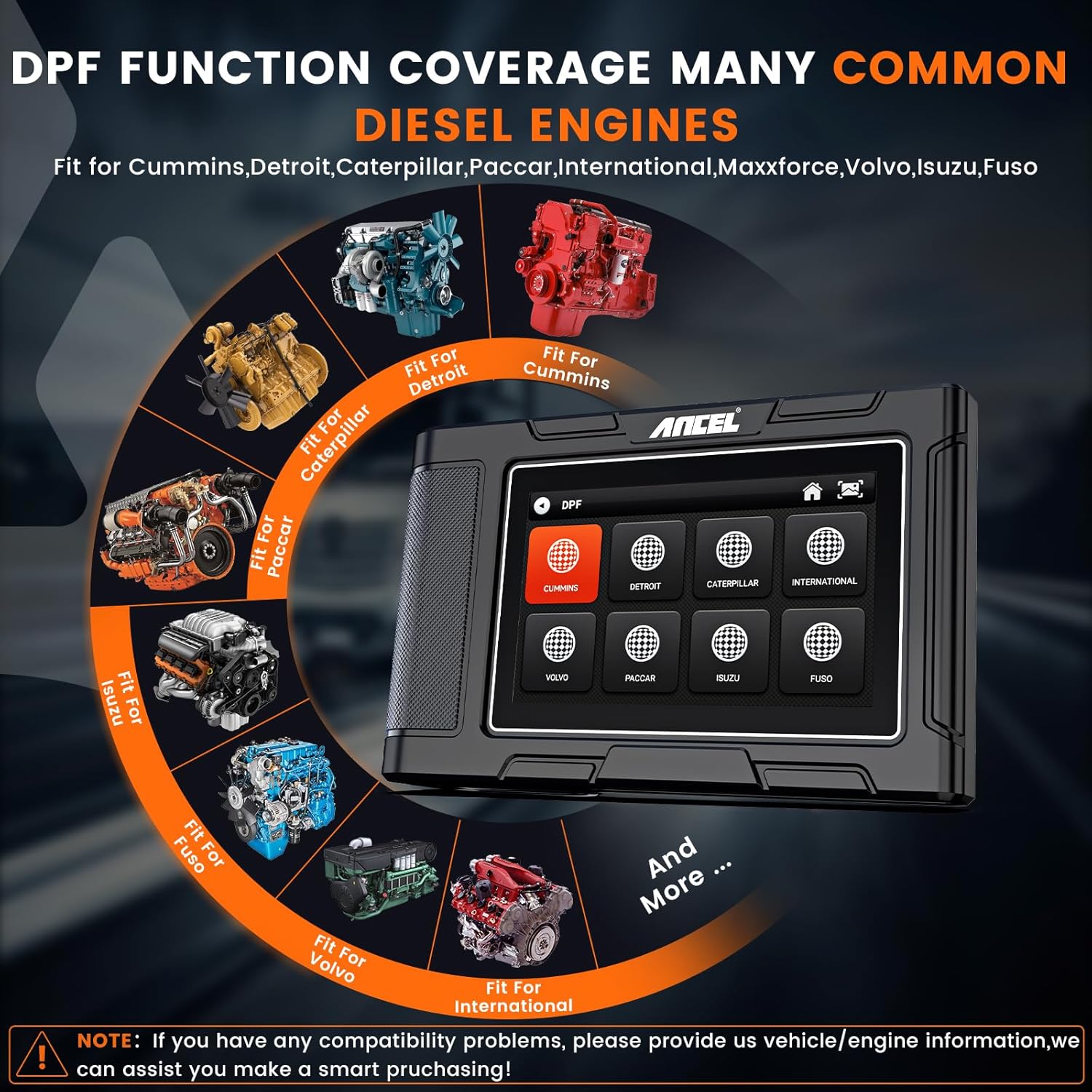
Image: Visual representation of various diesel engine brands supported for DPF functions by the HD3300 Plus.
For detailed steps on performing DPF regeneration, please refer to the video below:
Video: A demonstration of how to use the HD3300 Plus to perform DPF regeneration.
5.2. Oil Light Reset
The oil light reset function allows you to reset the oil life reminder after an oil change, ensuring accurate maintenance intervals for ISUZU and FUSO vehicles.

Image: Illustrates the benefits of the enhanced service reset and oil reset functions, showing engines supported.
6. Maintenance and Updates
6.1. Software Updates
Keep your HD3300 Plus up-to-date with the latest software and vehicle database versions through convenient one-click Wi-Fi updates. This ensures compatibility with new vehicle models and improved functionality.
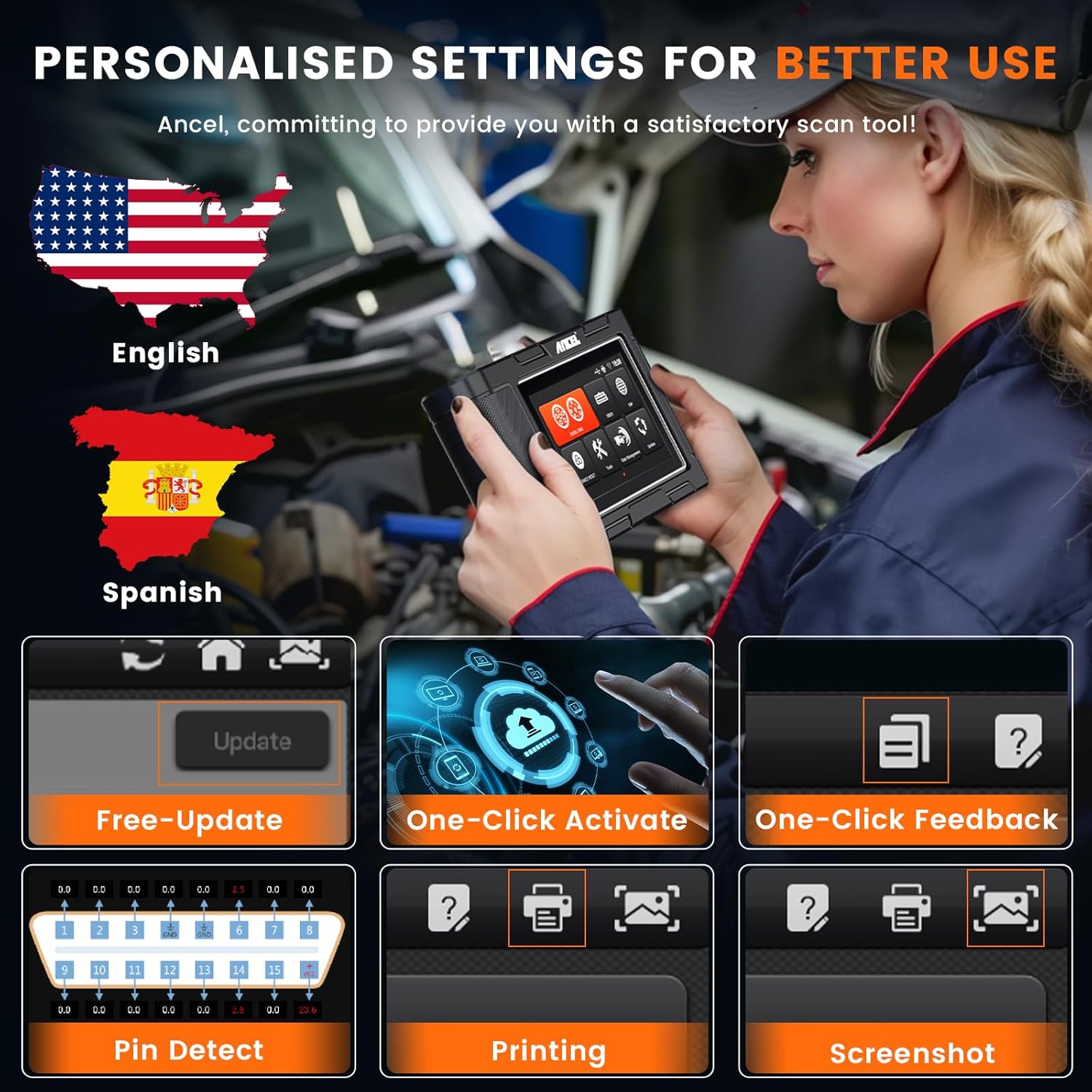
Image: Shows the personalized settings menu, including options for updates, feedback, printing, and screenshots.
For instructions on how to update the HD3300 Plus, please watch the video below:
Video: A short demonstration on how to update the software of the HD3300 Plus.
6.2. Other Functions
- One-click Screenshot: Capture diagnostic results or any screen for future reference.
- One-click Printing: Print diagnostic reports directly from the device (requires compatible printer setup).
- One-click Feedback: Send feedback or report issues directly to ANCEL support.
- Test Report by Email: Generate and send diagnostic reports via email for easy sharing and record-keeping.
7. Troubleshooting
If you encounter issues with your ANCEL HD3300 Plus, refer to the following common troubleshooting tips:
- Activation Failed / Network Issues: Ensure your Wi-Fi connection is stable and strong. If activation still fails, verify the serial number and contact customer support.
- Communication Error: Check all cable connections (6-pin, 9-pin, 16-pin, CAT-9) to ensure they are secure and correctly matched to the vehicle's port. Verify the vehicle's ignition is on. For HD OBD protocols, ensure the vehicle supports SAE J1939 and SAE J1708 standards. Try accessing the OBDII menu for testing if issues persist.
- Cannot Clear Codes: Ensure the vehicle's ignition is on and the engine is off (KOEO - Key On, Engine Off). Some codes may require specific driving cycles or repairs before they can be cleared. Verify compatibility with your vehicle model.
- Device Freezes/Slow Performance: Ensure the device software is up-to-date. Clear cache or perform a factory reset if necessary (note: this will erase saved data).
- No Power: Check the diagnostic cable connection to the vehicle's OBD port. Ensure the vehicle's battery has sufficient charge.
For further assistance, please contact ANCEL customer support.
8. Specifications
| Feature | Detail |
|---|---|
| Manufacturer | ANCEL |
| Item Weight | 3.36 pounds |
| Product Dimensions | 7.4 x 4.7 x 1.9 inches |
| Operating System | Android; Diesel OBD/One-Key Activation/Screenshot/Print/Feedback/PIN Detect |
| Special Features | DPF Regeneration & Service Reset |
9. Warranty and Support
ANCEL is committed to providing excellent customer service and product support for the HD3300 Plus.
- 30-Day Free Return: Enjoy peace of mind with a 30-day return policy.
- 24/7 Tech Support: Access professional technical assistance around the clock.
- 2-Year Service: Benefit from comprehensive service coverage for two years.
- Lifetime Free Update: Receive free software updates for the lifetime of the product, ensuring continued compatibility and enhanced features.
For any inquiries or support needs, please visit the official ANCEL website or contact their customer service team directly.


