
1. Introduction
The TrueLife Oximeter X5 Bluetooth is a compact, robust device designed for non-invasive measurement of blood oxygen saturation (SpO2), pulse rate (PR), and perfusion index (PI). It is suitable for use by individuals with respiratory or cardiac conditions, as well as athletes. The device features a clear OLED display and Bluetooth connectivity for data tracking via a compatible mobile application.
This manual provides essential information for the safe and effective operation of your TrueLife Oximeter X5. Please read it thoroughly before first use and keep it for future reference.
2. Package Contents
Upon unpacking, please verify that all items listed below are present and undamaged:
- TrueLife Oximeter X5
- 2x AAA Batteries
- Protective Pouch
- Lanyard
- User Manual

Image: TrueLife Oximeter X5 with its packaging and included protective pouch.
3. Product Overview
Familiarize yourself with the components of your TrueLife Oximeter X5:
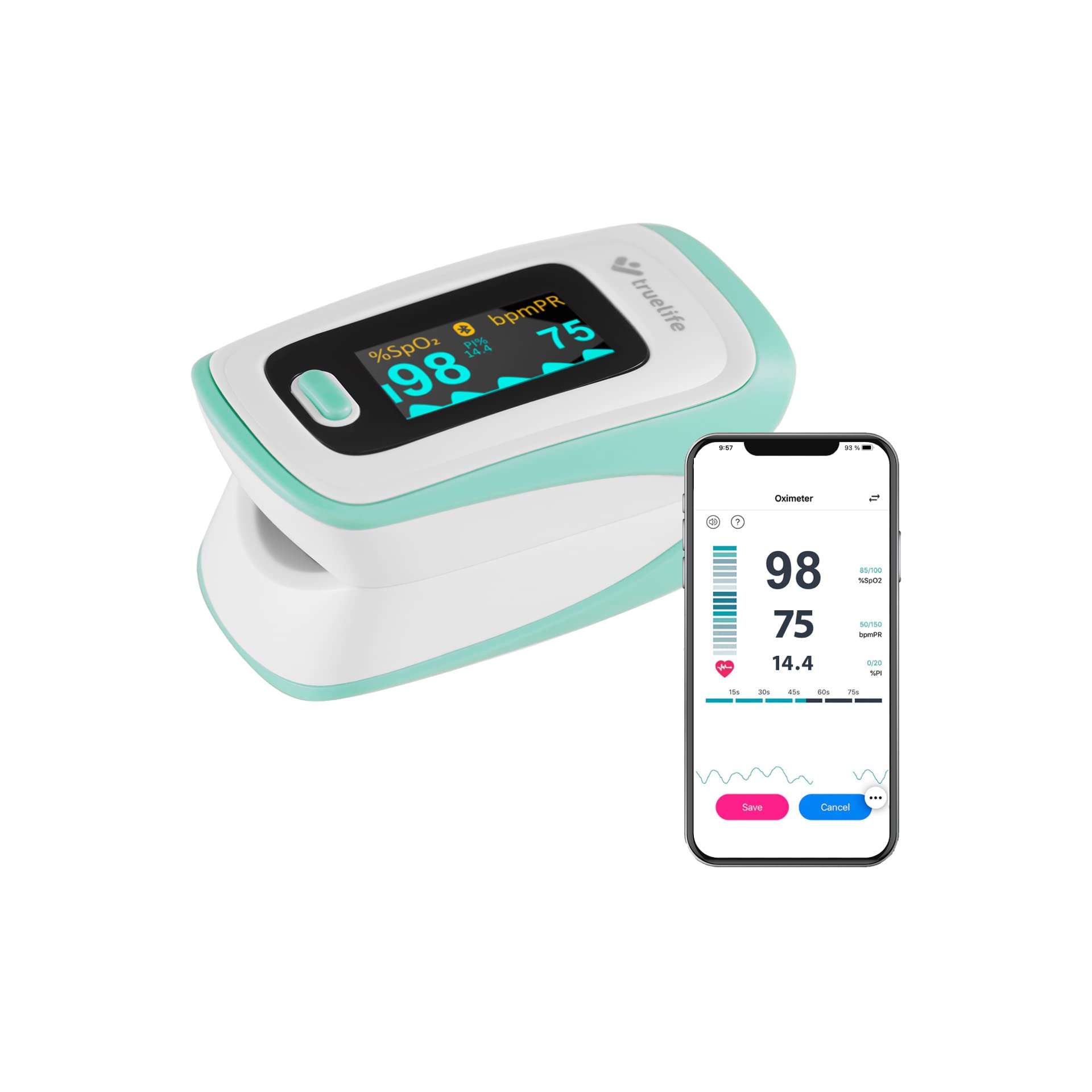
Image: Overview of the TrueLife Oximeter X5 highlighting its main features.

Image: Detailed view of the Oximeter X5 display and its indicators.
- Display: OLED screen showing SpO2, PR, PI, and pulse waveform.
- Control Button: For power on/off and changing display modes.
- Finger Clamp: Area where the finger is inserted for measurement.
- Battery Compartment: Located at the rear for AAA batteries.
4. Setup
4.1 Battery Installation
- Open the battery compartment cover on the back of the device.
- Insert the two AAA batteries according to the polarity indicators (+ and -) inside the compartment.
- Close the battery compartment cover securely.
The device is designed for low power consumption, providing up to 32 hours of operation with intelligent power management and automatic shutdown.
4.2 Mobile Application Download and Pairing
The TrueLife Oximeter X5 can connect to a compatible mobile application for data tracking and analysis. Search for the recommended application (e.g., "JUMPER Health" or similar as indicated in the product packaging) on your smartphone's app store.
- Download and install the application.
- Ensure Bluetooth is enabled on your smartphone.
- Turn on the Oximeter X5.
- Follow the in-app instructions to pair your device.

Image: Oximeter X5 demonstrating Bluetooth connectivity with a smartphone app.
5. Operating Instructions
5.1 Taking a Measurement
The Oximeter X5 provides immediate and accurate measurements:
- Open the finger clamp.
- Insert one of your fingers (preferably the index finger) into the rubber opening of the oximeter, ensuring the nail is facing upwards towards the display. The universal-sized finger hole is made of hypoallergenic silicone, suitable for both children and adults.
- Release the clamp. The device will automatically power on and begin measurement.
- Keep your hand still during the measurement. Results will appear on the OLED display within seconds.

Image: Proper finger placement for measurement.

Image: Example of measurement results on the display.
5.2 Understanding the Display
The OLED display shows the following key parameters:
- SpO2 (%): Blood Oxygen Saturation. Indicates the percentage of hemoglobin in your blood that is saturated with oxygen.
- PR (bpm): Pulse Rate. Your heart rate in beats per minute.
- PI (%): Perfusion Index. Indicates the strength of the pulse signal. It shows how much oxygenated blood arrives with each new heartbeat relative to the total blood already present in the limb.
- Pulse Waveform: A graphical representation of your pulse.
- Battery Status Symbol: Indicates remaining battery life.
5.3 Adjusting Display Modes and Settings
The Oximeter X5 offers 6 options for displaying readings. Press the control button briefly to cycle through the different display orientations and layouts. You can also adjust brightness, sound settings, or the audible pulse signal through the device's menu or the connected mobile application.

Image: Various display modes available on the OLED screen.
5.4 Using the Mobile Application
Once paired, the mobile application allows you to:
- View real-time measurements.
- Track historical data in clear graphs.
- Manage user profiles.
- Adjust device settings.

Image: Screenshots of the mobile application interface for data monitoring.
6. Maintenance
6.1 Cleaning
- Clean the surface of the oximeter with a soft cloth dampened with medical alcohol (70% ethanol or isopropanol).
- Do not immerse the device in water or any other cleaning solution.
- Ensure the device is dry before reuse.
6.2 Storage
- Store the oximeter in its protective pouch in a cool, dry place, away from direct sunlight and extreme temperatures.
- Remove batteries if the device will not be used for an extended period to prevent leakage.
7. Troubleshooting
If you encounter issues with your TrueLife Oximeter X5, refer to the following common problems and solutions:
| Problem | Possible Cause | Solution |
|---|---|---|
| Device does not turn on | Low or dead batteries; incorrect battery installation. | Replace batteries; ensure correct polarity. |
| No reading or unstable reading | Finger not inserted correctly; excessive movement; cold fingers; nail polish. | Reinsert finger properly; remain still; warm hands; remove nail polish. |
| Bluetooth connection fails | Bluetooth not enabled on phone; device too far; app issues. | Ensure Bluetooth is on; keep devices close; restart app/phone/oximeter. |
| Display is dim | Low battery; brightness setting. | Replace batteries; adjust brightness setting via device or app. |
8. Specifications
| Feature | Specification |
|---|---|
| Brand | TrueLife |
| Model Number | Oximeter X5 |
| Measurement Parameters | SpO2, Pulse Rate (PR), Perfusion Index (PI) |
| SpO2 Accuracy | ± 2% |
| Display Type | OLED, adjustable with 6 display modes |
| Connectivity | Bluetooth |
| Power Source | 2x AAA Batteries |
| Battery Life | Up to 32 hours (approx.) |
| Dimensions (L x W x H) | 50 x 50 x 28 mm |
| Weight | 96 grams (with batteries) |
9. Safety Information
- This device is intended for non-medical use and general wellness purposes. It is not a substitute for professional medical advice, diagnosis, or treatment.
- Consult your physician if you have any medical conditions or concerns about your health.
- Do not use the device in an MRI or CT environment.
- Keep out of reach of children. Small parts may pose a choking hazard.
- Do not use the device if it is damaged.
- Dispose of batteries and the device according to local regulations.
10. Warranty and Support
For warranty information and customer support, please refer to the documentation included with your purchase or visit the official TrueLife website. Keep your proof of purchase for warranty claims.


