
1. Introduction
This manual provides essential information for the proper use, installation, and maintenance of the Acxico DCB200 Li-Ion Battery PCB Charging Protection Circuit Board. This board is designed for repairing and assembling battery packs compatible with Dewalt 18V and 20V tools, specifically models such as DCB200, DCB201, DCB203, and DCB204.
Important: This product is a Charging Protection Circuit Board only and does not include a battery core. It is intended for individuals familiar with battery performance and possessing practical experience in battery assembly.
2. Product Overview
The Acxico DCB200 PCB serves as a standard replacement circuit board for Dewalt 18V/20V Li-Ion battery packs. It integrates charging protection functionalities to ensure safe operation of the battery pack.
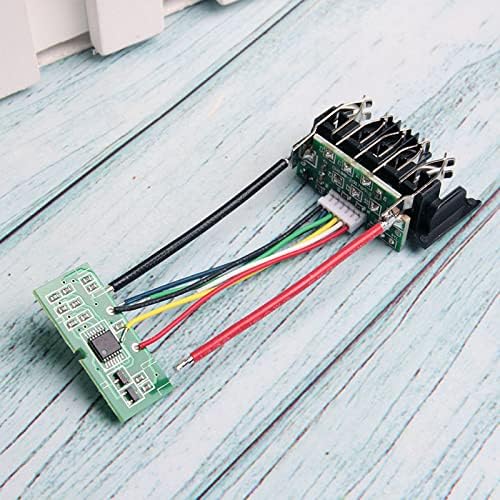
Figure 1: General view of the Acxico DCB200 PCB with connecting wires.
The board is compact, measuring approximately 3.15 x 1.38 x 0.39 inches (8 x 3.5 x 1 cm), and is constructed from PCB and metal components.
3. Safety Information
- Professional Use Only: This product is designed for users with practical experience in battery assembly and a thorough understanding of battery performance and safety protocols.
- Risk of Electric Shock: Always disconnect power sources before handling the PCB or battery components.
- Fire Hazard: Improper assembly or short-circuiting can lead to overheating, fire, or explosion. Ensure all connections are correct and secure.
- Component Handling: Handle the PCB with care to avoid damage to sensitive electronic components. Use appropriate anti-static measures.
- Ventilation: Work in a well-ventilated area.
- Eye Protection: Always wear appropriate eye protection when working with battery components.
4. Setup and Installation
Installation of the DCB200 PCB involves disassembling an existing battery pack and carefully integrating the new circuit board. This process requires precision and knowledge of battery pack construction.
4.1 Required Tools and Materials
- Soldering Iron and Solder
- Wire Strippers
- Multimeter
- Safety Glasses
- Anti-static Mat/Wrist Strap
- Original Dewalt 18V/20V battery casing (if reusing)
4.2 Installation Steps (General Guidance)
- Disassemble Battery Pack: Carefully open the existing Dewalt battery pack casing. Note the arrangement of the battery cells and the original PCB.
- Disconnect Old PCB: Desolder or disconnect all wires from the old PCB, paying close attention to polarity and connection points (e.g., B+, B-, balance leads).
- Prepare New PCB: Position the Acxico DCB200 PCB within the battery casing. Ensure it fits correctly and does not interfere with other components.
- Connect Wires: Solder the battery cell wires and output wires to the corresponding pads on the new DCB200 PCB. Double-check all connections for correct polarity and secure soldering. Refer to the original battery pack's wiring diagram or a reliable source for specific wiring configurations.
- Verify Connections: Use a multimeter to verify continuity and correct voltage readings across the PCB's output terminals before reassembling the casing.
- Reassemble Casing: Carefully close and secure the battery pack casing.
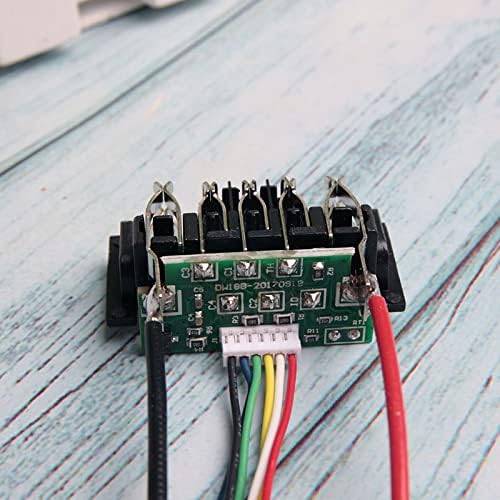
Figure 2: Close-up of the PCB showing various connection points.

Figure 3: Detailed view of the main chip on the PCB, responsible for protection functions.
Note: Due to variations in battery pack designs, specific wiring diagrams are not provided here. Consult detailed guides or professional assistance if unsure about the wiring process.
5. Operating Instructions
Once the Acxico DCB200 PCB is correctly installed within a battery pack, the battery pack operates as a standard Dewalt 18V/20V Li-Ion battery. The PCB manages the charging and discharging cycles, providing protection against common issues.
5.1 Charging
Use a compatible Dewalt 18V/20V Li-Ion battery charger. The PCB will manage the charging process, preventing overcharge and balancing cell voltages (if applicable to the specific PCB design and cell configuration).
5.2 Discharging
Insert the battery pack into a compatible Dewalt 18V/20V power tool. The PCB will monitor the discharge, preventing over-discharge and protecting the battery cells from damage.
5.3 Charge Indicator
Some PCBs may include a charge indicator button and LEDs. Pressing the button will illuminate the LEDs to show the approximate charge level of the battery pack.
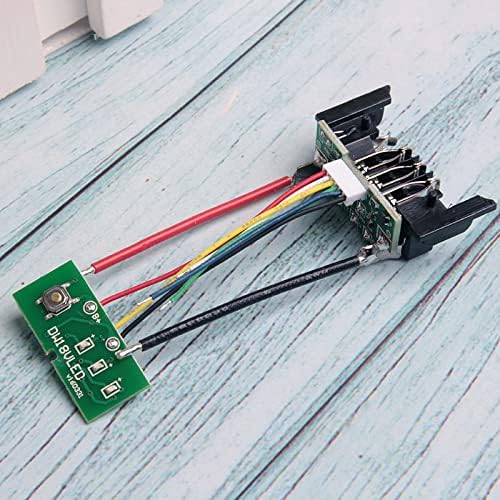
Figure 4: Reverse side of the PCB, potentially showing the charge indicator button area.
6. Maintenance
The Acxico DCB200 PCB itself requires minimal maintenance once installed. However, proper care of the entire battery pack is essential for longevity and safety.
- Storage: Store battery packs in a cool, dry place away from direct sunlight and extreme temperatures.
- Cleaning: Keep the battery pack terminals clean and free from dirt or debris. Use a dry cloth for cleaning.
- Inspection: Periodically inspect the battery pack for any signs of damage, swelling, or leakage. Discontinue use immediately if any issues are observed.
- Avoid Physical Damage: Do not drop or subject the battery pack to heavy impacts.
7. Troubleshooting
If the battery pack with the installed Acxico DCB200 PCB is not functioning as expected, consider the following troubleshooting steps:
| Problem | Possible Cause | Solution |
|---|---|---|
| Battery pack does not charge. |
|
|
| Battery pack does not power tool. |
|
|
| Charge indicator LEDs do not work. |
|
|
If troubleshooting steps do not resolve the issue, professional assistance may be required.
8. Specifications
- Model: DCB200 Li-Ion Battery PCB
- Compatibility: Dewalt 18V/20V Li-Ion battery packs (e.g., DCB200, DCB201, DCB203, DCB204)
- Function: Charging Protection Circuit Board
- Material: PCB + Metal
- Dimensions (L x W x H): Approximately 3.15 x 1.38 x 0.39 inches (8 x 3.5 x 1 cm)
- Weight: Approximately 0.81 ounces
- Package Includes: 1 x Acxico DCB200 Li-Ion Battery PCB
9. Warranty and Support
For any questions regarding the Acxico DCB200 Li-Ion Battery PCB, please refer to the retailer or manufacturer's support channels. Ensure to provide your product model and purchase details for efficient assistance.
This product is intended for repair and assembly by experienced individuals. Improper installation or use may void any implied warranties.