
1. Product Overview
This XTRONS 8.8 Inch IPS Touch Screen Car Stereo is designed to upgrade the in-car entertainment and navigation experience for specific BMW models. It integrates advanced features while retaining original vehicle functionalities.
1.1 Compatible Models and Years
- BMW 3 Series: E90, E91, E92, E93 (2009-2012)
- BMW 5 Series: E60, E61, E63, E64 (2009-2012)
Important: This unit is compatible only with vehicles equipped with the CIC system.
2. Key Features
- Operating System: Android 11
- Processor: Octa-core, 2.0GHz clock rate, 14nm Process
- Memory: 2GB DDR4 RAM, 32GB SSD ROM
- Display: 8.8 Inch IPS Panel, 178° Viewing Angle, 1080P Video Support
- Connectivity: Built-in 4G Module (supports various bands), Dual Wi-Fi Band (2.4GHz and 5GHz), Bluetooth 5.0
- Smartphone Integration: Built-in Wireless CarAutoPlay / Wired Android Auto
- Audio Enhancement: Built-in DSP (Digital Sound Processor)
- User Interface: Split-Screen Mode, Picture-in-Picture (PIP) Mode
- Navigation: GPS Navigation (supports Google Maps, Sygic, Waze, etc.)
- Original Car Information Display: Retains and displays original vehicle information (speed, fuel level, oil pressure, safety warnings).
- Original Functions: CD player, radio, Bluetooth, Steering Wheel Controls (SWC), Backup camera display remain functional.
2.1 System Architecture
The unit features an Octa-core processor and runs on Android 11, providing a responsive and modern user experience.

Image: Overview of the system's core components including the Octa-core processor, Android 11 operating system, integrated 4G, dual-band Wi-Fi, and memory specifications (2GB DDR4 RAM, 32GB ROM).
2.2 Integrated 4G Module
The built-in 4G module supports 99% of global carriers, enabling independent 4G network access and easy sharing. A data Micro-SIM card (not included) is required for 4G functionality.

Image: Details on the integrated 4G module, including supported regions (Europe, South America, North America, Asia, Middle East, Australia, Africa) and 4G bands. It also illustrates the different SIM card types (Mini-SIM, Micro-SIM, Nano-SIM) and specifies that a Micro-SIM is needed.
3. Setup and Installation
3.1 System Compatibility Check
Before installation, verify that your BMW vehicle is equipped with the CIC system. This unit is not compatible with CCC or NBT systems, or vehicles without an original display.

Image: Visual guide to distinguish between CIC, CCC, and NBT systems in BMW vehicles based on iDrive controller features, port configurations, and interface elements. It also indicates incompatibility with "No Original System".
3.2 Wiring Harness Connection
Connect the provided ISO wiring harness and other cables according to the diagram below. Ensure all connections are secure before powering on the unit.
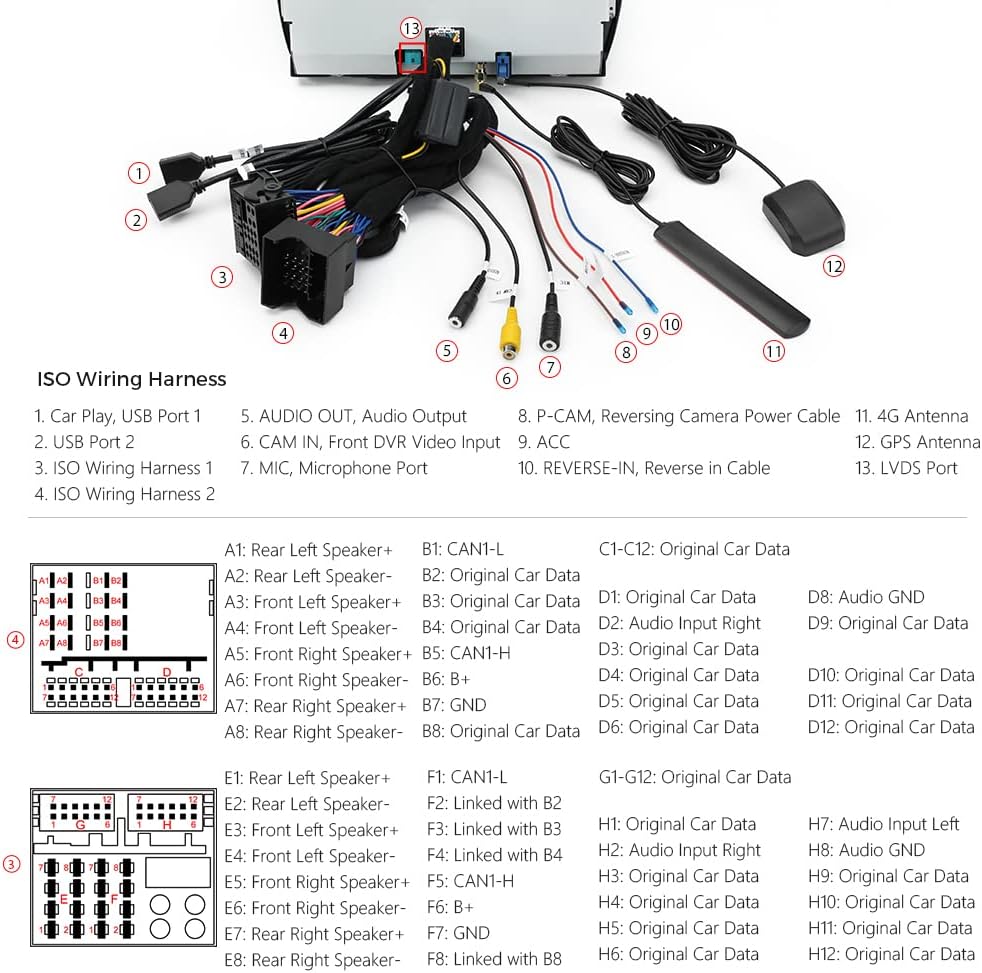
Image: Comprehensive diagram illustrating the ISO Wiring Harness and its various connections, including USB ports, audio output, camera inputs, 4G antenna, GPS antenna, and specific pin assignments for original car data.
For detailed installation steps, refer to the separate Installation Instructions document included with your product.
3.3 Accessories Included
Verify that all accessories are present in the package:
- 1 × ISO Wiring Harness
- 1 × USB Cable
- 1 × Audio Cable
- 1 × 4G Antenna
- 1 × GPS Antenna
- 1 × Tweezers
- 1 × Installation Instructions
- 1 × User Manual (this document)

Image: Visual representation of all components included in the product package, such as the ISO Wiring Harness, USB Cable, Audio Cable, 4G Antenna, GPS Antenna, Tweezers, Installation Instructions, and User Manual.
4. Operating Instructions
4.1 Wireless CarAutoPlay / Wired Android Auto
Connect your smartphone to access navigation, calls, music, and voice assistants (Google Assistant, Siri) directly on the car stereo screen. Wireless CarAutoPlay is compatible with iPhone 5 and newer (iOS 8+). Wired Android Auto is compatible with Android phones (Android 4.3+) via USB cable.

Image: Display of the CarAutoPlay interface (left) and Android Auto interface (right) on the car stereo screen, showing typical app icons for navigation, music, phone, and messages.
4.2 Digital Sound Processor (DSP)
Utilize the built-in DSP to customize your audio experience. Adjust equalizer settings (Flat, Pop, Rock, Jazz, Classic, User), apply filters (HPF/LPF), set sound delays, enhance bass with Smart Bass, adjust balance, and control loudness.

Image: Screenshots of the Digital Sound Processor (DSP) interface, detailing options for Equalizer presets, High-Pass Filter (HPF) and Low-Pass Filter (LPF) adjustments, sound delay settings, Smart Bass, Balance, and Loudness controls.
4.3 Split-Screen and PIP Mode
- Split-Screen Mode: Allows running two applications simultaneously, such as navigation and music playback.
- PIP (Picture-in-Picture) Mode: Supported by the built-in video player. Tap the Down Arrow on the screen during video playback to activate PIP.
4.4 GPS Navigation
The unit supports various Android-compatible navigation software like Google Maps, Sygic, and Waze. Ensure the GPS antenna is properly installed for optimal performance.
4.5 Bluetooth 5.0
Connect your smartphone via Bluetooth for hands-free calls, contact searching, and audio streaming. This enhances driving safety by allowing phone functions without handling your device.
5. Specifications
| Feature | Specification |
|---|---|
| Display Size | 8.8 Inches |
| Resolution | 1920 x 1080 |
| Operating System | Android 11 |
| Processor | Octa-core, 2.0GHz, 14nm |
| RAM | 2GB DDR4 |
| ROM | 32GB SSD |
| Connectivity | 4G LTE, Dual-band Wi-Fi, Bluetooth 5.0, USB |
| Special Feature | Touchscreen, Built-in DSP, Wireless CarPlay, Wired Android Auto |
| Mounting Type | Dashboard Mount |
| Audio Output Mode | Stereo |
| Map Type | North America (default, supports others) |
5.1 Unit Dimensions
The physical dimensions of the head unit are provided for reference during installation.
Image: Diagram illustrating the dimensions of the XTRONS 8.8 Inch Car Stereo, showing measurements of 274mm width, 243mm depth, 103mm height, and 27mm thickness at the thinnest point.
6. Troubleshooting
If you encounter issues with your XTRONS car stereo, consider the following general troubleshooting steps:
- No Power: Check all power connections and fuses. Ensure the vehicle's ignition is on.
- No Sound: Verify speaker connections. Check volume levels on both the unit and the original car system. Ensure the correct audio input/output mode is selected.
- GPS Signal Loss: Ensure the GPS antenna is installed correctly and has a clear view of the sky.
- Bluetooth Connection Issues: Ensure Bluetooth is enabled on both the unit and your smartphone. Try unpairing and re-pairing the devices.
- CarPlay/Android Auto Not Connecting: For wired connections, try a different USB cable. For wireless, ensure Wi-Fi and Bluetooth are active on your phone and the unit.
- System Freezing/Unresponsive: Perform a soft reset by pressing the reset button (if available) or by turning off the vehicle's ignition and restarting.
For more specific issues, refer to the detailed troubleshooting section in the separate Installation Instructions or contact XTRONS customer support.
7. Maintenance
To ensure the longevity and optimal performance of your car stereo, follow these maintenance guidelines:
- Cleaning the Screen: Use a soft, lint-free cloth to gently wipe the screen. Avoid abrasive cleaners or solvents.
- Software Updates: Periodically check for and install system software updates to ensure optimal performance and access to new features.
- Environmental Conditions: Avoid exposing the unit to extreme temperatures, direct sunlight for prolonged periods, or excessive moisture.
- Cable Management: Ensure all cables are securely routed and not pinched or damaged, which can lead to connectivity issues.
8. Warranty and Support
The XTRONS 8.8 Inch IPS Touch Screen Car Stereo comes with a 1-year warranty from the date of purchase.
For warranty claims, technical support, or further assistance, please contact XTRONS customer service through their official website or the retailer where the product was purchased. Please have your purchase receipt and product model information ready.
9. Product Videos
Watch these official videos for additional guidance on installation, features, and operation.
9.1 Comprehensive Product Overview (7:29)
Video: A detailed video providing a comprehensive overview of the XTRONS 8.8 Inch Car Stereo, covering its features, user interface, and general operation.
9.2 Feature Demonstration (3:01)
Video: This video demonstrates key features of the car stereo, such as the IPS touch screen, Android 11 interface, and responsiveness.
9.3 CarPlay and Android Auto Integration (2:53)
Video: A demonstration of how Wireless CarAutoPlay and Wired Android Auto integrate with the XTRONS unit, showcasing navigation, music, and communication functionalities.