
1. Important Safety Instructions
When using electrical appliances, basic safety precautions should always be followed to reduce the risk of fire, electric shock, and injury to persons, including the following:
- Read all instructions before using the oven.
- Do not touch hot surfaces. Use handles or knobs.
- To protect against electric shock, do not immerse cord, plugs, or the appliance in water or other liquid.
- Close supervision is necessary when any appliance is used by or near children.
- Unplug from outlet when not in use and before cleaning. Allow to cool before putting on or taking off parts.
- Do not operate any appliance with a damaged cord or plug, or after the appliance malfunctions or has been damaged in any manner.
- The use of accessory attachments not recommended by the appliance manufacturer may cause hazards.
- Do not use outdoors.
- Do not let cord hang over edge of table or counter, or touch hot surfaces.
- Do not place on or near a hot gas or electric burner, or in a heated oven.
- Extreme caution must be used when moving an appliance containing hot oil or other hot liquids.
- Always attach plug to appliance first, then plug cord into the wall outlet. To disconnect, turn any control to "OFF", then remove plug from wall outlet.
- Do not use appliance for other than intended use.
- Oversize foods or metal utensils must not be inserted in a toaster oven as they may create a fire or risk of electric shock.
- A fire may occur if the oven is covered or touching flammable material, including curtains, draperies, walls, and the like, when in operation.
- Do not place any of the following materials in the oven: paper, cardboard, plastic, and the like.
- Do not store any materials, other than manufacturer's recommended accessories, in this oven when not in use.
- Do not cover crumb tray or any part of the oven with metal foil. This will cause overheating of the oven.
2. Product Overview
Familiarize yourself with the components of your Mistral MO32RCL Electric Oven.
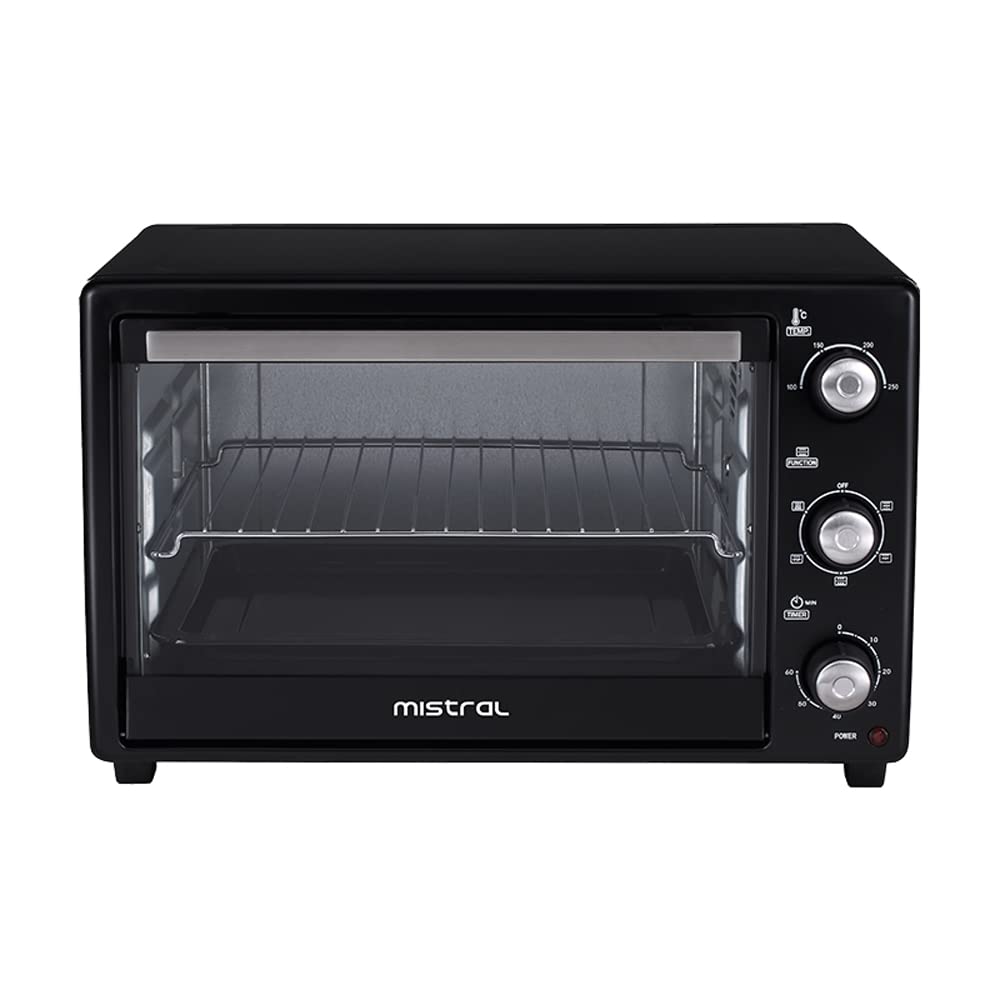
Figure 2.1: Front view of the Mistral MO32RCL Electric Oven with the door open, showing the interior, wire rack, and baking tray. The control panel is visible on the right side.

Figure 2.2: Front view of the Mistral MO32RCL Electric Oven with a chicken roasting on the rotisserie spit inside. The control panel is visible on the right side.
Main Components:
- Temperature Control Knob: Adjusts oven temperature from 100°C to 250°C.
- Function Selector Knob: Selects heating elements (upper, lower, both) and rotisserie function.
- Timer Knob: Sets cooking time up to 60 minutes or to "Stay On" mode.
- Power Indicator Light: Illuminates when the oven is operating.
- Glass Door: Heat-resistant glass for viewing food.
- Wire Rack: For baking and roasting.
- Baking Tray: For baking and collecting drips.
- Rotisserie Spit: For roasting whole chickens or other meats.
- Crumb Tray: Collects crumbs and drips at the bottom of the oven.
3. Setup and First Use
3.1 Unpacking
- Carefully remove the oven and all accessories from the packaging.
- Remove any packing materials, stickers, or labels from the oven and its accessories.
- Wash the wire rack, baking tray, rotisserie spit, and crumb tray in warm, soapy water. Rinse thoroughly and dry.
- Wipe the interior and exterior of the oven with a damp cloth.
3.2 Placement
- Place the oven on a stable, level, heat-resistant surface.
- Ensure there is adequate ventilation around the oven (at least 10-15 cm clearance on all sides and top).
- Do not place the oven near flammable materials such as curtains or walls.
- Ensure the power cord is not touching any hot surfaces.
3.3 First Use (Burn-Off)
Before cooking food in your new oven, it is recommended to perform a "burn-off" cycle to eliminate any manufacturing oils or residues that may produce smoke or odors during initial use.
- Ensure the oven is empty and all accessories are clean.
- Plug the oven into a grounded electrical outlet.
- Set the Temperature Control Knob to 250°C.
- Set the Function Selector Knob to "Upper and Lower Heating Elements" (usually indicated by both top and bottom lines).
- Set the Timer Knob to 15-20 minutes. The power indicator light will illuminate.
- Allow the oven to operate for the set time. Some smoke or odor is normal during this process. Ensure the area is well-ventilated.
- Once the timer rings, turn all knobs to the "OFF" position and unplug the oven.
- Allow the oven to cool completely before its first cooking use.
4. Operating Instructions
4.1 Basic Operation (Baking/Roasting)
- Place the wire rack or baking tray with food into the desired rack position.
- Close the oven door.
- Set the Temperature Control Knob to the desired temperature.
- Set the Function Selector Knob to the desired heating mode (e.g., upper, lower, or both elements).
- Set the Timer Knob to the desired cooking time. The power indicator light will turn on.
- When the cooking time is complete, the timer will ring, and the oven will turn off.
- Carefully remove the cooked food using oven mitts.
- Turn all knobs to the "OFF" position and unplug the oven when not in use.
4.2 Using the Rotisserie Function
The rotisserie function is ideal for roasting whole chickens or other cuts of meat evenly.
- Prepare the food (e.g., truss a chicken) and secure it onto the rotisserie spit using the forks provided. Ensure the food is centered and balanced.
- Insert one end of the rotisserie spit into the drive socket on the right side of the oven interior.
- Rest the other end of the spit onto the support bracket on the left side.
- Place the baking tray on the bottom rack to catch any drips.
- Close the oven door.
- Set the Temperature Control Knob to the desired temperature (e.g., 180-200°C for chicken).
- Set the Function Selector Knob to the "Rotisserie with Upper Heating Element" setting (usually indicated by a rotisserie symbol and upper line).
- Set the Timer Knob to the desired cooking time. The power indicator light will turn on, and the rotisserie spit will begin to rotate.
- Monitor cooking progress through the glass door.
- When cooking is complete, turn all knobs to "OFF" and unplug the oven.
- Using the rotisserie handle (if provided) or oven mitts, carefully remove the hot rotisserie spit and food from the oven.
5. Maintenance and Cleaning
Regular cleaning will help maintain the performance and appearance of your oven.
- Always unplug the oven from the power outlet and allow it to cool completely before cleaning.
- Wash the wire rack, baking tray, rotisserie spit, and crumb tray in warm, soapy water. Rinse and dry thoroughly. These parts may also be dishwasher safe (check manufacturer's guidelines if available).
- Wipe the interior walls of the oven with a damp cloth and a mild, non-abrasive cleaning solution. Avoid using harsh chemicals or abrasive scrubbers that could damage the non-stick coating (if applicable) or heating elements.
- Clean the exterior of the oven with a damp cloth. Do not use abrasive cleaners or polishes.
- Do not immerse the oven body, cord, or plug in water or any other liquid.
- Ensure all parts are completely dry before plugging the oven back in and storing or using it.
6. Troubleshooting
Before contacting customer service, please refer to the following troubleshooting guide for common issues.
| Problem | Possible Cause | Solution |
|---|---|---|
| Oven does not turn on. | Not plugged in; power outlet not working; timer not set. | Ensure the oven is securely plugged into a working outlet. Set the timer knob to a desired cooking time or "Stay On". |
| Food is not cooking evenly. | Incorrect rack position; uneven food placement; door opened too frequently. | Adjust rack position. Ensure food is centered. Avoid opening the door unnecessarily. Rotate food halfway through cooking if needed. |
| Excessive smoke or odor during cooking. | Food spills; residue from previous cooking; first use burn-off. | Clean the oven interior and accessories thoroughly. Ensure the first use burn-off cycle was completed. Reduce cooking temperature if food is burning. |
| Rotisserie spit is not rotating. | Function knob not set to rotisserie; food too heavy/unbalanced; spit not correctly seated. | Ensure the function knob is on the rotisserie setting. Check food weight and balance. Re-seat the spit firmly into the drive socket and support. |
7. Specifications
- Model: MO32RCL
- Brand: MISTRAL
- Capacity: 32 Liters
- Finish Type: Polished
- ASIN: B09QZHWK4B
- Timer: Up to 60 minutes with "Stay On" function
- Temperature Range: 100°C - 250°C
Note: Specifications are subject to change without prior notice for product improvement.
8. Warranty and Support
For warranty information and customer support, please refer to the warranty card included with your product or contact your local MISTRAL authorized service center.
Keep your purchase receipt as proof of purchase for warranty claims.

