
1. Introduction
Thank you for choosing the Shanrya Portable Humidifier GXZ-J623. This device is designed to enhance your environment by increasing humidity, improving air quality, and providing a soothing night light. Its compact size and USB power make it suitable for various settings, including homes, offices, and bedrooms.
Key features include a 500ml water capacity, two spray modes (continuous and intermittent), a warm night light, and double protection with automatic power-off.
2. Safety Instructions
- Do not immerse the humidifier in water or other liquids.
- Ensure the power supply voltage matches the device's specifications (DC5.0V).
- Keep out of reach of children and pets.
- Do not block the mist outlet.
- Use only clean tap water or distilled water. Do not add essential oils directly into the water tank as this may damage the device.
- Unplug the device before cleaning or refilling.
- If the device is damaged, do not attempt to repair it yourself. Contact customer support.
3. Package Contents
Please check the package for the following items:
- 1 x Shanrya Portable Humidifier GXZ-J623
- 1 x USB Cable
- 1 x User Manual

Image: Included USB Cable
4. Product Overview
Familiarize yourself with the components of your humidifier.

Image: Front view of the Shanrya Portable Humidifier GXZ-J623

Image: Side view showing the control button and USB port area.
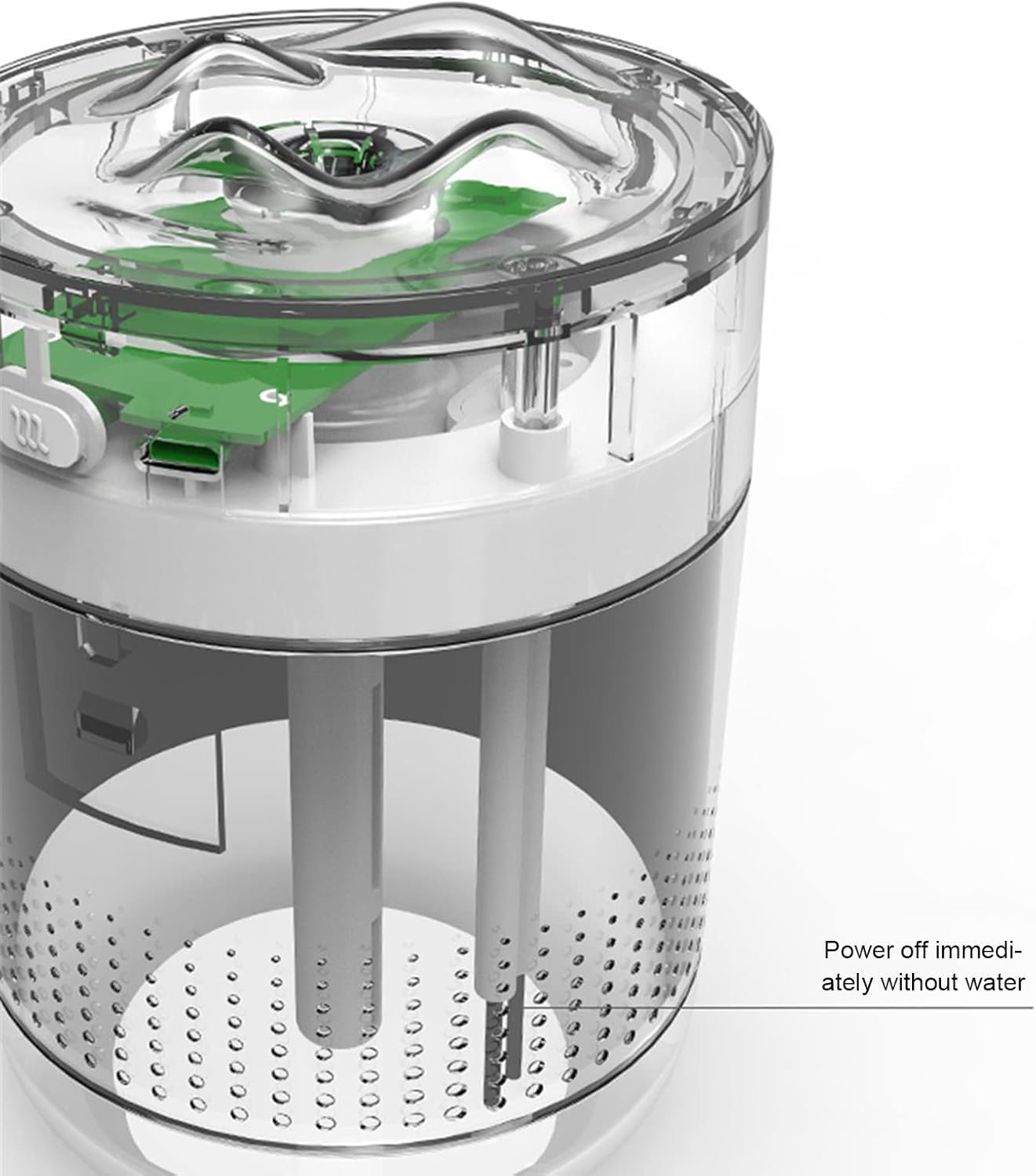
Image: Internal view of the humidifier, illustrating the water reservoir and internal components.
5. Setup
- Open the Humidifier: Gently twist the top cover counter-clockwise to separate it from the water tank.
- Fill the Water Tank: Fill the water tank with clean tap water or distilled water up to the maximum fill line. Do not overfill. The capacity is 500ml.
- Close the Humidifier: Place the top cover back onto the water tank and twist clockwise to secure it.
- Connect Power: Insert the small end of the provided USB cable into the humidifier's power port and the larger end into a compatible USB power source (e.g., computer, USB wall adapter).

Image: Humidifier in use on a desk, demonstrating typical setup.
6. Operating Instructions
The humidifier features a single control button for all functions.
- Power On / Continuous Spray Mode: Press the control button once to turn on the humidifier. It will start spraying continuously. This mode operates for 12 hours before automatically shutting off.
- Intermittent Spray Mode: Press the control button a second time to switch to intermittent spray mode. In this mode, the humidifier sprays for 3 seconds and then pauses for 2 seconds. This mode operates for 18 hours before automatically shutting off.
- Night Light On/Off: Press and hold the control button for 3 seconds to turn the warm night light on or off.
- Power Off: Press the control button a third time (after intermittent mode) to turn off the humidifier and the night light.

Image: Humidifier with its warm night light feature activated.

Image: Humidifier actively emitting mist while the night light is on.
7. Maintenance
Regular cleaning ensures optimal performance and extends the lifespan of your humidifier.
- Daily Cleaning: Empty any remaining water from the tank and wipe it dry with a clean cloth.
- Weekly Cleaning:
- Unplug the humidifier.
- Remove the top cover.
- Clean the water tank with a soft brush or cloth and mild detergent. Rinse thoroughly to remove any residue.
- Wipe the mist outlet and the inside of the top cover with a damp cloth.
- Ensure all parts are completely dry before reassembling.
- Filter/Cotton Swab Replacement: The humidifier uses a cotton swab filter. If mist output decreases or the humidifier stops working, the cotton swab may need replacement. Refer to the manufacturer's guidelines for purchasing replacement swabs.
8. Troubleshooting
| Problem | Possible Cause | Solution |
|---|---|---|
| No mist output | No water in tank; Cotton swab dry or clogged; Power not connected; Device malfunction. | Fill water tank; Ensure cotton swab is fully saturated; Check USB connection; Replace cotton swab; Contact support. |
| Weak mist output | Low water level; Clogged cotton swab; Mineral buildup on atomizer. | Refill water; Replace cotton swab; Clean atomizer gently with a cotton swab dipped in vinegar (then rinse). |
| Night light not working | Light function not activated; Device malfunction. | Press and hold the control button for 3 seconds; Contact support. |
| Automatic shut-off occurs too soon | Low water level sensor activated; Timer function. | Refill water; Note that continuous mode runs for 12 hours and intermittent for 18 hours before auto shut-off. |
9. Specifications
| Feature | Detail |
|---|---|
| Model | GXZ-J623 |
| Material | ABS |
| Dimensions | Approx. 95 x 95 x 129mm (3.7 x 3.7 x 5.1in) |
| Input Voltage | DC5.0V |
| Working Current | 200-450mA |
| Power Consumption | 1.0-2.25W |
| Water Bottle Capacity | 500ml |
| Spray Volume | 30ml-50ml/h |
| Operation Modes | Continuous (12h auto-off), Intermittent (18h auto-off) |
| Special Features | Warm Night Light, Quiet Operation, Automatic Power-off Protection |
| Color | White |
| Weight | 0.3 Kilograms (10.4 ounces) |

Image: Diagram showing the dimensions of the humidifier (95mm x 95mm x 129mm).
10. Warranty and Support
For warranty information, please refer to the documentation provided at the time of purchase or contact your retailer. If you encounter any issues or require technical assistance, please contact Shanrya customer support through your purchase platform or the official brand website.