
1. Introduction and Overview
This manual provides detailed instructions for the installation, operation, and maintenance of your XTRONS Android 11 Car Stereo. This advanced head unit is specifically designed for select BMW 1 Series models, offering a seamless integration with your vehicle's existing systems while enhancing your driving experience with modern features.

Figure 1.1: XTRONS Android 11 Car Stereo (Model QEB1087CC) main unit.
2. Product Features
The XTRONS Android 11 Car Stereo is equipped with a range of features designed to provide a comprehensive in-car entertainment and navigation solution:
- Operating System: Android 11
- Processor: Octa-core, 2.0GHz clock rate, 14nm Process
- Memory & Storage: 2GB DDR4 RAM, 32GB SSD ROM (supports 64-bit applications)
- Display: 10.25-inch IPS Touch Screen with 178° viewing angle, supports 1080P video
- Connectivity: Built-in 4G Module, Dual Wi-Fi Band (2.4GHz and 5GHz), Bluetooth 5.0
- Smartphone Integration: Built-in Wireless CarPlay and Wired Android Auto
- Audio Enhancement: Built-in Digital Sound Processor (DSP)
- Multitasking: Split-Screen Mode, Picture-in-Picture (PIP) Mode for video playback
- Navigation: GPS Navigation with support for various Android OS compatible software

Figure 2.1: Key features including optimized Android 11, dual user interface themes, and quick access to reversing camera view.
Video 2.1: An overview of the XTRONS Android 11 Car Stereo's main features and user interface.
3. Vehicle Compatibility
This head unit is designed for specific BMW 1 Series models equipped with the CCC system. Please verify your vehicle's system before installation.
- Applicable Models: BMW 1 Series E81, E82, E87, E88
- Applicable Years: 2006, 2007, 2008, 2009, 2010, 2011, 2012
- Required System: Must have the original CCC system.

Figure 3.1: Visual guide to identify your BMW's original system (CCC, CIC, or NBT) for compatibility.
4. Installation
The installation process requires careful attention to detail. Refer to the included Installation Instructions for a step-by-step guide specific to your vehicle. It is recommended that installation be performed by a qualified professional.
4.1. Wiring Connections
Ensure all wiring harnesses and cables are connected securely according to the provided diagram. Incorrect wiring can lead to malfunction or damage.
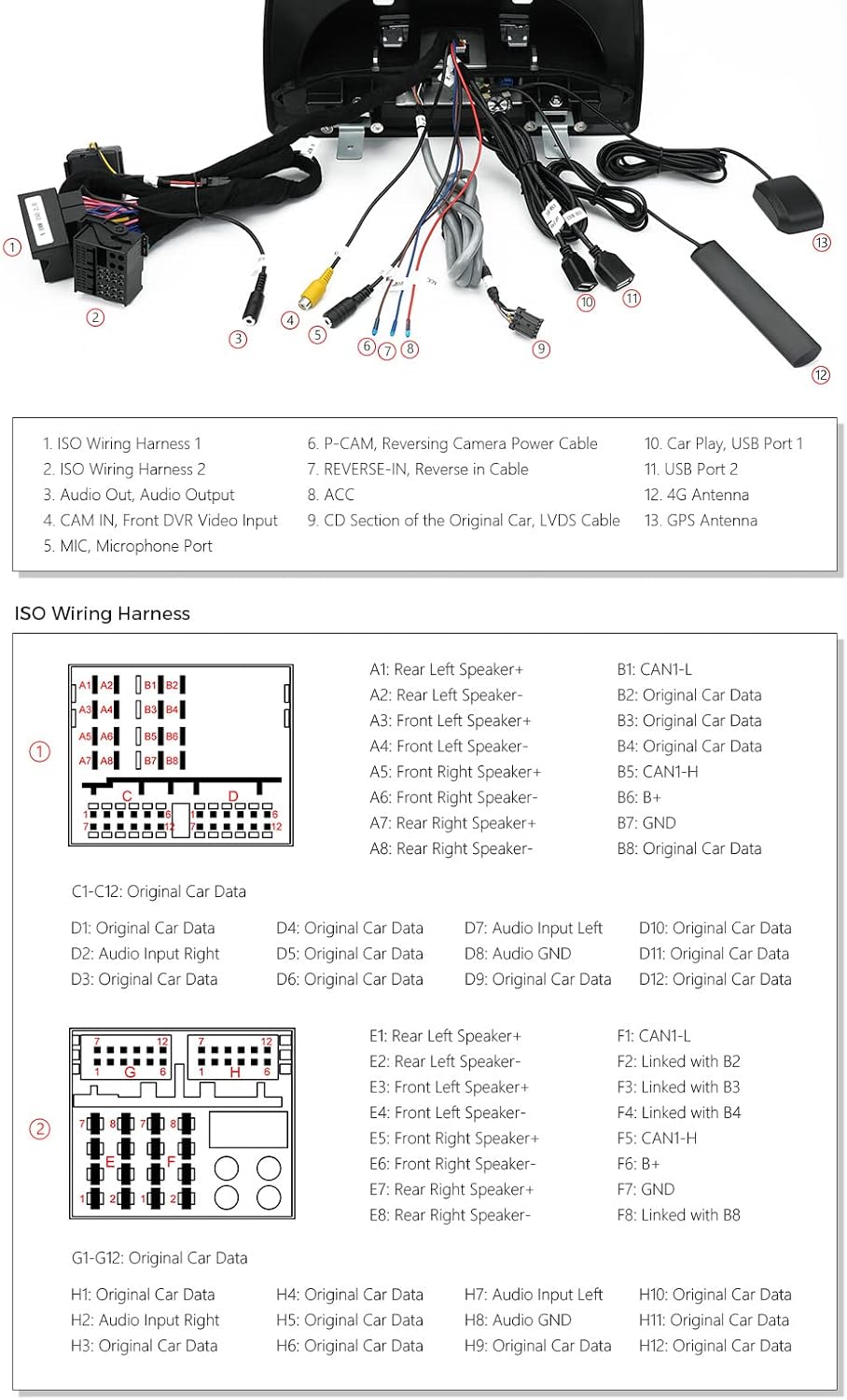
Figure 4.1: Detailed diagram illustrating the various wiring connections for the head unit, including ISO harnesses, USB, audio, 4G, and GPS antennas.
5. Operating Instructions
5.1. Wireless CarPlay and Wired Android Auto
Connect your iPhone (iOS 8 and newer) wirelessly for CarPlay or your Android phone (Android 4.3 and newer) via USB for Android Auto. This allows access to navigation, music, calls, and voice assistants directly from the head unit's screen.

Figure 5.1: Display of both Android Auto and Apple CarPlay interfaces, demonstrating smartphone integration.
5.2. Built-in DSP (Digital Sound Processor)
Utilize the built-in DSP to customize your audio experience. Adjust equalizer settings, filters, delay, smart bass, balance, and loudness to achieve optimal sound quality.
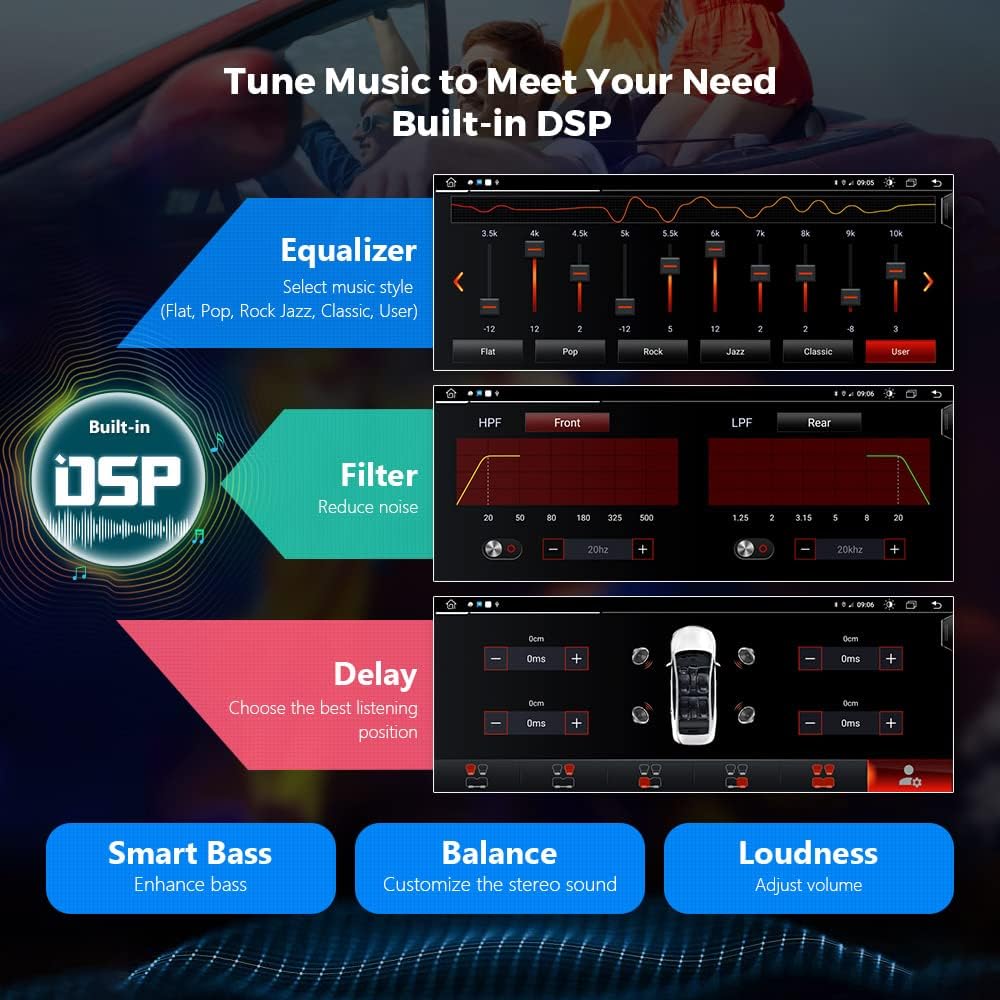
Figure 5.2: The DSP interface, allowing users to fine-tune audio settings such as equalizer, filters, and sound delay.
5.3. GPS Navigation
The unit supports various Android OS compatible navigation software, including Google Maps, Sygic, and Waze. Ensure your preferred navigation app is installed and updated for accurate routing.
5.4. Multi-Window and PIP Mode
The split-screen mode allows you to run two applications simultaneously, such as music playback and navigation. The Picture-in-Picture (PIP) mode enables a floating video player, allowing you to watch videos while performing other tasks.
5.5. 4G and Dual-Band Wi-Fi
Insert a data Micro-SIM card (not included) into the built-in 4G module for independent internet access. The dual-band Wi-Fi supports both 2.4GHz and 5GHz networks, providing faster and more stable connectivity.

Figure 5.3: Illustration of the integrated 4G module and compatible SIM card sizes (Mini-SIM, Micro-SIM, Nano-SIM).
5.6. Bluetooth 5.0
Connect your mobile phone via Bluetooth 5.0 for hands-free calls, contact management, and audio streaming. This ensures safe communication and entertainment while driving.
6. Maintenance
To ensure the longevity and optimal performance of your XTRONS Car Stereo, follow these general maintenance guidelines:
- Keep the screen clean using a soft, lint-free cloth. Avoid abrasive cleaners.
- Ensure proper ventilation around the unit to prevent overheating.
- Regularly update the system software to benefit from the latest features and security patches.
- Avoid exposing the unit to extreme temperatures or direct sunlight for extended periods.
7. Troubleshooting
If you encounter any issues with your XTRONS Car Stereo, refer to the troubleshooting section in the full user manual or contact XTRONS technical support for assistance. Common issues can often be resolved by checking connections, restarting the unit, or performing a factory reset (refer to the full manual for instructions).
8. Specifications
| Feature | Detail |
|---|---|
| Display Size | 10.25 Inches |
| Screen Type | IPS Touchscreen |
| Resolution | 1920 x 1080 (Video Playback) |
| Operating System | Android 11 |
| Processor | Octa-core, 2.0GHz |
| RAM | 2GB DDR4 |
| ROM | 32GB SSD |
| Connectivity | USB, Wi-Fi (2.4GHz/5GHz), 4G, Bluetooth 5.0 |
| Smartphone Integration | Wireless CarPlay, Wired Android Auto |
| Audio Output Mode | Stereo (Built-in DSP) |
| Mounting Type | Dashboard Mount |
9. Included Accessories
The following accessories are included with your XTRONS Android 11 Car Stereo:
- 1 × ISO Wiring Harness
- 1 × USB Cable
- 1 × Audio Cable
- 1 × 4G Antenna
- 1 × GPS Antenna
- 1 × Tweezers
- 1 × LVDS Connect Cable
- 1 × Installation Instructions
- 1 × User Manual

Figure 9.1: All accessories included in the product package.
10. Optional Accessories
Enhance the functionality of your head unit with these optional accessories (sold separately):
- OBD Function: For retrieving real-time data and trouble codes. (Search ASIN: B015MU8UN6 / B08HQ9LQ9X)
- TPMS Function: For Tire Pressure Monitoring System. (Search ASIN: B07WQFKV5G)
- Front / Reversing Camera: For enhanced visibility. (Search ASIN: B07HMLYLJJ / B00GY3BVT6)
- External DVR: For driving video recording. (Search ASIN: B07MBYCG4C / B08MF1ZRJ3)
11. Warranty and Support
XTRONS provides a 1-year warranty for this head unit. For technical assistance or warranty claims, please contact XTRONS customer support. Ensure you have your product model and purchase details available when contacting support.


