
Introduction
Thank you for choosing the VOESUD Q53 Wireless Earbuds. These earbuds are designed to provide a high-fidelity audio experience with advanced features such as Bluetooth 5.1 connectivity, IPX7 waterproofing, and an extended playtime of up to 100 hours with the charging case. This manual will guide you through the setup, operation, maintenance, and troubleshooting of your new earbuds.
Package Contents
- VOESUD Q53 Wireless Earbuds (Left and Right)
- Charging Case
- USB Charging Cable
- Multiple Sizes of Ear Tips
- User Manual
Setup
1. Charging the Earbuds and Case
Before first use, fully charge the earbuds and the charging case. Place the earbuds into the charging case. The LED display on the case will indicate the charging status and battery level. Connect the charging case to a USB power source using the provided USB cable.

Image: The VOESUD Q53 earbuds in their charging case, illustrating the impressive 100-hour total playtime provided by the case's battery. The LED display on the case shows battery levels for both the case and individual earbuds.
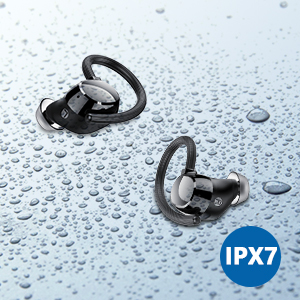
Image: The VOESUD Q53 charging case connected via USB to a smartphone, demonstrating its capability to function as an emergency power bank for other electronic devices. This highlights the large capacity of the charging case.
2. Pairing with Your Device
- Open the charging case. The earbuds will automatically enter pairing mode.
- On your device (smartphone, tablet, laptop), enable Bluetooth.
- Search for 'Q53' in the list of available Bluetooth devices.
- Select 'Q53' to connect. Once connected, you will hear a confirmation tone.

Image: A close-up of a single VOESUD Q53 earbud, emphasizing its Bluetooth 5.1 technology. The image also points out the location of the talking microphone, indicating enhanced call quality.

Image: Two individuals wearing VOESUD Q53 earbuds, illustrating the single/dual mode functionality. This shows that the earbuds can be used independently or together, offering flexibility for different listening scenarios.
Operating Instructions
1. Wearing the Earbuds
The VOESUD Q53 earbuds feature an ergonomic design with elastic and soft ear hooks to ensure a secure and comfortable fit, especially during sports and active use. Gently place the earbud into your ear canal and adjust the ear hook over your ear until it feels stable.

Image: A woman wearing VOESUD Q53 earbuds while exercising, demonstrating the secure fit designed for sports activities. The image highlights the elastic and soft ear hooks, ergonomic design, and includes replacement ear tips.
2. Touch Controls
The earbuds are equipped with touch-sensitive controls for easy management of music playback, calls, and voice assistant activation.
| Action | Left Earbud (L) | Right Earbud (R) |
|---|---|---|
| Play/Pause | Tap x 2 | Tap x 2 |
| Next Track | N/A | Tap & Hold 2s |
| Previous Track | Tap & Hold 2s | N/A |
| Volume Down | Tap x 1 | N/A |
| Volume Up | N/A | Tap x 1 |
| Answer/End Call | Tap x 2 | Tap x 2 |
| Reject Call | Tap & Hold 2s | Tap & Hold 2s |
| Power On | Tap & Hold 4s | Tap & Hold 4s |
| Power Off | Tap & Hold 4s | Tap & Hold 4s |
| Activate Voice Assistant (Siri) | Tap & Hold 3s | Tap & Hold 3s |

Image: A visual representation of the touch control functions for the VOESUD Q53 earbuds. It clearly shows the different tap and hold gestures for both left and right earbuds to control music, calls, and voice assistants.
Maintenance
1. Cleaning
Regularly clean your earbuds and charging case to ensure optimal performance and hygiene. Use a soft, dry, lint-free cloth to wipe the surfaces. For ear tips, you may gently remove them and clean with a damp cloth, ensuring they are completely dry before reattaching.
2. Storage
When not in use, store the earbuds in their charging case to protect them from dust and damage, and to keep them charged. Store in a cool, dry place away from extreme temperatures.
3. Water Resistance (IPX7)
The VOESUD Q53 earbuds are IPX7 waterproof, meaning they can withstand submersion in water up to 1 meter for 30 minutes. This makes them suitable for sports and exercise, providing resistance against sweat and rain. However, they are not designed for swimming or prolonged submersion. Ensure the earbuds are dry before placing them back into the charging case to prevent damage.

Image: The VOESUD Q53 earbuds displayed with water droplets, illustrating their IPX7 waterproof and sweatproof capabilities. This feature ensures durability and reliability during intense workouts or in rainy conditions.
Troubleshooting
- Earbuds not pairing: Ensure both earbuds are fully charged. Place them back in the case, close the lid, wait a few seconds, then open the lid again to re-enter pairing mode. Check your device's Bluetooth settings and try reconnecting.
- Only one earbud working: Try resetting the earbuds. Place both earbuds in the charging case, then remove them. If the issue persists, try re-pairing them with your device.
- No sound: Check the volume level on both your device and the earbuds. Ensure the earbuds are properly connected to your device.
- Charging issues: Ensure the charging cable is securely connected to both the case and the power source. Check if the charging pins on the earbuds and inside the case are clean and free of debris.
- Poor sound quality: Ensure the earbuds are properly seated in your ears. Try different sizes of ear tips for a better seal. Check for any obstructions in the earbud nozzles.
Specifications
| Feature | Detail |
|---|---|
| Model Number | Q53-R |
| Bluetooth Version | 5.1 |
| Playtime (Single Charge) | Up to 7 hours |
| Total Playtime (with Charging Case) | Up to 100 hours |
| Waterproof Rating | IPX7 |
| Driver Size | 10.0mm Dynamic Driver |
| Control Type | Touch Control |
| Connectivity | Wireless |
| Material | Plastic, Silicone |
| Product Dimensions | 4.33 x 3.35 x 1.46 inches |
| Item Weight | 5.8 ounces |
Warranty and Support
VOESUD products are designed for reliability and performance. For specific warranty details and terms, please refer to the warranty card included with your purchase or visit the official VOESUD website. If you encounter any issues or require technical assistance, please contact VOESUD customer support through the contact information provided in your product packaging or on the official brand website.


