
Inspireyes GL-568
Inspireyes Kids Walkie Talkies Instruction Manual
Model: GL-568
Brand: Inspireyes
Product Overview
The Inspireyes Kids Walkie Talkies are designed for clear and reliable communication, offering a fun and practical way for children to stay connected during various activities. Featuring a durable and lightweight design, these rechargeable two-way radios are easy for small hands to operate and come equipped with multiple useful functions.

Image: Three Inspireyes walkie talkies in pink, yellow, and blue, with one connected to a USB-C charging cable, illustrating the product's design and charging capability.
What's in the Box
- 3 Walkie Talkies (Pink, Yellow, Blue)
- USB Type-C Charging Cables (one per walkie talkie)
- Lanyards (one per walkie talkie, color-coordinated)
- User Manual

Image: The complete package contents laid out, showing the three walkie talkies, their respective charging cables, lanyards, and the user manual.
Setup
- Initial Charge: Before first use, fully charge each walkie talkie using the provided USB Type-C charging cables. Connect the cable to the charging port on the device and a compatible USB power source. The battery indicator on the LCD screen will show charging progress. A full charge provides up to 48 hours of playtime and 7 days of standby time.

Image: A blue Inspireyes walkie talkie being charged via its USB Type-C port, highlighting the rechargeable battery feature.
- Attach Lanyard: Thread the lanyard through the small loop at the top of the walkie talkie for easy carrying around the neck.
- Attach Belt Clip: The walkie talkies come with a removable belt clip on the back. To attach or remove, slide it into the designated slot until it clicks securely.
Operating Instructions
The Inspireyes walkie talkies are designed for intuitive use by children. Familiarize yourself with the buttons and their functions:
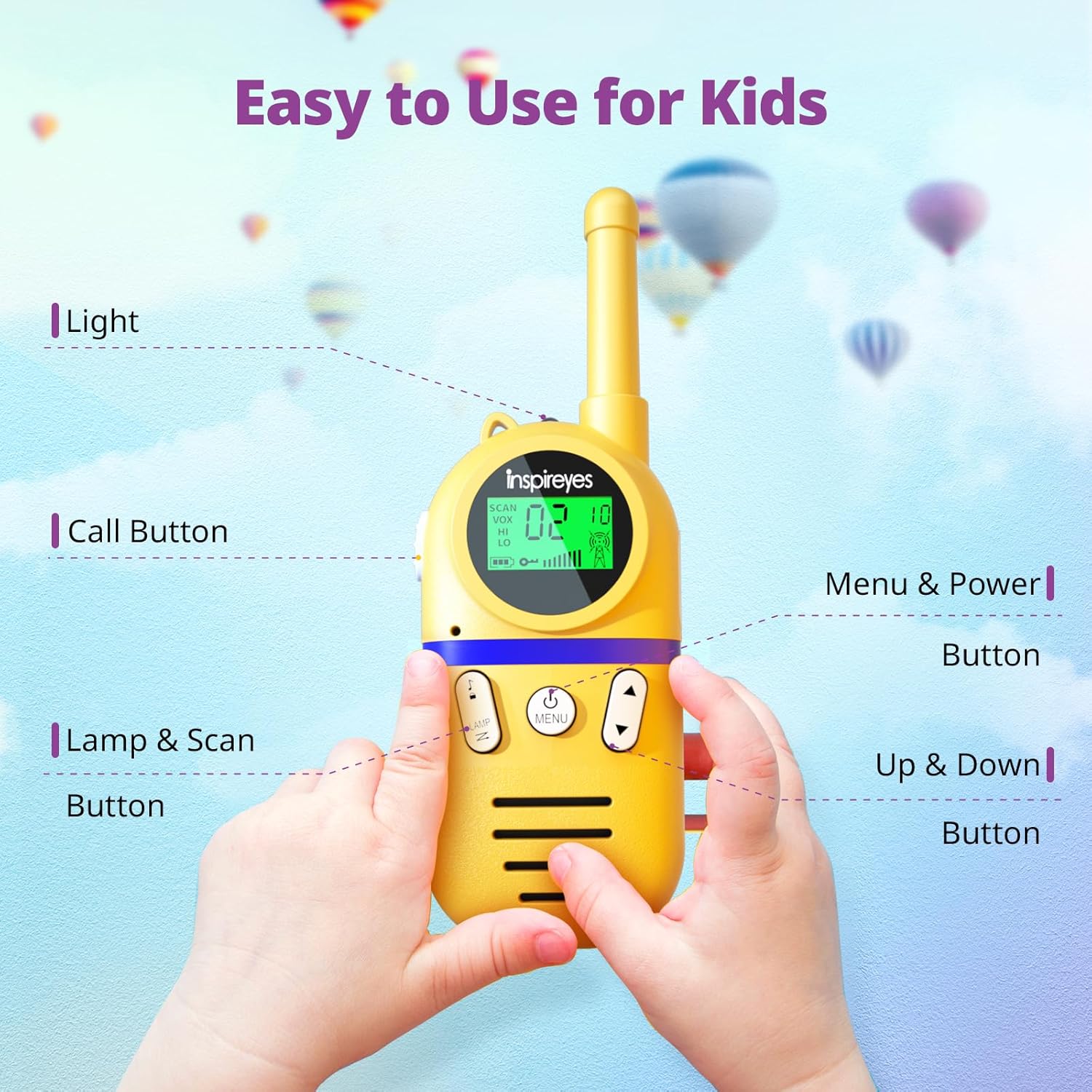
Image: A detailed view of the walkie talkie's front panel, showing the location and labels of each button for easy operation.
- Power On/Off: Press and hold the MENU/POWER button for a few seconds until the LCD screen lights up (to power on) or turns off (to power off).
- Channel Selection: Press the MENU/POWER button once to enter channel selection mode. Use the UP or DOWN arrow buttons to select one of the 22 available channels. Press MENU/POWER again to confirm. For private communication, you can also set 99 sub-codes (CTCSS/DCS) within each channel. Ensure all walkie talkies are on the same channel and sub-code for communication.
- Push-to-Talk (PTT): To transmit your voice, press and hold the large CALL button on the left side of the walkie talkie. Speak clearly into the microphone. Release the button when you are finished speaking to listen for a response.
- VOX Function (Hands-Free): The VOX (Voice Operated Exchange) function allows for hands-free communication without pressing the PTT button. To activate, press the MENU/POWER button multiple times until "VOX" appears on the screen. Use the UP or DOWN arrow buttons to select the VOX sensitivity level (1-3, with 3 being most sensitive). Press MENU/POWER to confirm.
- Flashlight: Press the LAMP button to turn the built-in flashlight on or off. This is useful in low-light conditions.
- Call Tone: Press the CALL button (usually located near the PTT button) briefly to send an alert tone to other walkie talkies on the same channel.
- Keypad Lock: To prevent accidental changes to settings, press and hold the MENU/POWER button until a key icon appears on the screen. Repeat to unlock.
- Headphone Jack: A 2.5mm headphone jack is available for private listening (headphones not included).

Image: Children using the walkie talkies for communication during play, highlighting the product's suitability for ages 3-12 and various activities.
Maintenance
- Keep the walkie talkies dry. Avoid exposure to rain, moisture, or liquids.
- Clean the devices with a soft, damp cloth. Do not use harsh chemicals or abrasive cleaners.
- Store in a cool, dry place when not in use.
- Do not attempt to disassemble or repair the walkie talkies yourself. This will void the warranty.
Troubleshooting
| Problem | Possible Cause | Solution |
|---|---|---|
| No sound or weak signal | Incorrect channel/sub-code; Out of range; Low battery. | Ensure all units are on the same channel and sub-code. Move closer to the other unit. Recharge the battery. |
| Battery not charging | Loose connection; Faulty cable/adapter. | Check cable connections. Try a different USB port or power adapter. |
| Buttons unresponsive | Keypad lock is active. | Press and hold the MENU/POWER button until the key icon disappears from the screen. |
Specifications
- Model Number: GL-568
- Item Weight: 2.93 ounces
- Product Dimensions: 1.29 x 2.16 x 6.02 inches
- Batteries: 1 Lithium Polymer battery required (included)
- Battery Life: Up to 48 hours playtime, 7 days standby
- Number of Channels: 22
- Sub-codes: 99 (CTCSS/DCS)
- Frequency Range: 462.5625-462.7125 MHz
- Talking Range Maximum: Up to 3 kilometers (approx. 1.86 miles) in open areas; 0.5 to 1 mile in typical environments.
- Special Features: Rechargeable, Lightweight, Keypad Lock, VOX Hands-free, Built-in Flashlight
- Water Resistance Level: Not Water Resistant
- Country of Origin: China
Warranty and Support
For warranty information, technical support, or any inquiries regarding your Inspireyes Walkie Talkies, please contact the manufacturer directly through their official website or the contact information provided with your purchase. Please retain your proof of purchase for warranty claims.
Related documentsGL-568


Ask a question about this manual
Ask about setup, troubleshooting, compatibility, parts, safety, or missing instructions. Manuals+ will review the question and use this page’s manual context to help answer it.