
1. Introduction
Thank you for purchasing the PUSOKEI Digital Alarm Clock Bluetooth Speaker. This device combines a digital alarm clock, Bluetooth 5.0 speaker, FM radio, and memory card player into a compact and portable unit. Please read this manual carefully to ensure proper use and optimal performance.
Package Contents:
- 1 x PUSOKEI Digital Alarm Clock Bluetooth Speaker
- 1 x Micro USB Charging Cable
- 1 x User Manual
2. Safety Information
- Do not expose the device to extreme temperatures, direct sunlight, or high humidity.
- Avoid dropping or subjecting the device to strong impacts.
- Do not disassemble or attempt to repair the device yourself. Contact qualified service personnel.
- Keep the device away from water and other liquids.
- Use only the provided or a certified Micro USB cable for charging.
3. Product Overview
Familiarize yourself with the main components and controls of your PUSOKEI Digital Alarm Clock Bluetooth Speaker.

Image 3.1: Front view of the device, highlighting the speaker, LED display, and control buttons.
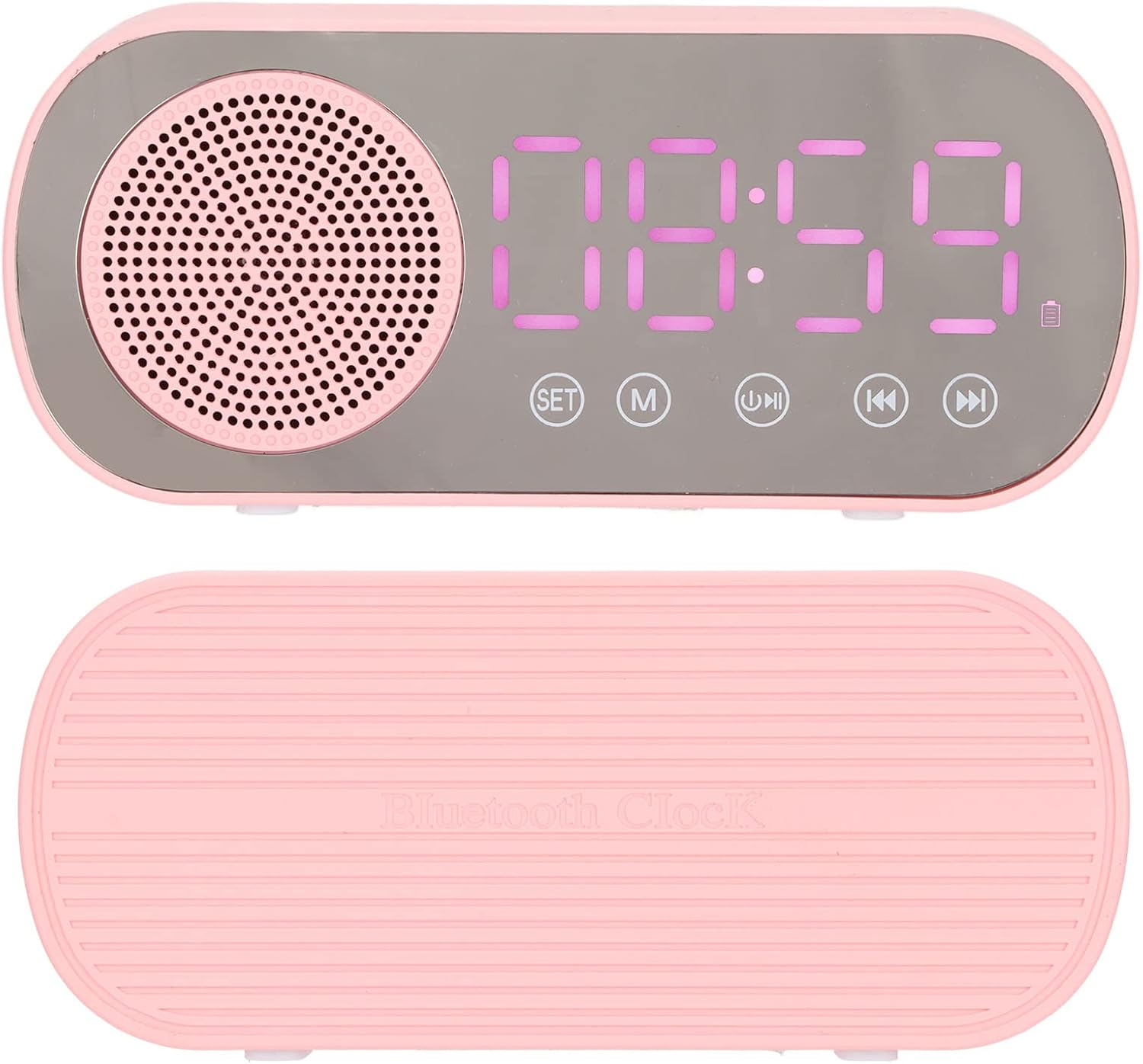
Image 3.2: Top and bottom views of the alarm clock, showing its compact design.

Image 3.3: Rear view of the device, illustrating the Micro USB charging port and the TF (memory card) slot.
Control Buttons:
- SET: Used to enter time/alarm setting mode and confirm selections.
- M (Mode): Switches between Bluetooth, FM Radio, and Memory Card playback modes.
- Play/Pause: Plays or pauses audio. In FM mode, long press to auto-scan and save stations.
- Previous/Volume Down: Short press for previous track/station. Long press to decrease volume.
- Next/Volume Up: Short press for next track/station. Long press to increase volume.
4. Setup
4.1 Charging the Device
Before first use, fully charge the alarm clock. Connect the supplied Micro USB cable to the charging port on the back of the device and the other end to a USB power adapter (5V=1A recommended) or a computer USB port. The charging indicator will illuminate and turn off once fully charged.
4.2 Setting the Time
- Press and hold the SET button until the hour digits start flashing.
- Use the Previous and Next buttons to adjust the hour.
- Press SET again to switch to minute adjustment. Use Previous and Next to adjust the minutes.
- Press SET one more time to confirm the time setting.
5. Operating Instructions
5.1 Setting Alarms (Dual Alarm Function)
The device supports two independent alarms.

Image 5.1: The dual alarm function allows setting two different wake-up times.
- Press the SET button once (short press) to enter Alarm 1 setting mode. The alarm icon and hour digits will flash.
- Use the Previous and Next buttons to adjust the hour. Press SET to confirm.
- Adjust the minutes using Previous and Next. Press SET to confirm.
- Repeat steps 1-3 for Alarm 2 by pressing SET twice (short presses) to enter Alarm 2 setting mode.
- To enable/disable an alarm, short press the SET button until the desired alarm icon flashes, then press the Play/Pause button. The alarm icon will appear/disappear on the display.
5.2 Bluetooth Playback

Image 5.2: Enjoy wireless music streaming from your phone via Bluetooth.
- Press the M (Mode) button until 'BT' appears on the display, indicating Bluetooth mode. The device will enter pairing mode.
- On your smartphone or other Bluetooth-enabled device, search for 'PUSOKEI' in the Bluetooth settings.
- Select 'PUSOKEI' to pair. Once connected, you will hear a confirmation sound.
- You can now play music from your device. Use the Play/Pause, Previous, and Next buttons to control playback.
5.3 FM Radio Operation

Image 5.3: The built-in FM radio allows access to local broadcasts.
- Press the M (Mode) button until 'FM' appears on the display.
- To auto-scan and save available stations, press and hold the Play/Pause button. The device will scan and store stations automatically.
- Once scanning is complete, use the Previous and Next buttons to navigate through the saved FM stations.
5.4 Memory Card Playback
The device supports memory cards (TF cards) up to 32GB (not included).
- Insert a memory card with MP3 audio files into the TF card slot on the back of the device.
- Press the M (Mode) button until the device automatically switches to memory card playback mode.
- Use the Play/Pause, Previous, and Next buttons to control playback.
6. Maintenance
- Cleaning: Wipe the device with a soft, dry cloth. Do not use abrasive cleaners or solvents.
- Battery Care: To prolong battery life, avoid fully discharging the battery frequently. Charge the device regularly, even if not in use for extended periods.
- Storage: Store the device in a cool, dry place when not in use.
7. Troubleshooting
| Problem | Possible Cause | Solution |
|---|---|---|
| Device does not power on. | Low battery. | Charge the device using the Micro USB cable. |
| No sound from speaker. | Volume too low; device not connected properly (Bluetooth); incorrect mode. | Increase volume. Re-pair Bluetooth device. Ensure correct mode (BT, FM, TF). |
| Bluetooth pairing fails. | Device not in pairing mode; too far from source; interference. | Ensure device is in BT mode and flashing. Move closer to the source device. Turn off other Bluetooth devices. |
| FM radio reception is poor. | Weak signal; environmental interference. | Try repositioning the device. Perform auto-scan again. |
| Alarm does not sound. | Alarm not enabled; volume too low. | Ensure the alarm icon is visible on the display. Increase the device volume. |
| Short battery life. | Frequent use at high volume; aging battery. | Reduce volume. Ensure full charge before use. Battery life naturally decreases over time. |
8. Specifications
| Feature | Detail |
|---|---|
| Product Type | Digital Alarm Clock Bluetooth Speaker |
| Model Number | PUSOKEIoi23d8mgzx1614 |
| Material | ABS (Acrilonitrilo Butadieno Estireno) |
| Product Dimensions (L x W x H) | Approx. 116 x 51 x 33 mm (4.6 x 2 x 1.3 inches) |
| Bluetooth Version | 5.0 |
| Battery Type | Built-in Lithium Battery, 3.7V |
| Battery Capacity | 1600 mAh |
| Power Input | 5V=1A |
| Speaker Output Power | 2W |
| Frequency Response | 80Hz-20KHz |
| Audio Signal to Noise Ratio | >85dB |
| FM Radio Frequency | 87.5 MHz - 108 MHz |
| Memory Card Support | TF Card, up to 32GB (not included) |
| Display Type | Digital LED with Mirror Screen |
| Special Features | Dual Alarms, FM Radio, Bluetooth Speaker, Memory Card Playback |