
1. Introduction
This manual provides instructions for the safe and effective use of your Qooltek LVG3 Green Laser Level with Measuring Tape. This multipurpose tool combines a bright green cross-line laser with an integrated 18ft/5.5m auto-lock tape measure, designed for various leveling and measurement tasks. Please read this manual thoroughly before operation and retain it for future reference.

Figure 1: Qooltek LVG3 Green Laser Level projecting a horizontal and vertical green laser line.
2. Safety Information
WARNING: LASER RADIATION. AVOID DIRECT EYE EXPOSURE.
This device emits a Class II laser. Direct exposure to the laser beam can cause eye injury. Always observe the following safety precautions:
- Do not stare directly into the laser beam.
- Do not aim the laser beam at people or animals.
- Do not operate the device in areas where children are present without adult supervision.
- Do not attempt to modify or disassemble the laser level.
- Use only as directed in this manual.
3. Product Overview
Familiarize yourself with the components of your Qooltek LVG3 laser level:

Figure 2: Labeled components of the Qooltek LVG3, including Horizontal Level Bubble, Vertical Level Bubble, Laser On/Off switch, Laser Line Transformation button, Micro-USB Charging Port, and 18ft/5.5m Measure Tape.
- Horizontal Level Bubble: Indicates horizontal alignment.
- Vertical Level Bubble: Indicates vertical alignment.
- Laser On/Off Switch: Activates or deactivates the laser.
- Laser Line Transformation Button: Cycles through laser modes (cross line, horizontal line, vertical line, laser dot).
- Micro-USB Charging Port: For recharging the internal battery.
- 18ft/5.5m Measure Tape: Integrated retractable tape measure with auto-lock feature.
4. Setup
4.1 Charging the Device
The Qooltek LVG3 is equipped with a rechargeable Lithium Polymer battery. Before first use, or when the laser brightness diminishes, charge the device using the provided USB cable.
- Locate the Micro-USB charging port on the side of the device (refer to Figure 2).
- Connect the Micro-USB cable to the device and the other end to any standard USB power source (e.g., computer, USB wall adapter, power bank).
- The charging indicator light (if present, typically red during charging and green when full) will show charging status.
- Allow sufficient time for a full charge before use.

Figure 3: The Qooltek LVG3 connected via its USB charging port.
4.2 Initial Power On
To turn on the laser, slide the Laser On/Off switch to the 'ON' position. The device will typically default to the cross-line laser mode.
5. Operating Instructions
5.1 Using the Green Laser
The green laser provides high visibility for various applications. To operate the laser:
- Turn on the device using the Laser On/Off switch.
- Press the Laser Line Transformation Button (refer to Figure 2) to cycle through the available laser modes:
- Cross Line: Projects both horizontal and vertical lines simultaneously. Ideal for general leveling and alignment.
- Horizontal Line: Projects only a horizontal line. Useful for hanging shelves or pictures at a consistent height.
- Vertical Line: Projects only a vertical line. Useful for aligning vertical elements or plumbing.
- Laser Dot: Projects a single laser dot.

Figure 4: The laser line transformation feature allows switching between cross-line and single-dot projection by adjusting the lens.
5.2 Using the Bubble Vials
The Qooltek LVG3 includes two backlit bubble vials for precise manual leveling:
- Horizontal Level Bubble: Use this vial to ensure the device is perfectly level horizontally. The bubble should be centered between the two lines.
- Vertical Level Bubble: Use this vial to ensure the device is perfectly level vertically. The bubble should be centered between the two lines.
These vials are particularly useful when the laser is off, or for quick checks.
5.3 Using the Measuring Tape
The integrated 18ft/5.5m measuring tape features an auto-lock mechanism.
- Pull the tape measure out to the desired length. It will automatically lock in place.
- To retract the tape, press the button located on the top of the device (refer to Figure 2).

Figure 5: The integrated 18ft/5.5m auto-lock measuring tape.
5.4 Applications
The Qooltek LVG3 is suitable for a variety of tasks:
- Hanging pictures and mirrors.
- Installing shelves and cabinets.
- Aligning tiles or wallpaper.
- DIY projects requiring straight lines or accurate measurements.
- Flooring installation.
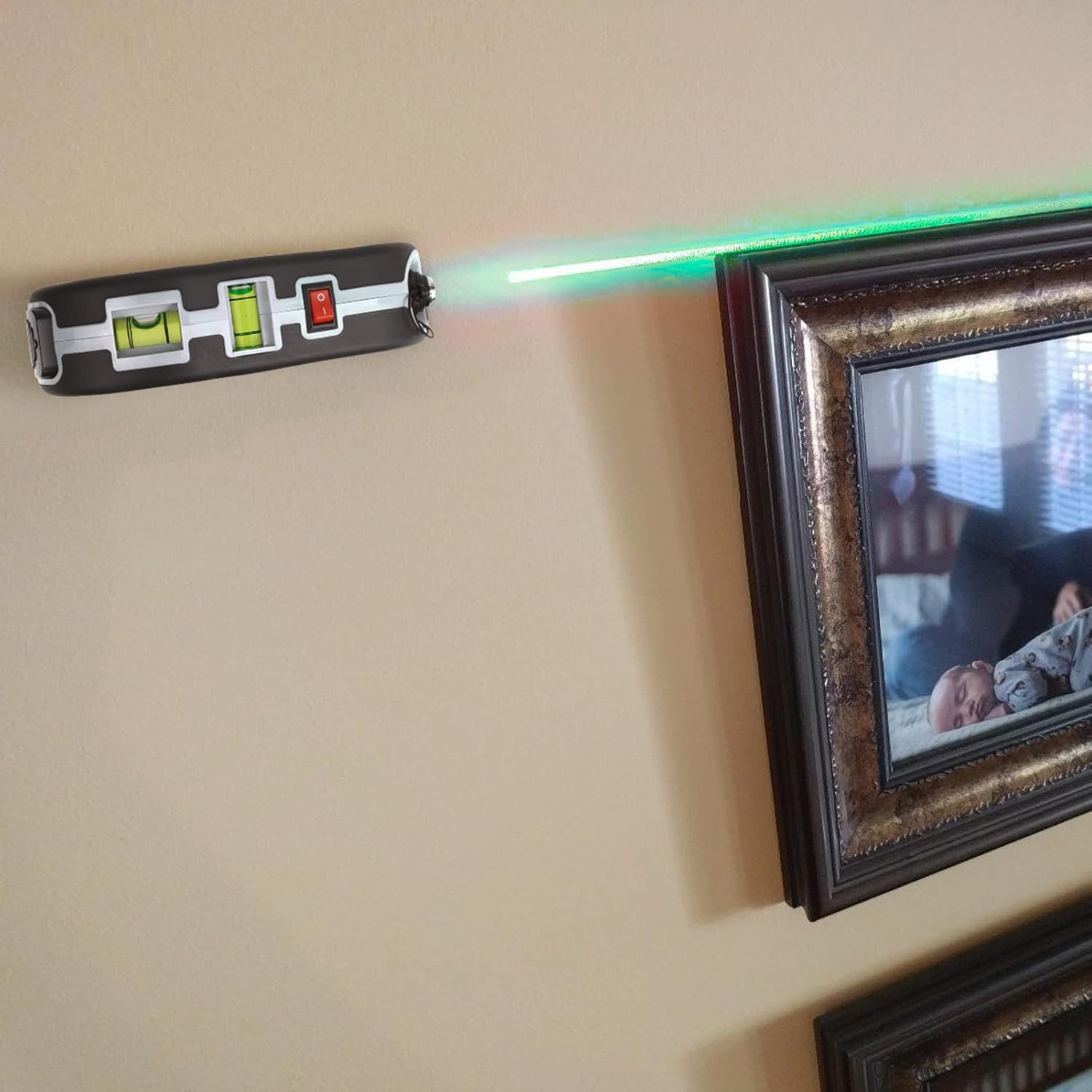
Figure 6: Using the laser level to align a picture frame.

Figure 7: The laser level assisting in precise flooring installation.
6. Maintenance
6.1 Cleaning
- Wipe the device with a soft, dry cloth.
- Do not use abrasive cleaners or solvents, as these can damage the housing or laser lens.
- Keep the laser aperture clean for optimal beam clarity.
6.2 Storage
- Store the device in a cool, dry place away from direct sunlight.
- Ensure the laser is turned off before storage.
- If storing for extended periods, charge the battery periodically to maintain its health.
7. Troubleshooting
| Problem | Possible Cause | Solution |
|---|---|---|
| Laser does not turn on. | Battery is depleted. | Charge the device using the Micro-USB port. |
| Laser beam is dim or flickers. | Low battery. | Recharge the device. |
| Laser beam is not straight. | Device is not level. | Use the horizontal and vertical bubble vials to ensure the device is level on a stable surface. |
| Tape measure does not retract. | Retraction button not pressed or mechanism jammed. | Ensure the retraction button is fully pressed. Check for any obstructions. Do not force the tape. |
8. Specifications

Figure 8: Dimensions of the Qooltek LVG3 Green Laser Level.
| Feature | Detail |
|---|---|
| Brand | Qooltek |
| Model Number | LVG3 |
| Laser Color | Green |
| Laser Type | Cross Line, Horizontal Line, Vertical Line, Laser Dot |
| Measuring Tape Length | 18ft / 5.5m |
| Power Source | Rechargeable Lithium Polymer Battery (included) |
| Charging Port | Micro-USB |
| Material | Acrylonitrile Butadiene Styrene, Aluminum |
| Product Dimensions | 5.31"L x 1.57"W (approximate, refer to Figure 8 for detailed dimensions) |
| Item Weight | 14.4 ounces |
9. Warranty and Support
9.1 Warranty Information
For specific warranty details, please refer to the warranty card included with your product packaging or contact Qooltek customer support directly. Keep your purchase receipt as proof of purchase.
9.2 Customer Support
If you encounter any issues or have questions regarding your Qooltek LVG3 Green Laser Level, please contact Qooltek customer support. Refer to the contact information provided in your product packaging or visit the official Qooltek website for assistance.