
Introduction
The Emerson EPB-3000 is a versatile portable CD player with an integrated AM/FM radio, designed for music enthusiasts who enjoy their audio entertainment at home or on the go. This unit combines classic CD playback with modern connectivity options, offering a rich and balanced audio experience through its dual stereo speakers. Its compact design and two-way power capability ensure your music is always within reach.
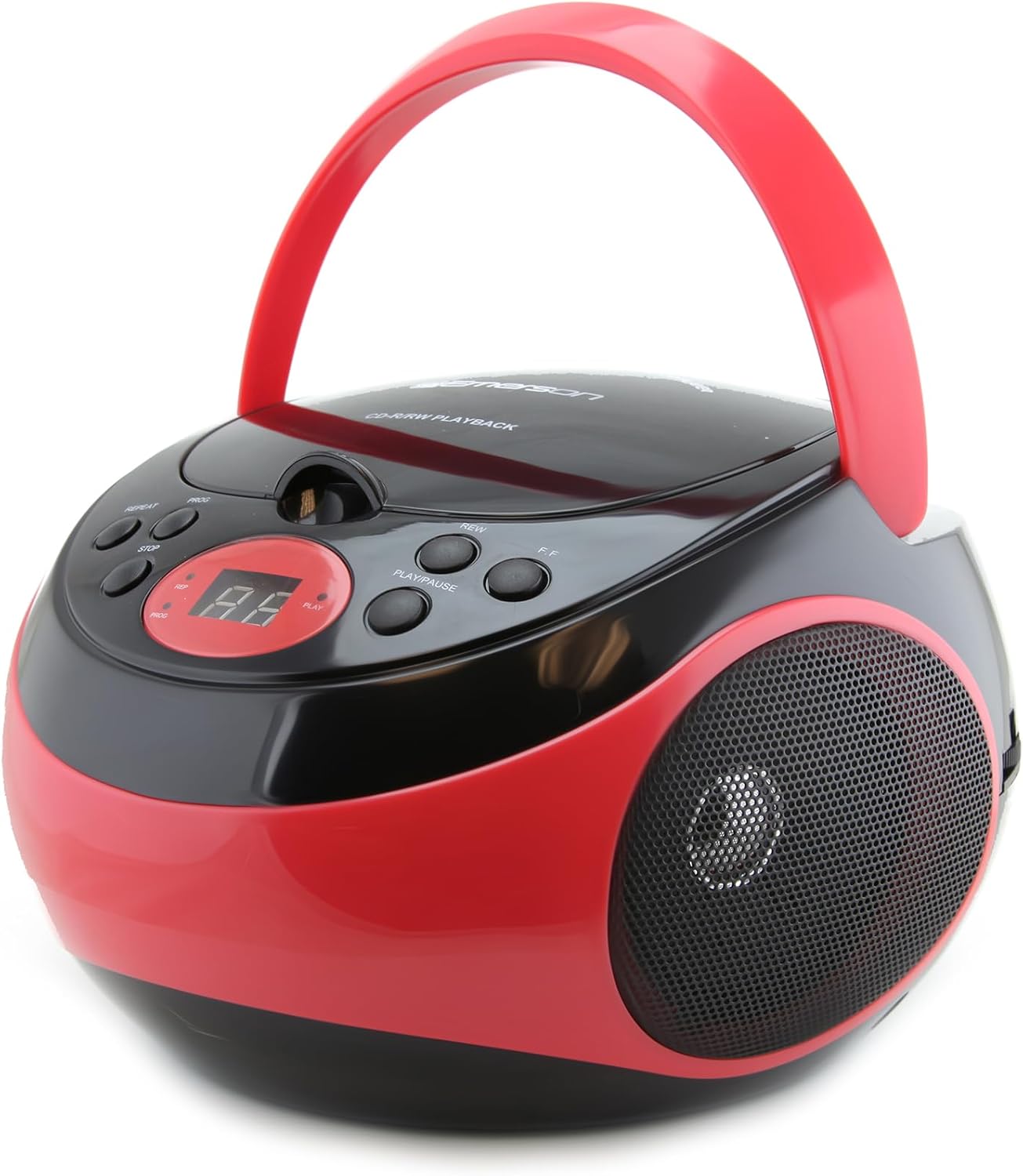
Figure 1: Front view of the Emerson EPB-3000 Portable CD Player in Red.
Product Features
- Portable CD Player: Enjoy your favorite CDs anywhere with this portable design, perfect for outdoor activities or home use.
- AM/FM Radio: Features a built-in telescopic antenna for clear reception of local radio stations.
- Programmable Memory: Create custom playlists by programming up to 20 CD tracks.
- Dual Stereo Speakers: Delivers rich, powerful sound for both CD and radio playback.
- 3.5mm AUX Input: Connect external audio devices like smartphones, MP3 players, or tablets.
- Two-Way Power: Operates via AC power or 6 C batteries (not included) for versatile use.

Figure 2: The Emerson EPB-3000 available in multiple colors, highlighting its portable design.

Figure 3: Top-loading CD player for easy disc insertion and removal.

Figure 4: Enjoying AM/FM radio outdoors, showcasing the portable nature of the device.

Figure 5: Connecting an external audio device using the 3.5mm AUX input.
Setup
Powering the Unit
The Emerson EPB-3000 can be powered in two ways:
- AC Power: Connect the supplied AC power cord to the AC IN jack on the back of the unit and then to a standard AC wall outlet.
- Battery Power: For portable use, open the battery compartment on the bottom of the unit. Insert 6 x "C" size batteries (not included), ensuring correct polarity (+/-). Close the battery compartment securely.
Initial Setup
- Before first use, ensure the unit is placed on a stable, flat surface.
- If using battery power, ensure batteries are fresh and correctly installed.
- Extend the telescopic antenna fully for optimal FM radio reception.
Operating Instructions
CD Playback
- Open the CD compartment door by gently lifting it.
- Place a CD (CD, CD-R, or CD-RW) onto the center spindle with the label side facing up.
- Close the CD compartment door firmly until it clicks.
- Press the PLAY/PAUSE button to begin playback. The track number and elapsed time will be displayed.
- Press PLAY/PAUSE again to pause playback; press it once more to resume.
- Press the STOP button to stop playback.
- To skip to the next track, press the NEXT button. To go back to the previous track, press the PREVIOUS button.
- To program tracks, press the PROG button while in STOP mode. Use NEXT/PREVIOUS to select tracks and PROG to confirm, up to 20 tracks. Press PLAY/PAUSE to start programmed playback.
- Press the REPEAT button to repeat the current track (one press) or all tracks (two presses).
AM/FM Radio Operation
- Set the Function Selector switch to RADIO.
- Extend the telescopic antenna for optimal FM reception. For AM, rotate the unit for best reception.
- Turn the TUNING knob to select your desired radio station.
- Adjust the VOLUME knob to your preferred listening level.
Using the AUX Input
- Connect one end of a 3.5mm audio cable (not included) to the AUX IN jack on the unit.
- Connect the other end of the cable to the headphone jack or audio output of your external device (e.g., smartphone, MP3 player).
- Set the Function Selector switch to AUX.
- Start playback on your external device.
- Adjust the volume using the VOLUME knob on the EPB-3000 and/or your external device.
Maintenance
- Cleaning: Use a soft, dry cloth to clean the exterior of the unit. Do not use abrasive cleaners or solvents.
- CD Lens Care: If the CD lens gets dirty, use a commercially available CD lens cleaner. Avoid touching the lens directly.
- Battery Replacement: If using batteries, replace all batteries at the same time. Do not mix old and new batteries or different types of batteries. Remove batteries if the unit will not be used for an extended period.
- Storage: Store the unit in a cool, dry place away from direct sunlight and extreme temperatures.
Troubleshooting
| Problem | Possible Cause | Solution |
|---|---|---|
| No power | AC cord not connected; Batteries dead or incorrectly inserted. | Ensure AC cord is securely plugged in. Replace batteries or check polarity. |
| CD not playing / Skipping | CD dirty or scratched; CD inserted incorrectly; CD compartment not closed. | Clean CD with a soft cloth; Reinsert CD with label side up; Close compartment firmly. |
| Poor radio reception | Antenna not extended; Unit position. | Fully extend the telescopic antenna. Rotate the unit for better AM reception. |
| No sound from AUX input | Cable not connected properly; Volume too low on unit or external device. | Check 3.5mm cable connections. Increase volume on both the EPB-3000 and the external device. |
Specifications
- Product Dimensions: 8.2 x 9 x 5.3 inches (L x W x H)
- Item Weight: 2.29 pounds
- Model Number: EPB-3000-RED
- Power Source: AC 120V ~ 60Hz or 6 x "C" size batteries (DC 9V)
- Speaker Type: Stereo
- Connectivity: 3.5mm Auxiliary Input
- CD Compatibility: CD, CD-R, CD-RW
- Radio Bands: AM/FM

Figure 6: Detailed dimensions and weight of the Emerson EPB-3000.
What's in the Box
- Emerson EPB-3000 Portable CD Player with AM/FM Stereo Radio
- AC Power Cord
- User Manual (this document)
Warranty and Support
For warranty information or technical support, please refer to the contact details provided on the product packaging or visit the official Emerson website. Keep your purchase receipt as proof of purchase for any warranty claims.
Emerson is committed to delivering quality and affordability in consumer electronics. For further assistance, please contact customer service.


