
Introduction
This manual provides detailed instructions for the safe and effective use of your TakTark BM802-EU 3.2'' Video Baby Monitor. Please read this manual thoroughly before operating the device and retain it for future reference.
The TakTark BM802-EU baby monitor offers essential features for monitoring your baby, including a 3.2-inch display, two-way audio communication, VOX sound activation, automatic night vision, remote pan-tilt camera control, built-in lullabies, and temperature monitoring. It operates on a secure 2.4 GHz wireless frequency, ensuring privacy and a stable connection without the need for Wi-Fi or a smartphone application.
Important Safety Information
WARNING:
- This product is designed to assist in monitoring your baby. It is not a substitute for responsible adult supervision.
- Keep all cords out of reach of children. Strangulation hazard.
- Do not place the baby unit (camera) or parent unit (monitor) in or near water.
- Use only the power adapters provided. Using unauthorized adapters may damage the device and void the warranty.
- The baby unit (camera) must always be connected to a power source. The parent unit (monitor) has a rechargeable battery but should be fully charged before first use.
- Ensure proper ventilation for both units. Do not cover them with blankets or other materials.
- Avoid placing the camera unit where direct sunlight or strong artificial light can shine into the lens.
- The operating temperature range for this device is 0°C to 40°C (32°F to 104°F).
Package Contents
Verify that all items listed below are included in your package:
- Parent Unit (Monitor) x 1
- Baby Unit (Camera) x 1
- Power Adapter x 2 (one for each unit)
- User Manual x 1
Product Overview
Parent Unit (Monitor)
The parent unit features a 3.2-inch LCD screen for clear video monitoring. It includes controls for various functions such as volume, brightness, pan/tilt, two-way talk, and menu navigation.
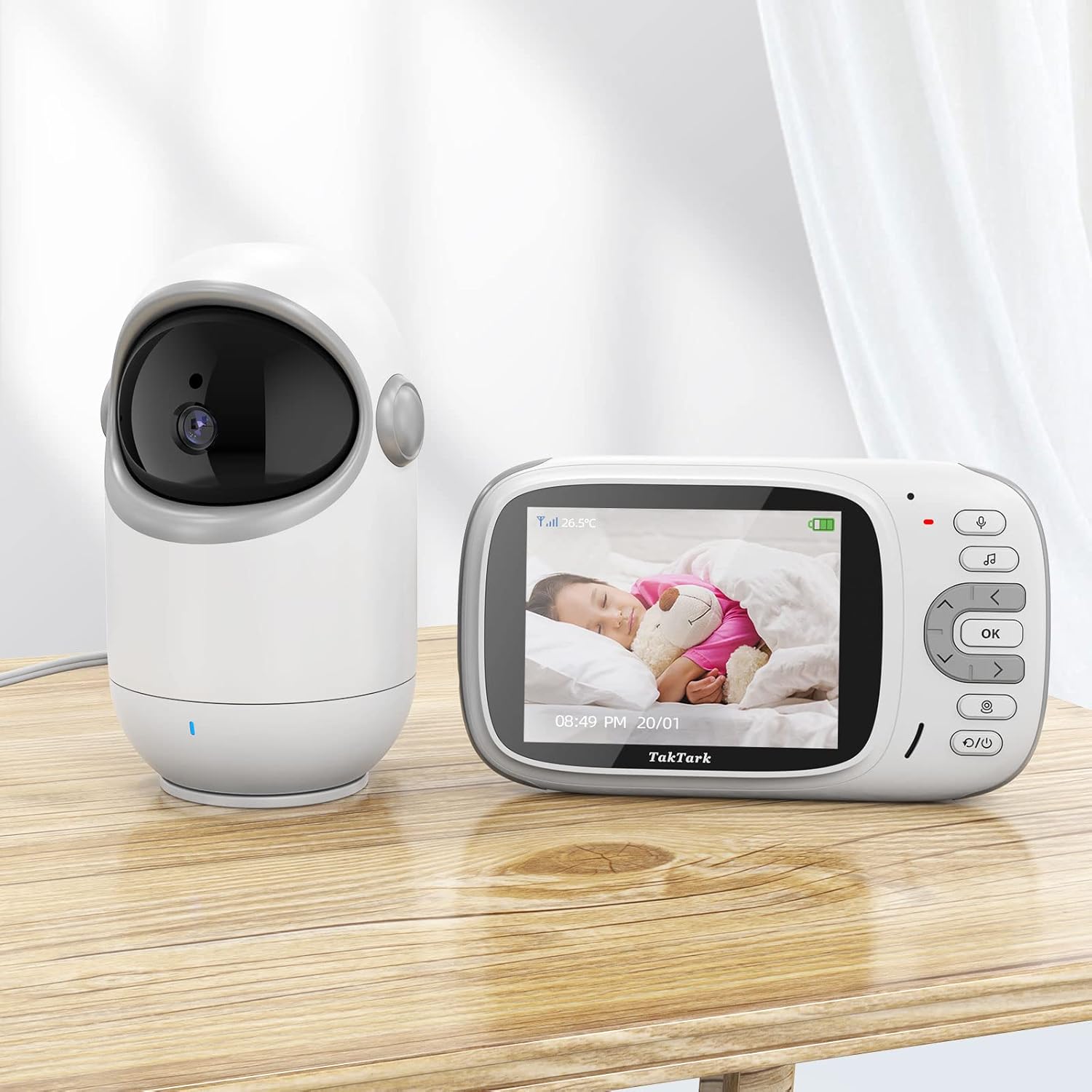
Image: The TakTark BM802-EU parent unit (monitor) and baby unit (camera) side-by-side. The monitor displays a sleeping baby, and the camera is a white, rounded device with a dark lens.
- LCD Screen: 3.2-inch display for live video feed.
- Power Button: Turns the unit on/off.
- Menu Button: Accesses settings and options.
- Navigation Buttons: Used for menu navigation and camera pan/tilt control.
- Talk Button: Activates two-way communication.
- Volume Buttons: Adjusts the sound level.
- VOX Button: Toggles VOX mode on/off.
- Microphone: For two-way talk function.
- Speaker: For audio output from the baby unit.
- Charging Port: Connects to the power adapter for charging.
Baby Unit (Camera)
The baby unit is equipped with a camera that can pan 300° and tilt 50°, infrared LEDs for night vision, a microphone, and a speaker. It also includes a temperature sensor.

Image: The TakTark BM802-EU baby unit (camera) showing its 300-degree pan and 50-degree tilt capabilities, with a monitor displaying a baby in the background.
- Camera Lens: Captures video feed.
- Infrared LEDs: For automatic night vision.
- Microphone: Picks up sounds from the baby's room.
- Speaker: For playing lullabies and two-way talk audio.
- Temperature Sensor: Monitors room temperature.
- Power Port: Connects to the power adapter.
- Pair Button: Used for pairing the units if connection is lost.
Setup Guide
- Charge the Parent Unit: Before first use, fully charge the parent unit for approximately 8 hours. Connect one power adapter to the parent unit's charging port and plug it into a power outlet. The battery icon on the screen will indicate charging status.
- Power the Baby Unit: Connect the second power adapter to the baby unit's power port and plug it into a power outlet. The baby unit does not contain a battery and must remain plugged in during operation.
- Position the Baby Unit: Place the baby unit (camera) in a secure location in your baby's room, at least 1 meter (3 feet) away from the baby's crib or bed. Ensure it has a clear view of your baby. Avoid placing it too close to walls or objects that might obstruct the view or sound.
- Power On: Press and hold the Power button on the parent unit to turn it on. The parent unit will automatically search for and connect to the baby unit. Once connected, you will see the live video feed on the screen.
- Pairing (if necessary): The units are pre-paired from the factory. If the connection is lost or you are setting up a new unit, press the "Pair" button on the back of the baby unit, then navigate to the pairing option in the parent unit's menu and follow the on-screen instructions.
Operating Instructions
Basic Functions
- Turning On/Off: Press and hold the Power button on the parent unit.
- Adjusting Volume: Use the Volume Up and Volume Down buttons on the parent unit.
- Adjusting Brightness: Access the menu and navigate to brightness settings.
VOX Mode (Voice Operated Exchange)
VOX mode conserves battery life by turning off the parent unit's screen when no sound is detected from the baby unit. The screen will automatically turn on when sound (e.g., baby crying) is detected.

Image: A crying baby next to the monitor, which displays an alert icon and the crying baby, illustrating the VOX sound activation feature.
- Activate/Deactivate VOX: Press the VOX button on the parent unit.
- Adjust VOX Sensitivity: In the menu, select VOX settings to adjust the sensitivity level. Higher sensitivity detects softer sounds.
Two-Way Communication
This feature allows you to speak to your baby through the baby unit's speaker.

Image: A hand holding the parent unit, showing a baby on screen, with sound waves indicating two-way communication between the parent unit and a happy baby on the floor.
- To Talk: Press and hold the Talk button on the parent unit. Speak clearly into the microphone. Release the button to hear your baby again.
Automatic Night Vision
The baby unit automatically activates infrared night vision in low-light conditions, providing a clear black-and-white image of your baby.
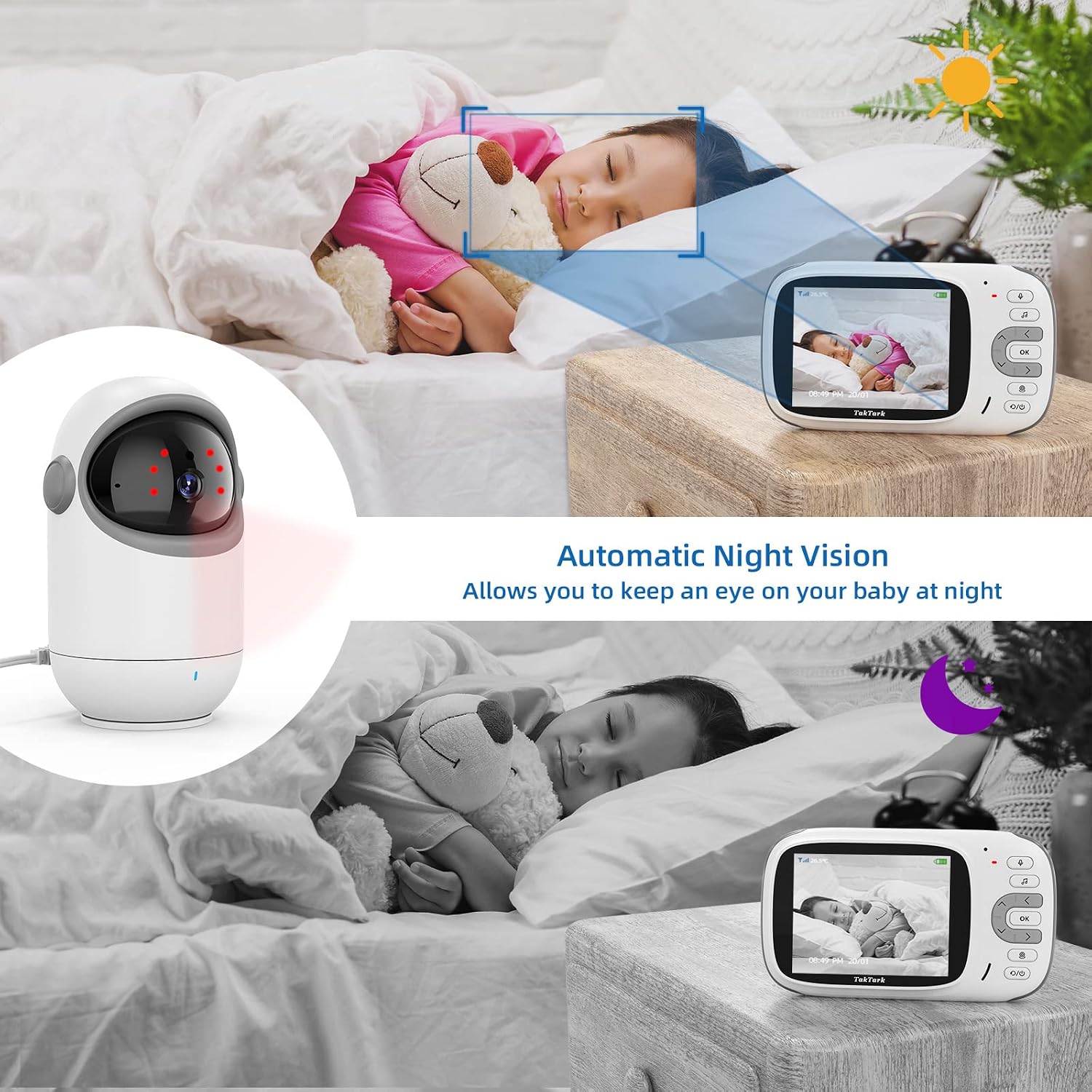
Image: A split image showing a child sleeping in daylight (color) and the same child sleeping in darkness (black and white), with the camera unit and monitor displaying the respective views, highlighting automatic night vision.
Remote Pan and Tilt
Adjust the camera's viewing angle remotely from the parent unit.
- Pan (Horizontal): Use the Left/Right navigation buttons. The camera can pan up to 300°.
- Tilt (Vertical): Use the Up/Down navigation buttons. The camera can tilt up to 50°.
Lullabies
Play soothing lullabies to help your baby fall asleep.

Image: A happy baby on a bed with musical notes floating around, and the camera unit with a thermometer icon, indicating built-in lullabies and temperature monitoring.
- To Play Lullabies: Access the menu and select the Lullaby option. Choose a melody and adjust the volume.
Temperature Monitoring
The baby unit continuously monitors the room temperature and displays it on the parent unit's screen.

Image: The parent unit displaying a sleeping baby and the room temperature (26.5°C), with the baby unit and a thermometer icon in the background, illustrating temperature monitoring.
- Temperature Display: The current room temperature is shown on the parent unit's screen.
- Temperature Alert: You can set high and low temperature alerts in the menu.
Maintenance
- Cleaning: Clean the units with a dry, soft cloth. Do not use cleaning sprays or liquid cleaners.
- Battery Care (Parent Unit): To prolong battery life, avoid fully discharging the parent unit frequently. Charge it regularly. If storing the unit for an extended period, charge it fully every three months.
- Lens Care: Gently wipe the camera lens with a soft, lint-free cloth if it becomes dirty.
- Storage: Store the monitor in a cool, dry place away from direct sunlight and extreme temperatures.
Troubleshooting
| Problem | Possible Cause | Solution |
|---|---|---|
| No image/sound on parent unit. | Units are not powered on or not paired. Out of range. | Ensure both units are powered on and connected to their respective power adapters. Check if the parent unit battery is charged. Move the parent unit closer to the baby unit. Re-pair the units if necessary (refer to Setup section). |
| Poor image quality. | Low light conditions (night vision active). Camera lens is dirty. Interference. | Night vision provides a black-and-white image, which is normal. Clean the camera lens. Move units away from other electronic devices that may cause interference. |
| Static or interference. | Units are too far apart or too close to other electronic devices. | Move the parent unit closer to the baby unit. Relocate the units away from other wireless devices (e.g., Wi-Fi routers, microwaves). |
| Parent unit battery drains quickly. | VOX mode is off. Screen brightness is too high. Battery degradation. | Activate VOX mode to conserve battery. Reduce screen brightness. Ensure the battery is fully charged before use. If the battery life is significantly reduced after prolonged use, it may need replacement. |
| Cannot pan/tilt the camera. | Units are not connected or out of range. | Ensure a stable connection between the parent and baby units. Move the parent unit closer to the baby unit. |
Specifications
| Feature | Detail |
|---|---|
| Model Number | BM802-EU |
| Screen Size | 3.2 inches |
| Display Resolution | 320 x 240 pixels |
| Video Resolution | 720p |
| Wireless Technology | 2.4 GHz FHSS (Frequency Hopping Spread Spectrum) |
| Operating Range | Up to 260 meters (850 feet) in open field |
| Camera Pan Angle | 300 degrees |
| Camera Tilt Angle | 50 degrees |
| Night Vision | Automatic Infrared (Black & White) |
| Two-Way Talk | Yes |
| VOX Mode | Yes, with adjustable sensitivity |
| Temperature Sensor | Yes, with alert function |
| Lullabies | Yes, built-in |
| Parent Unit Battery | 1150 mAh Lithium-ion (rechargeable) |
| Power Input | 5V, 1A (via included power adapters) |
| Operating Temperature | 0°C - 40°C (32°F - 104°F) |
| Dimensions (L x W x H) | 11 x 13.3 x 16.9 cm (approximate, for camera unit) |
| Weight | 608 grams (approximate) |
Warranty and Support
TakTark products are designed for reliability and performance. In the event of any issues, please refer to the following information:
Warranty Information
This product comes with a manufacturer's guarantee. If you are not satisfied with your product, you may contact TakTark for a free replacement or a full refund. Please retain your proof of purchase for warranty claims.
Customer Support
For technical assistance, troubleshooting, or warranty inquiries, please contact TakTark customer support through the retailer where you purchased the product or visit the official TakTark website for contact details.
Online Resources: For additional support and FAQs, please check the TakTark official website.